 安全软件
点击放大
AutoEASM - Tool for automated scanning of the common vulnerab
项目说明
Description
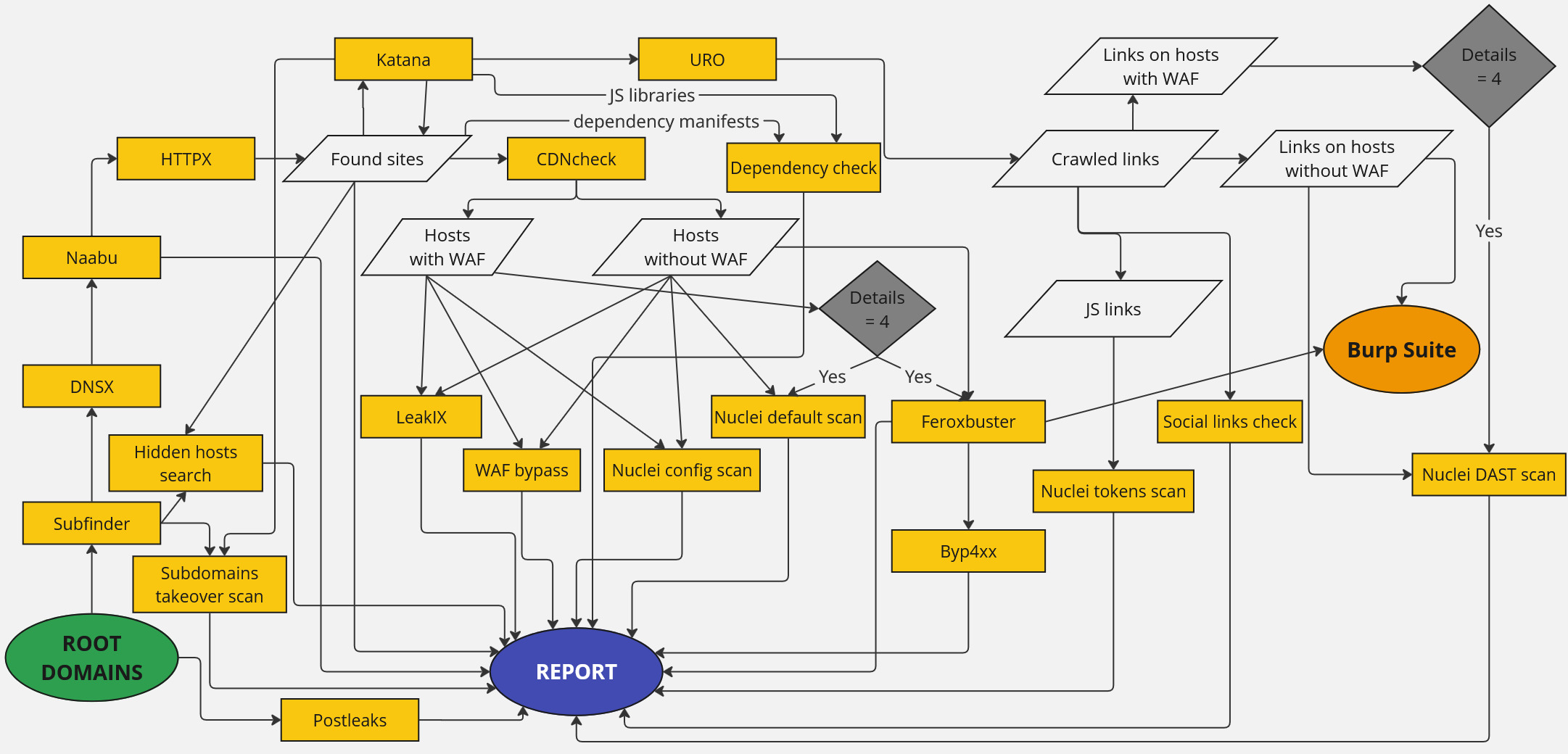
AutoEASM (External Attack Surface Management) tool allows a quick scan of all domains and subdomains of any company with the help of different utilities and gets a list of important issues for . This automation allows the automatic testing of domains regularly with limited resources of the security team.
Download and open "Report Example.html" file to see what you get when you run a scan with this utility.
Used utilities
| Name | Link | Description |
| --------- | --------------------------------------------------------------------------------------------------------------------------------------------------------------------------------------------------------------------------------------------------------------------------------------------------------------------------------------------------------------------------- | -------------------------------------------------------------------------------------------------------------------------------------------------------------------------------------------------------------------------------------------------------------------- |
| subfinder | subfinder: Fast passi enumeration tool. | Subfinder is a subdomain discovery tool that returns valid subdomains for websites, using passi sources. It has a simple, modular architecture and is optimized for speed. |
| dnsx | dnsx: dnsx is a fast and multi-purpose DNS toolkit allow to run multiple DNS queries of your choice with a list of user-supplied resolvers. | Dnsx is a fast and multi-purpose DNS toolkit designed for running probes. It supports multiple DNS queries, user supplied resolvers and DNS wildcard filtering. |
| naabu | naabu: A fast port scanner written in go with a focus on reliability and simplicity. Designed to be used in combination with other tools for attack surface discovery in bug bounties and pentests | Naabu is a port scanning tool written in Go that allows you to enumerate valid ports for hosts in a fast and reliable manner. It is a really simple tool that does fast SYN/CONNECT/UDP scans on the host/list of hosts and lists all ports that return a reply. |
| httpx | httpx: httpx is a fast and multi-purpose HTTP toolkit that allows running multiple probes using the retryablehttp library. | HTTPX is a fast and multi-purpose HTTP toolkit that allows running multiple probes using the retryablehttp library. It is designed to maintain result reliability with an increased number of threads. |
| nuclei | nuclei: Nuclei is a fast, customizable scanner powered by the global security community and built on a simple YAML-based DSL, enabling collaboration to tackle trending on the internet. It helps you find in your applications, APIs, networks, DNS, and cloud configurations. | Nuclei is a fast and customisable scanner based on simple YAML based DSL. |
| katana | katana: A next-generation crawling and spidering framework. | Katana is a next-generation crawling and spidering framework. |
| confused | confused (knavesec fork) | Confused checks dependency manifests against public registries and reports package names that are not registered (possible dependency confusion). Fork is used instead of the unmaintained original (Pipfile, composer installed.json, bugfixes). |
| os | os: scanner that uses data from OSV. | OS checks lockfiles, manifests and JS/CDN URLs (library name + in the path or filename) against the OS. |
| feroxbuster | feroxbuster: A fast, simple, recursi discovery tool written in Rust. | Feroxbuster is an open-source web fuzzing tool. Has con functions for automatic adjustment of scanning speed and filters. |
| uro | uro: declutters url lists for crawling/pentesting | Uro is designed to simplify handling URL lists for security testing, which can be cumbersome due to uninteresting or duplicate content. |
| byp4xx | byp4xx: 40X/HTTP bypasser in Go. Features: Verb tampering, headers, #bugbountytips, User-Agents, extensions, default credentials... | byp4xx is a 40X bypasser in Go. Methods from #bugbountytips, headers, verb tampering, user agents and more. |
| LeakiX | LeakiX | LeakiX is a cybersecurity company that specializes in pro businesses with comprehensi into their internet-facing assets. It provides tools and analysis to detect in systems and networks. |
| Postleaks | postleaks: Search for sensitive data in Postman public library. | Postleaks script is aimed at searching for confidential information in the Postman public library. |
!Flowchart
Installation
1. Install Python and Go on your PC (it can be both Windows or Linux). Clone the repository:git clone
2. For Linux the following commands are required:
For Windows no additional commands are required.
3. Install dependencies using the following commands:
4. \[*Optional, but preferable*\] Change the Leakix API key at the end of the Global.py file OR specify it in the LeakIX_API_key en . A free key for 3000 requests per month can be obtained here.
5. \[*Optional, but preferable*\] Add your API keys to subfinder using this instruction (for Windows, file with API keys is C:\Users\*user*\AppData\Roaming\subfinder\pro.yaml). We suggest adding at least Securitytrails free key, but you can also add other a keys.
Docker using
1. Go to the docker directory: cd Docker
2. *\[Optional\]* Specify a API keys to pro.yaml file. We advice specify at least securitytrails key. For example:
3. Build the docker container (use sudo on linux):docker build --no-cache -t easm-automate .
4. Run the docker using the command below. If there will be a question about access to host files - allow this (it is required to copy the report to the host). If the container does not start after that - execute the command again.
Windows: docker run --rm -it -v %cd%\Report:/app/output -v %cd%\pro.yaml:/root/.config/subfinder/pro.yaml -e LeakIX_API_key="CHANGEME" easm-automate -d domain.com
Linux: sudo docker run --rm -it -v "$(pwd)/Report":/app/output -v "$(pwd)/pro.yaml":/root/.config/subfinder/pro.yaml -e LeakIX_API_key="CHANGEME" easm-automate -d domain.com
Windows file scan: docker run --rm -it -v %cd%\Report:/app/output -v %cd%\pro.yaml:/root/.config/subfinder/pro.yaml -v %cd%:/src -e LeakIX_API_key="CHANGEME" easm-automate -f domains.txt
Linux file scan: sudo docker run --rm -it -v "$(pwd)/Report":/app/output -v "$(pwd)/pro.yaml":/root/.config/subfinder/pro.yaml -v "$(pwd):/src" -e LeakIX_API_key="CHANGEME" easm-automate -f domains.txt
Parameter -e LeakIX_API_key="CHANGEME" can be deleted if you don't have a leakIX key.
Usage
On the utility input, you need to get a list of root domains. It will find subdomains on them itself and scan for key .
To get help menu:python main.py -h
To scan one domain:python main.py -d .com
To scan the domain list:python main.py -f root_domains.txt
Also, the useful flags include:
For example, -ll 1 can be used if the hosts can go down from the load, or -ld 1 can be used if there is not a lot of time to check for findings.
Qualys WAS integration (-q)
The optional -q flag pushes every live web service found by the scan (root domains and subdomains that HTTPX confirmed as reachable websites, with or without a WAF) into Qualys Web Application Scanning (WAS). For each asset that does not already exist as a Qualys web app it will:
1. Create the web app — inheriting the parent domain's tags and default option profile.
2. Create an active scan schedule — default_ option profile, progressi enabled, and the recurrence + distribution group + pre-scan notification copied from the parent domain's schedule.
3. Launch an immediate scan with the Fast_Scan option profile.
4. Send a summary email of the launched scans (if SMTP is configured) and add a Qualys WAS section to the HTML/Markdown report.
Assets already present in Qualys are skipped. The feature is off by default — a normal run ne Qualys.
Configuration
Credentials are resolved once at startup in this order: AWS SSM Parameter Store → en → hardcoded in Global.py. For a quick local test, replace the CHANGEME in the Qualys block at the end of Global.py. E can also be set :
| | Default | Purpose |
| --- | --- | --- |
| QUALYS_API_URL | | QPS API host — set to your platform/POD (e.g. ) |
| QUALYS_USERNAME / QUALYS_PASSWORD | CHANGEME | Qualys credentials (Basic auth) |
| QUALYS_SSM_USER_PARAM / QUALYS_SSM_PASSWORD_PARAM | *(empty)* | AWS SSM Parameter Store names for the credentials (SecureString). Requires boto3 |
| QUALYS_SSM_REGION | AWS_REGION | AWS region for the SSM calls |
| QUALYS_SCAN_PROFILE | Fast_Scan | Option profile for the immediate, script-launched scan |
| QUALYS_DEFAULT_PROFILE | default_ | Option profile assigned to created web apps and their schedules |
| QUALYS_PROGRESSI | ENABLED | Progressi on created schedules (DEFAULT/ENABLED/DISABLED) |
| QUALYS_WEBUI_URL | derived from QUALYS_API_URL | Portal host for the WAS REST 1.0 API, e.g. |
| QUALYS_DISTRIBUTION_UUIDS | *(empty)* | O distribution-group UUID(s). Empty = copy from the parent domain's schedule |
| QUALYS_SCHEDULE_SENDMAIL | false | Schedule "send mail at scan completion" (off avoids emailing all admins with view access) |
| QUALYS_SCAN_SENDMAIL | false | The immediate scan's completion email |
| QUALYS_SCHEDULE_RECIPIENTS | *(edit for your org)* | Additional recipient(s) for the schedule's pre-scan notification |
| QUALYS_NOTIFICATION_MESSAGE | *(edit for your org)* | Custom pre-scan notification message |
| QUALYS_ENSURE_TAGS | prod,webapp | Tags applied to a newly bootstrapped root domain app, which has no parent to inherit from. Subdomains always inherit the root's tags instead. Tags must already exist in Qualys |
| QUALYS_IGNORE_HOSTS | *(empty)* | Comma-separated hosts/patterns to skip (merged with qualys_exclude.txt) |
| QUALYS_IGNORE_FILE | *(empty)* | Path o for the exclude file |
| QUALYS_NOTIFY_EMAIL | *(edit for your org)* | Recipient of AutoEASM's own launched-scans summary email |
| SMTP_HOST / SMTP_PORT / SMTP_USER / SMTP_PASSWORD / SMTP_FROM / SMTP_TLS | *(empty / 587 / on)* | SMTP server for the summary email (if unset, the summary is only printed) |
> Distribution groups exist only in the newer WAS REST 1.0 API on the portal host (QUALYS_WEBUI_URL). AutoEASM creates the schedule via the QPS 3.0 API, then attaches the group through that API with the same Basic-auth credentials. If the portal rejects Basic auth, the schedule is still created (without the group).
Excluding hosts
Create a qualys_exclude.txt file next to main.py — copy the included qualys_exclude.txt.example — with one host or fnmatch wildcard per line. Matching domains/subdomains are ne, scheduled, or scanned in Qualys. It is auto-detected, no flag needed; blank lines and # comments are ignored, matching is case-insensitive. (qualys_exclude.txt itself is git-ignored so your internal hostnames stay local.)
Testing without a full scan
qualys_sync_test.py runs only the Qualys sync against hosts you supply, skipping the discovery pipeline. Use --dry-run first (read-only — resolves and prints intended actions, mutates nothing):
-d sets the parent/root domains (for parent resolution and copy-from-parent); --assets / --assets-file is the list of live web services to sync. --ignore / --ignore-file add exclusions, and --newapi-get <schedule_id> dumps a schedule from the portal API for troubleshooting.
SecurityTrails historical IP checks
If a PAID SecurityTrails API key is a in the SecurityTrails_API_key en , AutoEASM uses historical DNS (A record) data to look for the real IPs behind the current infrastructure. It runs automatically only if the key is present. If all correct, you will see the [+] Found SecurityTrails API key... message in console on the first line.
Two checks are performed (one SecurityTrails query per host), and results are added to the existing Host header manipulation report tab:
Host: <subdomain> header. If an IP answers like the real site and is not itself behind a WAF, it is reported under WAF bypass as a likely origin ser behind the firewall.Host: <subdomain> header. If a ser (using the same response checks as the regular inacti scan), it is reported under Access to inacti as external access to an internal/decommissioned web application.Useful notes
-bb flag with enabled Burp Suite is very useful for quick in host header manipulation findings.项目信息
开发语言:Python
Star 数:9
技术要点
该项目属于安全软件方向的开源资源,代码结构清晰,适合安全研究人员学习参考。项目围绕Tool for automated scanning of the common vulnerabilities of company subdomains展开,提供了可运行的实现,对理解相关安全机制、工具原理与攻防技术具有较高的研究价值。
从技术实现角度看,此类项目的核心在于对底层原理的深入理解与工程化落地。开发者在研究过程中可以结合官方文档与社区讨论,梳理项目的初始化流程、核心模块职责与数据流转,逐步掌握其中的技术细节与设计思路。
使用与学习建议
1. 下载源码压缩包,解压到本地环境。
2. 根据项目类型准备对应的运行环境与依赖。
3. 按照 README 中的步骤完成配置与部署。
4. 在隔离的测试环境中运行验证,避免影响生产系统。
免责声明
本资源来源于开源社区,仅供安全研究、技术学习与合法授权范围内的攻防演练使用,请勿用于任何非法或侵害他人权益的用途。使用本项目产生的一切后果由使用者自行承担。
| 资源标题 | AutoEASM - Tool for automated scanning of the common vulnerab |
| 所属分类 | 安全软件 |
| 发布作者 | admin |
| 发布时间 | 2026-10-05 23:04:09 |
| 下载权限 | 免费下载 |
| 附件数量 | 2 个下载链接 |
| 浏览次数 | 354 |
| 讨论数量 | 0 |
| 主题状态 | 正常讨论中 |