 安全软件
点击放大
DevScopeAI - An advanced, unique cyber Blazor project and GitHu
项目说明
🛡️ De AI — Ad Static Security & Code Quality Platform
De AI is a premium, professional-grade static code analysis and security auditing platform designed to protect and optimize repositories. Built with a high-performance .NET 10 backend, a stunning Blazor WebAssembly client dashboard, and synchronized cloud storage with Supabase, it automates the detection of critical , hardcoded secrets, and architectural technical debt.
---
📸 Platform Showcase
📊 Modern User Interface Gallery
Here is a comprehensive tour of the De AI application interfaces, showing all major platform pages in action:
#### 1. 🌐 Landing & Uplink Authentication
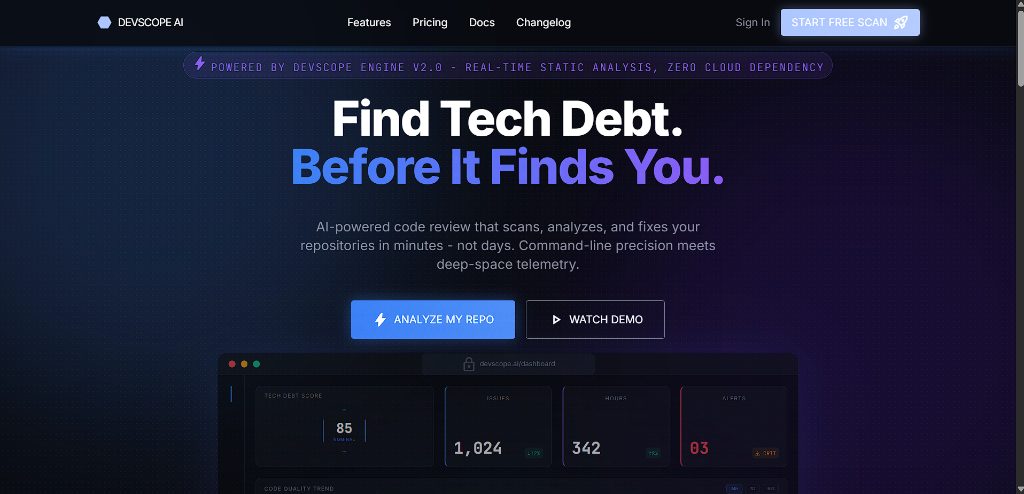
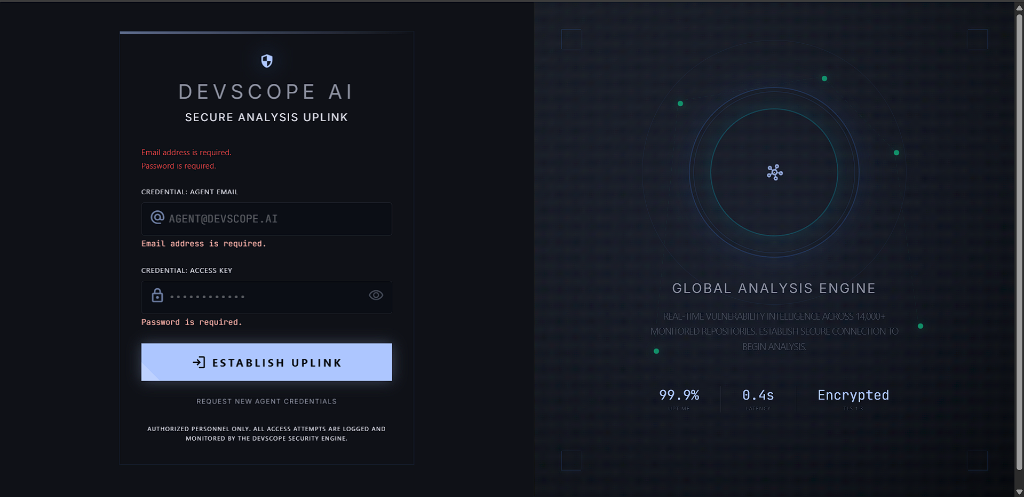
Premium landing page with interacti uplink, and a secure JWT authorization login screen:
| Landing Page Preview | Secure Login Uplink |
| :---: | :---: |
| !Landing Page Preview | !Secure Login Uplink |
#### 2. 📈 Central Dashboard & Li
| Dashboard O | Li Panel |
| :---: | :---: |
| !Dashboard O | !Li Panel |
#### 3. 🛡️ Reports & Scan Comparison
| Deep Analysis Reports | Scan Comparison |
| :---: | :---: |
| !Deep Analysis Reports | !Scan Comparison |
#### 4. 🔑 Admin Panel & User Preferences
| Settings & Configurations | System Admin Dashboard |
| :---: | :---: |
| !Settings & Configurations | !System Admin Dashboard |
| User List & Activity Feed |
| :---: |
| !User List & Activity Feed |
---
🏗️ System Architecture
De AI processes repository scans through a highly disciplined, multi-phase static analysis pipeline:
---
🚀 Key Features
1. 🔍 High-Performance Static Analyzers
Runs multi-threaded parallel analyzers analyzing:
2. 🧮 Sophisticated Health Scoring & Attribution
git blame.3. ⚖️ Multi-Le Rate Limiter
4. 🔄 Scan Comparison & Analytics
---
🛠️ Setup & Local Installation
1. Prerequisites
2. Backend Config (De.API)
Create or edit your local
appsettings.json file inside De.API:3. Frontend Config (BlazorApp1)
Create or edit your local
wwwroot/appsettings.json file inside BlazorApp1:4. Running the De Server
---
🔒 Security Practices & Memory Safety
ProcessStartInfo.ArgumentList collection.snake_case database table column mappings for smooth, warning-free cloud querying.项目信息
开发语言:C#
Star 数:8
技术要点
该项目属于安全软件方向的开源资源,代码结构清晰,适合安全研究人员学习参考。项目围绕An advanced, unique cyber Blazor project and GitHub vulnerability scanner. Real-time static code analysis engine, hardcoded secrets scanner, and deep Git forensics built in C# .NET 10.展开,提供了可运行的实现,对理解相关安全机制、工具原理与攻防技术具有较高的研究价值。
从技术实现角度看,此类项目的核心在于对底层原理的深入理解与工程化落地。开发者在研究过程中可以结合官方文档与社区讨论,梳理项目的初始化流程、核心模块职责与数据流转,逐步掌握其中的技术细节与设计思路。
使用与学习建议
1. 下载源码压缩包,解压到本地环境。
2. 根据项目类型准备对应的运行环境与依赖。
3. 按照 README 中的步骤完成配置与部署。
4. 在隔离的测试环境中运行验证,避免影响生产系统。
免责声明
本资源来源于开源社区,仅供安全研究、技术学习与合法授权范围内的攻防演练使用,请勿用于任何非法或侵害他人权益的用途。使用本项目产生的一切后果由使用者自行承担。
| 资源标题 | DevScopeAI - An advanced, unique cyber Blazor project and GitHu |
| 所属分类 | 安全软件 |
| 发布作者 | admin |
| 发布时间 | 2026-10-05 23:05:40 |
| 下载权限 | 免费下载 |
| 附件数量 | 2 个下载链接 |
| 浏览次数 | 496 |
| 讨论数量 | 0 |
| 主题状态 | 正常讨论中 |