 病毒分析
点击放大
cyberchef-recipes - A list of cyber-chef recipes and curated links
项目说明
!cyberchef_banner_1500
CyberChef is the self-purported 'Cyber Swiss-Army Knife' created by GCHQ. It's a fantastic tool for data transformation, extraction & manipulation in your web-browser.
Full credit to for producing the tool. See:
General Tips
Useful Regular Expressions
Mastering regular expressions are key to making the most of data manipulation in CyberChef (or any DFIR work). Below are some regexs that I keep coming back to.
Extracting Encoded Data
[a-zA-Z0-9+/=]{30,} - Here '30' is an arbitrary number that can be adjusted according to the script.
!base64
[a-fA-F0-9]{10,}- This could also be adjusted to {32} (MD5), {40} (SHA1), {64}, SHA256 to extract hashes
!hex
[\d]{2,3}(,|’)- In this example it would extract character codes in the format ('30, 40, 50, 60')
!charcode
Lookaheads & Lookbehinds
(?<=foo)(.*)- Extract e after 'foo' without including 'foo'
^.*(?=bar)- Extract e before 'bar' without including 'bar'
(?<=')(.*?)(?=')- Extract e between ' and '
!combo
Working with APIs and CyberChef
CyberChef provides an operation HTTP Request (see Recipe 22) which allows HTTP requests to external resources. Due to Same Origin Policy (SOP) or lack of Cross-Origin Resource Sharing configuration many do not work. SOP is a security measure in modern browsers which prevents you from reading cross-site responses from servers which don't explicitly allow it via CORS. Check out 's talk on CyberChef which includes tips to boot Chrome without web-security to enable HTTP requests to otherwise restricted APIs (like Virus Total)
CyberChef Recipes
Some example CyberChef recipes:
Recipe 1: Extract base64, raw inflate & beautify
Recipe 2: Invoke Obfuscation
Recipe 3: From CharCode
Recipe 4: Group Policy Preference Password Decryption
Recipe 5: Using Loops and Labels
Recipe 6: Google ei Timestamps
Recipe 7: Multi-stage COM scriptlet to x86 assembly
Recipe 8: Extract hexadecimal, convert to hexdump for embedded PE file
Recipe 9: Reverse strings, character substitution, from base64
Recipe 10: Extract object from Squid proxy cache
Recipe 11: Extract GPS Coordinates to Google Maps URLs
Recipe 12: Big Number Processing
Recipe 13: Parsing DNS PTR records with Registers
Recipe 14: Decoding POSHC2 executables
Recipe 15: Parsing $MFT $SI Timestamps
Recipe 16: Decoding PHP gzinflate and base64 webshells
Recipe 17: Extracting shellcode from a Powershell Meterpreter Reverse TCP Script
Recipe 18: Recycle Bin Parser with Subsections and Merges
Recipe 19: Identify Obfuscated Base64 with Regular Expression Highlighting
Recipe 20: Using Yara rules with deobfuscated malicious scripts
Recipe 21: Inline deobfuscation of hex encoded attached to a malicious LNK file
Recipe 22: JA3 API search with HTTP Request and Registers
Recipe 23: Defeating DOSfuscation embedded in a malicious DOC file with Regular Expression capture groups
Recipe 24: Picking a random letter from a six-byte string
Recipe 25: Creating a Wifi QR code
Recipe 26: Extracting and Decoding a Multistage PHP Webshell
Recipe 27: Decoding an Auto PHP script
Recipe 28: De-obfuscation of Cobalt Strike Beacon using Conditional Jumps to obtain shellcode
Recipe 29: Log File Timestamp Manipulation with Subsections and Registers
Recipe 30: CharCode obfuscated PowerShell Loader for a Cobalt Strike beacon
Recipe 31: Deobfuscate encoded strings in .NET binary
Recipe 32: Extract malicious Gootkit DLL from obfuscated registry data
Recipe 33: Identify embedded URLs in Emotet PowerShell script
Recipe 34: Analysing OOXML Files for URLs
Recipe 35: Decrypting RE ransomware sample
Recipe 36: Create a CyberChef Password Generator
Recipe 37: From Sandbox zipped email to malicious URL
Recipe 38: Planes, Skulls and En - Live and Let PowerShell
Recipe 39: Decrypt GoldMax aka Sunshutte encrypted configuration files
Recipe 40: Morse Code Madness
Recipe 41: PHP mixed hexadecimal and octal encoding
Recipe 42: PHP Webshell with layered obfuscation
Recipe 43: Magento skimmer deobfuscation
Recipe 44: Decrypting JobCrypter Ransomware
Recipe 45: Sqiud Proxy Log Timestamp Con
Recipe 46: Tailoring your regex for the situation
Recipe 47: Trickbot Basic script
Recipe 48: Emoji Madness
Recipe 49: Disassemble an EICAR test file
Recipe 50: Parse Security Descriptor Definition Language output
Recipe 51: Base-45 decoder
Recipe 52: Randomise list of items
Recipe 53: Ole to Powershell
Recipe 54: Windows Event ID 1029 Hashes
Recipe 55: Debofuscating BazarLoader aka TA551 maldoc
Recipe 56: Calculate and lookup JA3 or JA3S hash from a PCAP
Recipe 57: Make a meme with CyberChef
Recipe 58: Extract IcedID second stage URL from a maldoc
Recipe 59: Parse Cobalt Strike beacon configuration
Recipe 60: Decode URLs protected by Microsoft Safelinks
Recipe 61: Extract second stage URLs from Qakbot Excel maldocs
Recipe 62: Emotet Maldoc to PowerShell
Recipe 63: Extract URLs from Dridex obfuscated VBS
Recipe 64: Convert Strings to Grep queries
Recipe 65: Deobfuscate MSF Venom PowerShell reverse shell payload
Recipe 66: Nested subsection example
Recipe 67: Con a MSI ProductCode to Registry Installer ProductID
Recipe 68: Con Ja byte arrays
Recipe 69: Extracting DLL payload from a Bumblebee Powershell script
Recipe 70: Extracting endpoints from Android network security config
Recipe 1 - Extract base64, raw inflate and code beautify
A very common scenario: extract Base64, inflate, beautify the code. You may need to then do further processing or dynamic analysis depending on the next stage.
Filename: ahack.bat
Zipped File: cc9c6c38840af8573b8175f34e5c54078c1f3fb7c686a6dc49264a0812d56b54_183SnuOIVa.bin.gz
Sample: SHA256 cc9c6c38840af8573b8175f34e5c54078c1f3fb7c686a6dc49264a0812d56b54
Recipe Details
!Recipe_1
Recipe 2 - In
CyberChef won't be able to handle all types of In, but here is one that can be decoded.
Filename: Acknowledgement NUT-95-52619.eml
Zipped File: 1240695523bbfe3ed450b64b80ed018bd890bfa81259118ca2ac534c2895c835.bin.gz
Sample: SHA256 1240695523bbfe3ed450b64b80ed018bd890bfa81259118ca2ac534c2895c835
Recipe Details
!Recipe_2
Recipe 3 - From CharCode
Malware and scripts often use Charcode to represent characters in order to evade from AV and EDR solutions. CyberChef eats this up.
Filename: 3431818-f71f60d10b1cbe034dc1be242c6efa5b9812f3c6.zip
Source:
Recipe Details
!Recipe_3
Recipe 4 - Group Policy Preference passwords
When a new GPP is created, there’s an associated XML file created in SYSVOL with the relevant configuration data and if there is a password provided, it is AES-256 bit encrypted. Microsoft published the AES Key, which can be used to decrypt passwords store in: \\<DOMAIN>\SYSVOL\<DOMAIN>\Policies\
Credit:
Source 1:
Source 2:
Recipe Details
!Recipe_4
Recipe 5 - Using loops & labels
CyberChef can use labels to identify parts of the recipe and then loop back to perform operations multiple times. In this example, there are 29 rounds of Base64 encoding which are extracted and decoded.
Credit:
Source File: hmCPDnHs.txt
Source 1:
Source 2:
Also see more example of loops o: (Credit: )
Recipe Details
!Recipe_5
Recipe 6 - Google ei timestamp
Google uses its own timestamp, I call ei time, which it embeds in the URL.
Source:
Recipe Details
!Recipe_6
Recipe 7 - COM scriptlet to disassembled x86 assembly
This is an ele decoded COM scriptlet that uses Base64, Gunzip, RegEx, and Disassemble x86 instructions.
Credit:
Filename: 41a6e22ec6e60af43269f4eb1eb758c91cf746e0772cecd4a69bb5f6faac3578.txt
Source 1:
Source 2:
Recipe Details
!Recipe_7
Recipe 8 - Extract hexadecimal, convert to hexdump for embedded PE file
This file has an embedded PE file (SHA 256: 26fac1d4ea12cdceac0d64ab9694d0582104b3c84d7940a4796c1df797d0fdc2, R5Sez8PH.exe, VT: 54/70). Using CyberChef, we can regex hexadecimal and the convert to a more easily hexdump.
Source 1: (sorry: no longer a!)
Source 2:
Recipe Details
!Recipe_8
Recipe 9 - Reverse strings, character substitution, from base64
A blob of base64 with some minor bytes to be substituted. Original decoding done by in Python and con to CyberChef.
Credit:
Source 1: / RtjrweYF.txt
Source 2:
Recipe Details
!Recipe_9
Recipe 10 - Extract object from Squid proxy cache
Don't manually carve out your Squid cache objects. Simply upload the file to CyberChef. This recipe will search for the magic bytes 0x0D0A0D0A, extract e after. It then gzip decompresses the object for download.
Source: 00000915 (output should be TrueCrypt_Setup_7.1a.exe with SHA256 e95eca399dfe95500c4de569efc4cc77b75e2b66a864d467df37733ec06a0ff2)
Recipe Details
!Recipe_10
Recipe 11 - Extract GPS Coordinates to Google Maps URLs
If you need to quickly triage where a photo was taken and you're lucky enought to ha GPS latitude and longitudes then use this recipe to quickly make a usable Google Maps URL to identify the location.
Recipe Details
!Recipe_11
Recipe 12 - Big Number Processing
CyberChef can handle massi. Here we can use a simple recipe to change a 38-digit X509SerialNumber to its hexadecimal equi X.509 certificate serial number. Then we can regex the hexadecimal and insert a colon to transform it to the correct format.
Credit:
Source:
Recipe Details
!Recipe_12
Recipe 13 - Parsing DNS PTR records with Registers
IP addresses in DNS PTR records are stored as least significant octet first. For example: 167.139.44.10.in-addr.arpa would relate to IP address of 10.44.139.167. Using CyberChef's registers we can allocate each octet to a memory register (or if it's easier to think of it that way). These can then be re to re-order the IP address. A find/replace tidies up the rest of the record. This could be re it you wanted to translate 'regular' IP addresses to search in DNS PTR records.
!Recipe_13
Recipe Details
Recipe 14 - Decoding POSHC2 executables
PoshC2 is a proxy aware C2 framework that utilises Powershell to aid penetration testers with red teaming, post-exploitation and lateral mo. The dropper is based on PowerShell and consists of a PowerShell script which is double Base64 encoded and compressed. Extracting the strings can be done with CyberChef as detailed below. Depending on the settings and customisation of the executable you may need to adjust your recipe.
Credit:
Source:
Source: posh.zip
!Recipe_14
Recipe Details
Recipe 15 - Parsing $MFT $SI Timestamps
CyberChef can do just about anything with data. Here are raw hex bytes from a $MFT entry. By selecting certain bytes, and using functions of CyberChef I can parse any part of the data as needed. This recipe will extract and parse the $SI timestamps. Encase no more!
!Recipe 15
Recipe Details
Recipe 16 - Decoding PHP gzinflate and base64 webshells
Webshells come in all shapes and sizes. For PHP webshells the combination of gzinflate and base64 can be used to obfuscate the eval data. In this example, there are 21 rounds of compression and base64 that we can quickly parse out using labels and loops.
Source:
!Recipe 16
Recipe Details
Recipe 17 - Extracting shellcode from a Powershell Meterpreter Reverse TCP script
Often seen in 's Pastbin bot , this peels away multiple layers of an encoded Powershell script to display the shellcode. From here you *could* extract PUSH statements to try and identify the IP address & port, but you'll get too many false positives. So you're better off using a tool like scdbg (see: )
Source:
Source: / 9DnD6t6W.txt
!Recipe 17
Recipe Details
Recipe 18 - Recycle Bin Parser with Subsections and Merges
Subsections and Merges are powerful tools in CyberChef that allow the application of ingredients to a selection of data rather than the whole input file. This section can then be merged together to continue on the whole input. In an awesome piece of work has created a Windows Recycle Bin parser using CyberChef indicating the possibilities of these functions is endless.
Source:
Credit:
!Recipe 18
Recipe Details
Recipe 19 - Identify Obfuscated Base64 with Regular Expression Highlighting
Less of a recipe and more of a technique. Using the 'highlight' function of the regular expression ingredient can clearly bring out where base64 data has been broken up with non-traditional base64 character set. Here the sequence '@<!' is used to obfuscate and disrupt automated encoding con. Looking further down the script, the sequence is substituted with 'A', which can then be inserted with a Find/Replace prior to the extraction. This continues for multiple rounds until a domain of interest is re (along with an executable prior).
Source: &
!Recipe 19_1
!Recipe 19_2
!Recipe 19_final
Recipe Details
Recipe 20 - Using Yara rules with deobfuscated malicious scripts
Although not the most con way, CyberChef does provide the ability to run a yara rule over the output of a recipe. You could combine this by using the multiple inputs function to scan a larger number of files.
Source: &
!Recipe 20
Recipe Details
Recipe 21 - Inline deobfuscation of hex encoded attached to a malicious LNK file
This recipe extracts a from a Microsoft Shortcut File (LNK) and then decodes the hex strings in-line using subsections.
Source: malicious.lnk.bin
!Recipe 21
Recipe Details
Recipe 22 - JA3 API search with HTTP Request and Registers
Using the HTTP Request function and Registers we can enrich out data with that from an API or external resource. Here we are searching against three JA3 hashes for any known bad.
Source: Input hashes: 1aa7bf8b97e540ca5edd75f7b8384bfa, 1be3ecebe5aa9d3654e6e703d81f6928, and b386946a5a44d1ddcc843bc75336dfce
!Recipe 22
Recipe Details
Recipe 23 - Defeating DOSfuscation embedded in a malicious DOC file with Regular Expression capture groups
This malicious DOC file is downloaded straight from Hybrid-Analysis. We gunzip it out, select the dosfuscation with a regular expression, then select the critical section that is being used with the 'set' function. This section is deobfuscated with a reverse for loop with a step of three. So once selected we reverse the string and use regular expression capture groups to select every third character. This is great work from Hack eXPlorer on YouTube. Go there and watch!
Source: Untitled-11232018-659370.doc.bin.gz
Credit: Adapted from Hack eXPlorer's video Hiding Malicious code using windows CMD - Dosfuscation
!Recipe 23
Recipe Details
Recipe 24 - Picking a random letter from a six-byte string
A request for assistance led to this recipe which uses Registers, HTTP request and some Regex to select a random character from a six-byte string.
Credit: Adapted from Ste
!Recipe 24
Recipe Details
[{"op":"Register","args":["(.*)",true,false,false]},{"op":"HTTP request","args":["GET"," Resource Sharing",false]},{"op":"Register","args":["(.)",true,false,false]},{"op":"Find / Replace","args":[{"option":"Regex","string":"(.)"},"$R0",true,false,true,false]},{"op":"Regular expression","args":["User defined","(.){$R1}",true,true,false,false,false,false,"List capture groups"]},{"op":"Head","args":["Line feed",1]}]
Recipe 25 - Creating a WiFi QR code
Either for ease of letting your mates access your guest wifi, or for any Red Team that needs to add tempting con to a rogue access point! Using the create QR Code function to allow Android or iOS devices to logon to your Wifi.
Credit:
Background:
Recipe Details
Generate_QR_Code('PNG',5,2,'Medium')
!Recipe 25
Recipe 26 - Extracting and Decoding a Multistage PHP Webshell
Decoding a Webshell documented by SANS entirely within Cyberchef using regex, ROT13, HTTP Request, Registers and more!
Credit:
Recipe Details
[{"op":"Regular expression","args":["User defined","(?<=')(.*?)(?=')",true,true,false,false,false,false,"List matches"]},{"op":"From Base64","args":["A-Za-z0-9+/=",true]},{"op":"ROT13","args":[true,true,13]},{"op":"Raw Inflate","args":[0,0,"Adaptive",false,false]},{"op":"ROT13","args":[true,true,13]},{"op":"Extract URLs","args":[false]},{"op":"Register","args":["(.*)",true,false,false]},{"op":"HTTP request","args":["GET","$R0","","Cross-Origin Resource Sharing",false]},{"op":"Strings","args":["Single byte",4,"Alphanumeric + punctuation (A)",false]},{"op":"Regular expression","args":["User defined","[a-zA-Z0-9+=/]{30,}",true,true,false,false,false,false,"List matches"]},{"op":"From Base64","args":["A-Za-z0-9+/=",true]},{"op":"Regular expression","args":["User defined","(?<=')(.*?)(?=')",true,true,false,false,false,false,"List matches"]},{"op":"From Base64","args":["A-Za-z0-9+/=",true]},{"op":"Raw Inflate","args":[0,0,"Adaptive",false,false]},{"op":"ROT13","args":[true,true,13]},{"op":"Regular expression","args":["User defined","[a-zA-Z0-9+=/]{30,}",true,true,false,false,false,false,"List matches"]},{"op":"From Base64","args":["A-Za-z0-9+/=",true]}]
!Recipe 26
Recipe 27 - Decoding an Auto PHP script
Decoding an auto script written in PHP within Cyberchef using regex, ROT13, multiple decompression algorithms, and *subsections*! The key point to consider is there are two using different rounds of obfuscation. You have a couple of options: work in multiple CyberChef windows to get the end result, or, as below, use subsections and greg for each to manipulate each independently and get both deobfuscated outputs in the one script. You can shorten the recipe further by using loops to jump the multiple rounds of Raw Inflate.
Credit: Original script provided by , original Cyberchef recipe(s) created by , and refined by in to one recipe.
Recipe Details
[{"op":"Regular expression","args":["User defined","(?<=')(.*?)(?=')",true,true,false,false,false,false,"List matches"]},{"op":"From Base64","args":["A-Za-z0-9+/=",true]},{"op":"ROT13","args":[true,true,13]},{"op":"Raw Inflate","args":[0,0,"Adaptive",false,false]},{"op":"ROT13","args":[true,true,13]},{"op":"Subsection","args":["(?<=\\$Fadly.*?\")(.*?)(?=\\\")",true,true,false]},{"op":"From Base64","args":["A-Za-z0-9+/=",true]},{"op":"URL Decode","args":[]},{"op":"From HTML Entity","args":[]},{"op":"Merge","args":[]},{"op":"Subsection","args":["(?<=\\$Gans.*?\")(.*?)(?=\\\")",true,true,false]},{"op":"Reverse","args":["Character"]},{"op":"From Base64","args":["A-Za-z0-9+/=",true]},{"op":"Label","args":["jump"]},{"op":"Raw Inflate","args":[0,0,"Adaptive",false,false]},{"op":"Jump","args":["jump",2]},{"op":"Zlib Inflate","args":[0,0,"Adaptive",false,false]},{"op":"Zlib Inflate","args":[0,0,"Adaptive",false,false]}]
!Recipe 27
Recipe 28 - De-obfuscation of Cobalt Strike Beacon using Conditional Jumps to obtain shellcode
Choose your poison with this ingenious script from @0xtornado which determines which type of obfuscation your beacon script has conditional jumps to parse out the shellcode. First the code looks for a simple regex 'bxor' to then jump to the appropriate section of the recipe. Else it parses out the second type. Using CyberChef 'tabs' you can load up two different scripts and get out your data. Impress your colleagues and friendly red team or local APT crew!
Credit:
Recipe Details
[{"op":"Conditional Jump","args":["bxor",false,"Decode_Shellcode",10]},{"op":"Label","args":["Decode_beacon"]},{"op":"From Base64","args":["A-Za-z0-9+/=",true]},{"op":"Decode text","args":["UTF-16LE (1200)"]},{"op":"Regular expression","args":["User defined","[a-zA-Z0-9+/=]{30,}",true,true,false,false,false,false,"List matches"]},{"op":"From Base64","args":["A-Za-z0-9+/=",true]},{"op":"Gunzip","args":[]},{"op":"Label","args":["Decode_Shellcode"]},{"op":"Regular expression","args":["User defined","[a-zA-Z0-9+/=]{30,}",true,true,false,false,false,false,"List matches"]},{"op":"From Base64","args":["A-Za-z0-9+/=",true]},{"op":"XOR","args":[{"option":"Decimal","string":"35"},"Standard",false]}]
!Recipe 28_1
!Recipe 28_1
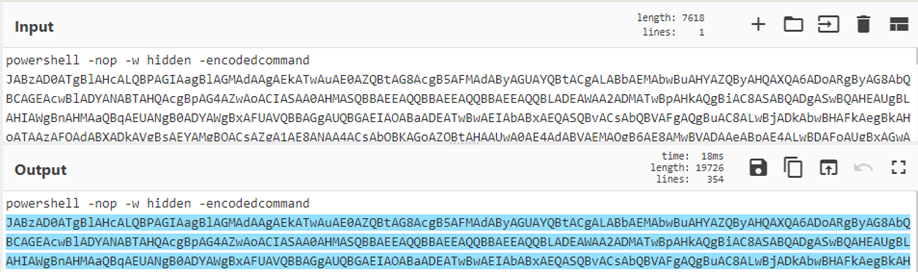
Recipe 29 - Log File Timestamp Manipulation with Subsections and Registers
Not e thinks of CyberChef as a tool for log file analysis. But its handy if you have to transpose, reformat or maniulate a log file to suit your purpose. Here, we have an Apache log file with a timestamp that doesn't lead to useful temporal analysis with other log files: the date format is not sortable, its enclosed in square brackets and it's in UTC +1 not a standard UTC. Using Subsections, Registers and Transpose Date and Time we can change the formatting of the timestamp and move the column around to be able to combine it with other data. Awesome!
Credit: and
Recipe Details
[{"op":"Fork","args":["\\n","\\n",false]},{"op":"Subsection","args":["\\[.*\\+0100\\]",true,true,false]},{"op":"Find / Replace","args":[{"option":"Regex","string":"\\[|\\]"},"",true,false,true,false]},{"op":"Translate DateTime Format","args":["Standard date and time","DD/MMM/YYYY:HH:mm:ss ZZ","Etc/GMT-1","YYYY-MM-DDTHH:mm:ss ZZ","UTC"]},{"op":"Merge","args":[]},{"op":"Fork","args":["\\n","\\n",false]},{"op":"Register","args":["(.*)(\\d{4}-.*\\+0000)(.*)",true,false,false]},{"op":"Find / Replace","args":[{"option":"Simple string","string":"$R0$R1$R2"},"$R1 $R0 $R2",true,false,true,false]}]
!Recipe 29
Recipe 30 - CharCode obfuscated PowerShell loader for a Cobalt Strike beacon
A on the standard PowerShell loader for Cobalt Strike. Here the first layer of obfuscation is a GZipped blob split into two CharCode arrays. The end result is up to you: disassembly, strings, extract IP, or parse UserAgent. Choose your own ad.
Source: &
Recipe Details
[{"op":"Regular expression","args":["User defined","\\d{1,3}",true,true,false,false,false,false,"List matches"]},{"op":"From Charcode","args":["Line feed",10]},{"op":"Gunzip","args":[]},{"op":"Regular expression","args":["User defined","[a-zA-Z0-9+/=]{30,}",true,true,false,false,false,false,"List matches"]},{"op":"From Base64","args":["A-Za-z0-9+/=",true]},{"op":"XOR","args":[{"option":"Decimal","string":"35"},"Standard",false]},{"op":"Strings","args":["Single byte",5,"All printable chars (A)",false]}]
!Recipe 30
Recipe 31 - Deobfuscate encoded strings in .NET binary
The SolarWinds malicious .dll contained obfuscated strings using compression and base64. Rather than lose the context in your analysis, we can do a quick de-obfuscation in-line by selecting the strings with a Subsection and then con. The result is a function that becomes readable with context and avoids a potentially error-prone cut and paste.
Credit: &
Source: &
Recipe Details
[{"op":"Subsection","args":["(?<=\\(\\\")(.*)(?=\\\"\\))",true,true,false]},{"op":"From Base64","args":["A-Za-z0-9+/=",true]},{"op":"Raw Inflate","args":[0,0,"Adaptive",false,false]}]
!Recipe 31
Recipe 32 - Extract malicious Gootkit DLL from obfuscated registry data
Gootkit stores a DLL inside the registry as encoded PowerShell. CyberChef makes mince meat of this so-called 'fileless' malware. A handy recipe provided by puts the 'file' back in 'fileless' (yes, I thought of that one myself, we are up to recipe 32 my friends...).
Source:
Recipe Details
[{"op":"Decode text","args":["UTF-16LE (1200)"]},{"op":"Regular expression","args":["User defined","[a-zA-Z0-9+/=]{30,}",true,true,false,false,false,false,"List matches"]},{"op":"From Base64","args":["A-Za-z0-9+/=",true]},{"op":"Decode text","args":["UTF-16LE (1200)"]},{"op":"Regular expression","args":["User defined","[a-zA-Z0-9+/=]{30,}",true,true,false,false,false,false,"List matches"]},{"op":"From Base64","args":["A-Za-z0-9+/=",true]},{"op":"Raw Inflate","args":[0,0,"Adaptive",false,false]}]
!Recipe 32
Recipe 33 - Identify embedded URLs in Emotet PowerShell script
Using the powerful operation of Registers, a handy recipe from extracts obfuscated URLs from the PowerShell from an Emotet malicious document. Here capture groups are used to grab the find/replace string which de-obfuscates the URLs. Awesome stuff.
Credit: and ()
Source:
Recipe Details
[{"op":"Regular expression","args":["User defined","[a-zA-Z0-9+/=]{30,}",true,true,false,false,false,false,"List matches"]},{"op":"From Base64","args":["A-Za-z0-9+/=",true]},{"op":"Decode text","args":["UTF-16LE (1200)"]},{"op":"Find / Replace","args":[{"option":"Regex","string":"'\\)?\\+\\(?'"},"",true,false,true,false]},{"op":"Register","args":["\\(+'(=[\\w\\d]*)'\\)+,'/'\\)",true,false,false]},{"op":"Find / Replace","args":[{"option":"Simple string","string":"$R0"},"/",true,false,true,false]},{"op":"Register","args":["\\/(.)http",true,false,false]},{"op":"Find / Replace","args":[{"option":"Simple string","string":"$R1"},"\\n",true,false,true,false]},{"op":"Find / Replace","args":[{"option":"Regex","string":"'"},"\\n",true,false,true,false]},{"op":"Extract URLs","args":[false]}]
!Recipe 33
Recipe 34 - Analysing OOXML Files for URLs
Didier Stevens demonstrates the amazing simplicity and usefulness of CyberChef by extracting URLs from OOXML documents (e.g. .docx files). By unzipping the file and filtering out the 'known good' the remaining URLs can be inspected. Don't forget to defang to avoid any unnecessary clicks or operational security mistakes. Combine with CyberChef 'tabs' functionality and you could analyse a batch of files.
Credit:
Source:
Recipe Details
[{"op":"Unzip","args":["",false]},{"op":"Extract URLs","args":[false]},{"op":"Filter","args":["Line feed","]},{"op":"Filter","args":["Line feed","]},{"op":"Filter","args":["Line feed","]},{"op":"Filter","args":["Line feed","]},{"op":"Defang URL","args":[true,true,true,"Valid domains and full URLs"]}]
!Recipe 34
Recipe 35 - Decrypting RE ransomware sample
An AES encrypted PowerShell ransomware script is no match for CyberChef. Here were can convert the Base64 to hex, extract the IV and Key into registers and use them to decrypt the blob. Once decrypted we can examine the data and identify a PE file 1925 bytes into the decrypted blob. Extracting this we can then use other tools to identify its behaviour including detonation or static analysis.
Source:
Further Info: Powershell Dropping a RE
Recipe Details
[{"op":"Subsection","args":["(?<=\\\")([a-zA-Z0-9+/=]{20,})(?=\\\")",true,true,false]},{"op":"From Base64","args":["A-Za-z0-9+/=",true]},{"op":"To Hex","args":["None",0]},{"op":"Merge","args":[]},{"op":"Register","args":["(?<=\\\")([a-fA-F0-9]{32})(?=\\\")",true,false,false]},{"op":"Register","args":["(?<=\\\")([a-fA-F0-9]{64})(?=\\\")",true,false,false]},{"op":"Regular expression","args":["User defined","[a-f0-9]{100,}",true,true,false,false,false,false,"List matches"]},{"op":"AES Decrypt","args":[{"option":"Hex","string":"$R1"},{"option":"Hex","string":"$R0"},"CBC","Hex","Raw",{"option":"Hex","string":""},""]},{"op":"Regular expression","args":["User defined","[a-f0-9]{30,}",true,true,false,false,false,false,"List matches"]},{"op":"From Hex","args":["Auto"]},{"op":"Drop bytes","args":[0,1925,false]},{"op":"SHA2","args":["256",64,160]}]
!Recipe 35
Recipe 36 - Create a CyberChef Password Generator
Ok, so I'm kinda cheating here, as the bulk of the work is being done by an API. But it's a good example to remind you the HTTP Requests operation can be a super powerful way of augmenting CyberChef. Here I made a little 'input form' in the CyberChef input pane, and use regular expressions to capture the key paramters for the API call into Registers. A little text massage, and you can have a quick and easy generator as you need it. Saved as a recipe for when you need to deliver a quick new password to a new user.
Source:
Recipe Details
[{"op":"Register","args":["(?<=number:\\s)(.*)",true,false,false]},{"op":"Register","args":["(?<=words:\\s)(.*)",true,false,false]},{"op":"Register","args":["(?<=length:\\s)(.*)",true,false,false]},{"op":"HTTP request","args":["GET"," Resource Sharing",false]},{"op":"Find / Replace","args":[{"option":"Regex","string":" "},"-",true,false,true,false]}]
!Recipe 36
Recipe 37 - From Sandbox zipped email to malicious URL
Most sandboxes deliver a zipped file with the generic password 'infected'. Why risk extracting out to your desktop when you can extract the contents in CyberChef? Here we have an email .eml file which includes an OLE2 file attachment. Strings identifies Base64 which is then extracted and decoded to pull out the second stage.
Source: Any.run
Recipe Details
[{"op":"Unzip","args":["infected",false]},{"op":"Find / Replace","args":[{"option":"Regex","string":"\\n"},"",true,false,true,false]},{"op":"Regular expression","args":["User defined","[a-zA-Z0-9+/=]{400,}",true,true,false,false,false,false,"List matches"]},{"op":"From Base64","args":["A-Za-z0-9+/=",true]},{"op":"Strings","args":["16-bit littleendian",400,"Null-terminated strings (U)",false]},{"op":"Decode text","args":["UTF-16LE (1200)"]},{"op":"Regular expression","args":["User defined","[a-zA-Z0-9+/=]{2000,}",true,true,false,false,false,false,"List matches"]},{"op":"From Base64","args":["A-Za-z0-9+/=",true]},{"op":"Decode text","args":["UTF-16LE (1200)"]},{"op":"Extract URLs","args":[false]},{"op":"Defang URL","args":[true,true,true,"Valid domains and full URLs"]}]
!Recipe 37
Recipe 38 - Planes, Skulls and En - Live and Let PowerShell
A substitution is a substitution. It can be letter for letter, letter for number, or letter for...skull? Here the obfuscation may initially look more confusing but its actually no different to other types. Find/Replce, Subsection, From Base64...all a standard day out for CyberChef. I' the first section to enable extraction of the url, then continue with the deobfuscation.
Source: any.run
Credit:
Recipe Details
[{"op":"Find / Replace","args":[{"option":"Regex","string":"☠"},"B",true,false,true,false]},{"op":"Subsection","args":["[a-zA-Z0-9+/=]{300,}",true,true,false]},{"op":"From Base64","args":["A-Za-z0-9+/=",true]},{"op":"Decode text","args":["UTF-16LE (1200)"]},{"op":"Reverse","args":["Character"]},{"op":"Merge","args":[]},{"op":"Find / Replace","args":[{"option":"Simple string","string":"_✉✈_"},"A",true,false,true,false]},{"op":"Regular expression","args":["User defined","[a-zA-Z0-9+/=]{300,}",true,true,false,false,false,false,"List matches"]},{"op":"From Base64","args":["A-Za-z0-9+/=",true]}]
!Recipe 38
Recipe 39 - Decrypt GoldMax aka Sunshutte encrypted configuration files
GoldMax aka Sunshuttle drops an encrypted configuration file when it executes. In the RE analysis by Microsoft and Fireeye the algorithm and keys were identified and published, making it a breeze to decrypt with CyberChef.
Source 1:
Source 2:
Recipe Details
[{"op":"From Base64","args":["A-Za-z0-9-_",true]},{"op":"AES Decrypt","args":[{"option":"UTF8","string":"hz8l2fnpk8"},{"option":"Hex","string":"00000000000000000000000000000000"},"CFB","Raw","Raw",{"option":"Hex","string":""}]},{"op":"Subsection","args":["[a-zA-Z0-9+/=]{50,}",true,true,false]},{"op":"From Base64","args":["A-Za-z0-9+/=",true]},{"op":"Merge","args":[]},{"op":"Drop bytes","args":[0,16,false]},{"op":"Take bytes","args":[0,120,false]},{"op":"Register","args":["(^.*?)\\|(.*?)\\|(.*?)\\|(.*)\\|(.*)",true,false,false]},{"op":"Find / Replace","args":[{"option":"Regex","string":".*"},"MD5 of Execution Time:\\t\\t\\t$R0\\nLower/Upper Limit for Sleep Time:\\t$R1\\nUtilize “blend-in” traffic requests:\\t$R2\\nEnd execution timestamp:\\t\\t$R2\\nUser-agent for HTTPS requests:\\t\\t$R4",false,false,false,false]}]
!Recipe 39
Recipe 40 - Morse Code Madness
Yes, there is a morse code operation in CyberChef. Yes, you may need to use it one day. Sadly this wasn't malware but still CyberChef does the job. Thanks to and for this entry.
Source:
Recipe:
Recipe Details
[{"op":"From Binary","args":["Space",8]},{"op":"From Morse Code","args":["Space","Forward slash"]},{"op":"Reverse","args":["Character"]},{"op":"ROT13","args":[true,true,false,13]}]
!Recipe 40
!Recipe 40a
Recipe 41 - PHP mixed hexadecimal and octal encoding
What do we want? Mixed encoding with both hexadecimal and octal in the one set! When do we want it? Now!
Source:
Recipe Details
[{"op":"Fork","args":["\\n","\\n",false]},{"op":"Subsection","args":["\\\\x[a-fA-F0-9]{2}",true,true,false]},{"op":"From Hex","args":["\\x"]},{"op":"Merge","args":[]},{"op":"Subsection","args":["\\\\\\d{3}",true,true,false]},{"op":"Find / Replace","args":[{"option":"Regex","string":"\\\\"},"",true,false,true,false]},{"op":"From Octal","args":["Space"]}]
!Recipe 41
Recipe 42 - PHP Webshell with layered obfuscation
This multi-layered webshell is a good case for subsections and jumps. You can break it into parts or complete it (as below) in a single CyberChef recipe.
Source:
Recipe Details
[{"op":"Regular expression","args":["User defined","[a-zA-Z0-9+/=]{30,}",true,true,false,false,false,false,"List matches"]},{"op":"From Base64","args":["A-Za-z0-9+/=",true]},{"op":"Subsection","args":["(?<=\\\\x)([a-fA-F0-9]{2})",true,true,false]},{"op":"From Hex","args":["\\x"]},{"op":"Merge","args":[]},{"op":"Find / Replace","args":[{"option":"Regex","string":"\\\\x"},"",true,false,true,false]},{"op":"Subsection","args":["[a-zA-Z0-9+/=]{30,}=",true,true,false]},{"op":"From Base64","args":["A-Za-z0-9+/=",true]},{"op":"Raw Inflate","args":[0,0,"Adaptive",false,false]},{"op":"From HTML Entity","args":[]},{"op":"Merge","args":[]},{"op":"Subsection","args":["[a-zA-Z0-9+/=]{30,}",true,true,false]},{"op":"Reverse","args":["Character"]},{"op":"From Base64","args":["A-Za-z0-9+/=",true]},{"op":"Label","args":["decompress"]},{"op":"Zlib Inflate","args":[0,0,"Adaptive",false,false]},{"op":"Raw Inflate","args":[0,0,"Adaptive",false,false]},{"op":"Jump","args":["decompress",3]},{"op":"ROT13","args":[true,true,false,13]}]
!Recipe 42
Recipe 43 - Magento skimmer deobfuscation
Let's face it, no-one likes to deobfuscate Ja. Looking at this mess of an obfuscation we probably don't need to do much to get the key info as the encoding is simple. With regex in a couple of Subsections we can deobfuscate 'in-line' quickly and get to the key data (i.e exfil domains) immediately. Then, we pass the full script for complete analysis to the new team member to finish while you get lunch...
Source:
Recipe Details
[{"op":"Subsection","args":["(?<=\\\")([\\w\\\\]+)(?=\\\")",true,true,false]},{"op":"From Hex","args":["\\x"]},{"op":"Merge","args":[]},{"op":"Subsection","args":["(?<=\\\")([a-f0-9\\$]+)(?=\\\")",true,true,false]},{"op":"Find / Replace","args":[{"option":"Simple string","string":"$"},",",true,false,true,false]},{"op":"From Hex","args":["Comma"]}]
!Recipe 43
Recipe 44 - Decrypting JobCrypter Ransomware
JobCrypter is a .NET ransomware that uses SMTP as a C2 channel. This allows an asute professional the ability to decrypt files if they ha email traffic as the communication is not encrypted. Full analysis of this ransomware is a at Yoroi, and provides two related recipes to decrypt files. The first uses the captured email C2 traffic to derive the encryption key, and the second applies that key to encrypted data. I particularly like the use of 'comments' in the recipes which allow a clear understanding of the recipe! Kudos!
Source:
Recipe 1 Details
[{"op":"Comment","args":["JobCrypter Ransomware Decryptor\n\nExtracts encryption key (96 digits) from captured email traffic\n\nDerive 3DES key as K1+K2+K1 (Keyring Option 2, see )"]},{"op":"Regular expression","args":["User defined","[0-9]{96}",true,true,false,false,false,false,"List matches"]},{"op":"MD5","args":[]},{"op":"Register","args":["([a-f0-9]{16})([a-f0-9]{16})",true,false,false]},{"op":"Find / Replace","args":[{"option":"Regex","string":"$R0$R1"},"$R0$R1$R0",true,false,true,false]}]
!Recipe 44a
Recipe 2 Details
[{"op":"Comment","args":["JobCrypter Ransomware Decryptor\n\nExtracts Base64-encoded 3DES-encrypted data from encrypted .txt files and decrypts the original data"]},{"op":"Regular expression","args":["User defined","[A-Za-z0-9+/=]{32,}",false,true,false,false,false,false,"List matches"]},{"op":"From Base64","args":["A-Za-z0-9+/=",true]},{"op":"Triple DES Decrypt","args":[{"option":"Hex","string":"ebd3ff58ec8ebf688e6c918a95622b9febd3ff58ec8ebf68"},{"option":"Hex","string":""},"ECB","Raw","Raw"]},{"op":"From Base64","args":["A-Za-z0-9+/=",true]},{"op":"Render Image","args":["Raw"],"disabled":true}]
!Recipe 44b
Recipe 45 - Sqiud Proxy Log Timestamp Con
The brother of Recipe 29, and cousin of Recipe 10, here we convert squid Unix millisecond timestamp format to ISO 8601 (or whatever our choosing). A fork and subsection to isolate the timestamp and translate date and time format for the con. Adding .SSS keeps the fractional millisecond precision. Don't forget to 'merge' it all back if you want to continue cooking up a storm later in this recipe.
Source:
Sample Data:
Recipe Details
[{"op":"Fork","args":["\\n","\\n",false]},{"op":"Subsection","args":["^(.*?)(?=\\s)",true,true,false]},{"op":"Translate DateTime Format","args":["UNIX timestamp (seconds)","X.SSS","UTC","YYYY-MM-DDTHH:mm:ss.SSS","UTC"]}]
!Recipe 45
Recipe 46 - Tailoring your regex for the situation
Here's a pretty standard script deobfuscation. You'll get some with comma separated URLs that are cycled through to download a second stage. If you want to extract the URLs, normally you'd use the 'Extract URLs' operation which give us 99% of what we want. Except the operation also picks up the trailing '.Split('');$name which looks ugly and not as easily cut and pasted or defanged.
Now the 'Extract URLs' function simply works via a regular expression, which takes into accout all the legitimate reser of a URL as per the RFC. The trailing ' (where we want it to end) is included, so we get more than we wanted. But using the built in regular expression for URLs (screenshot two) and adding the ' into the negation in the syntax we can tailor the regex to our needs and get the perfect outcome!
Source:
Recipe Details
[{"op":"Regular expression","args":["User defined","[a-zA-Z0-9+/=]{30,}",true,true,false,false,false,false,"List matches"]},{"op":"From Base64","args":["A-Za-z0-9+/=",true]},{"op":"Decode text","args":["UTF-16LE (1200)"]},{"op":"Regular expression","args":["User defined","\\d{2,3}",true,true,false,false,false,false,"List matches"]},{"op":"From Charcode","args":["Line feed",10]},{"op":"Extract URLs","args":[false],"disabled":true},{"op":"Regular expression","args":["URL","([A-Za-z]+://)([-\\w]+(?:\\.\\w[-\\w]*)+)(:\\d+)?(/[^.!,?\"<>\\[\\]{}\\s\\x7F-\\xFF]*(?:[.!,?]+[^.!,?'\"<>\\[\\]{}\\s\\x7F-\\xFF]+)*)?",true,true,false,false,false,false,"List matches"]},{"op":"Split","args":[",","\\n"]}]
!Recipe 46a
!Recipe 46b
Recipe 47 - Trickbot Basic script
The malware author here has attempted to fool automated analysis by slicing the recognisable Base64 encoded PE header into character codes. Using a filter to remove junk, subsection and standard regular expressions we can extract the base64 and the DLL the script is hiding.
Source:
Recipe Details
[{"op":"Filter","args":["Line feed","^'",true]},{"op":"Subsection","args":["(?<=\\()(\\d{2,3})(?=\\))",true,true,false]},{"op":"From Charcode","args":["Space",10]},{"op":"Merge","args":[]},{"op":"Regular expression","args":["User defined","(?<=\\()([a-zA-Z0-9+/=]{1}?)(?=\\))|[a-zA-Z0-9+/=]{20,}",true,true,false,false,false,false,"List matches"]},{"op":"Find / Replace","args":[{"option":"Regex","string":"\\n"},"",true,false,true,false]},{"op":"From Base64","args":["A-Za-z0-9+/=",true]},{"op":"SHA2","args":["256",64,160]}]
!Recipe 47
Recipe 48 - Emoji Madness
"Emojis, so hot right now", says the meme (see recipe 38 for proof) but this interesting sample found by TomU through his ongoing research into DESKTOP-group has a few tricks up its slee from emoji obfuscation, it downloads a snippet of code from pastee.ee which has the final key to its de-obfuscation. But it's no match for his CyberChef recipe. I' edited to use a subsection and done a find/replace directly with the emoji as these can be pasted easily into CyberChef. For those playing at home, the extra snippet of code that helps with the deobfuscation is also a in the sample zip.
Source:
[{"op":"Subsection","args":["\\\\x[a-fA-F0-9]{2}",true,true,false]},{"op":"From Hex","args":["Auto"]},{"op":"Merge","args":[]},{"op":"Find / Replace","args":[{"option":"Regex","string":"☽☂|☚☎"},"",true,false,true,false]},{"op":"Find / Replace","args":[{"option":"Simple string","string":"'"},"\"",true,false,true,false]}]
!Recipe 48
Recipe 49 - Disassemble an EICAR test file
The EICAR test file has a standard known structure of a 16 bit DOS program. Using CyberChef we can take any valid EICAR test file and break it down to its assembly. Here we use subsections (are we getting the idea that subsections are awesome yet?) and use it to capture and manipulate sections that we require. CyberChef can produce disassembly in 16, 32 or 64 bit and voilà! We've got the correct output. With thanks to Nintechnet blog for breaking down the EICAR file and helping me to understand the structure.
Source:
[{"op":"Subsection","args":["(.*)(\\$.*\\$)(.*)",true,false,false]},{"op":"To Hex","args":["None",0]},{"op":"Disassemble x86","args":["16","Full x86 architecture",16,0,true,false]},{"op":"Merge","args":[]},{"op":"Subsection","args":[".*(\\$.*\\$)",true,true,false]},{"op":"Find / Replace","args":[{"option":"Regex","string":"^"},"db\\t\\t\\t\\t",true,false,true,false]},{"op":"Merge","args":[]},{"op":"Subsection","args":[".*\\$(.*)",true,true,false]},{"op":"To Hex","args":["None",0]},{"op":"Disassemble x86","args":["16","Full x86 architecture",16,0,true,false]},{"op":"Find / Replace","args":[{"option":"Regex","string":"^"},"\\n",true,false,false,false]}]
!Recipe 49
Recipe 50 - Parse Security Descriptor Definition Language output
If there is one thing that is definately 'All Greek to me' it's Security Descriptor Definition Language (SDDL). Thankfully, has created a fantastic recipe to parse SDDL output to make it much easier to understand, read, and interpret. I also like the extensive use of Comments (something that I'm always ad, but often not implementing!) Kudos!
Source:
[{"op":"Comment","args":["subsection for the content before the ACE strings"]},{"op":"Subsection","args":["(.*?)\\(.*",false,true,false]},{"op":"Comment","args":["Each \"G:\" and \"D:\" on its own line"]},{"op":"Find / Replace","args":[{"option":"Regex","string":"([GD]):"},"\\n$1:",true,false,true,false]},{"op":"Comment","args":["add separator"]},{"op":"Find / Replace","args":[{"option":"Regex","string":"$"},"\\n######\\n",true,false,false,false]},{"op":"Merge","args":[]},{"op":"Comment","args":["subsection for the ACE strings"]},{"op":"Subsection","args":["######\\n(.*)",false,true,false]},{"op":"Find / Replace","args":[{"option":"Simple string","string":")("},"\\n",true,false,true,false]},{"op":"Find / Replace","args":[{"option":"Regex","string":"\\)$"},"",true,false,true,false]},{"op":"Find / Replace","args":[{"option":"Regex","string":"^\\("},"",true,false,true,false]},{"op":"Comment","args":["Add space between each permission or flag bigram"]},{"op":"Find / Replace","args":[{"option":"Regex","string":"([A-Z]{2})"},"$1 ",true,false,true,false]},{"op":"Comment","args":["Insert table header"]},{"op":"Find / Replace","args":[{"option":"Regex","string":"^"},"Type;Flags;Permissions;ObjectType;Inherited ObjectType;Trustee\\n",false,false,true,false]},{"op":"To Table","args":[";","\\n",true,"ASCII"]},{"op":"Merge","args":[]}]
!Recipe 50
Recipe 51 - Base-45 decoder
Base 45 is another type of encoding related to Base64 et al. Here Tomasz Zieliński has done amazing work in writing a CyberChef recipe for this encoding. Plus the recipe is heavily commented so you can see what is happening where! Awesome.
Credit:
Source:
Recipe Details
[{"op":"Comment","args":["CYBERCHEF BASE-45 DECODER\n\nTomasz Zielinski ()\npublic domain\n"]},{"op":"Conditional Jump","args":["^(...)+$",false,"multiply3",10]},{"op":"Comment","args":["Flow for case with number of input characters that not divide by 3"]},{"op":"Comment","args":["\nSTEP 1\nReplace BASE-45 alphabet with numeric \n]},{"op":"Substitute","args":["0123456789ABCDEFGHIJKLMNOPQRSTUVWXYZ $%*+\\-./:","\\x00\\x01\\x02\\x03\\x04\\x05\\x06\\x07\\x08\\x09\\x0a\\x0b\\x0c\\x0d\\x0e\\x0f\\x10\\x11\\x12\\x13\\x14\\x15\\x16\\x17\\x18\\x19\\x1a\\x1b\\x1c\\x1d\\x1e\\x1f\\x20\\x21\\x22\\x23\\x24\\x25\\x26\\x27\\x28\\x29\\x2a\\x2b\\x2c"]},{"op":"Comment","args":["STEP 2\nIf the length of is not di by 3, add 0 as last value"]},{"op":"To Decimal","args":["Space",false]},{"op":"Find / Replace","args":[{"option":"Regex","string":"((\\d+ \\d+ \\d+[ ]*)+)(\\d+ \\d+[ ]*)*"},"$1/$3_",false,false,false,false]},{"op":"Find / Replace","args":[{"option":"Regex","string":"((\\d)+[ ]*)_$"},"$1 0",true,false,true,false]},{"op":"Find / Replace","args":[{"option":"Regex","string":"[ _]*$|/"},"",true,false,true,false]},{"op":"Comment","args":["Take three-number sequences and prepare multiplication by 1, 45, and 2025"]},{"op":"Find / Replace","args":[{"option":"Regex","string":"(\\d+) (\\d+) (\\d+){0,1}"},"$1\\n$2 45\\n$3 2025\\n",true,false,true,false]},{"op":"Fork","args":["\\n","\\n",false]},{"op":"Multiply","args":["Space"]},{"op":"Merge","args":[]},{"op":"Find / Replace","args":[{"option":"Regex","string":"NaN"},"",true,false,true,false]},{"op":"Find / Replace","args":[{"option":"Regex","string":"\\n"}," ",true,false,true,false]},{"op":"Comment","args":["Sum sequences of three numbers"]},{"op":"Find / Replace","args":[{"option":"Regex","string":"(\\d+) (\\d+) (\\d+)"},"$1 $2 $3\\n",true,false,true,false]},{"op":"Fork","args":["\\n","\\n",false]},{"op":"Sum","args":["Space"]},{"op":"Merge","args":[]},{"op":"Find / Replace","args":[{"option":"Regex","string":"NaN"},"",true,false,true,false]},{"op":"Fork","args":["\\n","\\n",false]},{"op":"To Base","args":[16]},{"op":"Find / Replace","args":[{"option":"Regex","string":"NaN"},"",true,false,true,false]},{"op":"Find / Replace","args":[{"option":"Regex","string":"^(\\w\\w\\w)$"},"0$1",true,false,true,false]},{"op":"Find / Replace","args":[{"option":"Regex","string":"^(\\w\\w)$"},"00$1",true,false,false,false]},{"op":"Comment","args":["Split a number to two bytes (effectively DIV256 and MOD256)"]},{"op":"Find / Replace","args":[{"option":"Regex","string":"(\\w\\w)(\\w\\w)"},"$1\\n$2",true,false,true,false]},{"op":"Merge","args":[]},{"op":"Comment","args":["Change hex to chars"]},{"op":"Fork","args":["\\n","",false]},{"op":"Merge","args":[]},{"op":"Comment","args":["Special case, last byte is malformed as two bytes, remo 0"]},{"op":"Find / Replace","args":[{"option":"Regex","string":"00(\\w\\w)$"},"$1",true,false,true,false]},{"op":"From Hex","args":["Line feed"]},{"op":"Jump","args":["end",10]},{"op":"Label","args":["multiply3"]},{"op":"Comment","args":["Flow for case with number of input characters that divide by 3"]},{"op":"Substitute","args":["0123456789ABCDEFGHIJKLMNOPQRSTUVWXYZ $%*+\\-./:","\\x00\\x01\\x02\\x03\\x04\\x05\\x06\\x07\\x08\\x09\\x0a\\x0b\\x0c\\x0d\\x0e\\x0f\\x10\\x11\\x12\\x13\\x14\\x15\\x16\\x17\\x18\\x19\\x1a\\x1b\\x1c\\x1d\\x1e\\x1f\\x20\\x21\\x22\\x23\\x24\\x25\\x26\\x27\\x28\\x29\\x2a\\x2b\\x2c"]},{"op":"To Decimal","args":["Space",false]},{"op":"Comment","args":["Take three-number sequences and prepare multiplication by 1, 45, and 2025"]},{"op":"Find / Replace","args":[{"option":"Regex","string":"(\\d+) (\\d+) (\\d+){0,1}"},"$1\\n$2 45\\n$3 2025\\n",true,false,true,false]},{"op":"Fork","args":["\\n","\\n",false]},{"op":"Multiply","args":["Space"]},{"op":"Merge","args":[]},{"op":"Find / Replace","args":[{"option":"Regex","string":"NaN"},"",true,false,true,false]},{"op":"Find / Replace","args":[{"option":"Regex","string":"\\n"}," ",true,false,true,false]},{"op":"Comment","args":["Sum sequences of three numbers"]},{"op":"Find / Replace","args":[{"option":"Regex","string":"(\\d+) (\\d+) (\\d+)"},"$1 $2 $3\\n",true,false,true,false]},{"op":"Fork","args":["\\n","\\n",false]},{"op":"Sum","args":["Space"]},{"op":"Merge","args":[]},{"op":"Find / Replace","args":[{"option":"Regex","string":"NaN"},"",true,false,true,false]},{"op":"Fork","args":["\\n","\\n",false]},{"op":"To Base","args":[16]},{"op":"Find / Replace","args":[{"option":"Regex","string":"NaN"},"",true,false,true,false]},{"op":"Find / Replace","args":[{"option":"Regex","string":"^(\\w\\w\\w)$"},"0$1",true,false,true,false]},{"op":"Find / Replace","args":[{"option":"Regex","string":"^(\\w\\w)$"},"00$1",true,false,false,false]},{"op":"Comment","args":["Split a number to two bytes (effectively DIV256 and MOD256)"]},{"op":"Find / Replace","args":[{"option":"Regex","string":"(\\w\\w)(\\w\\w)"},"$1\\n$2",true,false,true,false]},{"op":"Comment","args":["Change hex to chars"]},{"op":"From Hex","args":["Line feed"]},{"op":"Merge","args":[]},{"op":"Fork","args":["\\n","",false]},{"op":"Merge","args":[]},{"op":"Label","args":["end"]}]
!Recipe 51
Recipe 52 - Randomise list of items
Here we can use the operation Pseudo-Random Number Generator to create a random hexadecimal value. Prior to that we save are items in registers. Then we can join them together and sort by the randomised hex . Sure, it's probably not cryptographically perfect and make NSA eggheads eyes bleed but ¯\_(ツ)_/¯.
Recipe Details
[{"op":"Find / Replace","args":[{"option":"Regex","string":","},"\\n",true,false,true,false]},{"op":"Sort","args":["Line feed",false,"Alphabetical (case insensitive)"]},{"op":"Fork","args":["\\n","\\n",false]},{"op":"Register","args":["([\\s\\S]*)",true,false,false]},{"op":"Pseudo-Random Number Generator","args":[32,"Hex"]},{"op":"Find / Replace","args":[{"option":"Regex","string":"(.*)"},"$1 $R0",false,false,true,false]},{"op":"Merge","args":[]},{"op":"Sort","args":["Line feed",false,"Numeric (hexadecimal)"]},{"op":"Regular expression","args":["User defined","(?<=\\s)\\w+$",true,true,false,false,false,false,"List matches"]}]
!Recipe 52
Recipe 53 - Ole to Powershell
With thanks to for this RustyBuer maldoc and recipe. Taking the output from Olevba we can regex, convert, loop and decode until we reach out PowerShell with its IOC goodies.
Credit:
Recipe Details
[{"op":"Regular expression","args":["User defined","\\d\\d+\\)(,|\\n)",true,true,false,false,false,false,"List matches"]},{"op":"Find / Replace","args":[{"option":"Regex","string":"\\)|,"},"",true,false,true,false]},{"op":"From Charcode","args":["Line feed",10]},{"op":"Label","args":["base64loop"]},{"op":"From Base64","args":["A-Za-z0-9+/=",true]},{"op":"Decode text","args":["UTF-16LE (1200)"]},{"op":"Jump","args":["base64loop",1]}]
!Recipe 53
Recipe 54 - Windows Event ID 1029 Hashes
Windows event logs. Love them? Hate them? Do you see event IDs in your dreams? Well rest easier with this smart recipe from Mike Peterson at nullsec.us who researched at Windows Event ID 1029 in the Microsoft-Windows-TerminalSer/Operational.evtx log. Lo placed in the log is this curious entry similar to: Base64(SHA256(UserName)) is = s8Wh9ojpi4aKwRwbOwFS5U=- which is a hashed & encoded entry of the username used for the RDP connection on computer initiating the connection. Read more at the blog. As it is hashed it's not easily re. But if you have a 'suspect' account(s) then you can use this recipe to test your hypothesis.
Credit:
Recipe Details
[{"op":"Decode text","args":["UTF-8 (65001)"]},{"op":"Encode text","args":["UTF-16LE (1200)"]},{"op":"SHA2","args":["256",64,160]},{"op":"From Hex","args":["Space"]},{"op":"To Base64","args":["A-Za-z0-9+/="]}]
!Recipe 54
Recipe 55 - Debofuscating BazarLoader aka TA551 maldoc
A recipe worthy of two screenshots! Here the maldoc uses a simple find/replace to further obfuscate base64 encoded & re data. Here within lies the URI for the next stage of malware goodness (or badness, depending on your profession, and point of view). Once you' the 'out of place data' (screenshot one), you can then modify your recipe to suit your needs.
Credit: Kostas
Recipe Details
[{"op":"Find / Replace","args":[{"option":"Simple string","string":"za67t"},"",true,false,true,false]},{"op":"Generic Code Beautify","args":[]},{"op":"Subsection","args":["[A-Za-z0-9+/=]{450,}",true,true,false]},{"op":"From Base64","args":["A-Za-z0-9+/=",true]},{"op":"Merge","args":[]},{"op":"Subsection","args":["(?<=\\)e\\()(.*?)(?=\\n)",true,true,false]},{"op":"Reverse","args":["Character"]},{"op":"Merge","args":[]},{"op":"Extract URLs","args":[false]},{"op":"Defang URL","args":[true,true,true,"Valid domains and full URLs"]}]
!Recipe 55a
!Recipe 55b
Recipe 56 - Calculate and lookup JA3 or JA3S hash from a PCAP
A in v9.30+ a modern update to Recipe 22. Filter a PCAP for the Client/Ser and extract the bytes. From here, pass it through the JA3 operation, into a register and then lookup via an API request to ja3er.com. Try out some PCAPs from the amazing www.malware-traffic-analysis.net.
Source:
Recipe Details
[{"op":"Regular expression","args":["User defined","16030[13].+",true,true,false,false,false,false,"List matches"]},{"op":"JA3 Fingerprint","args":["Hex","Hash digest"]},{"op":"Register","args":["(.*)",true,false,false]},{"op":"HTTP request","args":["GET"," Resource Sharing",false]},{"op":"JSON Beautify","args":[" ",false]}]
!Recipe 56a
!Recipe 56b
Recipe 57 - Make a meme with CyberChef
Yes, with Add Text to Image this can be done. Yes, with Add Test to Image this should be done. Go. Do it now.
Credit: Ignis
Recipe Details
[{"op":"HTTP request","args":["GET"," Resource Sharing",false]},{"op":"From Base64","args":["A-Za-z0-9+/=",true]},{"op":"Render Image","args":["Raw"]},{"op":"Add Text To Image","args":["Making memes normally","Right","None",0,150,32,"Roboto",0,0,0,255]},{"op":"Add Text To Image","args":["Making Memes with","Right","None",0,450,32,"Roboto",0,0,0,255]},{"op":"Add Text To Image","args":["Cyberchef","None","None",550,490,32,"Roboto",0,0,0,255]}]
!Recipe 57
Recipe 58 - Extract IcedID second stage URL from a maldoc
IcedID, also known as Bokbot, is a prolific threat, known for sending out waves of malicious documents. Here provides a quick way to extract the second stage URL from the maldoc without executing it. By unzipping the .docx and a little regex magic we can extract the URL in plain text.
Source: Max_Malyutin
Recipe Details
[{"op":"Unzip","args":["",false]},{"op":"Regular expression","args":["User defined","(?<=Target\\=\\\")(.*)(?=\\\"\\sTargetMode\\=)",true,true,false,false,false,false,"List matches"]}]
!Recipe 58
Recipe 59 - Parse Cobalt Strike beacon configuration
In the category of 'Things you probably shouldn't do in CyberChef but should try anyway' is parsing a Cobalt Strike beacon configuration file. has done a mammoth task of parsing the structure in CyberChef, and his blog goes into excellent detail into how this can be achieved. Definately take the time to have a read as you can learn some cool tips and tricks that could apply to other problems. You may need to adjust XOR parameters to account for different formats as in my sample. Amazing stuff!
Source: Cobalt Strike beacon configuration parsing with CyberChef
Recipe Details
[{"op":"To Hex","args":["None",0]},{"op":"Register","args":["([\\s\\S]*)",true,false,false]},{"op":"Regular expression","args":["User defined","(^(?:.*?)ffffff)",true,true,false,false,false,false,"List matches"]},{"op":"Find / Replace","args":[{"option":"Regex","string":"(..)"},"$1\\n",true,false,true,false]},{"op":"Add line numbers","args":[]},{"op":"Tail","args":["Line feed",1]},{"op":"Find / Replace","args":[{"option":"Regex","string":"(\\d+)"},"$1 4",true,false,true,false]},{"op":"Divide","args":["Space"]},{"op":"Find / Replace","args":[{"option":"Regex","string":"([0–9\\.]+)"},"$1 2",true,false,true,false]},{"op":"Sum","args":["Space"]},{"op":"Find / Replace","args":[{"option":"Regex","string":"\\..*"},"",true,false,true,false]},{"op":"Register","args":["(\\d+)",true,false,false]},{"op":"Find / Replace","args":[{"option":"Regex","string":".*"},"CLEAR",true,false,true,true]},{"op":"Find / Replace","args":[{"option":"Simple string","string":"CLEARCLEAR"},"$R0",true,false,true,false]},{"op":"Register","args":["(?:[0–9a-f][0–9a-f]){$R1}(.*)",true,false,true]},{"op":"Find / Replace","args":[{"option":"Regex","string":".*"},"CLEAR",true,false,true,true]},{"op":"Find / Replace","args":[{"option":"Simple string","string":"CLEARCLEAR"},"$R2",true,false,true,false]},{"op":"From Hex","args":["Auto"]},{"op":"Drop bytes","args":[0,4,false]},{"op":"XOR","args":[{"option":"Hex","string":"$R2"},"Standard",false],"disabled":true},{"op":"XOR","args":[{"option":"Hex","string":"2e"},"Standard",false]},{"op":"To Hex","args":["Space",0]},{"op":"Find / Replace","args":[{"option":"Regex","string":"(.*)"},"$1 00 08 00 03 01 00 ZZ ZZ ZZ ZZ 00 09 00 03 00 80 ZZ ZZ ZZ ZZ 00 0a 00 03 00 40 ZZ ZZ ZZ ZZ 00 0c 00 03 01 00 ZZ ZZ ZZ ZZ 00 0d 00 03 01 00 ZZ ZZ ZZ ZZ 00 0e 00 03 00 40 ZZ ZZ ZZ ZZ 00 0f 00 03 00 80 ZZ ZZ ZZ ZZ 00 1a 00 03 00 10 ZZ ZZ ZZ ZZ 00 1b 00 03 00 10 ZZ ZZ ZZ ZZ 00 1d 00 03 00 40 ZZ ZZ ZZ ZZ 00 1e 00 03 00 40 ZZ ZZ ZZ ZZ 00 20 00 03 00 80 ZZ ZZ ZZ ZZ 00 21 00 03 00 40 ZZ ZZ ZZ ZZ 00 22 00 03 00 40 ZZ ZZ ZZ ZZ 00 23 00 01 00 02 ZZ ZZ ZZ ZZ 00 24 00 01 00 02 ZZ ZZ ZZ ZZ 00 02 00 01 00 02 ZZ ZZ ZZ ZZ 00 05 00 01 00 02 ZZ ZZ ZZ ZZ 00 06 00 01 00 02 ZZ ZZ ZZ ZZ 00 10 00 01 00 02 ZZ ZZ ZZ ZZ 00 11 00 01 00 02 ZZ ZZ ZZ ZZ 00 12 00 01 00 02 ZZ ZZ ZZ ZZ 00 14 00 02 00 04 ZZ ZZ ZZ ZZ 00 03 00 02 00 04 ZZ ZZ ZZ ZZ 00 13 00 02 00 04 ZZ ZZ ZZ ZZ",true,false,true,false]},{"op":"Register","args":["(?:00 08 00 03 01 00)((?:.*?)(?=00)|(?: ZZ ZZ ZZ ZZ))",true,false,true]},{"op":"Register","args":["(?:00 09 00 03 00 80)((?:.*?)(?=00)|(?: ZZ ZZ ZZ ZZ))",true,false,true]},{"op":"Register","args":["(?:00 0a 00 03 00 40)((?:.*?)(?=00)|(?: ZZ ZZ ZZ ZZ))",true,false,true]},{"op":"Register","args":["(?:00 0c 00 03 01 00)((?:.*?)(?=00)|(?: ZZ ZZ ZZ ZZ))",true,false,true]},{"op":"Register","args":["(?:00 0d 00 03 01 00)((?:.*?)(?=00)|(?: ZZ ZZ ZZ ZZ))",true,false,true]},{"op":"Register","args":["(?:00 0e 00 03 00 40)((?:.*?)(?=00)|(?: ZZ ZZ ZZ ZZ))",true,false,true]},{"op":"Register","args":["(?:00 0f 00 03 00 80)((?:.*?)(?=00)|(?: ZZ ZZ ZZ ZZ))",true,false,true]},{"op":"Register","args":["(?:00 1a 00 03 00 10)((?:.*?)(?=00)|(?: ZZ ZZ ZZ ZZ))",true,false,true]},{"op":"Register","args":["(?:00 1b 00 03 00 10)((?:.*?)(?=00)|(?: ZZ ZZ ZZ ZZ))",true,false,true]},{"op":"Register","args":["(?:00 1d 00 03 00 40)((?:.*?)(?=00)|(?: ZZ ZZ ZZ ZZ))",true,false,true]},{"op":"Register","args":["(?:00 1e 00 03 00 40)((?:.*?)(?=00)|(?: ZZ ZZ ZZ ZZ))",true,false,true]},{"op":"Register","args":["(?:00 20 00 03 00 80)((?:.*?)(?=00)|(?: ZZ ZZ ZZ ZZ))",true,false,true]},{"op":"Register","args":["(?:00 21 00 03 00 40)((?:.*?)(?=00)|(?: ZZ ZZ ZZ ZZ))",true,false,true]},{"op":"Register","args":["(?:00 22 00 03 00 40)((?:.*?)(?=00)|(?: ZZ ZZ ZZ ZZ))",true,false,true]},{"op":"Register","args":["(?:00 23 00 01 00 02)((?:.*?)(?=00)|(?: ZZ ZZ ZZ ZZ))",true,false,true]},{"op":"Register","args":["(?:00 24 00 01 00 02)((?:.*?)(?=00)|(?: ZZ ZZ ZZ ZZ))",true,false,true]},{"op":"Register","args":["(?:00 02 00 01 00 02 )((?:[0–9A-F]{2}\\s){2}|(?:ZZ ZZ ZZ ZZ))",true,false,false]},{"op":"Register","args":["(?:00 05 00 01 00 02 )((?:[0–9A-F]{2}\\s){2}|(?:ZZ ZZ ZZ ZZ))",true,false,false]},{"op":"Register","args":["(?:00 06 00 01 00 02 )((?:[0–9A-F]{2}\\s){2}|(?:ZZ ZZ ZZ ZZ))",true,false,false]},{"op":"Register","args":["(?:00 10 00 01 00 02 )((?:[0–9A-F]{2}\\s){2}|(?:ZZ ZZ ZZ ZZ))",true,false,false]},{"op":"Register","args":["(?:00 11 00 01 00 02 )((?:[0–9A-F]{2}\\s){2}|(?:ZZ ZZ ZZ ZZ))",true,false,false]},{"op":"Register","args":["(?:00 12 00 01 00 02 )((?:[0–9A-F]{2}\\s){2}|(?:ZZ ZZ ZZ ZZ))",true,false,false]},{"op":"Register","args":["(?:00 14 00 02 00 04 )((?:[0–9A-F]{2}\\s){2}|(?:ZZ ZZ ZZ ZZ))",true,false,false]},{"op":"Register","args":["(?:00 03 00 02 00 04 )((?:[0–9A-F]{2}\\s){2}|(?:ZZ ZZ ZZ ZZ))",true,false,false]},{"op":"Register","args":["(?:00 13 00 02 00 04 )((?:[0–9A-F]{2}\\s){4}|(?:ZZ ZZ ZZ ZZ))",true,false,false]},{"op":"Find / Replace","args":[{"option":"Regex","string":".*"},"CLEAR",true,false,true,true]},{"op":"Find / Replace","args":[{"option":"Simple string","string":"CLEARCLEAR"},"7b 0a 22 43 32 20 53 65 72 76 65 72 22 3a $R3 2c 0a 22 55 73 65 72 20 41 67 65 6e 74 22 3a $R4 2c 0a 22 48 54 54 50 20 4d 65 74 68 6f 64 20 50 61 74 68 20 32 22 3a $R5 2c 0a 22 48 65 61 64 65 72 20 31 22 3a $R6 2c 0a 22 48 65 61 64 65 72 20 32 22 3a $R7 2c 0a 22 49 6e 6a 65 63 74 69 6f 6e 20 50 72 6f 63 65 73 73 22 3a $R8 2c 0a 22 50 69 70 65 20 4e 61 6d 65 22 3a $R9 2c 0a 22 4d 65 74 68 6f 64 20 31 22 3a $R10 2c 0a 22 4d 65 74 68 6f 64 20 32 22 3a $R11 2c 0a 22 53 70 61 77 6e 20 54 6f 20 78 38 36 22 3a $R12 2c 0a 22 53 70 61 77 6e 20 54 6f 20 78 36 34 22 3a $R13 2c 0a 22 50 72 6f 78 79 20 48 6f 73 74 6e 61 6d 65 22 3a $R14 2c 0a 22 50 72 6f 78 79 20 55 73 65 72 6e 61 6d 65 22 3a $R15 2c 0a 22 50 72 6f 78 79 20 50 61 73 73 77 6f 72 64 22 3a $R16 2c 0a 22 50 72 6f 78 79 20 41 63 63 65 73 73 20 54 79 70 65 22 3a $R17 2c 0a 22 43 72 65 61 74 65 52 65 6d 6f 74 65 54 68 72 65 61 64 22 3a $R18 2c 0a 22 50 6f 72 74 22 3a $R19 2c 0a 22 4a 69 74 74 65 72 22 3a $R20 2c 0a 22 4d 61 78 20 44 4e 53 22 3a $R21 2c 0a 22 59 65 61 72 22 3a $R22 2c 0a 7d",true,false,true,false]},{"op":"Find / Replace","args":[{"option":"Simple string","string":"ZZ ZZ ZZ ZZ"},"4e 55 4c 4c",true,false,true,false]},{"op":"From Hex","args":["Auto"]}]
!Recipe 59
Recipe 60 - Decode URLs protected by Microsoft Safelinks
Safe Links is a feature in Defender for Office 365 that provides URL scanning and rewriting of inbound email messages in mail flow, and time-of-click of URLs and links in email messages, Teams and Office 365 apps.
Source 1:
Source 2:
[{"op":"Split","args":["?","\\n"]},{"op":"Split","args":["&","\\n"]},{"op":"Split","args":["=","\\n"]},{"op":"Regular expression","args":["User defined","url\\s([^\\s]+)",true,true,false,false,false,false,"List capture groups"]},{"op":"URL Decode","args":[]}]
!Recipe 60
Recipe 61 - Extract second stage URLs from Qakbot Excel maldocs
Qbot? Qakbot? Who cares? With this short and sweet recipe we can extract the malicious URLs from Qakbot Excel maldocs. Pivot from here to other log sources like proxy logs, sysmon, EDR, DNS...you've got all those right?
Credit:
Source:
Recipe Details
[{"op":"Unzip","args":["",false]},{"op":"Strings","args":["16-bit littleendian",10,"All printable chars (U)",false]},{"op":"Filter","args":["Line feed","^\\\"",false]},{"op":"Find / Replace","args":[{"option":"Extended (\\n, \\t, \\x...)","string":"\\x00"},"",true,false,true,false]},{"op":"Find / Replace","args":[{"option":"Regex","string":"[\"& ,]"},"",true,false,true,false]}]
!Recipe 61
Recipe 62 - Emotet Maldoc to PowerShell
Emotet is back! Gianni Amato has whipped up a great recipe using unzip, filter, regex and some other tricks to extract and deobfuscate the embedded PowerShell. A fantastic learning recipe. Great work.
Credit:
Source:
Recipe Details
[{"op":"Unzip","args":["",false]},{"op":"XML Beautify","args":["\\t"]},{"op":"Filter","args":["Line feed","<w:t>.*?<\\/w:t>",false]},{"op":"Find / Replace","args":[{"option":"Regex","string":"3-"},"",true,false,true,false]},{"op":"From HTML Entity","args":[]},{"op":"Regular expression","args":["User defined","(?:[A-Za-z0-9+/]{4})*(?:[A-Za-z0-9+/]{2}==|[A-Za-z0-9+/]{3}==)",true,true,false,false,false,false,"List matches"]},{"op":"From Base64","args":["A-Za-z0-9+/=",true]},{"op":"Reverse","args":["Character"]}]
!Recipe 62
Recipe 63 - Extract URLs from Dridex obfuscated VBS
Let's switch to Dridex, and smash their with this excellent submission from . Using subsection the full recipe is kept for any further analysis, but a simple 'Extract URLs' lets us see the (unsurprising) Discord destination.
Credit:
Source:
Recipe Details
[{"op":"Find / Replace","args":[{"option":"Simple string","string":"+1-1"},"",true,false,true,false]},{"op":"Subsection","args":["chr\\((\\d+)\\)",false,true,false]},{"op":"Fork","args":["\\n","\\n",false]},{"op":"From Charcode","args":["Space",10]},{"op":"Merge","args":[]},{"op":"Find / Replace","args":[{"option":"Simple string","string":"chr("},"",true,true,true,false]},{"op":"Find / Replace","args":[{"option":"Regex","string":"(\\)\\s&\\s|\\\"\\s&\\s\\\"|\\\"\\s&\\s|\\\")"},"",true,false,true,false]},{"op":"Extract URLs","args":[false]},{"op":"Defang URL","args":[true,true,true,"Valid domains and full URLs"]}]
!Recipe 63
Recipe 64 - Convert Strings to Grep queries
Straight forward recipe for con Strings to the syntax used for VT Grep queries. Syntax Reference
Credit:
Source:
Recipe Details
[{"op":"To Hex","args":["Space",0]},{"op":"Find / Replace","args":[{"option":"Regex","string":"^"},"content:{",true,false,true,false]},{"op":"Find / Replace","args":[{"option":"Regex","string":"$"},"}",true,false,true,false]}]
!Recipe 64
Recipe 65 - Deobfuscate MSF Venom PowerShell reverse shell payload
Regular contributor cooks a storm here with all the hallmarks of a seasoned CyberChef : Registers, eye-bleeding regex, and a solid understanding of 'getting it done' in CyberChef. Kudos!
Credit:
Recipe Details
[{"op":"Regular expression","args":["User defined","[a-zA-Z0-9=/+]{30,}",true,true,false,false,false,false,"List matches"]},{"op":"From Base64","args":["A-Za-z0-9+/=",true]},{"op":"Decode text","args":["UTF-16LE (1200)"]},{"op":"Register","args":["\\'\\'\\)\\-f\\'\\'([a-zA-Z0-9+=\\/])\\'\\'[\\,\\'\\)]{3}([a-zA-Z0-9+=\\/])?[\\'\\)\\,]{1,5}([a-zA-Z0-9+=\\/])?.*?\\[",true,false,false]},{"op":"Find / Replace","args":[{"option":"Regex","string":"\\{[\\'\\+0]*?}"},"$R0",true,false,true,false]},{"op":"Find / Replace","args":[{"option":"Regex","string":"\\{[\\'\\+1]*?}"},"$R1",true,false,true,false]},{"op":"Find / Replace","args":[{"option":"Regex","string":"\\{[\\'\\+2]*?}"},"$R2",true,false,true,false]},{"op":"Find / Replace","args":[{"option":"Simple string","string":"''+''"},"",true,false,true,false]},{"op":"Regular expression","args":["User defined","[a-zA-Z0-9=/+]{30,}",true,true,false,false,false,false,"List matches"]},{"op":"From Base64","args":["A-Za-z0-9+/=",true]},{"op":"Gunzip","args":[]},{"op":"Regular expression","args":["User defined","[a-zA-Z0-9=/+]{30,}",true,true,false,false,false,false,"List matches"]},{"op":"From Base64","args":["A-Za-z0-9+/=",true]},{"op":"To Hex","args":["None",0]}]
!Recipe 65
Recipe 66 - Nested subsection example
Nested subsections is a feature a in >= 9.46.0. If you have a layered obfuscation and use two subsections you can merge the second layer only without losing your first subsection later. The below recipe is a contri and is explained in this Twitter thread.
Source:
Recipe Details with nested subsection
[{"op":"Subsection","args":["[a-zA-Z0-9+/=]{100,}",true,true,false]},{"op":"From Base64","args":["A-Za-z0-9+/=",true,false]},{"op":"Subsection","args":["\\\".*\\\"",true,true,false]},{"op":"Find / Replace","args":[{"option":"Regex","string":"\\\""},"",true,false,true,false]},{"op":"From Base64","args":["A-Za-z0-9+/=",true,false]},{"op":"Merge","args":[false]},{"op":"From Hex","args":["Auto"]}]
Recipe details on older
[{"op":"Subsection","args":["[a-zA-Z0-9+/=]{100,}",true,true,false]},{"op":"From Base64","args":["A-Za-z0-9+/=",true,false]},{"op":"Subsection","args":["\\\".*\\\"",true,true,false]},{"op":"Find / Replace","args":[{"option":"Regex","string":"\\\""},"",true,false,true,false]},{"op":"From Base64","args":["A-Za-z0-9+/=",true,false]},{"op":"Merge","args":[]},{"op":"Subsection","args":["[a-fA-F0-9]{100,}",true,true,false]},{"op":"From Hex","args":["Auto"]}]
!Recipe 66
Recipe 67 - Con a MSI ProductCode to Registry Installer ProductID
MSI files have a master ProductCode GUID for each installer file. This will be referenced in the registry at HKEY_LOCAL_MACHINE\SOFTWARE\Classes\Installer\Products\ with a ProductID. That original ProductCode GUID undergoes a simple transformation that we can do in CyberChef. If you have a malicious .msi file you could look up the corresponding ProductCode, calculate the ProductID and hunt in the registry for artifacts. Try it with the string: {6732E1E0-6629-4B92-A25F-40377D162D15}. Good luck!
Source:
Recipe Details
[{"op":"Find / Replace","args":[{"option":"Regex","string":"\\}|\\{|-"},"",true,false,true,false]},{"op":"Subsection","args":["^(\\w{8})",true,true,false]},{"op":"Reverse","args":["Character"]},{"op":"Merge","args":[true]},{"op":"Subsection","args":["^\\w{8}(\\w{4})",true,true,false]},{"op":"Reverse","args":["Character"]},{"op":"Merge","args":[true]},{"op":"Subsection","args":["^\\w{8}\\w{4}(\\w{4})",true,true,false]},{"op":"Reverse","args":["Character"]},{"op":"Merge","args":[true]},{"op":"Subsection","args":["(\\w{16})$",true,true,false]},{"op":"Reverse","args":["Character"]},{"op":"Swap endianness","args":["Hex",8,false]},{"op":"Merge","args":[true]},{"op":"Remo","args":[true,true,true,true,true,false]},{"op":"To Upper case","args":["All"]},{"op":"Find / Replace","args":[{"option":"Regex","string":"^"},"HKEY_LOCAL_MACHINE\\SOFTWARE\\Classes\\Installer\\Products\\",true,false,true,false]}]
!Recipe 67
Recipe 68 - Con Ja byte arrays
Java uses signed integers so character codes need to be con to unsigned before we can use the 'From Character Code' operation. Here we extract the byte array from a Ja webshell and conver the data to its class file. From there we can save off the class file and decompile for further analysis.
Source:
Source:
Recipe Details
[{"op":"Regular expression","args":["User defined","(?<=\\{)([\\-\\d,]+)(?=\\})",true,true,false,false,false,false,"List matches"]},{"op":"Find / Replace","args":[{"option":"Regex","string":"(-\\d+)"},"$1 256",true,false,true,false]},{"op":"Find / Replace","args":[{"option":"Regex","string":","},"\\n",true,false,true,false]},{"op":"Fork","args":["\\n","\\n",false]},{"op":"Sum","args":["Space"]},{"op":"Merge","args":[true]},{"op":"From Charcode","args":["Line feed",10]}]
!Recipe 68
Recipe 69 - Extracting DLL payload from a Bumblebee Powershell script
Bumblebee, the apparent successor to Bazarloader, comes in swinging with a large PowerShell payload containing 113 Base64 blobs. Convert, decompress, substitute, regex-fu, substitute. All in a days work to extra the DLL payload with CyberChef.
Source:
Credit: and
[{"op":"Decode text","args":["UTF-16LE (1200)"]},{"op":"Regular expression","args":["User defined","[a-zA-Z0-9+/=]{30,}",true,true,false,false,false,false,"List matches"]},{"op":"Fork","args":["\\n","\\n",false]},{"op":"Find / Replace","args":[{"option":"Regex","string":"^."},"H",true,false,true,false]},{"op":"From Base64","args":["A-Za-z0-9+/=",true,false]},{"op":"Gunzip","args":[]},{"op":"Merge","args":[true]},{"op":"Regular expression","args":["User defined","(?<=0\\n*x)([a-f0-9]{2})(?=,|\\))",true,true,false,false,false,false,"List matches"]},{"op":"From Hex","args":["Auto"]},{"op":"Find / Replace","args":[{"option":"Regex","string":"^."},"M",true,false,false,false]}]
!Recipe 69
Recipe 70 - Extracting endpoints from Android network security config
The Network Security Configuration feature lets you customize your app's network security settings in a safe, declarati file without modifying app code. These settings can be configured for specific domains and for a specific app. This recipe can be used to extract some endpoints that can help in your recon:
Credit:
[{"op":"Regular expression","args":["User defined","includeSubdomains\\=\\\"\\w+\\\"\\>(?<lista>.*)\\<",true,true,false,false,false,false,"List capture groups"]},{"op":"Unique","args":["Line feed",false]}]
!Recipe 70
Training
I' a course 'CyberChef for Security Analysts' which contains 10 hours of instuctional plus labs through Applied Network Defense. To find out more visit learncyberchef.com
Resources, Books & Blog Articles
Twitter #cyberchef
CyberChef & DFIR
CyberChef Docker Image (untested!)
Static Malware Analysis with OLE Tools and CyberChef
Analyzing obfuscated Powershell with shellcode
Solving Simple Crypto Challenges with CyberChef
CyberChef: BASE64/XOR Recipe
Deciphering Browser Hieroglyphics: LocalStorage (Part 2)
Cooking with the Cyber-Chef 2020
Instructional
13cubed: Cooking with CyberChef
Decoding Metasploit framework and CobaltStrike shells
Hiding Malicious code using windows CMD - Dosfuscation
Splunk TA (Technology Add-on) Example
Browser & Application Extensions/APIs
I haven't tested these, so caveat emptor.
FireFox
Chrome
Burp - SentToCyberChef
CyberSaucier
Official CyberChef Server
Splunk TA (Technology Add-on)
Presentations / Conference Talks
: Zero to Hero with CyberChef
Contributions
Happy to add (and learn) more. Pull request or tweet to !
Please include original source of text and recipe de (if not yourself). For consistency in pasting into CyberChef I ha the best results are to export the function as compact JSON.
项目信息
开发语言:未知
Star 数:2220
技术要点
该项目属于病毒分析方向的开源资源,代码结构清晰,适合安全研究人员学习参考。项目围绕A list of cyber-chef recipes and curated links展开,提供了可运行的实现,对理解相关安全机制、工具原理与攻防技术具有较高的研究价值。
从技术实现角度看,此类项目的核心在于对底层原理的深入理解与工程化落地。开发者在研究过程中可以结合官方文档与社区讨论,梳理项目的初始化流程、核心模块职责与数据流转,逐步掌握其中的技术细节与设计思路。
使用与学习建议
1. 下载源码压缩包,解压到本地环境。
2. 根据项目类型准备对应的运行环境与依赖。
3. 按照 README 中的步骤完成配置与部署。
4. 在隔离的测试环境中运行验证,避免影响生产系统。
免责声明
本资源来源于开源社区,仅供安全研究、技术学习与合法授权范围内的攻防演练使用,请勿用于任何非法或侵害他人权益的用途。使用本项目产生的一切后果由使用者自行承担。
| 资源标题 | cyberchef-recipes - A list of cyber-chef recipes and curated links |
| 所属分类 | 病毒分析 |
| 发布作者 | admin |
| 发布时间 | 2026-10-05 23:11:57 |
| 下载权限 | 免费下载 |
| 附件数量 | 2 个下载链接 |
| 浏览次数 | 139 |
| 讨论数量 | 0 |
| 主题状态 | 正常讨论中 |