 病毒分析
点击放大
Qu1cksc0pe - All-in-One malware analysis tool.
项目说明
Qu1cksc0pe
<a href=" src=" height="40px"></a><br><br>
<img src=" <img src=" <img src=" <img src="
<p align="center">
<img width="400" src=" alt="logo">
</p>
<br>All-in-One malware analysis tool for analyze many file types, from Windows binaries to E-Mail files.<br>
*You can get*:
<br><b>And so on...</b><br>
Qu1cksc0pe aims to get even more information about suspicious files and helps user realize what that file is capable of.
Qu1cksc0pe Can Analyze Currently
| Files | Analysis Type |
| :--- | :--- |
| Windows Executables (.exe, .dll, .msi, .bin) | Static, Dynamic |
| Linux Executables (.elf, .bin) | Static, Dynamic |
| MacOS Executables (mach-o) | Static |
| Android Files (.apk, .jar, .dex) | Static, Dynamic(for now .apk only) |
| Golang Binaries (Linux) | Static |
| Document Files | Static; sandboxed emulation when macros are present |
| / (.vbs, .vbe, .vba, .vb, .bas, .cls, .frm) | Static + sandboxed behavior emulation (
--docs) || AppleScript Source (.applescript, including content detected under misleading extensions) | Static (
--analyze) || HTML Documents (.html, .htm) | Static + isolated inline Ja behavior emulation (
--analyze) || Ja (.js) | Static + isolated behavior emulation (
--analyze) || HTA / HTML Application (.hta) | Static + isolated JScript behavior emulation (
--analyze) || Windows Batch Scripts (.bat, .cmd, including content detected under misleading extensions) | Static (
--analyze) || Windows Shortcut (.lnk) | Static (
--analyze) || Archi (.zip, .rar, .ace) | Static |
| PCAP Files (.pcap) | Static |
| PowerShell Scripts (.ps1, .PS1) | Static + bounded in-memory behavior emulation (
--analyze) || E-Mail Files (.eml) | Static |
MCP Server
Qu1cksc0pe ships an MCP server (
Modules/mcp_server.py) that exposes its static-analysis features as tools for MCP-aware clients (Claude Code, Claude Desktop, etc.). It shells out to qu1cksc0pe.py the same way the Web UI does, so it needs no code changes to stay in sync with the CLI, and it only imports the mcp package itself at startup (the indi analyzers' own dependencies are only needed once a tool actually runs).Install the extra dependency (already included in requirements.txt):
Launch it through the --mcp flag, same as every other Qu1cksc0pe command:
Transport defaults to streamable-http (binds 127.0.0.1:8765/mcp), so the server is a persistent process any number of clients can attach to and detach from independently -- run it once in its own terminal, point clients at . O with:
| Env var | Default | |
| :--- | :--- | :--- |
| SC0PE_MCP_TRANSPORT | streamable-http | streamable-http, stdio, or sse. |
| SC0PE_MCP_HOST | 127.0.0.1 | Bind address for streamable-http/sse. |
| SC0PE_MCP_PORT | 8765 | Bind port for streamable-http/sse. |
| SC0PE_MCP_HTTP_PATH | /mcp | URL path for streamable-http. |
A project-level .mcp.json is included so Claude Code picks the server up automatically for this repo. It pins stdio explicitly (via env), since Claude Code spawns and owns a fresh process per session rather than attaching to one you started yourself:
If python3 on your PATH isn't the interpreter with Qu1cksc0pe's dependencies installed (common on Windows, or with multiple Python installs), change command to the full path of the right python/python.exe, or run python3 -c "import mcp" first to check.
Tools: analyze_file, analyze_document, analyze_archive, detect_packer, detect_language, extract_iocs, check_resources, check_signatures, scan_hash, scan_, configure_, configure_ai_api_key, update_hash_database, list_supported_file_types. Each tool its input file/folder locally (rejecting files >= 50MB, since the CLI would otherwise prompt interactively) before in the CLI, and returns the resulting JSON report(s) plus captured console output. Interacti features (--watch dynamic analysis, --ui, --install) are intentionally not exposed as tools.
The fi tools that support ai=True also take an ai_provider argument ("auto"/"ollama" (default, local), "claude", "openai", "deepseek", "kimi", or "glm") -- see AI Analysis Pro below. Configure a cloud key first with configure_ai_api_key(provider="claude", api_key="...") (or whiche).
Logs: every tool call and CLI dispatch (command, duration, exit code, reports collected) is logged to stderr and to sc0pe_reports/mcp/mcp_server.log. Set SC0PE_MCP_LOG_LE for full stderr output too, or SC0PE_MCP_LOG_FILE=0 to disable the file sink.
AI Analysis Pro
--ai (and the MCP tools' ai=True) summarizes a generated report with an LLM. Ollama (local) is the default; fi backends are also supported.| Provider | Flag/value | Env var |
| :--- | :--- | :--- |
| Ollama (default) | auto or ollama | OLLAMA_HOST |
| Claude (Anthropic) | claude | ANTHROPIC_API_KEY |
| OpenAI | openai | OPENAI_API_KEY |
| DeepSeek | deepseek | DEEPSEEK_API_KEY |
| Kimi (Moonshot AI) | kimi | MOONSHOT_API_KEY |
| GLM (Zhipu AI) | glm | ZHIPUAI_API_KEY |
Ollama needs no key -- install Ollama and select the model via [Ollama] model in Systems/Multiple/multiple.conf. For a cloud provider, either set its env , or save a key through the interactive key manager:
--key_init --key_provider <name> (e.g. --key_provider claude) skips the menu and prompts for just that one key -- useful for scripts (this is what the MCP server's configure_ai_api_key/configure_ tools do under the hood).
The default (auto/unset) is unchanged from prior : Ollama, falling back to a heuristic summary if it's una. Cloud pro are strictly opt-in -- report data is only sent off-machine if you explicitly pass --ai_provider <name> or set SC0PE_AI_PROVIDER. See the En table for model/base-URL/timeout/token tuning per provider.
Usage
Screenshot
!Screenshot
Updates
<b>18/09/2026</b>
--watch now supports process-tree monitoring with strace/ltrace, network connections, open files, li YARA/IOC scanning, and structured behavior obser. Reports record collection errors and incomplete co.aapt recovery preser identity and obser when the manifest parser fails. Partial decompilation is reported explicitly, and generic component names no longer establish a malware-family candidate.tools/audit_yara_rules.py to check compilation and empty-input matches.<b>14/09/2026</b>
--analyze) now includes Qu1cksc0pe's bounded, in-memory abstract emulator. It models supported PowerShell operations and selected .NET APIs to report dynamic code, network requests, process attempts, and filesystem activity without in a real PowerShell runtime or fetching network responses. Unsupported operations, unresol, and resource limits can leave the analysis incomplete; speculati does not establish runtime reachability.<b>01/09/2026</b>
eval layers are modeled entirely in memory; sample code, commands, files, and network requests are ne on the host.<b>25/08/2026</b>
--docs analysis. The normal static scan still runs, and JSON reports include the emulation findings, IOC event trace, network requests, process attempts, persistence activity, and files.Modules/apple_analyzer.py, including execution, network, credential-access, collection, persistence, defense-e, filesystem, shell-command, URL, and YARA indicators. Use --analyze; AppleScript is ne through osascript..bat/.cmd files, with execution, persistence, defense-e, download/network, obfuscation, IOC, and YARA detection.<b>12/08/2026</b>
--mcp, Modules/mcp_server.py, .mcp.json) exposing Qu1cksc0pe as tools for MCP clients like Claude Code, defaulting to streamable-http (persistent, multi-client; stdio/sse also a) with logging to stderr and sc0pe_reports/mcp/mcp_server.log (SC0PE_MCP_LOG_LEVEL/SC0PE_MCP_LOG_FILE). See the "MCP Server" section above.--ai now supports Claude, OpenAI, DeepSeek, Kimi, and GLM as alternati to Ollama via --ai_provider/SC0PE_AI_PROVIDER (or the MCP tools' ai_provider argument). Ollama stays the local-only default unless a cloud provider is explicitly selected; see "AI Analysis Pro" above.--key_init is now an interactive menu co + all five AI pro instead of a single prompt. --key_init --key_provider <name> skips the menu for scripted use.--key_init saved (and could silently o) an empty API key if you pressed Enter without typing anything. Empty input is now rejected.execute_module()'s os.system() call mis-quoted its command on Windows, silently breaking every analysis whenever the interpreter or project path contained a space.A On
<img width="400" src=" alt="logo"><img width="400" src=" alt="logo">
<img width="400" src=" alt="logo">
<img width="400" src=" alt="logo">
Recommended Systems
<br><b><i>And also another Linux distributions like as Kali/Parrot</i></b>
Setup and Installation
> [!NOTE]
> If you encounter issues with the Python modules, creating a Python en (python_ven resolve them.
> For detailed setup and troubleshooting (dependencies, Docker usage, Windows notes), see the <a href=" o documentation</a>.
> AI model selection is manual: set
[Ollama] model in Systems/Multiple/multiple.conf to the exact model you want to use.En
You can change some analyzer behaviors (useful for CI, reproducibility, or controlling report size/timeouts).
Linux/macOS (bash/zsh) example
Windows (PowerShell) example
| | Default | What It Does |
| :--- | :--- | :--- |
| SC0PE_ANDROID_REPORT_DETAILED | 0 | Android analyzer JSON becomes more (keeps larger fields and higher limits). Includes more details under resource_scan, and keeps large duplicate fields like code_patterns more often. |
| SC0PE_WINDOWS_REPORT_DETAILED | 0 | Windows analyzer stores per-category API lists in more detail (instead of unique API names only). |
| SC0PE_AUTO_DECRYPT_CHAIN | 0 | Document analyzer: when an Office document decryption succeeds, automatically re-runs analysis on the decrypted output (best-effort). |
| SC0PE_AI_INTERESTING_PATTERNS_MAX_KEYS | 25 | AI analyzer: limit how many keys from interesting_string_patterns are included in the LLM prompt. |
| SC0PE_AI_INTERESTING_PATTERNS_MAX_ | 30 | AI analyzer: limit list size per interesting_string_patterns key in the LLM prompt. |
| SC0PE_AI_INCLUDE_TEMP_EXCERPT | 0 | AI analyzer: include raw temp.txt excerpt in prompt when set to 1 (default is parsed/summarized mode without raw excerpt). |
| SC0PE_AI_TEMP_TXT_EXCERPT_CHARS | 800 | AI analyzer: character limit for raw temp.txt excerpt (used when SC0PE_AI_INCLUDE_TEMP_EXCERPT=1). |
| SC0PE_AI_TEMP_TXT_MAX_STRINGS | 50 | AI analyzer: limit number of meaningful strings selected from parsed temp.txt. |
| SC0PE_AI_TEMP_TXT_MIN_LEN | 6 | AI analyzer: minimum length for a meaningful string extracted from temp.txt. |
| SC0PE_AI_TEMP_TXT_MAX_LEN | 180 | AI analyzer: maximum length for a meaningful string extracted from temp.txt. |
| SC0PE_AI_TEMP_PARSE_MAX_BYTES | 2097152 | AI analyzer: max bytes to parse from temp.txt while building compact e. |
| SC0PE_AI_TEMP_PARSE_MAX_LINES | 12000 | AI analyzer: max lines to parse from temp.txt. |
| SC0PE_AI_TEMP_SAMPLE_LINES | 2500 | AI analyzer: sample size used for meaningful-string scoring. |
| SC0PE_AI_TEMP_IOC_CAP | 40 | AI analyzer: cap for IoC candidates parsed from temp.txt. |
| SC0PE_AI_TEMP_IOC_PROMPT_MAX | 20 | AI analyzer: max parsed IoC per kind sent to LLM prompt. |
| SC0PE_AI_MAX_REPORT_CHARS | 180000 | AI analyzer: threshold for full-report prompt mode; larger reports are compacted automatically. |
| SC0PE_AI_COMPACT_MAX_LIST_ITEMS | 40 | AI analyzer: list sampling limit in compact report mode. |
| SC0PE_AI_COMPACT_MAX_STR | 220 | AI analyzer: max string length per field in compact report mode. |
| SC0PE_AI_COMPACT_MAX_DEPTH | 4 | AI analyzer: nested depth limit in compact report mode. |
| SC0PE_AI_OLLAMA_HTTP_TIMEOUT | 60 | AI analyzer: Ollama HTTP call timeout (seconds). |
| SC0PE_AI_HTTP_PROBE_TIMEOUT | 20 | AI analyzer: short probe timeout before full HTTP generation call (seconds). |
| SC0PE_AI_OLLAMA_CLI_TIMEOUT | 90 | AI analyzer: Ollama CLI call timeout (seconds). |
| SC0PE_AI_TOTAL_BUDGET | 120 | AI analyzer: total generation budget across retries/fallback attempts (seconds). |
| SC0PE_AI_OLLAMA_NUM_PREDICT | 700 | AI analyzer: default generation token budget per Ollama call. |
| SC0PE_AI_OLLAMA_RETRY_NUM_PREDICT | 1400 | AI analyzer: generation token budget for retry when output looks truncated. |
| SC0PE_AI_OLLAMA_NUM_CTX | 8192 | AI analyzer: Ollama context window setting. |
| SC0PE_AI_DISABLE_THINK | 1 | AI analyzer: sends think=false (if supported) and remo artifacts from displayed/sa. |
| SC0PE_AI_ALLOW_MODEL_FALLBACK | 1 | AI analyzer: when 1, can try locally a Ollama models if configured model fails/una. |
| SC0PE_AI_SKIP_CLOUD_WHEN_LOCAL | 1 | AI analyzer: prefer local models o models when local options exist. |
| SC0PE_AI_SKIP_CLOUD_CLI | 1 | AI analyzer: skip cloud-tagged models for CLI fallback attempts. |
| SC0PE_AI_MAX_MODEL_CANDIDATES | 4 | AI analyzer: maximum number of candidate models to try in fallback chain. |
| SC0PE_AI_PROVIDER | auto | AI analyzer backend: auto/ollama (default, local, nothing below applies), claude, openai, deepseek, kimi, or glm. Same as --ai_provider; the flag wins if both are set. |
| SC0PE_AI_CLAUDE_MODEL | claude-haiku-4-5-20251001 | AI analyzer: model used when SC0PE_AI_PROVIDER=claude. |
| SC0PE_AI_<PROVIDER>_MODEL | see below | AI analyzer: model for openai/deepseek/kimi/glm (e.g. SC0PE_AI_DEEPSEEK_MODEL). Defaults: openai=gpt-4o-mini, deepseek=deepseek-chat, kimi=moonshot-v1-8k, glm=glm-4-flash. Cloud model names drift; o if stale. |
| SC0PE_AI_<PROVIDER>_BASE_URL | provider default | AI analyzer: chat-completions endpoint for openai/deepseek/kimi/glm, in case a provider changes its API URL. |
| SC0PE_AI_CLAUDE_MAX_TOKENS / SC0PE_AI_<PROVIDER>_MAX_TOKENS | 1200 | AI analyzer: response token cap for the respecti provider. |
| SC0PE_AI_CLOUD_HTTP_TIMEOUT | 90 | AI analyzer: HTTP timeout (seconds) for any cloud provider call. |
| ANTHROPIC_API_KEY / OPENAI_API_KEY / DEEPSEEK_API_KEY / MOONSHOT_API_KEY / ZHIPUAI_API_KEY | unset | AI analyzer: cloud provider API keys. Take precedence over keys saved via --key_init. |
| SC0PE_AI_FILTER_WHITELIST_DOMAINS | 1 | AI IoC sanitizer: filter legit/whitelisted domains using Systems/Multiple/whitelist_domains.txt. |
| SC0PE_AI_ALLOW_SHORT_DOMAINS | 0 | IoC sanitizer: allow very short SLD domains (disabled by default to reduce false positives). |
| SC0PE_AI_MIN_SLD_LEN | 4 | IoC sanitizer: minimum registrable-label length for domain . |
| SC0PE_AI_ALLOW_FILELIKE_TLDS | 0 | IoC sanitizer: when 0, filters file-like pseudo-domains such as sheet1.xml. |
| SC0PE_AI_KEEP_LOCAL_PATHS | 0 | IoC sanitizer: when 0, remo analysis machine paths from file_paths. |
| SC0PE_DOC_AUTO_EXTRACT_MACROS | 1 | Document analyzer: automatically extract detected VBA/XLM macros into report output (0 disables). |
| SC0PE_REPORT_MAX_MACRO_CHARS | 50000 | Document analyzer: per-macro text cap used while saving extracted macro content into JSON report. |
| SC0PE_EMAIL_DNSBL_FILTER_NOISY | 1 | Email analyzer: filter noisy DNSBL pro to reduce false positives. |
| SC0PE_EMAIL_DNSBL_ALLOW_UNKNOWN | 0 | Email analyzer: include/exclude DNSBL hits with unknown category. |
| SC0PE_EMAIL_DNSBL_NOISY_PRO | unset | Email analyzer: comma-separated extra DNSBL pro to treat as noisy. |
| SC0PE_AUTO_CLEANUP_ATTACHMENTS | unset | Email analyzer: set 1 for auto-delete, 0 for ne, unset for interacti. |
| OLLAMA_HOST | | AI report analysis backend (Ollama). Set this if Ollama is remote or on a different host/port. |
| JA | unset | Android analyzer: helps locate Ja for JADX. Set this if Java is installed but not detected. |
Static Analysis
Normal analysis
<i><b>Description</b>: You can perform basic analysis and triage against your samples.</i>
<b>Usage</b>: <br>
!windows_analyze
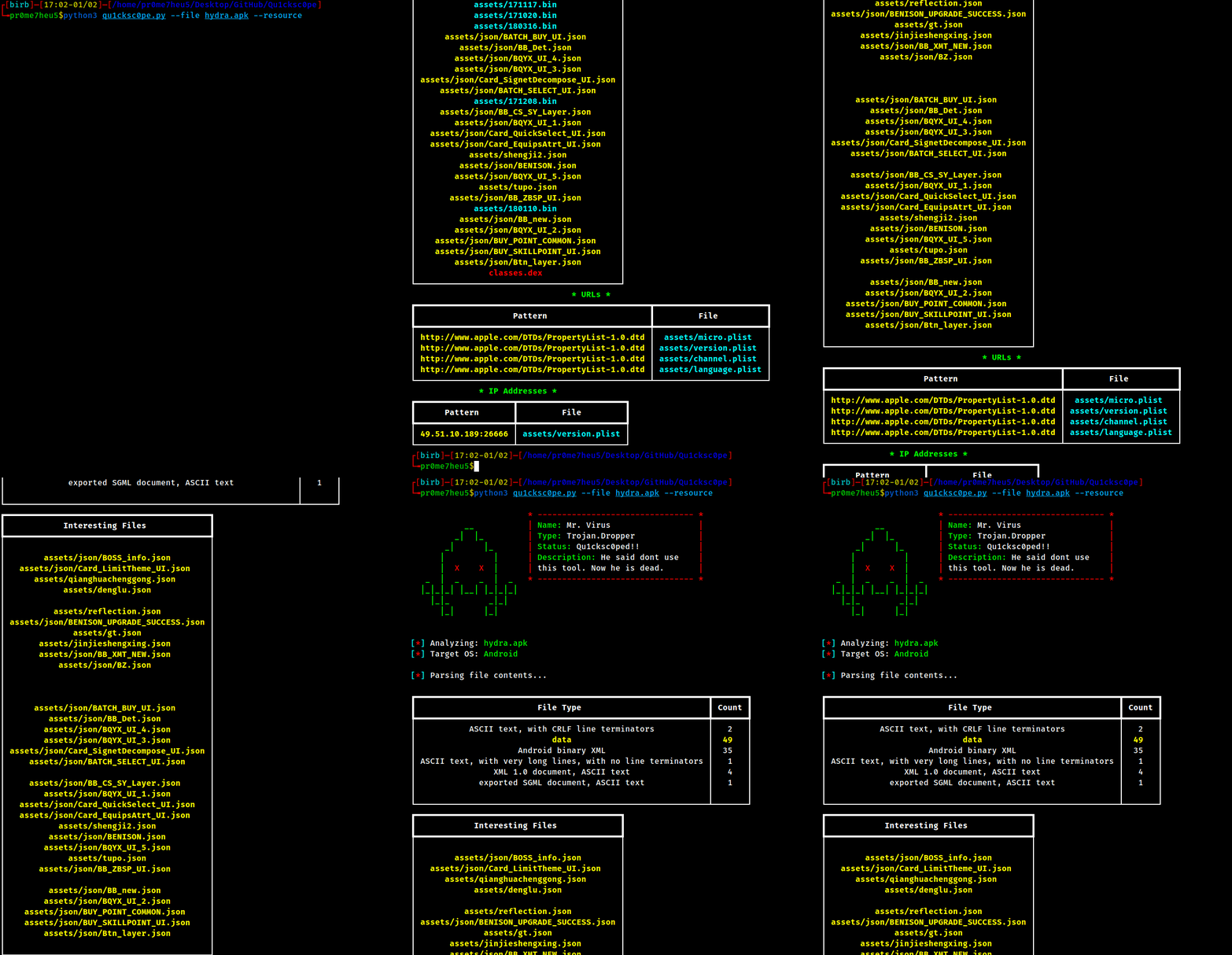
Resource analysis
<i><b>Description</b>: With this feature you can analyze assets of given file. Also you can detect and extract embedded payloads from malware samples such as AgentTesla, Formbook etc.</i>
<b>Effecti</b>:
<b>Usage</b>: <br>
> [!NOTE]
> Android APK resource scanning was moved into the Android analyzer. Use:
> python qu1cksc0pe.py --file app.apk --analyze --report
> The JSON report includes resource_scan. Set SC0PE_ANDROID_REPORT_DETAILED=1 to keep more details in the report.
!resource
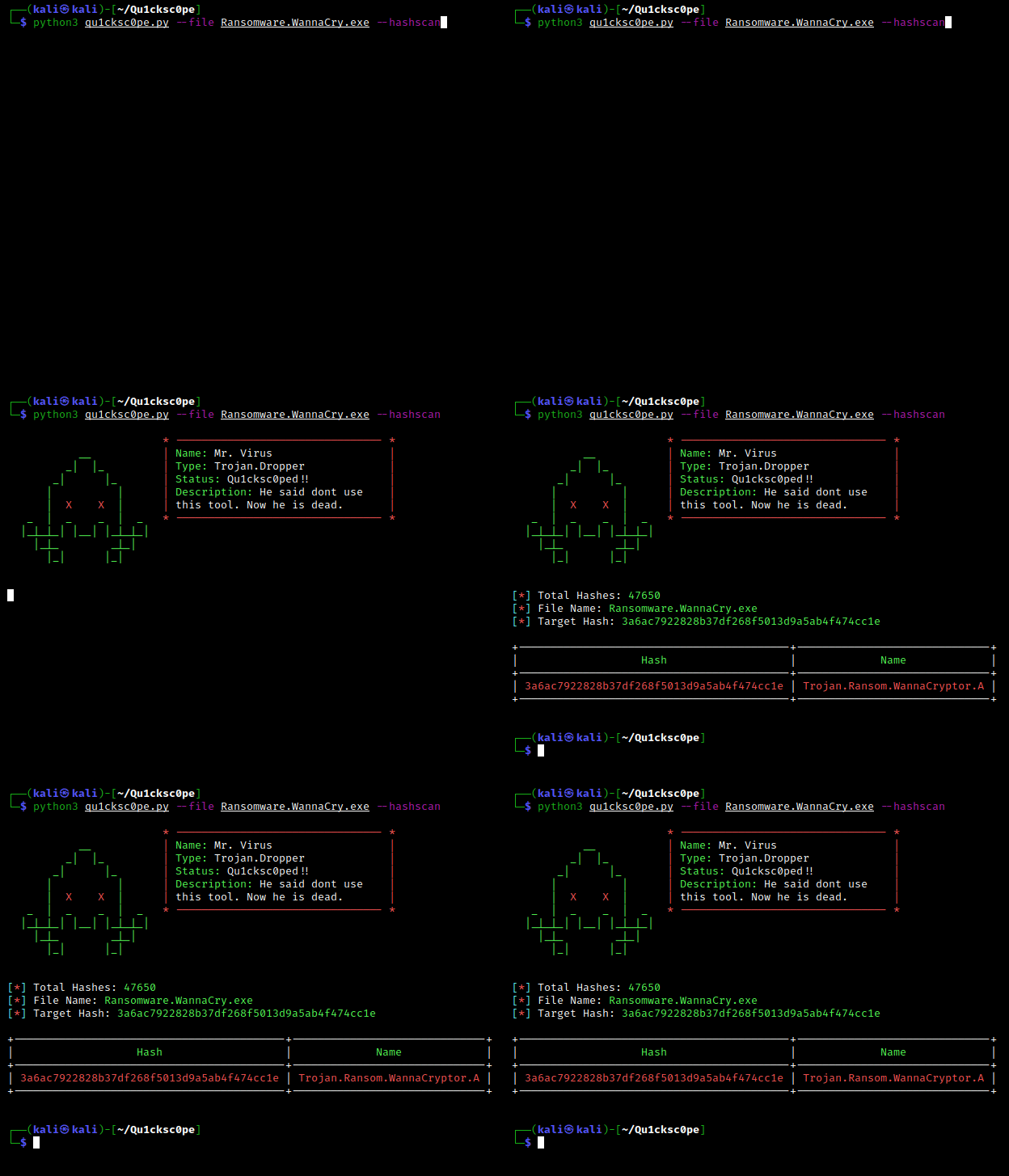
Hash scan
<i><b>Description</b>: You can check if hash value of the given file is in built-in malware hash database. Also you can scan your directories with this feature.</i>
<b>Usage</b>: <br>
!hash
Folder scan
<b>Supported Arguments</b>:
<b>Usage</b>: <br>
!hashscan_tui
<b>Report Contents</b>:
<b>Usage for --</b>: <br>
> [!NOTE]
> In Web UI flow, Standart Analysis, Document, and Archive presets also execute file lookup in background and show the result in the report page.
!total
Document scan
<i><b>Description</b>: This feature performs deep inspection of document files and / source. It detects and extracts possible malicious links, embedded exploits/payloads, and macro code. When plaintext is a, Qu1cksc0pe also runs it automatically through its in-memory beha sandbox after the normal static analysis.</i>
<b>Effecti</b>:
<b>Usage</b>: <br>
Automatic behavior emulation
The emulator models common behavior such as CreateObject,
filesystem and registry access, HTTP/COM calls, process creation, WMI,
Office object access, scheduled tasks, decoding, and dynamic execution. All
filesystem, registry, process, and network effects are : analyzed code
does not execute commands or contact remote systems on the host.
emulation section to JSON reports..vbe bodies when plaintext cannot be recovered; their static indicators are still analyzed.!docs
Embedded File/Exploit Extraction
!exploit
Archive File Scan
<i><b>Description</b>: With this feature you can perform checks for suspicious files against archi.</i>
<b>Effecti</b>:
<b>Usage</b>: <br>
<b>With report</b>: <br>
<b>With AI support</b>:
> [!NOTE]
> ACE archi requires 7z/7zz to be installed (setup scripts install it on supported systems).
!archi
File signature analyzer
<i><b>Description</b>: With this feature you can detect and extract embedded executable files(.exe, .elf) from given file. Also you can analyze large files (even 1gb or higher) and extract actual malware samples from them (pumped-file analysis).</i>
<b>Usage</b>: <br>
!sigcheck
File Carving
!carving
MITRE ATT&CK Technique Extraction
<i><b>Description</b>: MITRE ATT&CK mapping is generated automatically during static analysis based on detected APIs/functions/patterns.</i>
<b>Effecti</b>:
<b>Usage</b>: <br>
!mitre
Android Permission Risk Classification
<i><b>Description</b>: Android permission analysis now classifies permissions as
Dangerous, Special, or Info and writes an aggregate permission_summary into JSON reports.</i><b>Usage</b>: <br>
> [!NOTE]
> In Web UI report page, Android permissions are shown in a dedicated section with counters and per-permission state badges.
Programming language detection
<i><b>Description</b>: You can get programming language information from given file.</i>
<b>Usage</b>: <br>
!langdetect
Interacti
<i><b>Description</b>: You can use Qu1cksc0pe in command line mode.</i>
<b>Usage</b>: <br>
!console
Dynamic Analysis
Android Application Analysis
> [!NOTE]
> You must connect a device or physical device to your computer.
<br><b>Usage</b>: <br>
Linux Dynamic Analysis
<i><b>Description</b>: Linux dynamic flow is menu-driven and lets you choose emulation or li monitoring.</i>
<br><b>Usage</b>: <br>
After selecting Linux:
1: Binary Emulation (isolated en).2: PID Monitoring.Notes:
qemu (if Docker is una).Windows Process Analysis
<br><b>Usage</b>: <br>
References
Star History
![Star History Chart]()
项目信息
开发语言:YARA
Star 数:2065
技术要点
该项目属于病毒分析方向的开源资源,代码结构清晰,适合安全研究人员学习参考。项目围绕All-in-One malware analysis tool.展开,提供了可运行的实现,对理解相关安全机制、工具原理与攻防技术具有较高的研究价值。
从技术实现角度看,此类项目的核心在于对底层原理的深入理解与工程化落地。开发者在研究过程中可以结合官方文档与社区讨论,梳理项目的初始化流程、核心模块职责与数据流转,逐步掌握其中的技术细节与设计思路。
使用与学习建议
1. 下载源码压缩包,解压到本地环境。
2. 根据项目类型准备对应的运行环境与依赖。
3. 按照 README 中的步骤完成配置与部署。
4. 在隔离的测试环境中运行验证,避免影响生产系统。
免责声明
本资源来源于开源社区,仅供安全研究、技术学习与合法授权范围内的攻防演练使用,请勿用于任何非法或侵害他人权益的用途。使用本项目产生的一切后果由使用者自行承担。
| 资源标题 | Qu1cksc0pe - All-in-One malware analysis tool. |
| 所属分类 | 病毒分析 |
| 发布作者 | admin |
| 发布时间 | 2026-10-05 23:12:04 |
| 下载权限 | 免费下载 |
| 附件数量 | 2 个下载链接 |
| 浏览次数 | 89 |
| 讨论数量 | 0 |
| 主题状态 | 正常讨论中 |