 病毒分析
点击放大
yarGen - yarGen is a generator for YARA rules
项目说明
![Not Maintained]()
I created a new YARA rule generator named yarGen-Go (Golang).
yarGen
_____
__ _____ _____/ ___/__ ___
/ // / _
/ __/ (_ / -_) _ \

       \_, /\_,_/_/  \___/\__/_//_/

      /___/  Yara Rule Generator

             Florian Roth, July 2020,  0.23.2
      Note: Rules have to be post-processed

      See this post for details:
What does yarGen do?
yarGen is a generator for YARA rules
The main principle is the creation of yara rules from strings found in malware files while removing all strings that also appear in goodware files. Therefore yarGen includes a big goodware strings and opcode database as ZIP archives that have to be extracted before the first use.
In  0.24.0, yarGen introduces an output option (
--ai). This feature generates a YARA rule with an expanded set of strings and includes instructions tailored for an AI. I suggest employing ChatGPT Plus with model 4 to refine these rules. Acti the --ai flag appends the instruction text to the yargen_rules.yar output file, which can subsequently be fed into your AI for processing.
With 0.23.0 yarGen has been ported to Python3. If you'd like to use a using Python 2, try a previous release. (Note that the download location for the pre-built databases has changed, since the database format has been changed from the outdated
pickle to json. The old databases are still a but in an old location on our web server only used in the old yarGen <0.23)
Since 0.12.0 yarGen does not completely remove the goodware strings from the analysis process but includes them with a very low score depending on the number of occurrences in goodware samples. The rules will be included if no
better strings can be found and marked with a comment /* Goodware rule */.
Force yarGen to remove all goodware strings with --excludegood. Also since 0.12.0 yarGen allows to place the "strings.xml" from PEstudio in the program directory in order to apply the blacklist definition during the string analysis process. You'll get better results.
Since 0.14.0 it uses nai by Mustafa Atik and Nejdet Yucesoy in order to classify the string and detect useful words instead of compression/encryption garbage.
Since 0.15.0 yarGen supports opcode elements extracted from the
.text sections of PE files. During database creation it splits the .text sections with the regex [\x00]{3,} and takes the first 16 bytes of each part
to build an opcode database from goodware PE files. During rule creation on sample files it compares the goodware opcodes with the opcodes extracted from the malware samples and removes all opcodes that also appear in the goodware
database. (there is no further magic in it yet - no XOR loop detection etc.) The option to activate opcode integration is '--opcodes'.
Since 0.17.0 yarGen allows creating multiple databases for opcodes and strings. You can now easily create a new database by using "-c" and an identifier "-i identifier" e.g. "office". It will then create two new
database files named "good-strings-office.db" and "good-opcodes-office.db" that will be initialized during startup with the built-in databases.
Since 0.18.0 yarGen supports extra conditions that make use of the
pe module. This includes imphash and the PE file's exports. We provide pre-generated imphash and export databases.
Since 0.19.0 yarGen support a 'dropzone' mode in which it initializes all strings/opcodes/imphashes/exports only once and queries a gi for new samples. If it finds new samples dropped to the folder, it creates rules for these samples, writes the YARA rules to the defined output file (default: yargen_rules.yar) and removes the dropped samples. You can specify a text file (
-b) from which the identifier is read. The reference parameter (-r) has also been extended so that it can be a text file on disk from which the reference is read. E.g. drop two files named 'identifier.txt' and 'reference.txt' together with the samples to the folder and use the parameters -b ./dropzone/identifier.txt and -r ./dropzone/reference.txt to read the respecti from the files each time an analysis starts.
Since 0.20.0 yarGen supports the extraction and use of hex encoded strings that often appear in weaponized RTF files.
The rule generation process also tries to identify similarities between the files that get analyzed and then combines the strings to so called super rules. The super rule generation does not remove the simple rule for the files that have been combined in a single super rule. This means that there is some redundancy when super rules are created. You can suppress a simple rule for a file that was already covered by super rule by using --nosimple.
Installation
1. Make sure you have at least 4GB of RAM on the machine you plan to use yarGen (8GB if opcodes are included in rule generation, use with --opcodes)
2. Install all dependencies with
pip install -r requirements.txt (or pip3 install -r requirements.txt)
3. Run python yarGen.py --update to automatically download the built-in databases. The are saved into the './dbs' sub folder. (Download: 913 MB)
4. See help with python yarGen.py --help for more information on the command line parameters
Memory Requirements
Warning: yarGen pulls the whole
goodstring database to memory and uses at least 3 GB of memory for a few seconds - 6 GB if opcodes e is activated (--opcodes).
I' tried to migrate the database to sqlite but the numerous string comparisons and lookups made the analysis painfully slow.
Post-Processing Video Tutorial
![YARA rule post-processing video tutorial]()
Multiple Database Support
yarGen allows creating multiple databases for opcodes or strings. You can easily create a new database by using "-c" for new database creation and "-i identifier" to give the new database a unique identifier as e.g. "office". It will the create two new database files named "good-strings-office.db" and "good-opcodes-office.db" that will from then on be initialized during startup with the built-in databases.
Database Creation / Update Example
Create a new strings and opcodes database from an Office 2013 program directory:
The analysis and string extraction process will create the following new databases in the "./dbs" sub folder.
The from these new databases will be automatically applied during the rule creation process because all *.db files in the sub folder "./dbs" will be initialized during startup.
You can update the once created databases with the "-u" parameter
This would update the "office" databases with new strings extracted from files in the gi.
Command Line Parameters
Best Practice
See the following blog posts for a more detailed description on how to use yarGen for YARA rule creation:
How to Write Simple but Sound Yara Rules - Part 1
How to Write Simple but Sound Yara Rules - Part 2
How to Write Simple but Sound Yara Rules - Part 3
Screenshots
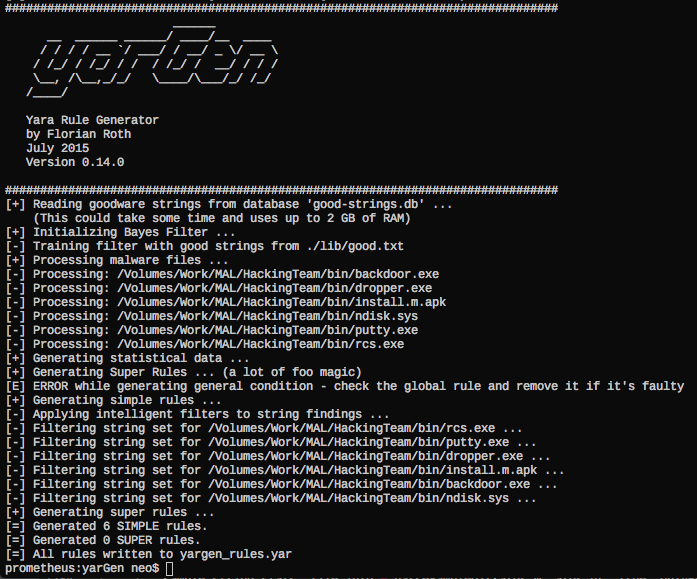
!Generator Run
!Output Rule
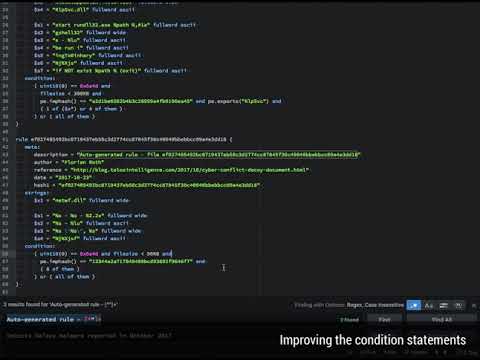
As you can see in the screenshot above you'll get a rule that contains strings, which are not found in the goodware strings database.
You should clean up the rules afterwards. In the example abo the strings $s14, $s17, $s19, $s20 that look like random code to get a cleaner rule that is more likely to match on other samples of the same family.
To get a more generic rule, remo $s5, which is very specific for this compiled executable.
Examples
Dropzone Mode (Recommended)
Monitors a gi (-m) for new samples, processes the samples, writes YARA rules to the set output file (default: yargen_rules.yar) and deletes the folder contents afterwards.
WARNING: All files dropped to the set dropzone will be removed!
In the following example two files named
identifier.txt and reference.txt are read and used for the reference and as identifier in the YARA rule sets. The files are read at each iteration and not only during initialization. This way you can pass specific strings to each dropzone rule generation.
Use the shipped database (FAST) to create some rules
Use the shipped database of goodware strings and scan the malware directory
"X:\MAL" recursively. Create rules for all files included in this directory and
below. A file named 'yargen_rules.yar' will be generated in the current
directory.
Show the score of the strings as comment
yarGen will by default use the top 20 strings based on their score. To see how a
certain string in the rule scored, use the "--score" parameter.
Use only strings with a certain minimum score
In order to use only strings for your rules that match a certain minimum score use the "-z" parameter. It is a good pratice to first create rules with "--score" and than perform a second run with a minimum score set for you sample set via "-z".
Preset author and reference
Add opcodes to the rules
Show debugging output
Create a new goodware strings database
This will generate two new databases for strings and opcodes named:
good-strings-office.db
good-opcodes-office.db
The new databases will automatically be initialized during startup and are from then on used for rule generation.
Update a goodware strings database (append new strings, opcodes, imphashes, exports to the old ones)
My Best Pratice Command Line
db-lookup.py
A tool named
db-lookup.py, which was introduced with 0.18.0 allows you to query the local databases in a simple command line interface. The interface takes an input value, which can be string, export or imphash value, detects the query type and then performs a lookup in the loaded databases. This allows you to query the yarGen databases with string, export and imphash in order to check if this value appears in goodware that has been processed to generate the databases.
This is a nice feature that helps you ta answer the following questions:
* Does this string appear in goodware samples of my database?
* Does this export name appear in goodware samples of my database?
* Does a sample in my goodware database has this imphash?
However, there are several drawbacks:
* It does only match on the full string (no contains, no startswith, no endswith)
* Opcode lookup is not supported (yet)
I plan to release a new project named
` which extracts o byte sequences from samples and creates searchable databases. This project will be the new backend API for yarGen allowing all kinds of queries, opcodes and string , ascii and wide formatted.
项目信息
开发语言:Python
Star 数:1815
技术要点
该项目属于病毒分析方向的开源资源,代码结构清晰,适合安全研究人员学习参考。项目围绕yarGen is a generator for YARA rules展开,提供了可运行的实现,对理解相关安全机制、工具原理与攻防技术具有较高的研究价值。
从技术实现角度看,此类项目的核心在于对底层原理的深入理解与工程化落地。开发者在研究过程中可以结合官方文档与社区讨论,梳理项目的初始化流程、核心模块职责与数据流转,逐步掌握其中的技术细节与设计思路。
使用与学习建议
1. 下载源码压缩包,解压到本地环境。
2. 根据项目类型准备对应的运行环境与依赖。
3. 按照 README 中的步骤完成配置与部署。
4. 在隔离的测试环境中运行验证,避免影响生产系统。
免责声明
本资源来源于开源社区,仅供安全研究、技术学习与合法授权范围内的攻防演练使用,请勿用于任何非法或侵害他人权益的用途。使用本项目产生的一切后果由使用者自行承担。
| 资源标题 | yarGen - yarGen is a generator for YARA rules |
| 所属分类 | 病毒分析 |
| 发布作者 | admin |
| 发布时间 | 2026-10-05 23:12:23 |
| 下载权限 | 免费下载 |
| 附件数量 | 2 个下载链接 |
| 浏览次数 | 180 |
| 讨论数量 | 0 |
| 主题状态 | 正常讨论中 |