 病毒分析
点击放大
MacSai - Mac Sai: the open-source Mac cleaner, optimizer, a
项目说明
<p align="center">
<img src="assets/app_icon.png" width="150" alt="Mac Sai Icon" />
</p>
<h1 align="center">Mac Sai</h1>
<p align="center">
<strong>The open-source Mac cleaner, optimizer, and malware scanner.</strong><br>
A free, Apple-notarized alternative to CleanMyMac, built with Swift 6 and SwiftUI.
</p>
<p align="center">
<strong>English</strong> | <a href="README.zh-CN.md">简体中文</a> | <a href="README.ru.md">Русский</a>
</p>
<p align="center">
<a href=" src=" alt="GitHub stars" /></a>
<a href=" src=" alt="Latest release" /></a>
<img src=" alt="macOS 14+" />
<img src=" alt="Swift 6" />
<img src=" alt="Tests" />
<img src=" alt="No telemetry" />
<img src=" alt="Notarized" />
<img src=" alt="License" />
<img src=" alt="PRs Welcome" />
</p>
<p align="center">
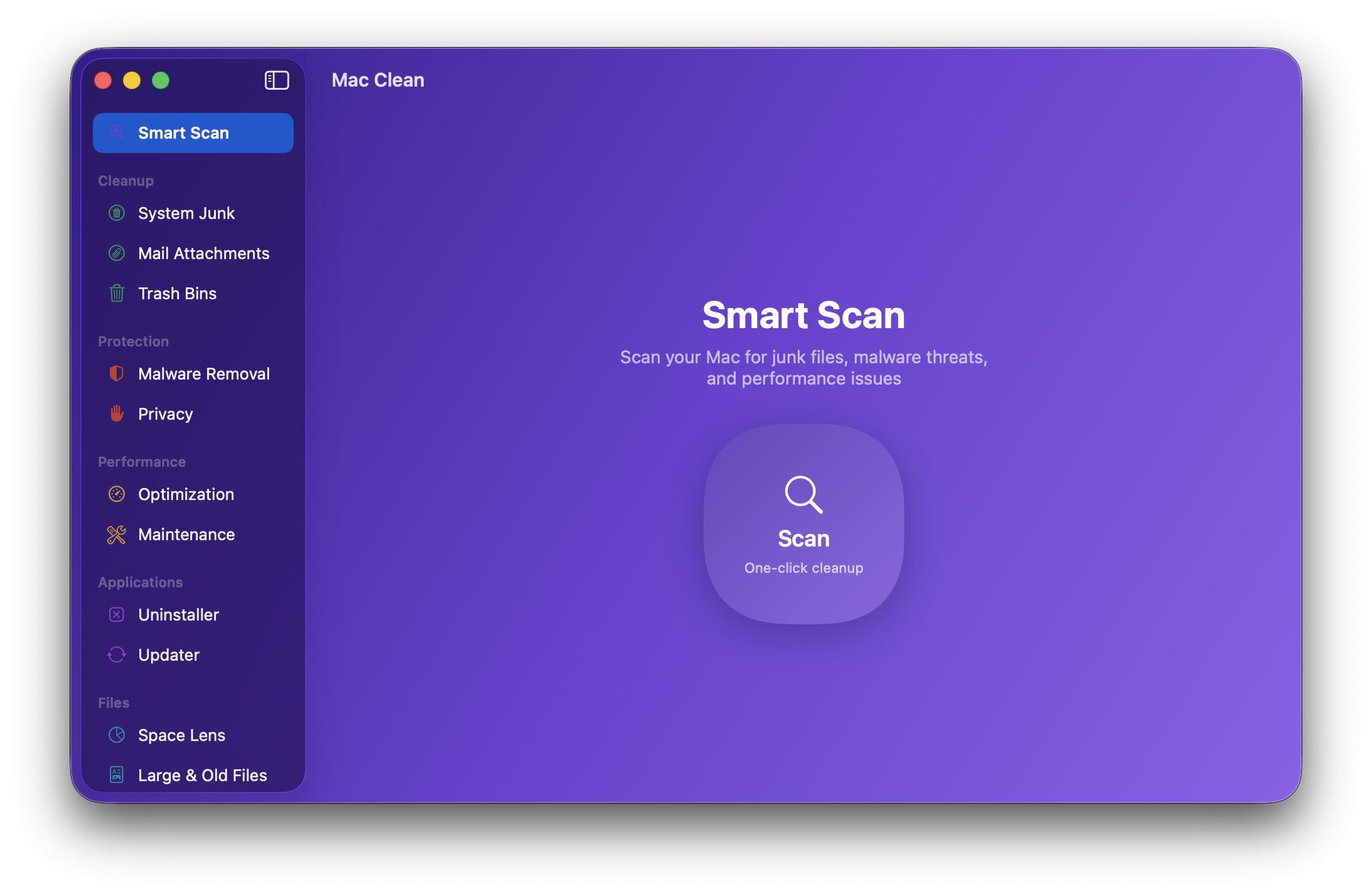
<img src="assets/demo.png" width="720" alt="Mac Sai Screenshot" />
</p>
<p align="center">
<strong>Install in one command:</strong>
</p>
<p align="center">
Or grab the <a href=" DMG</a>. It is notarized by Apple, so it just opens, no right-click, no warnings, no Terminal.
</p>
---
Why Mac Sai?
A full-featured Mac cleaner should not cost a yearly subscription or ask you to trust a black box with deep access to your files. Mac Sai gives you the whole toolkit, in the open.
SafetyGuard that every path. It is built to never lose your data.---
Features at a glance
<table>
<tr>
<td width="33%" ="top">
🧹 Cleanup
</td>
<td width="33%" ="top">
🛡️ Protection
</td>
<td width="33%" ="top">
⚡ Performance
</td>
</tr>
<tr>
<td width="33%" ="top">
📦 Applications
</td>
<td width="33%" ="top">
🗂️ Files
</td>
<td width="33%" ="top">
📊 Menu Bar
</td>
</tr>
</table>
---
Features in detail
🧹 Cleanup
| Module | What it does |
|--------|------------|
| Smart Scan | One click runs cleanup, protection, and performance modules together with li, then shows exactly what it freed per module |
| System Junk | 16+ scan categories: user and system caches, logs, language files, broken preferences, broken login items, document , iOS backups, Xcode junk, package-manager / IDE / AI-tool caches, deleted-user leftovers, and Uni Binary thinning (finds fat Mach-O binaries carrying both arm64 and x86_64 and rewrites them to your native arch via
lipo, honoring Cancel) || Mail Attachments | Finds cached attachments from Apple Mail, Outlook, and Spark |
| Trash Bins | Empties the Trash across every location, including external drives |
🛡️ Protection
| Module | What it does |
|--------|------------|
| Malware Removal | Signature-based scanning at 3 depths (Quick / Balanced / Deep): launch agents and daemons, browser extensions, and known adware/malware patterns (curated list, not an antivirus, and it says so) |
| Privacy | Cleans Safari, Chrome, and Firefox history, cookies, and cache, with time filters. Safari bookmarks are ne |
| Sa | Lists your preferred wireless networks and forgets the ones you pick |
| Permissions O | A read-only, by-app view of which privacy (TCC) grants each app holds, the angle System Settings does not give you. Every action deep-links to System Settings, which owns the toggles |
⚡ Performance
| Module | What it does |
|--------|------------|
| Optimization | Manage login items and launch agents with per-item enable/disable |
| Maintenance | System tasks: free RAM, run maintenance scripts, the startup disk, rebuild Launch Services, reindex Spotlight, flush DNS, thin Time Machine snapshots. Tasks are tagged by se, "Run Safe Tasks" is sequential, and the admin password is asked once |
📦 Applications
| Module | What it does |
|--------|------------|
| Uninstaller | A pattern-matching engine that finds every associated file across 17+ Library subdirectories (including apps nested in subfolders). Complete removal, Reset to Defaults (wipe an app's caches and preferences while keeping the app), and unused-app detection |
| Extensions | Review third-party preference panes, Internet Plug-Ins, and Safari extensions. User-installed panes and plug-ins can go to the Trash |
| Updater | Checks installed apps for updates own Sparkle appcast feeds (reads info only, sends nothing about you) |
🗂️ Files
| Module | What it does |
|--------|------------|
| Space Lens | Squarified-treemap of disk usage with drill-down na |
| Large & Old Files | Finds files over 50 MB, sorted by size and last access date |
| Duplicates | Progressi (size grouping, partial SHA-256, full hash, inode ), plus a Consolidate mode that reclaims space with APFS copy-on-write clones without deleting a single copy |
| Shredder | Secure file erasure with standard, permanent, and secure-o modes |
📊 Menu Bar Widget
<p align="center">
<img src="assets/menu_bar.png" width="300" alt="Mac Sai menu bar widget" />
</p>
A glassmorphism menu-bar widget that puts your Mac's one click away. It is an independent process that launches at login and is toggled from the app's sidebar, so you never have to open the main window just to check in.
host_processor_info, --⌨️ Keyboard shortcuts
| Shortcut | Action |
|----------|--------|
| ⌘R | Start a scan in the current module |
| ⌘K | Clean the current selection (when results are showing) |
| ⌘1 to ⌘9 | Jump to the first nine sidebar modules |
| ⌘, | Open Settings |
---
How Mac Sai compares
| | Mac Sai | CleanMyMac | Pearcleaner | PureMac | OnyX | Mole |
|---|:---:|:---:|:---:|:---:|:---:|:---:|
| Price | Free | $39.95/yr | Free | Free | Free | Free (CLI) |
| Open source | ✅ BSD-3 | ❌ | ✅ Fair-code | ✅ MIT | ❌ | ✅ MIT |
| Telemetry | ❌ None | ⚠️ Yes | ❌ None | ❌ None | ❌ None | ❌ None |
| Native GUI app | ✅ | ✅ | ✅ | ✅ | ✅ | ❌ CLI (paid GUI separate) |
| Smart Scan (one-click) | ✅ | ✅ | ❌ | ➖ Partial | ❌ | ➖ Interactive CLI |
| System Junk (16+ categories) | ✅ | ✅ | ➖ | ✅ | ➖ Limited | ✅ |
| Uni Binary thinning | ✅ | ✅ | ❌ | ❌ | ❌ | ❌ |
| Malware scanner | ✅ | ✅ | ❌ | ❌ | ❌ | ❌ |
| Browser privacy cleaner | ✅ | ✅ | ❌ | ❌ | ➖ | ❌ |
| Uninstaller with lefto | ✅ | ✅ | ✅ Focus | ❌ | ❌ | ✅ |
| Duplicate finder (+ consolidation) | ✅ | ➖ | ❌ | ❌ | ❌ | ❌ |
| Disk treemap | ✅ | ❌ | ❌ | ❌ | ❌ | ➖ Analyzer |
| Menu bar system monitor | ✅ | ✅ Menu | ❌ | ❌ | ❌ | ❌ |
| Maintenance scripts | ✅ | ✅ | ❌ | ❌ | ✅ Strong | ➖ |
| Notarized by Apple | ✅ | ✅ | ✅ | ✅ | ✅ | N/A |
| macOS | 14+ | 13+ | 13+ | 13+ | | |
> CleanMyMac is a great product, and the people who want a polished, supported experience should happily pay for it. Mac Sai is for e who would rather ha source code and zero subscription.
---
Interface languages
Choose System, Deutsch, Русский, 简体中文, 繁體中文, or English in Settings → Interface Language. German and Traditional Chinese translate static interface strings; interpolated messages retain the English wording and plural rules for now (Traditional Chinese falls back to Simplified). The main window and menu-bar widget share the language preference.
Installation
Homebrew (recommended)
Mac Sai is in the official Homebrew cask, so no tap is needed:
It is notarized by Apple, so it launches from Spotlight or Applications with no warnings and no extra steps.
<details>
<summary><strong>Other ways to install</strong> (one-line script, DMG, build from source)</summary>
<br>
One-line installer
Downloads the latest DMG and installs the app to /Applications.
DMG download
Grab the latest DMG from Releases and drag Mac Sai to your Applications folder.
Build from source
Requires the Swift 6 toolchain (Xcode 16+).
Installed via the old tap?
Mac Sai is in the official cask now, so you can drop the tap: brew untap iliyami/macsai (your installed app and future brew upgrade are unaffected).
</details>
Granting Full Disk Access
A few modules (Mail Attachments, Privacy, Malware) need Full Disk Access to scan protected areas:
1. Open System Settings, Privacy & Security, Full Disk Access
2. Click + and add Mac Sai.app
3. Restart Mac Sai
Uninstalling
Homebrew install:
DMG or manual install (also handles a Homebrew install):
Both remove Mac Sai plus its preferences, caches, logs, and database under ~/Library.
---
Signed, notarized, and yours to trust
Mac Sai is code-signed with an Apple De ID and notarized by Apple. That matters more for a cleaning app than for almost anything else you install, because you are about to give it deep access to your files, and you deserve to know that what runs on your Mac is genuinely ours and untampered with. All of this is enforced by your own Mac, not just promised by us:
Put together with a fully open source, this is a chain of trust you do not take on faith: the code is public, we sign every release, Apple it, and your Mac re-checks the seal every time you open the app.
no telemetry yourself
Do not take our word for it. Both the source and the running process are checkable.
1. Search the source for networking APIs
You should only ever see two network paths, both optional and both read-only:
Sources/MacCleanKit/UpdateChecker.swift: the optional Mac Sai update check (turn it off in Settings)Sources/MacClean/Modules/Updater/UpdaterModule.swift: the user-dri of *other apps'* Sparkle feeds when you open the UpdaterThere is no analytics, crash reporter, or tracker SDK anywhere in the codebase.
2. Watch the li
Expected: no established connections while you are only cleaning locally. Little Snitch or LuLu make the same check .
3. Inspect the binary you actually installed
The source and the signed binary are different artifacts, so the strongest check runs against the app on your disk, not this repo. After brew install --cask mac-sai:
Expected: the only networking class is _OBJC_CLASS_$_NSURLSession, and the only fetch endpoints are api.github.com/repos/iliyami/MacSai/releases/latest and formulae.brew.sh/api/cask/mac-sai.json. The other github.com/iliyami/MacSai links just open in your browser. No trackers, no analytics hosts, nothing else. Re-run it after any update; it always describes the exact build you are running.
Note: on a non-sandboxed De ID app like this one, network access is not gated by an entitlement, so this symbol and string inspection, not codesign --entitlements, is the real check. The same guard runs in CI on every change (scripts/check-network-surface.sh).
---
Architecture
Tech stack
| Layer | Technology |
|-------|-----------|
| Language | Swift 6 with strict concurrency |
| UI | SwiftUI + AppKit hybrid |
| Concurrency | Actors, TaskGroup, async/await, |
| Database | GRDB.swift (SQLite) with WAL mode |
| File scanning | URLResourceKey prefetching on APFS |
| Incremental updates | FSEvents with historical replay |
| Pri ops | SMAppService + NSXPCConnection |
| System stats | Mach APIs (host_processor_info, , proc_pidinfo) |
Safety model
Mac Sai is designed to ne data loss:
/System, /usr, /bin, /sbin, and Apple system apps are untouchable, with macOS firmlinks canonicalized so symlink-redirect detection does not false-positive on legitimate system paths~/Library/Caches/com.apple.* dirs) are dropped at scan time so they ne as cleanableSafetyGuard additionally refuses to delete anything under themNSXPCListener.setCodeSigningRequirement so the kernel itself rejects any connection whose code signature does not match the app's identifier and team---
Tests
The XCTest suite has 862 tests and treats SafetyGuard and CleaningEngine (the death-and-life files) as must-be-perfect: ad co of symlinks, path tra, NULL bytes, SIP, protected apps, file-count caps, TOCTOU, and idempotence, plus integration co of dry-run / trash / permanent cleaning, the scan state machine, every System Junk category, the treemap math, the uninstaller matching engine, duplicate detection, appcast parsing, and full end-to-end fixture-to-clean cycles. Fixtures (withTempHome, withFakeApp, withFakePlist) keep every test off your real home directory.
---
Contributing
Contributions are very welcome. Read the Contributing Guidelines, then:
1. Fork the repo and create a feature branch
2. Make your change (one focused change per PR keeps review easy)
3. Run swift test
4. Open a Pull Request
There is also an open feature vote: 👍 the tools you want built next.
License
BSD 3-Clause. See LICENSE. You may use, modify, and redistribute the code, provided you keep the copyright and license text and do not use the "Mac Sai" name or contributors' names to endorse deri without permission.
Acknowledgments
Inspired by the open-source Mac utility community:
Star History
<p align="center">
<a href="
<picture>
<source media="(prefers-color-scheme: dark)" srcset=" />
<source media="(prefers-color-scheme: light)" srcset=" />
<img alt="Star History Chart" src=" />
</picture>
</a>
</p>
<p align="center">
<strong>Mac Sai is free software built by the community, for the community.</strong><br>
If it saved you from a subscription, a ⭐ helps others find it.
</p>
项目信息
开发语言:Swift
Star 数:1715
技术要点
该项目属于病毒分析方向的开源资源,代码结构清晰,适合安全研究人员学习参考。项目围绕Mac Sai: the open-source Mac cleaner, optimizer, and malware scanner. A free, Apple-notarized alternative to CleanMyMac, built with Swift 6 and SwiftUI.展开,提供了可运行的实现,对理解相关安全机制、工具原理与攻防技术具有较高的研究价值。
从技术实现角度看,此类项目的核心在于对底层原理的深入理解与工程化落地。开发者在研究过程中可以结合官方文档与社区讨论,梳理项目的初始化流程、核心模块职责与数据流转,逐步掌握其中的技术细节与设计思路。
使用与学习建议
1. 下载源码压缩包,解压到本地环境。
2. 根据项目类型准备对应的运行环境与依赖。
3. 按照 README 中的步骤完成配置与部署。
4. 在隔离的测试环境中运行验证,避免影响生产系统。
免责声明
本资源来源于开源社区,仅供安全研究、技术学习与合法授权范围内的攻防演练使用,请勿用于任何非法或侵害他人权益的用途。使用本项目产生的一切后果由使用者自行承担。
| 资源标题 | MacSai - Mac Sai: the open-source Mac cleaner, optimizer, a |
| 所属分类 | 病毒分析 |
| 发布作者 | admin |
| 发布时间 | 2026-10-05 23:12:31 |
| 下载权限 | 免费下载 |
| 附件数量 | 2 个下载链接 |
| 浏览次数 | 302 |
| 讨论数量 | 0 |
| 主题状态 | 正常讨论中 |