 病毒分析
点击放大
Noriben - Noriben - Portable, Simple, Malware Analysis Sandb
项目说明
<img src=" height=100> Noriben Malware Analysis Sandbox
!Black Hat Arsenal !Black Hat Arsenal
<pre>
Contact Information:
on Twitter
brian _at_ thebaskins _dot_ com
</pre>
Noriben is a Python-based script that works in conjunction with Sysinternals Procmon to automatically collect, analyze, and report on runtime indicators of malware. In a nutshell, it allows you to run an applications, hit a keypress, and get a simple text report of the sample's acti.
Noriben allows you to not only run malware similar to a sandbox, but to also log system-wide events while you manually run malware in ways particular to making it run. For example, it can listen as you run an application that requires command line options, or user interaction. Or, to watch the system as you step through the application in a debugger.
While Noriben was designed for analysis of malware, it has also been widely used to audit normal software applications. In 2013 it was used by the Tor Project to provide a public audit of the Tor Browser Bundle
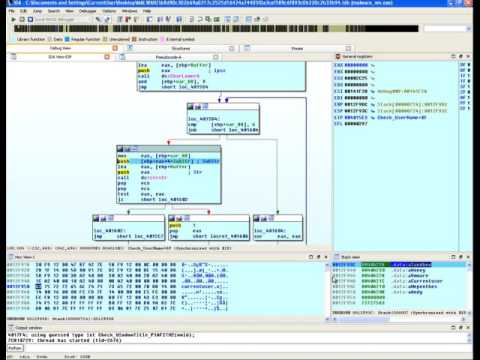
Below is a video of debugging a malware in a way to still get sandbox results (mis-clicks due to a mouse pointer that was 5 pixels off :))
![Noriben running against malware checking for VM ]()
Noriben only requires Sysinternals procmon.exe (or procmon64.exe) to operate. It requires no pre-filtering (though it would greatly help) as it contains numerous white list items to reduce unwanted noise from system activity.
For a more detailed explanation, see <a href=" slide deck</a> from Black Hat 2015 Arsenal. And a more detailed blog post:
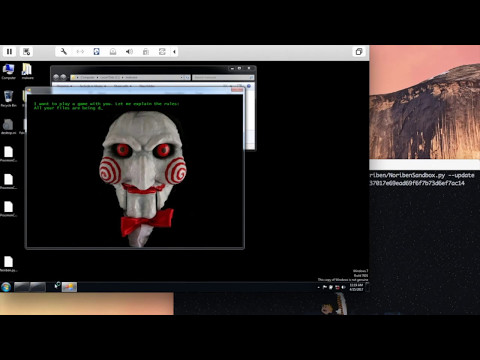
I've also included a much desired frontend operator, NoribenSandbox.py. This script allows you to automate the execution of Noriben within a guest VM and retrieve the reports. It currently runs on OSX (but will be ported) and is responsible for: spinning up a predefined VM and snapshot, copying the malware to the Noriben and the malware, waiting a predetermined period of time, copying the results to the host as a ZIP, and taking a screen capture of the VM. You can even use --update to automatically copy the newest Noriben from your host, so that you don't have to continually make new snapshots when you make a change to the script.
Want to see that in action?
![Noriben Automation Script in Action]()
Cool Features
If you have a folder of YARA signature files, you can specify it with the --yara option. Every new file create will be scanned against these signatures with the results displayed in the output results.
If you have a API, place it into a file named ".api" (or embed directly in the script) to auto-submit MD5 file hashes to VT to get the number of viral results.
You can add lists of MD5s to auto-ignore (such as all of your system files). Use md5deep and throw them into a text file, use --hash <file> to read them. This will ultimately go under changes, though.
You can automate the script for sandbox-usage. Using -t <seconds> to automate execution time, and --cmd "path\exe" to specify a malware file, you can automatically run malware, copy the results off, and then revert to run a new sample.
The --generalize feature will automatically substitute absolute paths with Windows en paths for better IOC de. For example, C:\Users\malware_user\AppData\Roaming\malware.exe will be automatically resolved to %AppData%\malware.exe.
Usage:
<pre>
--===[ Noriben v1.7.2
--===[
usage: Noriben.py [-h] [-c CSV] [-p PML] [-f FILTER] [--hash HASH]
[--hashtype {MD5,SHA1,SHA256}] [--headless] [-t TIMEOUT]
[--output OUTPUT] [--yara YARA] [--generalize] [--cmd CMD]
[-d]
optional arguments:
-h, --help show this help message and exit
-c CS CSV Re-analyze an existing Noriben CSV file
-p PML, --pml PML Re-analyze an existing Noriben PML file
-f FILTER, --filter FILTER
Specify alternate Procmon Filter PMC
--hash HASH Specify hash whitelist file
--hashtype {MD5,SHA1,SHA256}
Specify hash type
--headless Do not open results on processing
--process_tree Add an ASCII process tree after created processes
-t TIMEOUT, --timeout TIMEOUT
Number of seconds to collect activity
--output OUTPUT Folder to store output files
--yara YARA Folder containing YARA rules
--generalize Generalize file paths to their en .
Default: True
--cmd CMD Command line to execute (in quotes)
-d, --debug Enable debugging
</pre>
Integration Testing with unit_tester.ps1
Run from the Noriben directory in a Windows VM with Procmon module loads enabled:
---
Notable contributors
Brian Baskin
<Your name here>
<Documentation writers welcome!>
<a href=" for the logo design</a>
Copyright and license
Copyright 2015 Brian Baskin
Licensed under the Apache License, 2.0 (the "License");
you may not use this work except in compliance with the License.
You may obtain a copy of the License in the LICENSE file, or at:
Unless required by applicable law or agreed to in writing, software
distributed under the License is distributed on an "AS IS" BASIS,
WITHOUT WARRANTIES OR CONDITIONS OF ANY KIND, either express or implied.
See the License for the specific language go permissions and
limitations under the License.
项目信息
开发语言:Python
Star 数:1304
技术要点
该项目属于病毒分析方向的开源资源,代码结构清晰,适合安全研究人员学习参考。项目围绕Noriben - Portable, Simple, Malware Analysis Sandbox展开,提供了可运行的实现,对理解相关安全机制、工具原理与攻防技术具有较高的研究价值。
从技术实现角度看,此类项目的核心在于对底层原理的深入理解与工程化落地。开发者在研究过程中可以结合官方文档与社区讨论,梳理项目的初始化流程、核心模块职责与数据流转,逐步掌握其中的技术细节与设计思路。
使用与学习建议
1. 下载源码压缩包,解压到本地环境。
2. 根据项目类型准备对应的运行环境与依赖。
3. 按照 README 中的步骤完成配置与部署。
4. 在隔离的测试环境中运行验证,避免影响生产系统。
免责声明
本资源来源于开源社区,仅供安全研究、技术学习与合法授权范围内的攻防演练使用,请勿用于任何非法或侵害他人权益的用途。使用本项目产生的一切后果由使用者自行承担。
| 资源标题 | Noriben - Noriben - Portable, Simple, Malware Analysis Sandb |
| 所属分类 | 病毒分析 |
| 发布作者 | admin |
| 发布时间 | 2026-10-05 23:13:35 |
| 下载权限 | 免费下载 |
| 附件数量 | 2 个下载链接 |
| 浏览次数 | 199 |
| 讨论数量 | 0 |
| 主题状态 | 正常讨论中 |