 病毒分析
点击放大
dagda - a tool to perform static analysis of known vulnera
项目说明
Dagda
![Python]()
![Docker Pulls]()
![License]()
Dagda is a tool to perform static analysis of known , trojans, , malware & other malicious threats in docker images/containers and to monitor the docker daemon and running docker containers for detecting anomalous acti.
In order to fulfill its mission, first the known as CVEs (Common and Exposures), BIDs (Bugtraq IDs), RHSAs (Red Hat Security Ad) and RHBAs (Red Hat Bug Ad), and the known exploits from Offensi database are imported into a MongoDB to facilitate the search of these and exploits when your analysis are in progress.
Then, when you run a static analysis of known , Dagda retrie about the software installed into your docker image, such as the OS packages and the dependencies of the programming languages, and for each product and its if it is free of against the pre stored information into the MongoDB. Also, Dagda uses ClamAV as antivirus engine for detecting trojans, , malware & other malicious threats included within the docker images/containers.
Dagda supports multiple Linux base images:
* Red Hat/CentOS/Fedora
* Debian/Ubuntu
* OpenSUSE
* Alpine
Dagda rests on OWASP dependency check + Retire.js for analyzing multiple dependencies from:
* java
* python
* nodejs
* js
* ruby
* php
On the other hand, Dagda is integrated with Falco for monitoring running docker containers to detect anomalous acti. Also, Dagda includes the gathering of real time events from docker daemon.
Finally, each analysis report of a docker image/container, included all static analysis and all runtime monitoring, is stored into the same MongoDB for having a the history of each docker image/container when it is needed.
* Requirements
* Installation of Docker
* Installation of MongoDB
* Installation of kernel headers in the host OS
* Usage
* Populating the database
* Database contents
* Analyzing docker images/containers
* Performing static analysis of known and other malicious threats
* Monitoring running containers for detecting anomalous acti
* Getting docker daemon events
* Bonus Track: Quick Start with Docker
* Internal workflows
* Troubleshooting
* Change Log
* Bugs and Feedback
* License
Requirements
Before Dagda usage, you must ha the next requirements:
* Python 3.8.X or later
* MongoDB 3.6 or later
* Docker
* Pip3
* PyMongo
* Requests
* Python-dateutil
* Joblib
* Docker
* Flask
* Flask-cors
* PyYAML
* Defusedxml
* Waitress
The requirements can be installed with pip:
Installation of Docker
You must ha Docker for using Dagda. If you need instructions for Docker installation, see the How-to install Docker page.
In order to avoid having to use sudo when you use the docker command, create a Unix group called docker and add users to it. When the docker daemon starts, it makes the ownership of the Unix socket read/writable by the docker group.
Installation of MongoDB
You must ha MongoDB 3.6 or later for using Dagda because in MongoDB are stored both the /exploits and the analysis results.
If you need instructions for MongoDB installation, see the How-to install MongoDB Community Edition page.
You can also run MongoDB using docker:
Installation of kernel headers in the host OS
You must ha the kernel headers in the host OS because Dagda is integrated with Falco for monitoring running docker containers to detect anomalous acti.
This can usually be done on Debian-like distributions with: apt-get -y install linux-headers-$(uname -r)
Or, on RHEL-like distributions: yum -y install kernel-devel-$(uname -r)
After that, run the command /usr/lib/dkms/dkms_autoinstaller start is recommended for a the next Sysdig Falco error trace:
Important to note: In some distributions it has been detected that Sysdig installation is required, so if you need instructions for Sysdig installation, see the How-to install Sysdig for Linux page.
Usage
You must run python3 dagda.py start for starting the Dagda server. See the *start* sub-command in the wiki page for details.
After the Dagda ser and before the Dagda CLI usage, you must set the next en as you need:
Although in this usage documentation only the CLI usage is shown, Dagda has a REST API for using it. See REST API documentation page for details.
Populating the database
For the initial run, you need to populate the and the exploits in the database by running:
The previous command can take several minutes for finishing so be patient.
If you need repopulating your database for updating with the new and exploits, you only need rerun the previous command.
Also, you can run queries on your personal database with dagda.py vuln. A usage example would be the next one:
The expected output for the previous query is shown below:
For getting all information about a specific CVE, you must run the next command:
The expected output for the previous query is shown below:
If you want to know more details about dagda.py vuln, type python3 dagda.py vuln --help or see the *vuln* sub-command in the wiki page.
#### Database contents
The database is called and there are 10 collections:
* c and Exposure items) - source NVD NIST
* c (Extends the information about C)
* bid (BugTraqs Ids items from ) - source bidDB_downloader
* bid_info (Extends the information about BugTraqs Ids items)
* exploit_db (Offensi - Exploit Database) - source Offensi
* exploit_db_info (Extends the information about exploits)
* rhba (Red Hat Bug Ad) - source O for Red Hat Enterprise Linux 3 and above
* rhba_info (Extends the information about RHBAs)
* rhsa (Red Hat Security Ad) - source O for Red Hat Enterprise Linux 3 and above
* rhsa_info (Extends the information about RHSAs)
Analyzing docker images/containers
In the next subsections, both, performing static analysis of known , trojans, , malware & other malicious threats and monitoring running docker containers for detecting anomalous acti will be described in depth.
#### Performing static analysis of known and other malicious threats
One of the main Dagda targets is perform the analysis of known , trojans, , malware & other malicious threats in docker images/containers, so if you want perform an analysis over a docker image/container, you must type:
See the *check* sub-command wiki page for details.
The expected output for the previous command will be the next one. In this output, Dagda responses with the analysis id.
Also, if you want run a static analysis in a remote way, you can use the *agent* sub-command:
The expected output for the previous command will be the next one. In this output, Dagda responses with the analysis id.
If you want review a concrete docker analysis, you must type:
For more details about dagda.py history, type python3 dagda.py history --help or see the *history* sub-command in the wiki page.
The analysis can take several minutes for finishing, so be patient. If you typed the previous command, when you type python3 dagda.py history jboss/wildfly --id 58667994ed253915723c50e7, the expected output looks like as shown below.
#### Monitoring running containers for detecting anomalous acti
Another of the main Dagda targets is perform the monitoring of running docker containers for detecting anomalous acti, so if you want perform the monitoring over a running docker container, you must type:
See the *monitor* sub-command wiki page for details.
The expected output looks like as shown below:
You can stop the monitoring when you want if you type:
The expected output when you stop the monitoring over a running container looks like as shown below:
If you want review all your reports, see the *history* command.
Getting docker daemon events
Dagda includes the gathering of real time events from docker daemon, so if you want get all docker daemon events, you must type:
The expected output looks like as shown below:
If you want review all allowed filters for this command, see the *docker* command.
Bonus Track: Quick Start with Docker
This section describes the installation of Dagda using Docker containers, including the Mongo database and a container for Dagda, using . The docker socket is shared with the Dagda container, so it is possible to check docker images and containers from the host where is executed.
Execute the following commands in the root folder of Dagda and then, the Dagda server will start listening at port 5000:
Internal workflows
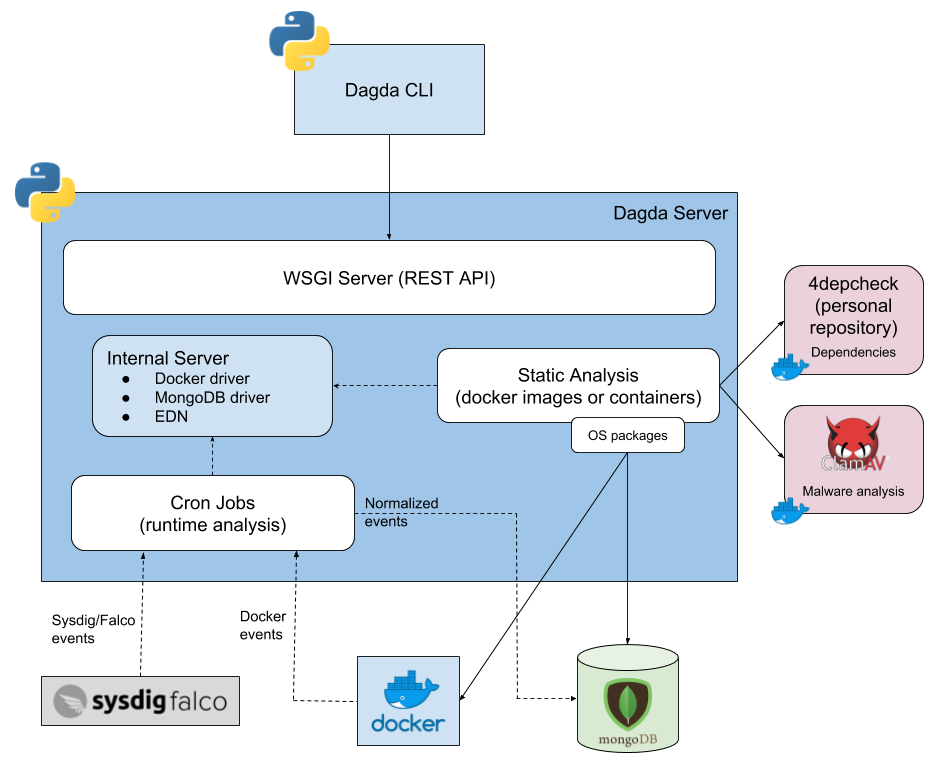
Below, a 10,000 foot diagram about the Dagda internal workflows is shown:
!Dagda_internal_workflows
Troubleshooting
Typically, Dagda works fine, but some scenarios can cause problems. If you get some issue, check the Troubleshooting page for fixing it.
Change Log
See the Change Log page for details.
Bugs and Feedback
For bugs, questions and discussions please use the Github Issues or ping me on Twitter (@3grander).
项目信息
开发语言:Python
Star 数:1252
技术要点
该项目属于病毒分析方向的开源资源,代码结构清晰,适合安全研究人员学习参考。项目围绕a tool to perform static analysis of known vulnerabilities, trojans, viruses, malware & other malicious threats in docker images/containers and to monitor the docker daemon and running docker containers for detecting anomalous activities展开,提供了可运行的实现,对理解相关安全机制、工具原理与攻防技术具有较高的研究价值。
从技术实现角度看,此类项目的核心在于对底层原理的深入理解与工程化落地。开发者在研究过程中可以结合官方文档与社区讨论,梳理项目的初始化流程、核心模块职责与数据流转,逐步掌握其中的技术细节与设计思路。
使用与学习建议
1. 下载源码压缩包,解压到本地环境。
2. 根据项目类型准备对应的运行环境与依赖。
3. 按照 README 中的步骤完成配置与部署。
4. 在隔离的测试环境中运行验证,避免影响生产系统。
免责声明
本资源来源于开源社区,仅供安全研究、技术学习与合法授权范围内的攻防演练使用,请勿用于任何非法或侵害他人权益的用途。使用本项目产生的一切后果由使用者自行承担。
| 资源标题 | dagda - a tool to perform static analysis of known vulnera |
| 所属分类 | 病毒分析 |
| 发布作者 | admin |
| 发布时间 | 2026-10-05 23:13:42 |
| 下载权限 | 免费下载 |
| 附件数量 | 2 个下载链接 |
| 浏览次数 | 253 |
| 讨论数量 | 0 |
| 主题状态 | 正常讨论中 |