 病毒分析
点击放大
malcom - Malcom - Malware Communications Analyzer
项目说明
Malcom - Malware Communication Analyzer
Malcom is a tool designed to analyze a system's network communication using graphical representations of network traffic, and cross-reference them with known malware sources. This comes handy when analyzing how certain malware species try to communicate with the outside world.
- Configuration options
- Docker instance
- Quick note on TLS interception
- En
- Feeds
What is Malcom?
Malcom can help you:
* detect central command and control (C&C) servers
* understand peer-to-peer networks
* observe DNS fast-flux infrastructures
* quickly determine if a network artifact is 'known-bad'
The aim of Malcom is to make malware analysis and intel gathering *faster* by pro a human-readable of network traffic originating from a given host or network. Convert network traffic information to actionable intelligence faster.
Check the wiki for a Quickstart with some nice screenshots and a tutorial on how to add your own feeds.
If you need some help, or want to contribute, feel free to join the mailing list or try to grab someone on IRC (#malcom on freenode.net, it's pretty quiet but there's always someone around). You can also hit me up on twitter
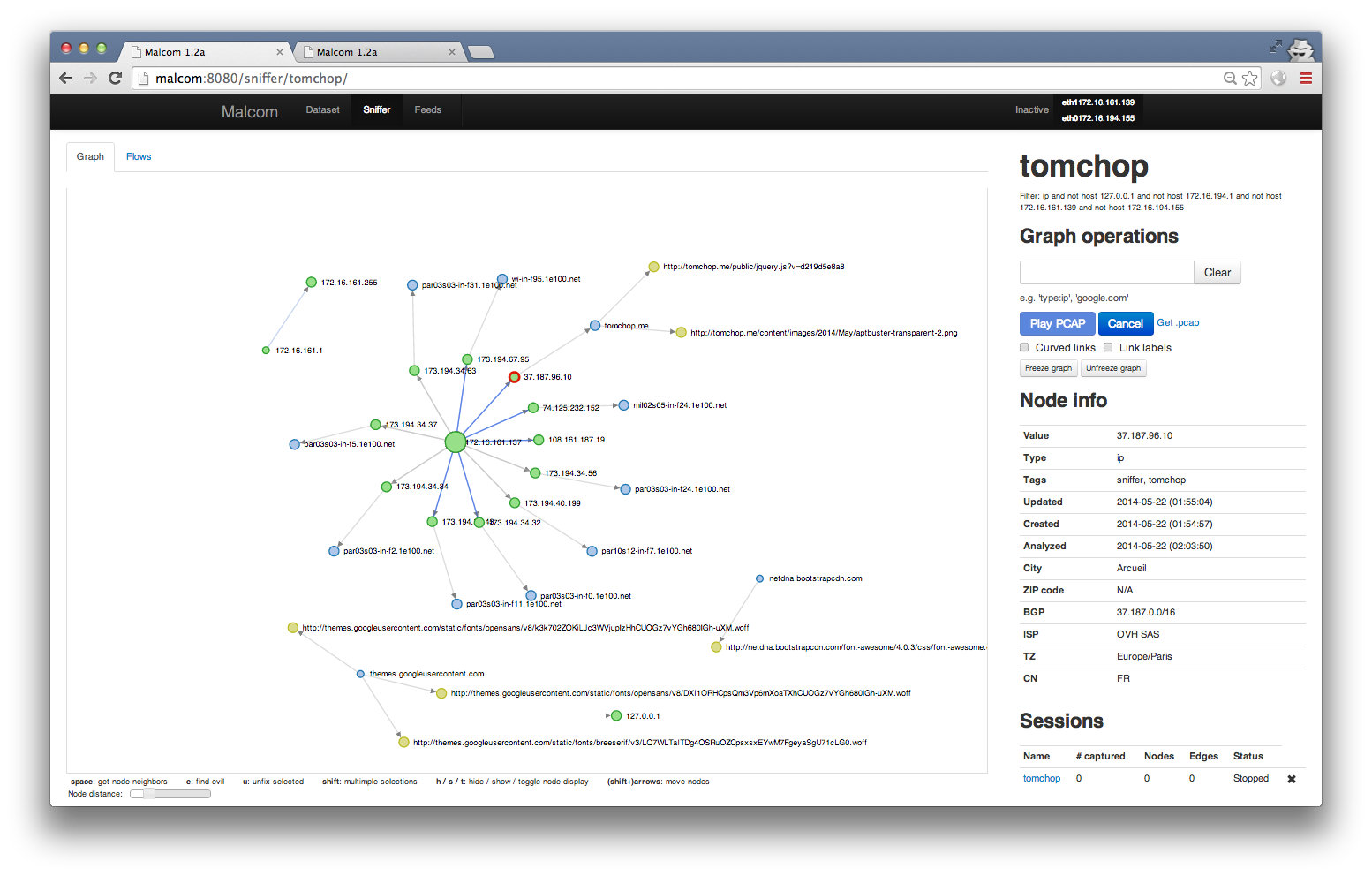
Here's an example graph for host tomchop.me
!nodes-tomchop.png
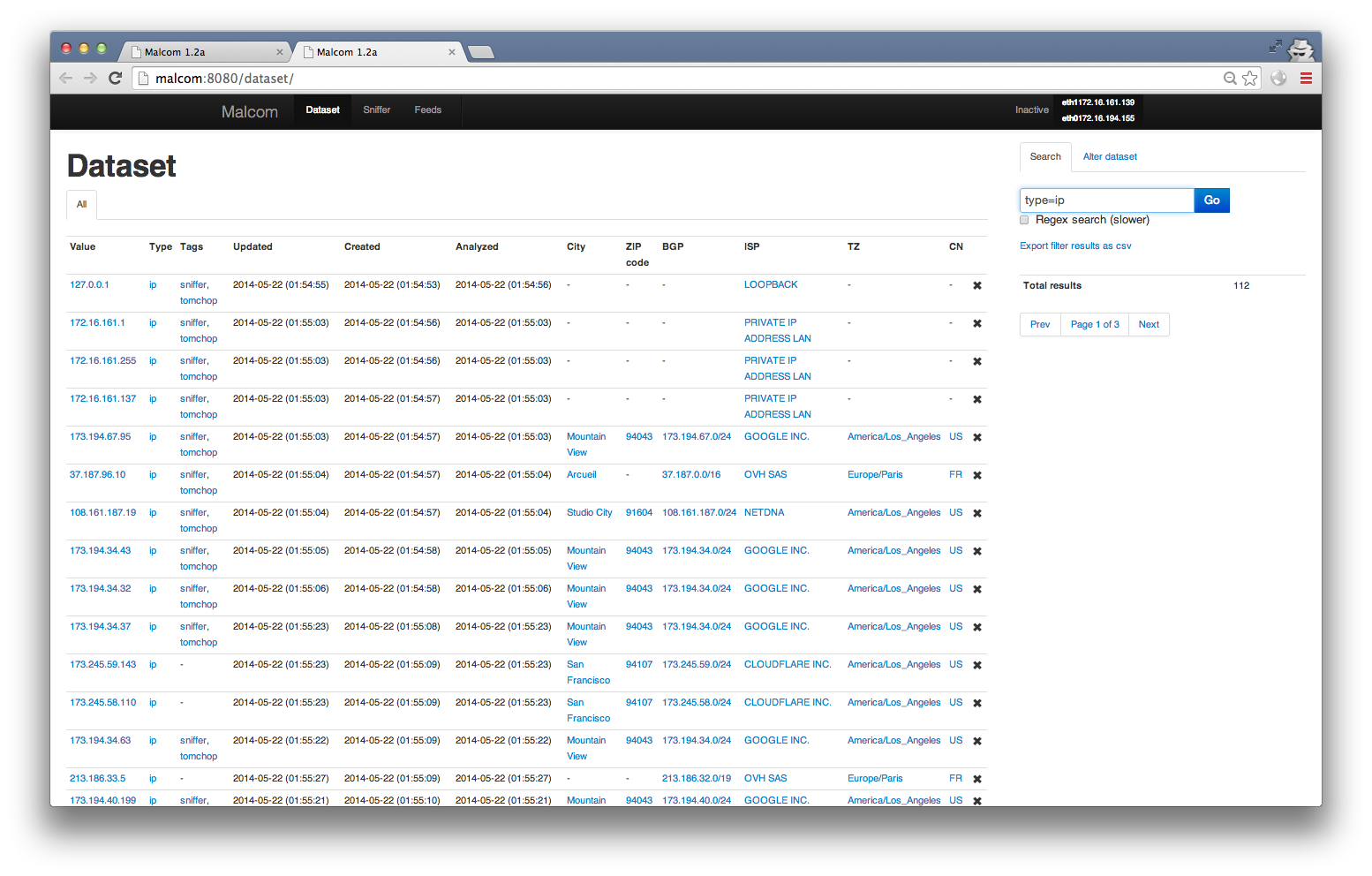
Dataset view (filtered to only show IPs)
!dataset-view.png
Quick how-to
* Install
* Make sure mongodb and redis-server are running
* Elevate your pri to root (yeah, I know, see disclaimer)
* Start the webser the default configuration with ./malcom.py -c malcom.conf (or see options with ./malcom.py --help)
** For an example configuration file, you can copy malcom.conf.example to malcom.conf
** Default port is 8080
** Alternatively, run the feeds from celery. See the feeds section for details on how to to this.
Installation
Malcom is written in python. Provided you have the necessary libraries, you should be able to run it on any platform. I highly recommend the use of python en () so as not to mess up your system libraries.
The following was tested on Ubuntu server 14.04 LTS:
* Install git, python and libevent libs, mongodb, redis, and other dependencies
$ sudo apt-get install build-essential git python-de mongodb libxml2-de zlib1g-de libffi-de python-
* Clone the Git repo:
$ git clone malcom
* Create your and activate it:
$ cd malcom
$ en
$ source en/bin/activate
* Get and install scapy:
$ cd ..
$ wget
$ tar x.tar.gz
$ cd scapy-2.1.0
$ python setup.py install
* Still from your , install necessary python packages from the requirements.txt file:
$ cd ../malcom
$ pip install -r requirements.txt
* For IP geolocation to work, you need to download the Maxmind database and extract the file to the malcom/Malcom/auxiliary/geoIP directory. You can get Maxmind's free (and thus more or less accurate) database from the following link:
$ cd Malcom/auxiliary/geoIP
$ wget
$ gunzip -d GeoLite2-City.mmdb.gz
$ m.mmdb GeoIP2-City.mmdb
* Launch the webserver from the malcom directory using ./malcom.py. Check ./malcom.py --help for listen interface and ports.
* For starters, you can copy the malcom.conf.example file to malcom.conf and run ./malcom.py -c malcom.conf
Configuration options
#### Database
By default, Malcom will try to connect to a local mongodb instance and create its own database, named malcom. If this is OK for you, you may skip the following steps. Otherwise, you need to edit the database section of your malcom.conf file.
##### Set an other name for your Malcom database
By default, Malcom will use a database named malcom. You can change this behavior by editing the malcom.conf file and setting the name directive from the database section to your liking.
[database]
...
name = my_malcom_database
...
##### Remote database(s)
By default, Malcom will try to connect to localhost, but your database may be on another server. To change this, just set the hosts directive. You may use hostnames or IPv4/v6 addresses (just keep in mind to enclose your IPv6 addresses between [ and ], e.g. [::1]).
If you'd like to use a standalone database on host my.mongo.server, just set:
[database]
...
hosts = my.mongo.server
...
You can also specify the port mongod is listening on by specifying it after the name/address of your server, separated with a :
[database]
...
hosts = localhost:27008
...
And if you're using a ReplicaSet regrouping my.mongo1.server and my.mongo2.server, just set:
[database]
...
hosts = my.mongo1.server,my.mongo2.server
...
##### Use authentication
You may ha your mongod instances to enforce authenticated connections. In that case, you have to set the username the driver will have to use to connect to your mongod instance. To do this, just add a username directive to the database section in the malcom.conf file. You may also have to set the password with the password directive. If the user does not have a password, just ignore (i.e. comment out) the password directive.
[database]
...
username = my_user
password = change_me
...
If the user is not linked to the malcom database but to another one (for example the admin database for a admin user), you will have to set the authentication_database directive with the name of that database.
[database]
...
authentication_database = some_other_database
...
##### Case of a replica set
When using a replica set, you may need to ensure you are connected to the right one. For that, just add the replset directive to force the mongo driver to check the name of the replicaset
[database]
...
replset = my_mongo_replica
...
By default, Malcom will try to connect to the primary node of th replica set. You may need/want to change that. In order to change that behaviour, just set the read_preference directive. See the mongo documentation for more information.
[database]
...
read_preference = NEAREST
...
Supported read preferences are:
* PRIMARY
* PRIMARY\_PREFERRED
* SECONDARY
* SECONDARY\_PREFERRED
* NEAREST
Docker instance
The quickest way to get you started is to pull the Docker image from the public docker repo. To pull older, more stable Docker builds, use tomchop/malcom instead of tomchop/malcom-automatic.
$ sudo docker pull tomchop/malcom-automatic
$ sudo docker run -p 8080:8080 -d --name malcom tomchop/malcom-automatic
Connecting to should get you started.
Quick note on TLS interception
Malcom now supports TLS interception. For this to work, you need to generate some keys in Malcom/networking/tlsproxy/keys. See the KEYS.md file there for more information on how to do this.
Make sure you also ha (you already should) and permissions to do some port forwarding with it (you usually need to be root for that).
You can to this using the con forward_port.sh script. For example, to intercept all TLS communications towards port 443, use forward_port.sh 443 9999. You'll then have to tell malcom to run an interception proxy on port 9999.
Expect this process to be automated in future releases.
En
Malcom was designed and tested on a Ubuntu Server 14.04 LTS VM.
If you're used to doing malware analysis, you probably already have tons of machines running on a host OS. Just install Malcom on a new VM, and route your other VM's connections through Malcom. Use enable_routing.sh to activate routing / NATing on the is running on. You'll need to add an extra network card to the guest OS.
As long as it's getting layer-3 network data, Malcom can be deployed anywhere. Although it's not recommended to use it on high-a networks (it wasn't designed to be fast, see disclaimer), you can have it running at the end of your switch's mirror port or on your gateway.
Feeds
To launch an instance of Malcom that ONLY fetches information from feeds, run Malcom with the --feeds option or tweak the configuration file.
Your database should be populated automatically. If you can dig into the code, adding feeds is pretty straightforward (assuming you're generating Evil objects). You can find an example feed in /feeds/zeustracker. A more detailed tutorial is a here.
You can also use celery to run feeds. Make sure celery is installed by running $ pip install celery from your . You can then use celery worker -E --config=celeryconfig --logle --concurrency=12 to launch the feeding process with 12 simultaneous workers.
Technical specs
Malcom was written mostly from scratch, in Python. It uses the following frameworks to work:
* flask - a lightweight python web framework
* mongodb - a NoSQL database. It interfaces to python with pymongo
* redis - An ad in-memory key-value store
* d3js - a Ja library that produces awesome force-directed graphs ()
* bootstrap - a CSS framework that will e kill webdesign, but makes it extremely easy to quickly "webize" applications that would only work through a command prompt.
Roadmap
Collaboration - The main direction I want this tool to take is to become collaborative. I have a few ideas for this, and I think it will become 100x more useful once data sharing is implemented.
Extendability - The other thing I want to include in the tool is the ability to more easily extend it. I don't have the same needs as e else, and this tool was concei my needs in mind. You can now customize Malcom by adding new feeds.
Once collaboration and extension are up and running, I think this will be helpful for more than one incident responder out there. :-)
Disclaimer
This tool was coded during my free time. Like a huge number of tools we download and use daily, I wouldn't recommend to use it on a production en where data stability and reliability is a MUST.
* It may be broken, ha gaps (running it as root in uncontrolled en is probably not a good idea), or not work at all.
* It's written in python, so don't expect it to be ultra-fast or handle huge amounts of data easily.
* I'm no coder, so don't expect to see beautiful pythonic code e you look. Or lots of comments.
It's in early stages of de, meaning "it works for me". You're free to share it, improve it, ask for pull requests.
License
Malcom - Malware communications analyzer
Copyright (C) 2013 Thomas Chopitea
This program is free software: you can redistribute it and/or modify
it under the terms of the GNU General Public License as published by
the Free Software Foundation, either 3 of the License, or
(at your option) any later .
This program is distributed in the hope that it will be useful,
but WITHOUT ANY WARRANTY; without even the implied warranty of
MERCHANTABILITY or FITNESS FOR A PARTICULAR PURPOSE. See the
GNU General Public License for more details.
You should ha a copy of the GNU General Public License
along with this program. If not, see <
Please note that Redis, MongoDB, d3js, Maximind and Bootstrap (and other third party libraries included in Malcom) may ha own GPL compatible licences.
项目信息
开发语言:Python
Star 数:1173
技术要点
该项目属于病毒分析方向的开源资源,代码结构清晰,适合安全研究人员学习参考。项目围绕Malcom - Malware Communications Analyzer展开,提供了可运行的实现,对理解相关安全机制、工具原理与攻防技术具有较高的研究价值。
从技术实现角度看,此类项目的核心在于对底层原理的深入理解与工程化落地。开发者在研究过程中可以结合官方文档与社区讨论,梳理项目的初始化流程、核心模块职责与数据流转,逐步掌握其中的技术细节与设计思路。
使用与学习建议
1. 下载源码压缩包,解压到本地环境。
2. 根据项目类型准备对应的运行环境与依赖。
3. 按照 README 中的步骤完成配置与部署。
4. 在隔离的测试环境中运行验证,避免影响生产系统。
免责声明
本资源来源于开源社区,仅供安全研究、技术学习与合法授权范围内的攻防演练使用,请勿用于任何非法或侵害他人权益的用途。使用本项目产生的一切后果由使用者自行承担。
| 资源标题 | malcom - Malcom - Malware Communications Analyzer |
| 所属分类 | 病毒分析 |
| 发布作者 | admin |
| 发布时间 | 2026-10-05 23:13:58 |
| 下载权限 | 免费下载 |
| 附件数量 | 2 个下载链接 |
| 浏览次数 | 258 |
| 讨论数量 | 0 |
| 主题状态 | 正常讨论中 |