 病毒分析
点击放大
matkap - Matkap - hunt down malicious Telegram bots
项目说明
Matkap Web
Hunt down malicious
Matkap is the web of 0x6rss/matkap.
A lot of commodity malware (stealers, RATs) exfiltrates stolen data to a
bot and reads it from a private chat. If you recover that bot's
token, Matkap lets you it, recover the operator's data, monitor the
bot live, and discover more leaked tokens from threat-intel sources.
This is a defensi threat-hunting tool, not a malware-analysis
engine. Use it only on projects and tokens you are authorized to in.
Features
messages/files into your own chat via
forwardMessage.optionally them (
getMe) and resolve chat ids (getUpdates).to capture new exfil messages + chat ids in real time.
the
through local, read-only tools. Ghidra and Binary Ninja support is coming soon.
DeepSeek; only exact, format-
MalwareBazaar YARA metadata, TweetFeed, and dated TI reports into 7/14/30-day
type, family, filename, campaign, source, and daily-activity charts.
Interface
The screenshots below show MATKAP's main workspaces. Any indicators or expired
credentials in these examples are historical test data; .env ,
provider API keys,
not included.
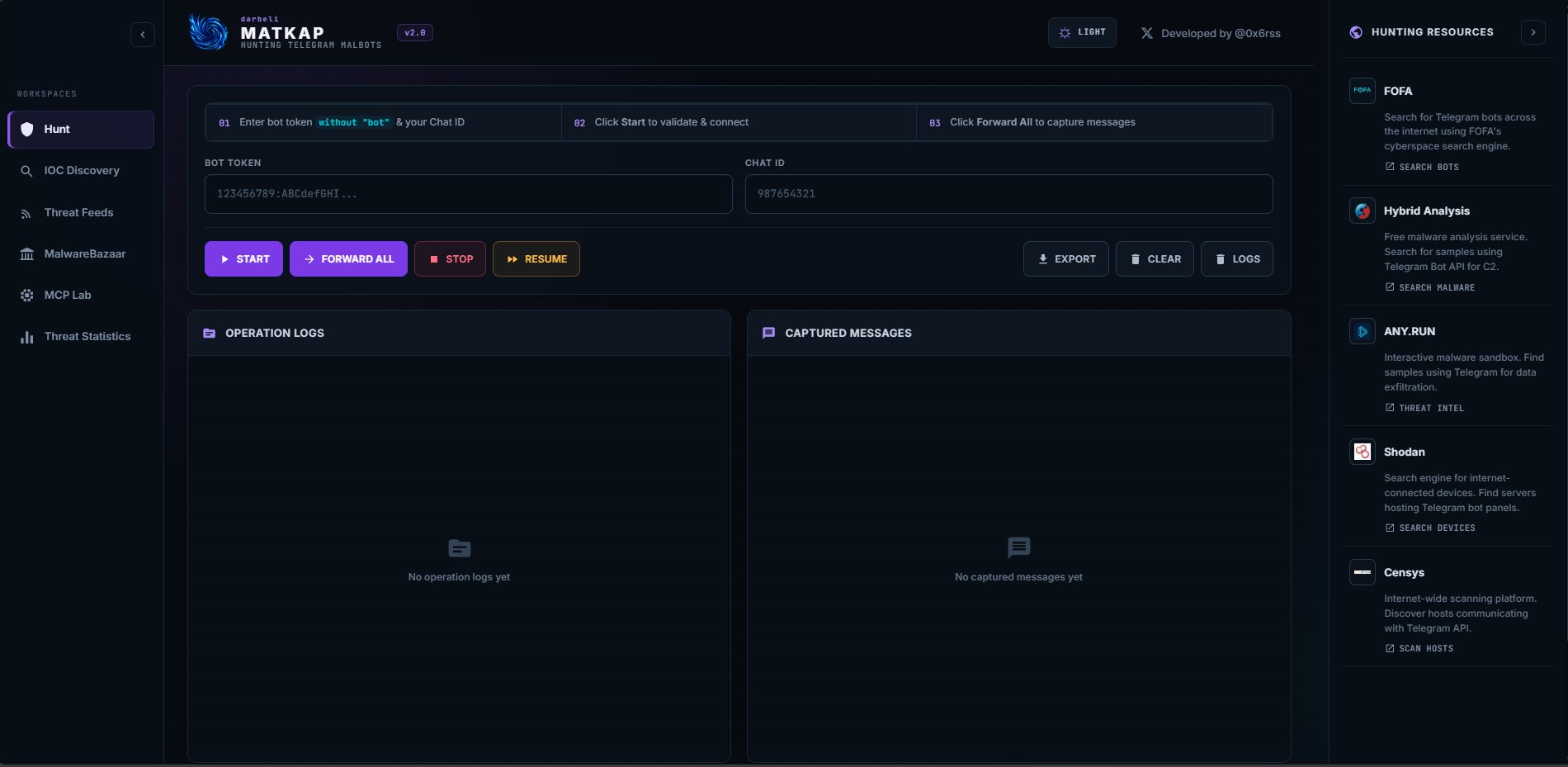
Hunt workspace
!MATKAP Hunt workspace
an authorized bot token, start or pause an in, forward
messages, and review operation logs and captured content from one workspace.
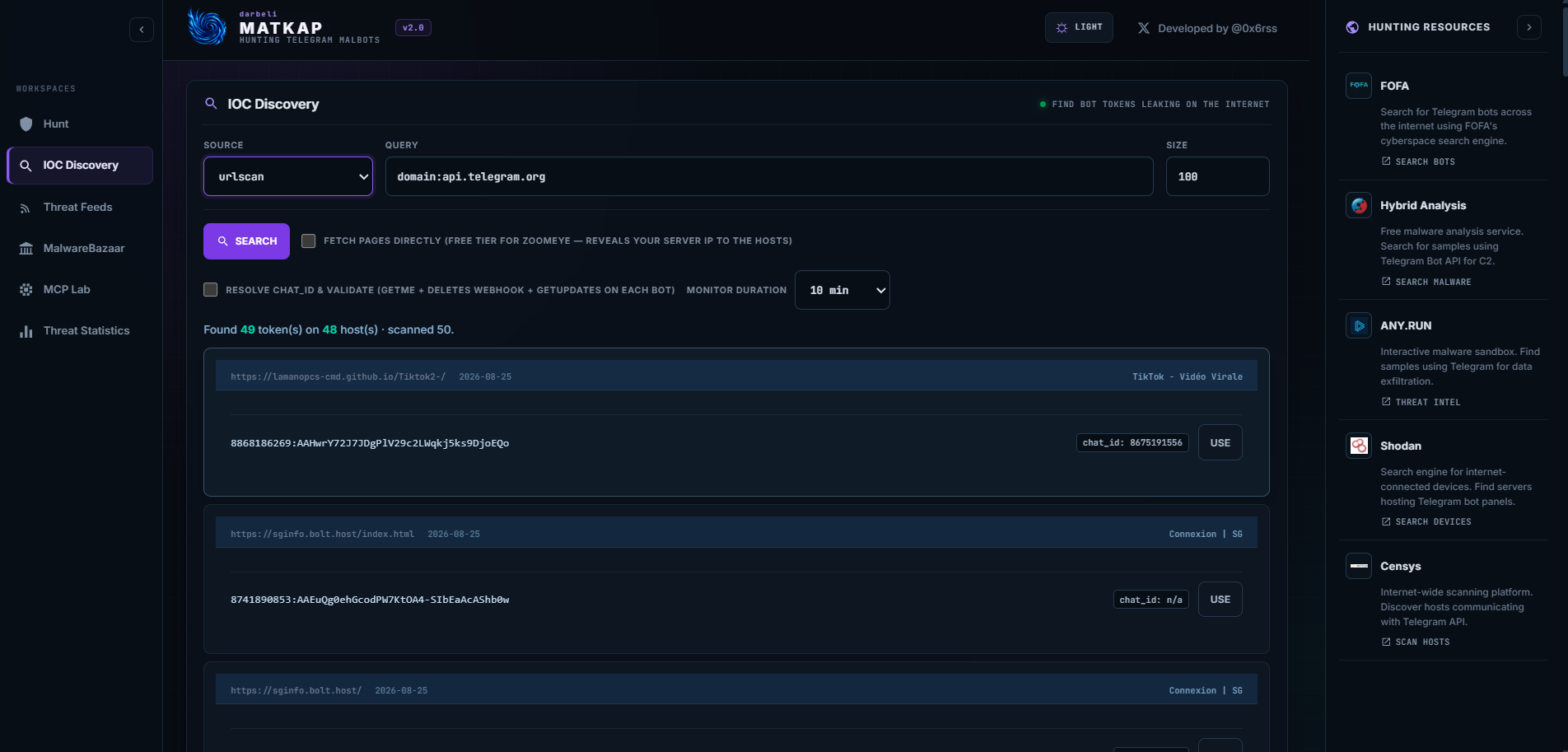
IOC Discovery
!MATKAP IOC Discovery
Search supported intelligence sources for exposed
optionally results, resolve chat IDs, and send a result to Hunt.
!MATKAP
Review community-reported
malware tags, and links back to the original public reports.
TI Report Dorking
!MATKAP TI Report Dorking
Search selected threat-intelligence publishers and rank reports by
signals such as bot API endpoints, bot references, chat IDs, and send methods.
MalwareBazaar
!MATKAP MalwareBazaar feed
Track metadata for recent samples matched by MalwareBazaar's YARA rule without downloading malware files.
MCP Lab
!MATKAP MCP Lab
Connect to the packaged read-only JADX MCP connector, scan the project already
open in JADX, and optionally use a configured AI provider as a fallback.
Threat Statistics
!MATKAP Threat Statistics
Explore 7, 14, or 30-day malware, feed, family, campaign, and daily-activity
statistics assembled from cached MATKAP data sources.
How the hunt works
1. You provide a bot token (recovered from a malware sample or IOC Discovery).
2. Matkap it (getMe) and, using a user account you
control, sends /start to the bot to trigger an update.
3. getUpdates reveals the operator's chat id and the latest message id.
4. Using the bot token's forwardMessage pri, Matkap forwards the
operator's messages into your own chat, capturing text and files.
Requirements
DATABASE_URL, MCP findings run in memory.running the complete Docker Compose stack.
api_id / api_hash from Quick start on Windows
On Linux or macOS, use cp .en .env instead of Copy-Item.
1. Database (optional)
A ready-to-use PostgreSQL database is provided through Docker. Skip this entire
step if persistence is not needed; MATKAP will still run, but captured logs and
feed caches will exist only in memory and are lost when the ser.
To start only PostgreSQL on local port 5433:
Then set in .env:
The database is reachable only from this computer. Any other reachable
PostgreSQL instance can be used; MATKAP creates its required tables on start.
2.
Log in at api_id and api_hash into .env:
3. Log in to
Leave TELEGRAM_STRING_SESSION empty and start the app in a local terminal
with NODE_EN (the provided default). MATKAP asks for the login
code sent by
MATKAP writes the generated TELEGRAM_STRING_SESSION directly to .env
without printing it. Later npm start runs reuse that session and do not ask
for a code. If
you to log in again and replaces it automatically. Keep .env private and
ne or share it.
4. Single account accounts
Single account — just fill the fields above.
Multiple accounts — set TELEGRAM_ACCOUNTS to a JSON array (this o
the single-account fields). On first login, include phone and leavestringSession empty for each account. MATKAP saves each generated session back
into the JSON value in .env. The UI shows an account selector; the server
round-robins if you do not pick one:
Run
For the complete Docker stack, first complete the one-time
with npm start, then stop it with Ctrl+C. The generated session is now in.env, so the container will not need an interacti. Start the app and
database with:
Open Both the web application and PostgreSQL published
ports are restricted to 127.0.0.1 by the provided Compose configuration.
JADX connector
The current release supports JADX only. Ghidra and Binary Ninja connectors
are shown as SOON and will be added later. MATKAP does not execute or upload
the APK; it reads the project already open in JADX through a local connector.
End-user installation on Windows
1. Download MATKAP-JADX-Connector-6.4.1.zip from GitHub Releases or from
connectors/jadx/dist
in the cloned repository.
2. Extract the ZIP and close JADX if it is open.
3. Open PowerShell in the extracted folder and run:
4. Reopen JADX and load the APK.
5. In MATKAP, open MCP Lab, click Connect JADX, then click
Scan open JADX project.
That is the entire connector setup. End users do not compile anything and do
not install Maven, Python, Node.js, or a separate MCP bridge for the connector.
The ZIP contains the ready JAR, installer, SHA-256 checksum, license, and notice.
When running directly from this repository, the same installer is a at:
MATKAP's default connector configuration is:
The installer the packaged JAR's SHA-256 and backs up an existingjadx-ai-mcp.jar before replacing it. The endpoint listens only on the local
machine. APK resources are size-limited, treated as data, and ne.
MATKAP first scans likely text resources locally; enable **Use AI fallback after
local scan** only when deeper source analysis is wanted.
AI provider
Add at least one provider key to .env (choose whiche you use):
An AI key is optional for the local deterministic MCP preflight. It is used only
when Use AI fallback after local scan is explicitly enabled and the preflight
cannot recover an exact token and chat ID.
The bundled adapters use each provider's REST API. Every default model and
endpoint can be o with <PROVIDER>_MODEL and <PROVIDER>_BASE_URL;
see .en for the complete list. Choose one configured provider in
MCP Lab, enable the AI fallback checkbox, and click Scan open JADX project.
Provider output is treated as untrusted: candidates must match MATKAP's exact
until the local user clicks Reveal.
For a lightweight MCP-only launch, set:
Run the MCP and mocked pro tests with npm test.
Dashboard
The UI is organised into tabs:
Hunt
1. (If multiple accounts) pick a controller account.
2. Paste the bot token and your own chat id (message
to get it).
3. Start + connects, Forward All captures the operator's
messages, Stop/Resume control long runs, Export downloads the
captured messages as JSON.
IOC discovery (find leaked bot tokens)
The IOC Discovery panel searches threat-intel sources for
credentials and parses out bot tokens + chat ids. Use auto-fills the hunt.
| Source | Env key | Default query | Notes |
|---|---|---|---|
| ThreatFox | ABUSECH_AUTH_KEY | api. | abuse.ch IOC DB; are often full bot<token> URLs; malware family attached. Best free source. Also tag: / malware:... |
| urlscan | URLSCAN_KEY | domain:api. | Free tier; pulls each scan's request URLs + DOM (capped at 50) |
| ZoomEye | ZOOMEYE_KEY | http.body="api. | body needs a Business plan; free tier works with "Fetch pages directly" |
Options in the panel:
link on the freetier (ZoomEye), the ser each discovered link and parses it locally.
Trade-off: your ser to those (often malicious) hosts, re its
IP. Off by default.
getMe + deletes anywebhook +
getUpdates) to mark it li / dead and fill thechat id when a pending update exists (works for idle bots; active bots consume
their own updates).
(10 min / 1 h / 12 h). Captured messages appear in the Hunt tab and persist
to the DB. Stop early with the Hunt Stop button.
Adding a source is one file: create sources/<name>.js exportingsearch({ key, query, size }) that returns [{host, ip, port, link, title, date, body}],
then register it in sources/index.js. The token/chat-id parser (ioc.js) is
shared across all sources.
Threat feeds
Both feeds are refreshed every 10 minutes and cached in the DB; the panels load
the cache instantly and show "updated X ago".
no key. The ser IOCs by tweet, fetches each tweet's text via X's
public syndication endpoint, and lists tweets mentioning a
site:<source> "-styledorks across reputable TI publishers and scores each article on
signals; only hits at/above the min score are shown. Uses DuckDuckGo by
default (which rate-limits scraping); set
GOOGLE_CSE_KEY + GOOGLE_CSE_CX(free Google Programmable Search, 100/day) for reliable results.
MalwareBazaar
The MalwareBazaar tab automatically queries the YARA rule,
keeps samples first seen during the last 14 days, and displays their SHA-256,
other hashes, family, file metadata, tags, detections, reporter, and abuse.ch
sample page. Metadata refreshes on ser and every 3 hours; MATKAP does
not download malware files. This feed uses the YARA rule only and does not merge
the broader tag results.
The manual hash checker remains a below the feed. Run a TI Report
Dorking hunt, click Load from reports, then Check MalwareBazaar to query
those hashes indi. Both features require a free abuse.ch Auth-Key
(ABUSECH_AUTH_KEY).
Threat statistics
Open the standalone Threat Statistics sidebar tab directly below MCP Lab.
Select 7, 14, or 30 days to combine the cached
MalwareBazaar results, TweetFeed signals, and dated TI reports. It includes a
malware-type pie chart, a three-source daily activity chart, and ranked charts
for filenames, malware families, explicit campaign metadata, and report
publishers.
Statistics use only fields present in the source data. Reports without a
publication date are counted in co but excluded from time-window charts;
campaign names are shown only when the upstream metadata explicitly identifies
them. MATKAP does not infer a campaign from a report title or arbitrary tag.
En
| | Required | Meaning |
|---|---|---|
| DATABASE_URL | no | PostgreSQL URL; without it, MATKAP runs in memory-only mode |
| HOST | no | Bind address; defaults to local-only 127.0.0.1 |
| JADX_MCP_URL | no | Packaged JADX connector URL; default |
| JADX_MCP_TRANSPORT | no | Keep jadx-rest for the packaged JADX connector |
| JADX_MCP_TOKEN | no | Optional bearer token if configured in the JADX connector |
| MATKAP_MCP_CONNECT_TIMEOUT_MS | no | Per-connection timeout (default 3500 ms) |
| MATKAP_MCP_TOOL_TIMEOUT_MS | no | Per-tool-call timeout (default 45000 ms) |
| MATKAP_MCP_AGENT_MAX_STEPS | no | Maximum AI planning rounds (default 6, hard cap 12) |
| MATKAP_MCP_AGENT_MAX_CALLS | no | Maximum MCP tool calls per scan (default 24, hard cap 60) |
| MATKAP_MCP_PREFLIGHT_MAX_FILES | no | Likely APK text resources read locally before any AI request (default 120, hard cap 500) |
| MATKAP_AI_ENABLED | no | Enables AI-driven MCP in (default true) |
| MATKAP_AI_PRIMARY | AI | Default provider: openai, anthropic, gemini, xai, kimi, or deepseek |
| MATKAP_AI_TIMEOUT_MS | no | Per-provider request timeout (default 90000 ms) |
| OPENAI_API_KEY | no | OpenAI Responses API key |
| ANTHROPIC_API_KEY | no | Claude Messages API key |
| GEMINI_API_KEY | no | Gemini API key |
| XAI_API_KEY | no | xAI/Grok API key |
| KIMI_API_KEY | no | Kimi API key (MOONSHOT_API_KEY is also accepted) |
| DEEPSEEK_API_KEY | no | DeepSeek API key |
| TELEGRAM_API_ID | yes* | Controller account api_id |
| TELEGRAM_API_HASH | yes* | Controller account api_hash |
| TELEGRAM_PHONE | first run | Phone used for the first login or session recovery |
| TELEGRAM_STRING_SESSION | yes* | Controller session; automatically written after the first local login |
| TELEGRAM_ACCOUNTS | no | JSON array of accounts; generated sessions are written back automatically |
| PORT | no | Listen port (default 3000) |
| NODE_ENV | no | production or de (default) |
| SESSION_SECRET | no | Session cookie secret (random if empty) |
| ABUSECH_AUTH_KEY | no | abuse.ch Auth-Key (auth.abuse.ch) — ThreatFox source + MalwareBazaar tab |
| URLSCAN_KEY | no | urlscan.io API key — IOC Discovery |
| ZOOMEYE_KEY | no | ZoomEye API key — IOC Discovery |
| GOOGLE_CSE_KEY | no | Google Programmable Search key — reliable TI dorking |
| GOOGLE_CSE_CX | no | Google Programmable Search engine id |
\* Required unless you configure TELEGRAM_ACCOUNTS instead.
Notes
session gets its own isolated workspace; captured data persists to the DB.
putting your own access control (reverse proxy / auth) in front of it.
intrusive step against the C2. Use only within an authorized in.
Disclaimer
Matkap is intended for educational and research purposes only. It helps
cybersecurity professionals analyze
not use it for illegal purposes. You are fully responsible for your actions and
must follow
liable for any misuse.
Legacy desktop
The previous Python desktop implementation is preserved inmatkap-old/. It is included for reference and is not
required by the current web application.
项目信息
开发语言:JavaScript
Star 数:1037
技术要点
该项目属于病毒分析方向的开源资源,代码结构清晰,适合安全研究人员学习参考。项目围绕Matkap - hunt down malicious Telegram bots展开,提供了可运行的实现,对理解相关安全机制、工具原理与攻防技术具有较高的研究价值。
从技术实现角度看,此类项目的核心在于对底层原理的深入理解与工程化落地。开发者在研究过程中可以结合官方文档与社区讨论,梳理项目的初始化流程、核心模块职责与数据流转,逐步掌握其中的技术细节与设计思路。
使用与学习建议
1. 下载源码压缩包,解压到本地环境。
2. 根据项目类型准备对应的运行环境与依赖。
3. 按照 README 中的步骤完成配置与部署。
4. 在隔离的测试环境中运行验证,避免影响生产系统。
免责声明
本资源来源于开源社区,仅供安全研究、技术学习与合法授权范围内的攻防演练使用,请勿用于任何非法或侵害他人权益的用途。使用本项目产生的一切后果由使用者自行承担。
| 资源标题 | matkap - Matkap - hunt down malicious Telegram bots |
| 所属分类 | 病毒分析 |
| 发布作者 | admin |
| 发布时间 | 2026-10-05 23:14:22 |
| 下载权限 | 免费下载 |
| 附件数量 | 2 个下载链接 |
| 浏览次数 | 373 |
| 讨论数量 | 0 |
| 主题状态 | 正常讨论中 |