 病毒分析
点击放大
opensquat - openSquat is an open-source tool that detects look
项目说明
<p align="center">
<img src=" alt="openSquat Logo" width="550"/>
</p>
<h1 align="center">openSquat Core</h1>
<p align="center">
<a href=" src=" alt="PyPI"></a>
<a href=" src=" alt="Python 3.10+"></a>
<a href=" src=" alt="License: GPL v3"></a>
<a href=" src=" alt="GitHub issues"></a>
<a href=" src=" alt="GitHub stars"></a>
</p>
---
📑 Table of Contents
---
🎯 What is openSquat?
openSquat is an Open Source Intelligence (OSINT) security tool that identifies cyber squatting threats targeting your brand or domains:
| Threat Type | Description |
|-------------|-------------|
| 🎣 Phishing | Fraudulent domains mimicking your brand |
| 🔤 Typosquatting | Domains with common typos (e.g., gooogle.com) |
| 🌐 IDN Homograph | Look-alike characters from other alphabets |
| 👥 Doppelgänger | Domains containing your brand name |
| 🔀 Bitsquatting | Single-bit errors in domain names |
---
🌟 Featured In
> "A powerful swiss army knife for brand protection"
> — WhoisXML API Blog, August 2022
> "A handy tool for collecting information on newly registered domains." — ranked Top 5 phishing detection tool
> — SOCRadar Blog, July 2022
> "openSquat provides essential protection against domain squatting and phishing attacks through automated monitoring and detection."
> — Prince Yada, March 2026
Academic Citation
> "OpenSquat identified 103 squatting domains, 960 acti websites, and 53 domains with suspicious certificates."
> — Sharma et al., Journal of Information Security and Cybercrimes Research (JISCR), Vol. 7, Issue 1, June 2024
---
🔓 Open-Core Model
openSquat follows an open-core model:
This model enables transparency and community collaboration while supporting the scale, reliability, and operational requirements of enterprise use.
---
✨ Key Features
---
🚀 Quick Start
Install via pip (recommended)
Or clone the repository
> Repo users: in all the examples below, replace opensquat with python3 opensquat.py to run from a cloned checkout.
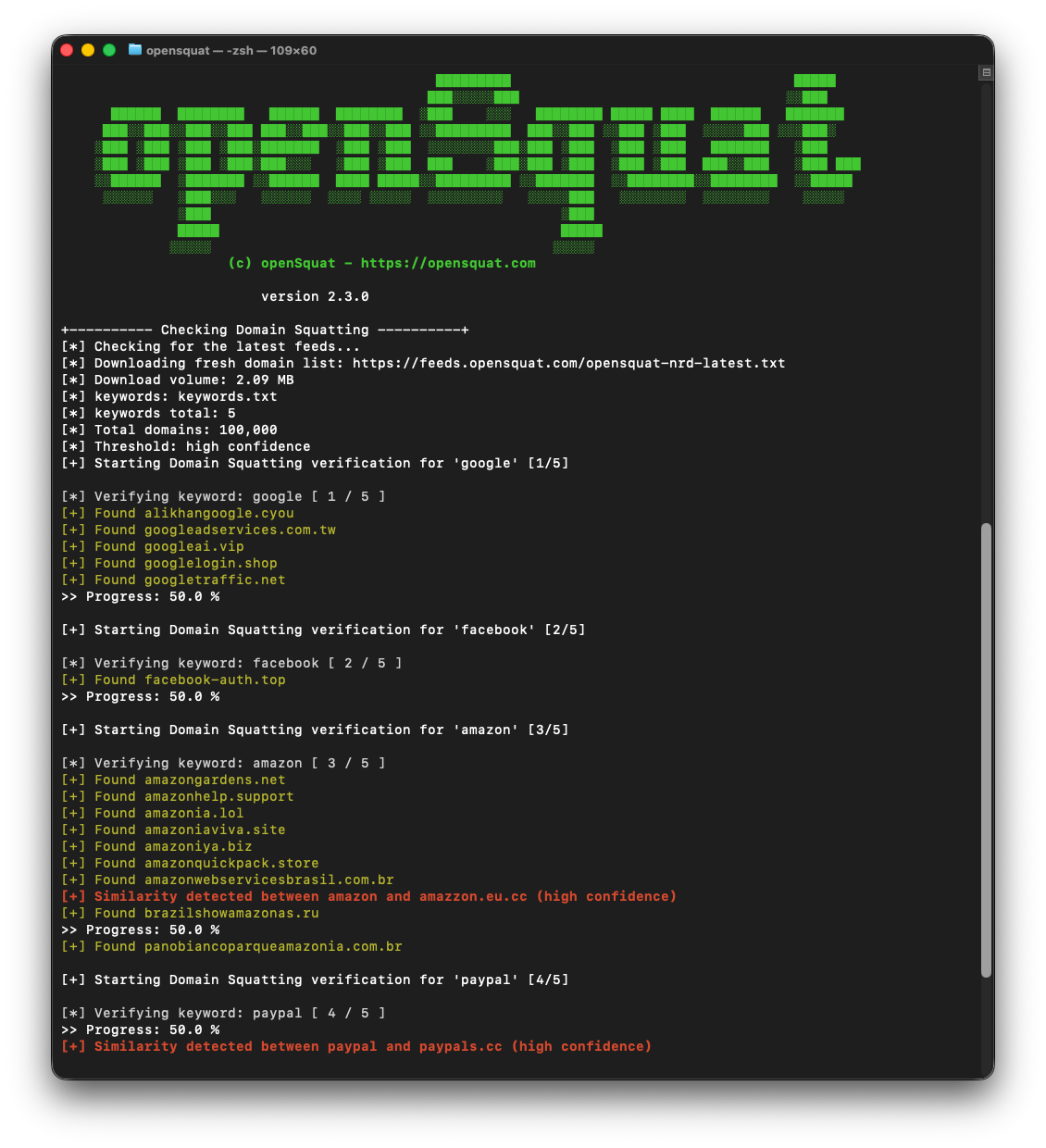
See it in action
<p align="center">
<img src="screenshots/openSquat_v2.3.0.png" alt="openSquat 2.3.0 scanning the daily NRD feed for lookalikes of google, facebook, amazon and paypal" width="650"/>
</p>
---
📦 Requirements
confusable_homoglyphs, homoglyphs, colorama, requests, dnspython, beautifulsoup4---
📖 Usage
Basic Commands
Options
Output Formats
Confidence Levels
| Level | Flag | Description |
|-------|------|-------------|
| 0 | -c 0 | Very high (fewer results, high accuracy) |
| 1 | -c 1 | High (default) |
| 2 | -c 2 | Medium |
| 3 | -c 3 | Low |
| 4 | -c 4 | Very low (more results, more false positives) |
> Note: On the API side (--api), the fi levels map to four fuzziness (exact, low, auto, high) — -c 3 and -c 4 both map to high. See Premium and API Modes for the full mapping and how to o with --api-fuzziness.
---
💎 Premium and API Modes
openSquat supports three modes. The default (Community) is unchanged — existing users need no flags. The two Premium modes share a single openSquat API key; pick Premium Feed if you want the same local detection pipeline with a larger feed, or Premium API if you want ser detection with no local feed download.
| Mode | Flag | What it does |
|------|------|--------------|
| Community (default) | _(none)_ | Downloads the free NRD feed (~100k domains/day) and runs local Le detection. |
| Premium Feed | --premium | Downloads the paid NRD feed (nrd-lite, much larger) using your openSquat API key, then runs the same local Le detection. |
| Premium API | --api | Skips local feed download. Queries the openSquat lookalike REST API per keyword and returns ser matches. |
Get an API key
Sign up at opensquat.com to get a key. The same key works for both Premium Feed (--premium) and Premium API (--api).
Provide the API key (priority order)
1. --api-key YOUR_KEY on the command line
2. OPENSQUAT_API_KEY en
3. api_key.txt in the current directory (one key per file, # comments allowed)
> The CLI flag is in ps output. Prefer the env var or key file in shared en.
Examples
When --premium or --api successfully loads a key, the CLI prints a masked confirmation line so you can which key was picked up without leaking it:
In Premium API mode, the run summary reports the active mode, the number of API calls made, and your remaining balance with usage delta (for example, 4972 (used 4 of 4976 this run)). Per-keyword progress lines appear in the same order as your keywords file e the calls run in parallel. Quota exhaustion (HTTP 429) returns partial results gracefully; auth errors (401) and plan errors (403) abort with a clear message.
If the backend rate-limits your request (HTTP 429 with a Retry-After header), the tool distinguishes it from quota exhaustion: you'll see a yellow [!] Rate limit hit (retry in Ns) warning instead of the red quota exhausted message, partial results are still returned, and the summary preserves your real API balance so you can see exactly how many credits you actually used. To avoid triggering rate limits on large scans, pass --api-rate-limit N to cap outbound requests per second across all workers. A value of 8 is a safe starting point for most backends.
Output format recommendation
JSON is the recommended output format for Premium API mode because the API returns per-domain metadata that the other formats cannot carry as cleanly: the registered TLD, the NRD first-seen date, an IDN homograph flag, and the unicode rendering of the homograph when the domain is one.
Example of the richer output in Premium API mode (trimmed):
The idn flag plus the unicode rendering let you see at a glance that xn--mirosoft-hw7c.com is actually ᴄ (Latin Letter Small Capital C) impersonating the c in "microsoft" — information that a plain punycode string completely hides.
CS is also supported and produces one row per domain with the same metadata columns, which suits analysts working in Excel or pandas:
The CSV is written with a UTF-8 BOM so Excel on Windows correctly renders the unicode homograph column.
Community and Premium Feed modes emit the same JSON top-le for cross-mode consistency, but with only the domain field populated per entry — the NRD feed does not carry the per-domain metadata that only the hosted API has:
If you pass --api-key without also selecting --premium or --api, the CLI prints a one-line hint that the key will be ignored in Community mode (no silent mode-switching).
In Premium API mode, -c/--confidence is auto-mapped to API fuzziness (0→exact, 1→low, 2→auto, 3→high, 4→high). Use --api-fuzziness to o.
Premium API (--api) is incompatible with --doppelganger and -d/--domains.
---
🔌 MCP Server
openSquat is also a as a Model Context Protocol (MCP) server, so AI assistants and agents (Claude, and any other MCP-compatible client) can query lookalike-domain intelligence directly:
| Tool | What it does | Quota cost |
|------|--------------|------------|
| search_lookalike_domains | Find newly registered domains impersonating a brand or keyword (phishing, brand abuse, typosquatting) | 1 query per search |
| | Confirm the connection is authenticated | Free |
Authentication uses the same openSquat account as the Premium modes: either sign in with OAuth, or supply your API key (os_...) via the Authorization: Bearer header (or X-OpenSquat-Key). Searches draw from the same plan quota as the Premium API.
See opensquat.com for the MCP endpoint and client setup instructions.
---
⚙️ Configuration
Keywords File (keywords.txt)
API Key (.txt)
To use --vt or --subdomains, add your API key:
openSquat API Key (api_key.txt)
Required for --premium and --api. Create an api_key.txt file in the working directory:
The CLI resolves the key in this order: --api-key flag → $OPENSQUAT_API_KEY en → api_key.txt file. The env var and file methods are preferred over the CLI flag in shared en, since CLI arguments are via ps.
---
🤖 Automation
Run daily :
> The cd into a working directory matters if you rely on api_key.txt (resolved from the current directory) or want results.json written to a specific place.
---
📋 CLI Reference
| Argument | Default | Description |
|----------|---------|-------------|
| -k, --keywords | keywords.txt | Keywords file to search |
| -o, --output | results.txt | Output filename |
| -t, --type | txt | Output format: txt, json, csv |
| -c, --confidence | 1 | Confidence level (0-4). In --api mode this is auto-mapped to fuzziness (-c 3 and -c 4 both → high). |
| -d, --domains | — | Use local domain file instead of downloading |
| -u, --url | opensquat feed | URL to download domain feed |
| --dns | — | Enable Quad9 DNS |
| --doppelganger | — | Doppelganger-only mode (keyword in domain + reachability check) |
| --ct | — | Search Certificate Transparency logs |
| --phishing | — | Cross-reference phishing database |
| --subdomains | — | Fetch subdomains |
| --portcheck | — | Check for open ports 80/443 |
| --vt | — | against |
| --premium | — | Premium Feed mode — use the paid NRD feed (requires openSquat API key) |
| --api | — | Premium API mode — query the openSquat lookalike REST API per keyword (no local feed) |
| --api-key | — | openSquat API key (or set $OPENSQUAT_API_KEY, or use api_key.txt) |
| --api-fuzziness | _(from -c)_ | Premium API mode: exact, low, high, or auto |
| --api-history-days | — | Premium API mode: NRD history window in days (clipped to plan cap) |
| --api-max-results | — | Premium API mode: max results per keyword (clipped to plan cap) |
| --api-rate-limit | _(unlimited)_ | Premium API mode: max outbound requests per second across all workers |
---
🤝 Contributing
We welcome contributions! See our Contributing Guide for details.
---
👤 Author
Andre Tenreiro — LinkedIn · PGP Key
---
📜 License
This project is licensed under the GNU GPL v3.
项目信息
开发语言:Python
Star 数:986
技术要点
该项目属于病毒分析方向的开源资源,代码结构清晰,适合安全研究人员学习参考。项目围绕openSquat is an open-source tool that detects look-alike domains impersonating your brand, by scanning newly registered domains daily.展开,提供了可运行的实现,对理解相关安全机制、工具原理与攻防技术具有较高的研究价值。
从技术实现角度看,此类项目的核心在于对底层原理的深入理解与工程化落地。开发者在研究过程中可以结合官方文档与社区讨论,梳理项目的初始化流程、核心模块职责与数据流转,逐步掌握其中的技术细节与设计思路。
使用与学习建议
1. 下载源码压缩包,解压到本地环境。
2. 根据项目类型准备对应的运行环境与依赖。
3. 按照 README 中的步骤完成配置与部署。
4. 在隔离的测试环境中运行验证,避免影响生产系统。
免责声明
本资源来源于开源社区,仅供安全研究、技术学习与合法授权范围内的攻防演练使用,请勿用于任何非法或侵害他人权益的用途。使用本项目产生的一切后果由使用者自行承担。
| 资源标题 | opensquat - openSquat is an open-source tool that detects look |
| 所属分类 | 病毒分析 |
| 发布作者 | admin |
| 发布时间 | 2026-10-05 23:14:34 |
| 下载权限 | 免费下载 |
| 附件数量 | 2 个下载链接 |
| 浏览次数 | 381 |
| 讨论数量 | 0 |
| 主题状态 | 正常讨论中 |