 病毒分析
点击放大
HaboMalHunter - HaboMalHunter is a sub-project of Habo Malware Ana
项目说明
HaboMalHunter: Habo Linux Malware Analysis System
![BlackHat]()
![license]()
![PRs Welcome]()
![Platform]()
(中文版本请参看这里)
参与贡献
腾讯开源激励计划 鼓励开发者的参与和贡献,期待你的加入。
Introduction
HaboMalHunter is a sub-project of Habo Malware Analysis System (), which can be used for automated malware analysis and security assessment on the Linux system. The tool help security analyst extracting the static and dynamic features from malware effectively and efficiently. The generated report provides significant information about process, file I/O, network and system calls.
Features
The tool can be used for the static and dynamic analysis of ELF files on the Linux x86/x64 platform.
Static analysis
1. Basic Information: md5, name, file type, size and SSDEEP.
2. SO Files Dependency: SO files information (only applied for dynamic linked files).
3. Strings Information.
4. ELF Header and Entry Point.
5. IP and PORTS
6. ELF Segment, Section and Hash.
7. Source File Names.
Dynamic analysis
1. Starting and Termination: Time Stamps and Elapsed Time.
2. Processes Information: clone, execve and exit etc.
3. File I/O: open, read, write and delete etc.
4. Network: TCP, UDP, HTTP and HTTPS etc.
5. Typical Malicous Actions: self deletion, midification and lock.
6. API Information: getpid, system, dup and other libc functions.
7. syscall sequences.
Screenshot
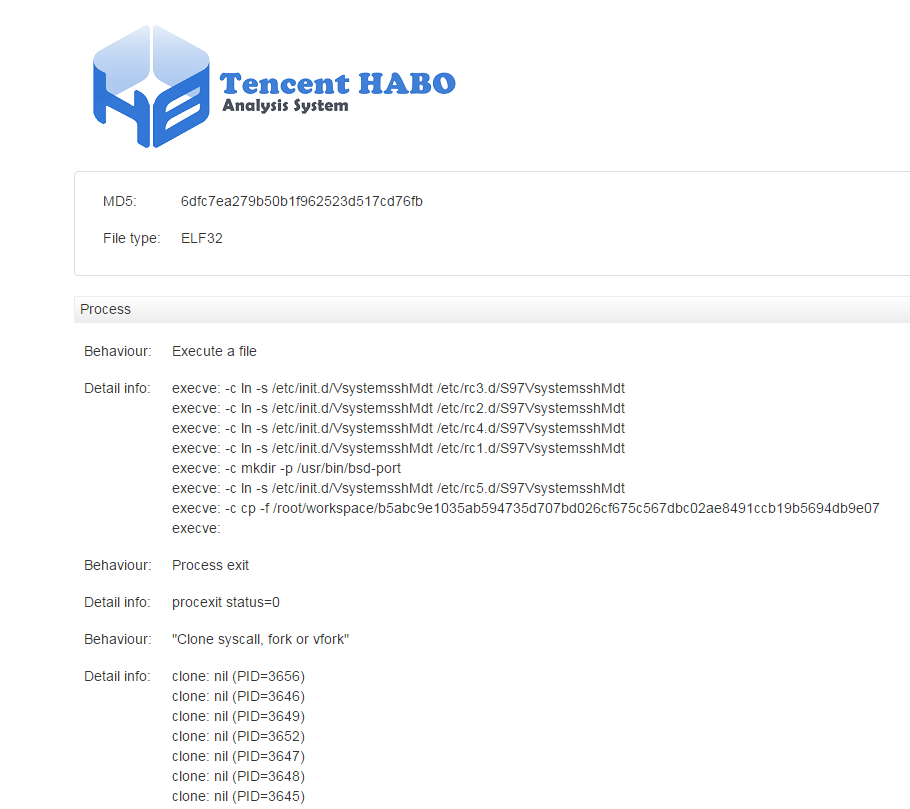
1. The HTML report.
!png22
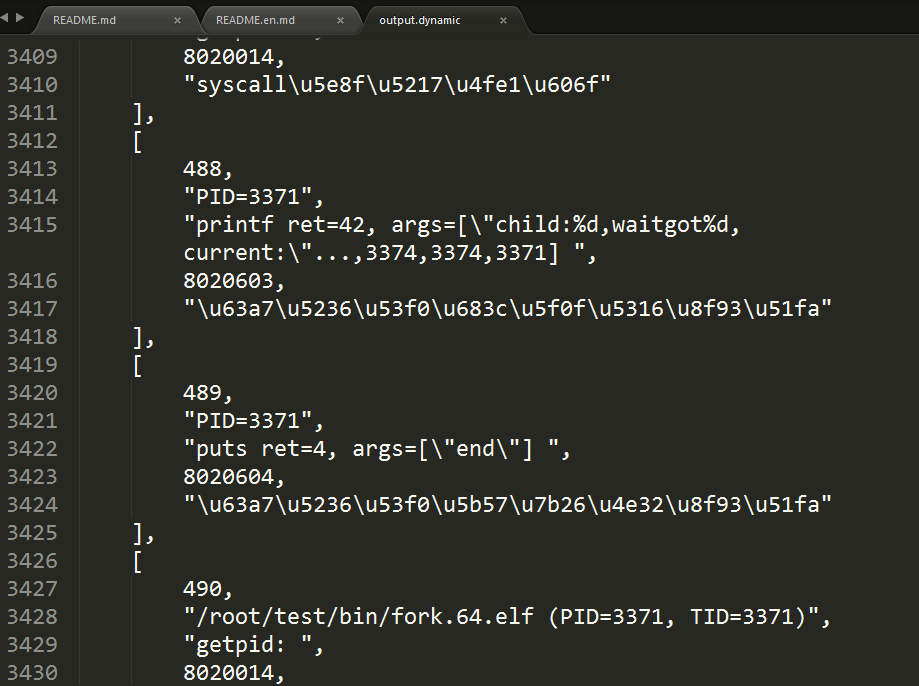
2. The JSON report.
!png21
Demo
1.Setup En
The tool will run on the 5.1 with Ubuntu 14.04 LTS.
in order to install thrid party software, please execute the following command after obtaining the code:
2.Get Source Code
3.Compile
Firstly, please upload the source code into the VM.
Execute the following command with root permision under the /root directory.
!source
The command will compile and package the source code, and then will generate two zip files.
!png2
4.Analysis
using ./test/bin/read.32.elf to make a test.
The second command will copy report and log outside the VM.
!png3
Among the result, output.static is static analysis result, output.dynamic is dynamic analysis result, and system.log is runtime log. Users can also upload samples to the Habo Malware Analysis System () to get a brief report.
!png4
!habo_01
Future Work
1. [done] Memory Analysis.
2. More YARA rules (./utils/yara/malware/)
3. [done] HTML output format
Errors and Issues
1. Malware Analysis should be done inside a Machine en and Intel- be enabled on the host's BIOS. We shall not be liable to the damage of the analysed malware.
2. 5.1 is recommended.
3. The tool will also generate dynamic log, which contains one error message, for ELF files which can not be executed, such as so files.
<a name="readme_cn">哈勃分析系统(HaboMalHunter)</a>
功能描述
HaboMalHunter是哈勃分析系统 () 的开源子项目,用于Linux平台下进行自动化分析、文件安全性检测的开源工具。使用该工具能够帮助安全分析人员简洁高效的获取恶意样本的静态和动态行为特征。分析报告中提供了进程、文件、网络和系统调用等关键信息。
功能清单
开源代码支持Linux x86/x64 平台上的ELF文件的自动化静态动态分析功能。
静态分析
1. 基础信息:包括文件md5,名称,类型,大小和SSDEEP等信息。
2. 依赖so信息:对于动态链接的文件,输出依赖的so信息。
3. 字符串信息
4. ELF头信息,入口点
5. IP和端口信息
6. ELF段信息,节信息和hash值
7. 源文件名称
动态分析
1. 动态运行启动结束信息:耗时等
2. 进程信息:clone系统调用,execve调用,进程创建结束等
3. 文件操作信息:打开,读取,修改,删除等文件IO操作
4. 网络信息:TCP, UDP, HTTP, HTTPS, SSL等信息
5. 典型恶意行为:自删除,自修改和自锁定等
6. API信息:getpid, system, dup 等libc函数调用
7. syscall 序列信息
Demo
1.环境配置
使用哈勃Linux开源版进行病毒分析,需要首先制作用于运行病毒的虚拟机环境。切勿直接在真实环境下运行和分析病毒。项目默认使用 5.1 运行Ubuntu 14.04 LTS 作为分析环境。
安装相关的软件,获取源代码之后,请在虚拟机内以root身份运行如下命令:
2.获取源代码
使用git工具获取源代码。
3.编译源代码
大部分源代码是python, 有一部分c代码需要进行编译和打包。
首先将代码上传到虚拟机中。
使用root身份,在/root/ 目录下使用命令,如图:
!source
运行命令,进行编译和打包,会输出AnalyzeControl_1129.zip 和test_1129.zip 两个文件, 如图:
!png2
4.进行分析
本次使用测试文件 ./test/bin/read.32.elf 进行测试。使用如下命令:
其中第二条命令会将分析结果拷贝到虚拟机外,用于分析人员阅读。
!png3
分析结果中,output.static 是静态分析结果,output.dynamic 是动态分析结果,system.log是运行时的日志。同时也可以结合哈勃分析系统 () 中的结果展示进行样本分析。
!png4
未来规划
1. [已完成] 希望使用和LiME进行内存分析
2. 希望增加更多的病毒规则(./util/yara/malware)
3. [已完成] 希望将输出的json数据格式转化成为HTML页面进行展示
已知故障和错误列表
1. 分析病毒请在虚拟机环境下进行,并在BIOS设置中开启Intel-VT功能,对因运行病毒引起的任何软件安全问题,本项目不承担责任。
2. 推荐使用 5.1以上版本运行虚拟机。
3. 对于无法运行的ELF文件,例如so文件,哈勃分析系统默认会生成动态日志,但是里面只有无法运行的报错信息。
项目信息
开发语言:Python
Star 数:751
技术要点
该项目属于病毒分析方向的开源资源,代码结构清晰,适合安全研究人员学习参考。项目围绕HaboMalHunter is a sub-project of Habo Malware Analysis System (https://habo.qq.com), which can be used for automated malware analysis and security assessment on the Linux system.展开,提供了可运行的实现,对理解相关安全机制、工具原理与攻防技术具有较高的研究价值。
从技术实现角度看,此类项目的核心在于对底层原理的深入理解与工程化落地。开发者在研究过程中可以结合官方文档与社区讨论,梳理项目的初始化流程、核心模块职责与数据流转,逐步掌握其中的技术细节与设计思路。
使用与学习建议
1. 下载源码压缩包,解压到本地环境。
2. 根据项目类型准备对应的运行环境与依赖。
3. 按照 README 中的步骤完成配置与部署。
4. 在隔离的测试环境中运行验证,避免影响生产系统。
免责声明
本资源来源于开源社区,仅供安全研究、技术学习与合法授权范围内的攻防演练使用,请勿用于任何非法或侵害他人权益的用途。使用本项目产生的一切后果由使用者自行承担。
| 资源标题 | HaboMalHunter - HaboMalHunter is a sub-project of Habo Malware Ana |
| 所属分类 | 病毒分析 |
| 发布作者 | admin |
| 发布时间 | 2026-10-05 23:15:38 |
| 下载权限 | 免费下载 |
| 附件数量 | 2 个下载链接 |
| 浏览次数 | 525 |
| 讨论数量 | 0 |
| 主题状态 | 正常讨论中 |