 病毒分析
点击放大
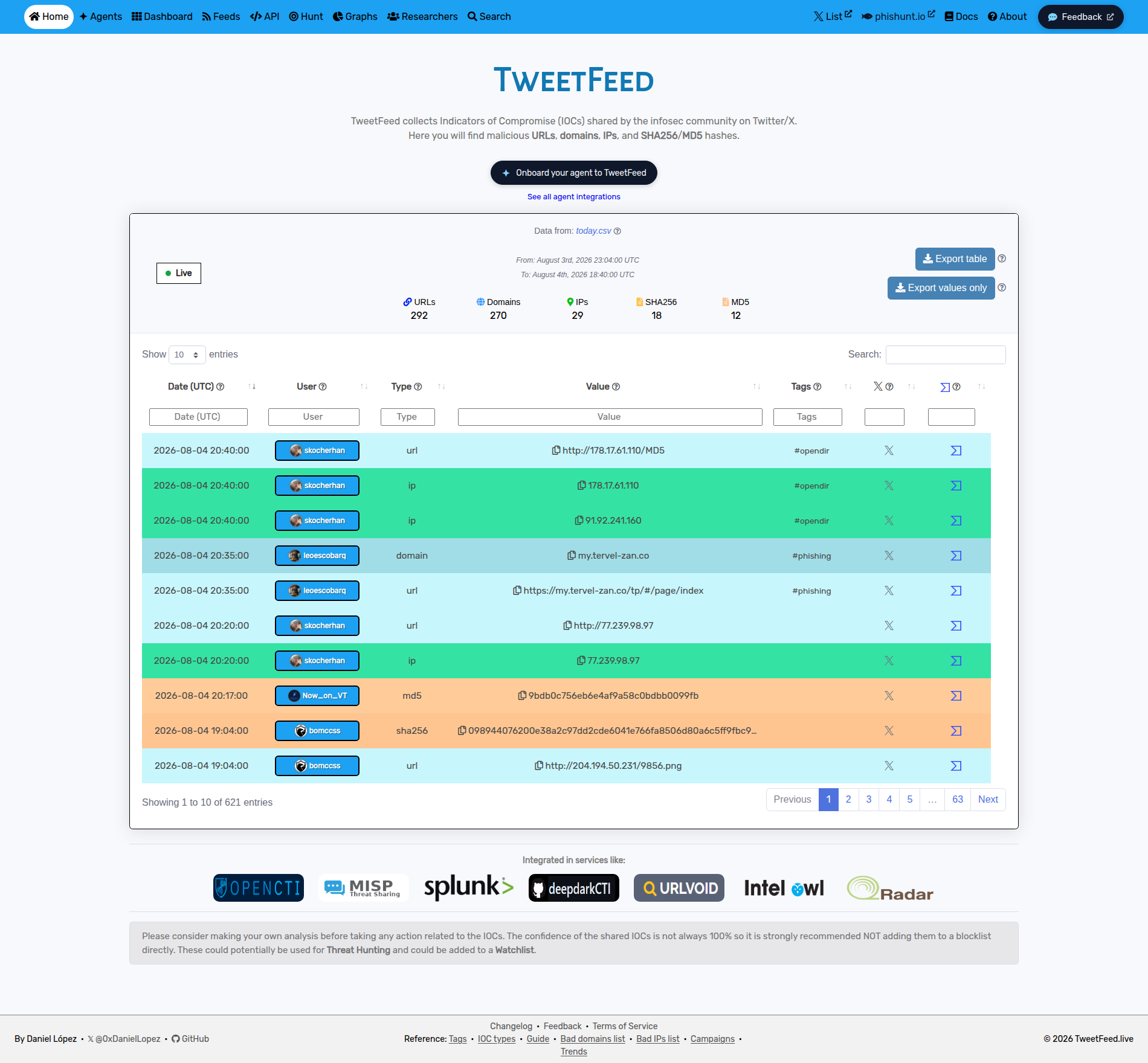
TweetFeed - TweetFeed collects Indicators of Compromise (IOCs)
项目说明
<di="center">
<h1 align="center">TweetFeed</h1>
<h3 align="center">Feeds of IOCs posted by the community on Twitter/X</h3>
<p align="center">
<b>
<a href="
<a href="
<a href="
<a href="
</b>
</p>
---
!TweetFeed.live
---
</div>
☰ Content
> The counters below (timestamp, per-type totals, tag count, top tags, top reporters) are regenerated by the pipeline every 15 minutes. Hand-written sections are stable.
:satellite: Consuming this data
api.tweetfeed.live/v1/today (week, month, type/tag/user filters), blocklists (domains.txt, ips.txt, urls.txt, hosts.txt, adguard.txt, rpz.txt, zeek-intel.txt, Wazuh CDB lists...), TAXII 2.1 / STIX 2.1, the MISP feed and RSS.If-None-Match (ETag) or If-Modified-Since: every 200 response carries ETag and Last-Modified, and an unchanged file answers 304 with an empty body.git pull breaks daily. Use git clone --depth 1 --filter=blob:none and refresh with git fetch --depth 1 origin master && git reset --hard origin/master, never more often than every 15 minutes./v1/status gives a per artifact and /v1/manifest lists every published file.:heart: Support the project
If you like the project, please consider:
:page_facing_up: Data collected
<di="center">
<h3>CS</h3>
<table>
<thead>
</thead>
<tbody>
<tr>
<th colspan=4>2026-10-05 15:15:16 (UTC)</th>
</tr>
<tr>
<th>Today</th>
<th>Last 7 days</th>
<th>Last 30 days</th>
<th>Last 365 days</th>
</tr>
<tr>
<td>:clipboard: <a href=" (<a href=")</td>
<td>:clipboard: <a href=" (<a href=")</td>
<td>:clipboard: <a href=" (<a href=")</td>
<td>:clipboard: <a href=" (<a href=")</td>
</tr>
</tbody>
</table>
<h3>Other formats</h3>
<table>
<thead>
<tr>
<th>Format</th>
<th>URL</th>
<th>Notes</th>
</tr>
</thead>
<tbody>
<tr>
<td><b>RSS 2.0</b></td>
<td><a href="
<td>Today's IOCs (regenerated every 15 min)</td>
</tr>
<tr>
<td><b>MISP</b></td>
<td><a href="
<td>One event per day, 365 days of history. In MISP's default feed list since 2.5.47 (<i>Sync Actions → List Feeds → Load default feed metadata</i>, then enable TweetFeed); on older add it as a feed via <i>Sync Actions → Feeds → Add</i>, using the directory <code> - MISP appends <code>/manifest.json</code> itself.</td>
</tr>
<tr>
<td><b>MISP hash cache</b></td>
<td><a href="
<td><code>md5(value),e</code> pairs for MISP's <i>Cache feed</i> correlation, last 31 days</td>
</tr>
<tr>
<td><b>STIX 2.1</b></td>
<td><a href="
<td>Bundles for <a href=" / <a href=" / <a href=" No year bundle on purpose - it would land north of 80 MB, close to GitHub's push limit. Use the diff endpoint below to stay in sync instead.</td>
</tr>
<tr>
<td><b>TAXII 2.1</b></td>
<td><a href="
<td>Read-only TAXII server, no auth. One collection, <code>b7dc78af-1d12-5059-898c-3f0e77636204</code> (<i>TweetFeed IOCs, rolling 31 days</i>). Point any TAXII 2.1 client at the discovery URL.</td>
</tr>
<tr>
<td><b>Blocklists</b></td>
<td><a href="
<td>Rolling 30 days, ready to drop into a resolver: 16 formats, see <a href=" or <a href="#mag-use-tweetfeed-in-your-stack">DNS / network blocking</a> below.</td>
</tr>
<tr>
<td><b>Scoped RSS</b></td>
<td><code>rss/{tag,type,user}/<name>.xml</code></td>
<td>Narrower feeds than the firehose: <a href=" tag</a> (any tag active in the last 7 days), <a href=" IOC type</a> (always all five), and per reporter handle.</td>
</tr>
</tbody>
</table>
</div>
<di="center">
<h3>Output example</h3>
<p><b>CS</b></p>
<pre><code>date, user, type, value, tags, tweet_url</code></pre>
<sub><b>No header row</b> - the first line is already data, so do not set <code>ignoreFirstRecord</code> / <code>skip_header</code> or you will drop a real IOC. Dates are UTC, <code>tags</code> is space-separated. Li: <a href="
</div>
:gear: Programmatic access
<di="center">
<table>
<thead>
<tr>
<th>Surface</th>
<th>URL</th>
<th>Use case</th>
</tr>
</thead>
<tbody>
<tr>
<td><b>REST API</b></td>
<td><a href="
<td>JSON, no auth, CORS enabled. <code>/v1/{today,week,month,year}[/filter][/filter]</code> where a filter is an IOC type, a tag, or an <code></code>. Order does not matter: <code>/v1/today/url/phishing</code> and <code>/v1/today/phishing/url</code> are the same query.</td>
</tr>
<tr>
<td><b>Incremental sync</b></td>
<td><code>/v1/since/<ISO8601></code></td>
<td>Only what landed after a timestamp, same filter syntax. Poll this instead of re-downloading <code>year.csv</code>. Returns <code>410</code> past the 365-day horizon.</td>
</tr>
<tr>
<td><b>Single-IOC lookup</b></td>
<td><code>/v1/ioc?value=<ioc></code></td>
<td>Exact match across the full 365-day window, plus AI context, related infrastructure and network metadata when a. Backs <a href="
</tr>
<tr>
<td><b>Campaigns / trends / counts</b></td>
<td><code>/v1/{campaigns,trends,counts}</code></td>
<td><a href=" clusters</a> from the last 7 days, <a href=" trend series</a> (movers, TLDs, novelty), and <a href=" per-window counters</a>.</td>
</tr>
<tr>
<td><b>MCP server</b></td>
<td><a href="
<td>JSON-RPC 2.0 endpoint exposing 13 tools (<code>query_iocs</code>, <code>check_url</code>, <code>check_ip</code>, <code>check_hash</code>, <code>list_recent_iocs</code>, <code>get_tag_info</code>, <code>get_trending</code>, <code>enrich_ioc</code>, <code>get_campaigns</code>, <code>get_campaign_iocs</code>, <code>get_trends</code>, <code>search</code>, <code>fetch</code>) for Claude / AI agents</td>
</tr>
</tbody>
</table>
Full request/response shapes live in the <a href=" spec</a>; see <a href=" for the copy-paste MCP config and full tool reference.
</div>
:bar_chart: Some statistics
<di="center">
<h3>Types</h3>
| Type | Today | Week | Month | Year |
| :--- | :---: | :---: | :---: | :---: |
| :link: URLs | 25 | 425 | 1715 | 47136 |
| :globe_with_meridians: Domains | 18 | 356 | 1520 | 40941 |
| :triangular_flag_on_post: IPs | 34 | 220 | 413 | 6266 |
| :1234: SHA256 | 8 | 75 | 187 | 2703 |
| :1234: MD5 | 1 | 9 | 69 | 2191 |
</div>
---
<di="center">
<h3>Top 10 tags <sub>(by year activity, refreshed every 15 min)</sub></h3>
<!-- TAG_TABLE_START -->
| Tag | Today | Week | Month | Year |
| :--- | :---: | :---: | :---: | :---: |
| #phishing | 25 | 440 | 1839 | 37928 |
| #Kimsuky | 0 | 6 | 88 | 13299 |
| #DPRK | 0 | 3 | 20 | 11667 |
| #scam | 2 | 10 | 82 | 4384 |
| #malware | 10 | 134 | 621 | 3145 |
| #C2 | 2 | 28 | 121 | 2292 |
| #APT | 0 | 8 | 42 | 1586 |
| #ClickFix | 2 | 103 | 365 | 932 |
| #opendir | 0 | 20 | 41 | 713 |
| #stealer | 1 | 3 | 19 | 688 |
<!-- TAG_TABLE_END -->
These are the busiest 10 of <!-- TAG_COUNT_START -->94<!-- TAG_COUNT_END --> tags being matched. Every one of them is queryable through the API and has its own RSS feed; the highest- ones also get a curated landing page at tweetfeed.live/tags/.
</div>
---
<di="center">
<h3>Top Reporters (today)</h3>
<!-- TOP_REPORTERS_START -->
| Number | User | IOCs |
| :--- | :---: | :---: |
| #1 | teamcymru_S2 | 26 |
| #2 | smica83 | 16 |
| #3 | masaomi346 | 10 |
| #4 | Metemcyber | 8 |
| #5 | scanmalware | 4 |
| #6 | PhishStats | 3 |
| #7 | phishunt_io | 3 |
| #8 | ShadowOpCode | 3 |
| #9 | patialavii | 2 |
| #10 | fr0s7_ | 2 |
<!-- TOP_REPORTERS_END -->
</div>
:question: How it works?
Search tweets that contain certain tags or that are posted by certain *infosec* people.
Tags being searched
##### *(case-insensiti, top 10 by year activity, refreshed every 15 min)*
<!-- TAGS_LIST_START -->
<!-- TAGS_LIST_END -->
The 10 above are just the busiest. Curated landing pages for the highest- tags live at tweetfeed.live/tags/, and any tag can be queried directly via /v1/{window}/{tag}.
Also search Tweets posted by
##### *(these are trusted folks that sometimes don't use tags)*
<big><pre>
TweetFeed list
</pre></big>
:mag: Use TweetFeed in your stack
TweetFeed publishes the same data as CSV, JSON, RSS, MISP, STIX, TAXII and ready-made blocklists, so you can wire it into whichever SIEM, EDR, TIP or resolver you already run. Examples below default to year.csv (1-year window); swap to month.csv / week.csv / today.csv to keep the dataset smaller.
<details>
<summary><b>Microsoft Defender XDR / Sentinel</b> <sub>(KQL via <code>externaldata</code>)</sub></summary>
<br>
1. Match SHA256 hashes against the yearly feed
2. Match IP addresses against the monthly feed
3. Match URLs and domains against the weekly feed
The same KQL works in Microsoft Sentinel if you replace De / De with the equi Sentinel tables (SecurityEvent, CommonSecurityLog, etc.).
</details>
<details>
<summary><b>Splunk</b> <sub>(SPL with <code>inputlookup</code> after CS, or <code>rest</code> for ad-hoc fetch)</sub></summary>
<br>
Schedule a recurring CS via the Add-on Builder or the inputs.conf REST modular input, and refresh it on the same 15-minute cadence the feed publishes on (sa.conf):
> The CS without a header row, so declare the field names in your lookup definition (transforms.conf -> fields_list = date, user, type, value, tags, tweet). The searches below assume those lowercase names.
Match firewall traffic against TweetFeed IPs:
For proxy / DNS logs vs. URLs and domains:
For process-execution hashes:
</details>
<details>
<summary><b>Elastic Security / OpenSearch</b> <sub>(Logstash ingest + ES|QL, or the TAXII 2.1 endpoint)</sub></summary>
<br>
1. Pull the CSV into an index every 15 minutes with Logstash. document_id plus doc_as_upsert makes re-ingesting the same IOC idempotent, so o windows ne:
2. Join it against your telemetry with ES|QL, in Kibana Discover or Lens. DNS resolutions in the last 24h that hit a TweetFeed domain:
The resulting tweetfeed-iocs-* index doubles as a value list for Elastic Security detection rules, so the same data is alert-routable without a second pipeline.
Prefer a nati feed? Point Elastic's TAXII 2.1 input at (collection b7dc78af-1d12-5059-898c-3f0e77636204, no auth) and the indicators arri mapped to threat.indicator.*.
For OpenSearch, the Security Analytics threat intel framework consumes either the STIX bundles at stix/manifest.json or the same TAXII endpoint.
More recipes, including a Watcher alert, live at tweetfeed.live/hunt/.
</details>
<details>
<summary><b>MISP / OpenCTI / TheHive</b> <sub>(threat intel platforms)</sub></summary>
<br>
| TIP | How to add TweetFeed |
| :--- | :--- |
| MISP | On 2.5.47 or newer: *Sync Actions → List Feeds → Load default feed metadata*, then enable TweetFeed. On older : *Sync Actions → Feeds → Add*, source format *MISP Feed*, URL - the directory, not the manifest. MISP appends /manifest.json itself, and pointing it straight at the file makes the feed fail to enumerate. One event per day, 365 days of history, regenerated every 15 min. Enable *Cache feed* to pick up hashes.csv for correlation. Enrichment: the TweetFeed Lookup module in misp-modules 3.0.10 or newer (expansion and hover, no API key) adds the reporter, source tweets, corroboration and campaign membership to IP, domain, hostname, URL, MD5 and SHA-256 attributes (Plugin.Enrichment_tweetfeed_enabled). |
| OpenCTI | Use the official tweetfeed connector. |
| TheHive 5 | Import the STIX bundles at via the *MISP-Hi or directly through the API. |
| Any TAXII 2.1 client | Discovery URL , no credentials. Single read-only collection b7dc78af-1d12-5059-898c-3f0e77636204 co a rolling 31 days. |
</details>
<details>
<summary><b>DNS / network blocking</b> <sub>(Pi-hole, AdGuard Home, RPZ, dnsmasq)</sub></summary>
<br>
16 pre-rendered blocklists, rolling 30-day window, rebuilt every 15 minutes. Point your resolver at the format it already speaks and you are done - no parsing, no cron job of your own.
| Format | URL | Where it goes |
| :--- | :--- | :--- |
| Plain domains | | Pi-hole *Adlists*, most DNS filters |
| Hosts file | | /etc/hosts, anything expecting 0.0.0.0 domain |
| AdGuard | | AdGuard Home *DNS blocklists* (\|\|domain^) |
| RPZ | | BIND / Unbound / PowerDNS Recursor response policy zones |
| dnsmasq | | dnsmasq address=/domain/0.0.0.0 |
| IPs | | Firewall / IPset drop lists |
| URLs | | Proxy and URL filters, for indicators that DNS blocking cannot reach |
| Zeek intel | | Zeek Intelligence Framework, via redef Intel::read_files |
| Wazuh domains | | Wazuh CDB list, rule with lookup="match_key" |
| Wazuh IPs | | Wazuh CDB list, rule with lookup="address_match_key" on srcip/dstip |
| Domains, corroborated | | conser subset also listed by URLhaus, ThreatFox, MalwareBazaar, USOM or IPsum |
| IPs, corroborated | | same corroboration logic, for IPs |
| URLs, corroborated | | same corroboration logic, for URLs |
| SHA-256 hashes | | Microsoft Defender for Endpoint Indicators import, CrowdStrike IOC management, EDR/AV bulk import |
| MD5 hashes | | same as SHA-256, for tools keyed on MD5 |
| Newly registered domains | | domains.txt entries with an RDAP apex creation date 30 days or less before first report |
Pi-hole - *Settings → Adlists → Add*, paste the domains.txt URL, then pihole -g to pull it in.
AdGuard Home - *Filters → DNS blocklists → Add blocklist → Add a custom list*, paste the adguard.txt URL.
Unbound / BIND (RPZ):
Fetch on a schedule - the endpoints honour If-None-Match, so a conditional request costs you a 304 when nothing changed:
> These lists are the raw community feed with TweetFeed's own filtering applied, and nothing more. There is no extra reputation gate in front of them, so treat them as high-signal-but-un and start in a monitoring or logging mode before you block on them in a network people depend on.
</details>
<details>
<summary><b>CLI / scripting</b> <sub>(curl + jq, Python)</sub></summary>
<br>
Pull today's phishing URLs:
Cross-check a hash against the year window:
Pandas one-liner - top 20 IPs reported in the last year:
For interacti / AI agents, see Programmatic access above (the MCP ser the same data with built-in query helpers).
</details>
:robot: Agent-ready surface
TweetFeed is built for consumption by AI agents and LLM-based tooling:
/.well-known/agent-skills/index.json - skill discovery (RFC v0.2.0)/.well-known/mcp/ser.json - MCP server card (SEP-1649 draft)/.well-known/api-catalog - API discovery linkset (RFC 9727)/llms.txt - llms.txt index, and /llms-full.txt for the expanded single-file reference/AGENTS.md - agents.md-con guide: preferred access order and the full tool table/agent-setup/prompt.md - hand this to an agent and it registers the MCP ser/agents/ - human-readable o with copy-paste MCP config/openapi.yaml - OpenAPI 3.1 spec for every REST routePlug the MCP endpoint above into Claude Desktop / Claude Code / any MCP-aware client to query feeds in natural language.
:balance_scale: License
The data feeds (CSV, JSON, RSS, MISP, STIX) and the public API responses are released under CC0 1.0 Uni - no rights reserved, reuse freely, no attribution required.
One exception: the optional external corroboration block in /v1/ioc responses (and its external.json sidecar) is not ours to relicense. It is courtesy of abuse.ch - URLhaus, ThreatFox and MalwareBazaar - and is go by abuse.ch terms of use, not CC0. It is shown for context only and ne the feed data itself.
A primer on how to put this data to work in detection workflows lives at tweetfeed.live/docs/.
:bust_in_silhouette: Author
* Daniel López
:pushpin: Disclaimer
Please note that all the data is collected from Twitter/X and sorted/served here as it is on best effort.
I ha to tune as much as possible the searches trying to collect only info. Howe consider making your own analysis before taking any action related to these IOCs.
Anyway feel free to reach me out or to provide any kind of feedback regarding any contribution or suggestion. False positives are the most useful thing you can report - there is a template for them.
<hr>
<b>By the community, for the community.</b>
项目信息
开发语言:未知
Star 数:686
技术要点
该项目属于病毒分析方向的开源资源,代码结构清晰,适合安全研究人员学习参考。项目围绕TweetFeed collects Indicators of Compromise (IOCs) shared by the infosec community at Twitter. Here you will find malicious URLs, domains, IPs, and SHA256/MD5 hashes.展开,提供了可运行的实现,对理解相关安全机制、工具原理与攻防技术具有较高的研究价值。
从技术实现角度看,此类项目的核心在于对底层原理的深入理解与工程化落地。开发者在研究过程中可以结合官方文档与社区讨论,梳理项目的初始化流程、核心模块职责与数据流转,逐步掌握其中的技术细节与设计思路。
使用与学习建议
1. 下载源码压缩包,解压到本地环境。
2. 根据项目类型准备对应的运行环境与依赖。
3. 按照 README 中的步骤完成配置与部署。
4. 在隔离的测试环境中运行验证,避免影响生产系统。
免责声明
本资源来源于开源社区,仅供安全研究、技术学习与合法授权范围内的攻防演练使用,请勿用于任何非法或侵害他人权益的用途。使用本项目产生的一切后果由使用者自行承担。
| 资源标题 | TweetFeed - TweetFeed collects Indicators of Compromise (IOCs) |
| 所属分类 | 病毒分析 |
| 发布作者 | admin |
| 发布时间 | 2026-10-05 23:15:54 |
| 下载权限 | 免费下载 |
| 附件数量 | 2 个下载链接 |
| 浏览次数 | 505 |
| 讨论数量 | 0 |
| 主题状态 | 正常讨论中 |