 病毒分析
点击放大
项目说明
WinDBG Anti-RootKit extension
![Co Scan Build Status]()
![Build status]()
![License: GPL v3]()
* Preface
* Requirements
* Supported commands
* Supported targets
* Sources and build
* Build using
* Build using BUILD
* Build using CMD
* Using
* FAQ
* Help
* Used code
* Whoami
* License
Preface
WDBGARK is an extension (dynamic library) for the
Microsoft Debugging Tools for Windows.
It main purpose is to view and analyze anomalies in Windows kernel using kernel debugger. It is possible to view
system callbacks, system tables, object types and so on. For more user-friendly view extension uses DML.
For the most of commands kernel-mode connection is required. Feel free to use extension with li debugging
or with kernel-mode crash dump analysis (some commands will not work). Public symbols are required, so use them, force
to reload them, ignore checksum problems, prepare them before analysis and you'll be happy.
Requirements
* Microsoft Studio 2017
* WDK and SDK for Windows 10, 1709 (10.0.16299.0)
* C++ Redistributable for Studio 2017
Supported commands
* !wa_scan
* !wa_systemcb
* !wa_objtype
* !wa_objtypeidx
* !wa_objtypecb
* !wa_callouts
* !wa_pnptable
* !wa_crashdmpcall
* !wa_ssdt
* !wa_w32psdt
* !wa_checkmsr
* !wa_idt
* !wa_gdt
* !wa_haltables
* !wa_colorize
* !wa_chknirvana
* !wa_eop
* !wa_cicallbacks
* !wa_ciinfo
* !wa_dr
* !wa_lxsdt
* !wa_psppico
* !wa_systables
* !wa_apiset
* !wa_process_anomaly
* !wa_w32psdt
* !wa_w32psdtflt
* !wdrce_copyfile
* !wdrce_cpuid
Supported targets
* Microsoft Windows XP (x86)
* Microsoft Windows 2003 (x86/x64)
* Microsoft Windows Vista (x86/x64)
* Microsoft Windows 7 (x86/x64)
* Microsoft Windows 8.x (x86/x64)
* Microsoft Windows 10 (x86/x64)
Multiple targets debugging is not supported!
Windows BETA/RC is supported by design, but read a few notes. First, i don't care about checked builds.
Second, i don't care if you don't have symbols
(public or private). IA64/ARM is unsupported (and will not).
Sources and build
Sources are organized as a Studio 2017 solution.
Build using
* Download and install latest WDK
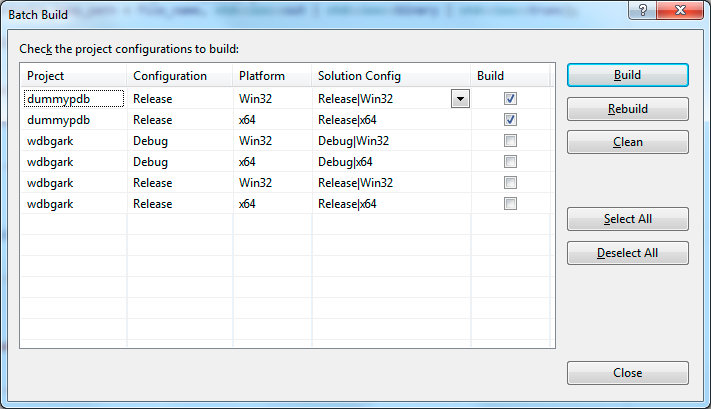
* Select Build -> Batch Build from the menu and build dummypdb module (x86 and x64).
!Batch Build
* Choose solution configuration and platform for the main project.
* Build.
#### NOTE!
Post-build event is enabled for debug build. It automatically copies linked extension into WinDBG's plugins folder (e.g. x64 target:
).
Build using BUILD
Deprecated.
Build using CMD
Yeah, it's possible to build all the stuff using simple batch script.
* Make sure that you ha installed PowerShell at least 3.0.
* If not, then download and install Windows Management Framework.
* Execute the release_build.cmd with a single parameter - a .
* Voila! If there were no errors, the archive file will be created (e.g. wdbgark.X.Y.zip).
* If something is wrong, check the path to the Studio 2017 in the script and/or output log file (release_build.log).
Using
* Download and install Debugging Tools.
* Build or download the extention.
* Make sure that C++ Redistributable for Studio 2017 has already been installed.
* Copy extension to the WDK debugger's directory (e.g. WDK 10):
* x64:
* x86:
* Start WinDBG.
* Setup.aspx) WinDBG to use Microsoft Symbol Ser or deal with them manually.
* Load extension by .load wdbgark (you can see loaded extensions with a .chain command).
* Execute !wdbgark.help for help or !wdbgark.wa_scan for a full system scan.
* Have fun!
FAQ
Q: What is the main purpose of the extension?
A: Well, first is educational only. Second, for fun and profit.
Q: Do you know about PyKd? I can script the whole Anti-Rootkit using Python.
A: Yeah, i know, but C++ is much better.
Q: Where is 1.0?
A: Lost in space of Google Code.
Q: When did the project start?
A: February 2013 on Google Code.
Q: What should i use?
A: Please use x64 only. In the era of x64 i dunno why the heck you may need to use x86 . x64 WinDBG is
able to debug both x86 and x64. Host OS bitness is the only limitation.
Q: How can i help?
A: Spread a word. Report issues and feature requests. I'm open for any suggestions. Thanks!
Q: What kind of memory dump is better to use with an extension?
A: Complete memory dump.
Q: How to report an issue?
A: Feel free to report an issue using GitHub or email to me directly, but please, attach complete memory crash dump file.
Help
Wiki can help.
Used code
* BPrinter. BSD License.
* Udis86. Simplified BSD License.
* TinyXML2. Zlib license.
Whoami
* LinkedIn profile
* Blog
License
This software is released under the GNU GPL v3 License. See the COPYING file for the full license text and
this small addition.
项目信息
开发语言:C++
Star 数:641
技术要点
该项目属于病毒分析方向的开源资源,代码结构清晰,适合安全研究人员学习参考。项目围绕WinDBG Anti-RootKit Extension展开,提供了可运行的实现,对理解相关安全机制、工具原理与攻防技术具有较高的研究价值。
从技术实现角度看,此类项目的核心在于对底层原理的深入理解与工程化落地。开发者在研究过程中可以结合官方文档与社区讨论,梳理项目的初始化流程、核心模块职责与数据流转,逐步掌握其中的技术细节与设计思路。
使用与学习建议
1. 下载源码压缩包,解压到本地环境。
2. 根据项目类型准备对应的运行环境与依赖。
3. 按照 README 中的步骤完成配置与部署。
4. 在隔离的测试环境中运行验证,避免影响生产系统。
免责声明
本资源来源于开源社区,仅供安全研究、技术学习与合法授权范围内的攻防演练使用,请勿用于任何非法或侵害他人权益的用途。使用本项目产生的一切后果由使用者自行承担。
| 资源标题 | wdbgark - WinDBG Anti-RootKit Extension |
| 所属分类 | 病毒分析 |
| 发布作者 | admin |
| 发布时间 | 2026-10-05 23:16:17 |
| 下载权限 | 免费下载 |
| 附件数量 | 2 个下载链接 |
| 浏览次数 | 516 |
| 讨论数量 | 0 |
| 主题状态 | 正常讨论中 |