 病毒分析
点击放大
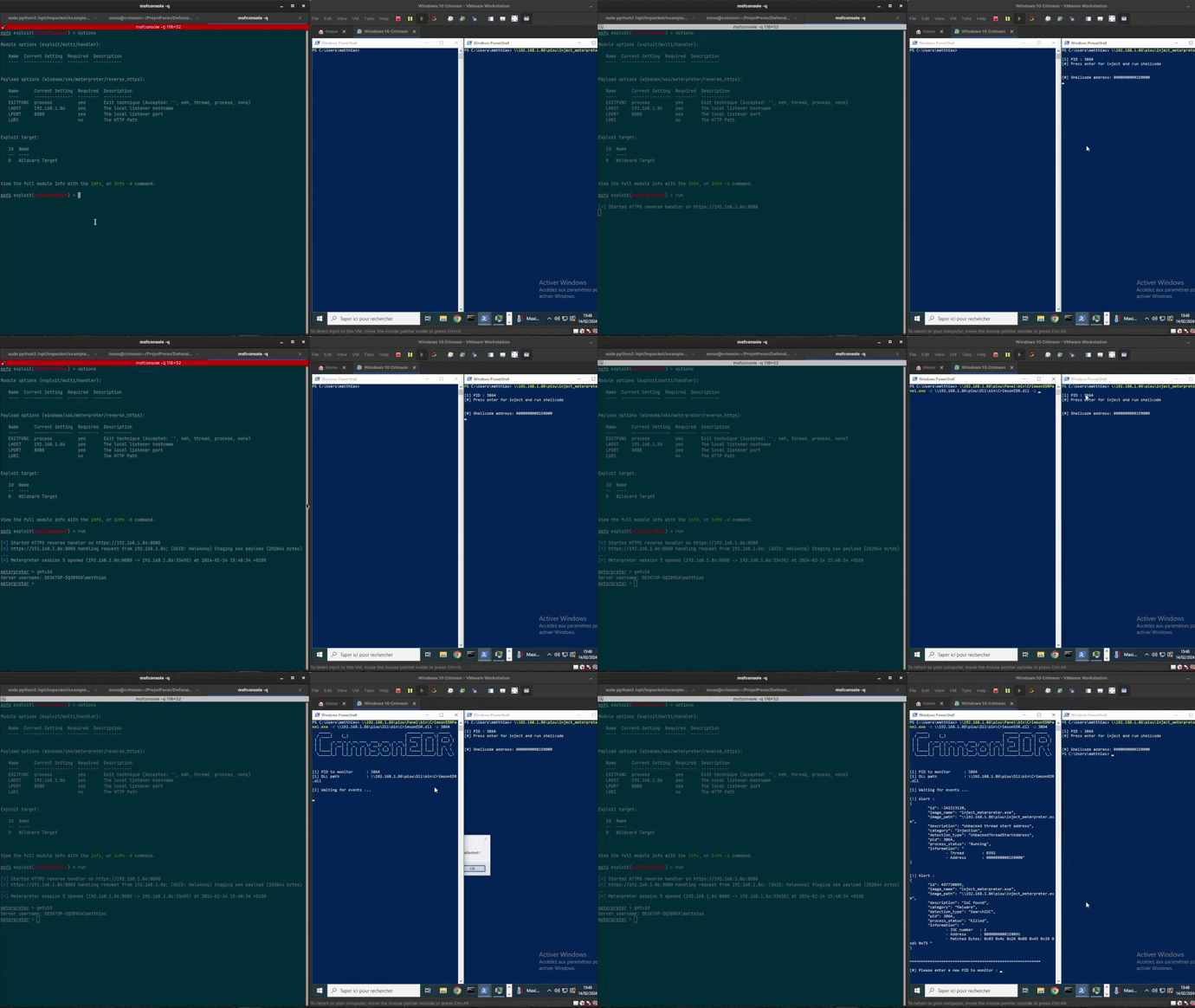
CrimsonEDR - Simulate the behavior of AV/EDR for malware develo
项目说明
CrimsonEDR
CrimsonEDR is an open-source project engineered to identify specific malware patterns, offering a tool for honing skills in circum Endpoint Detection and Response (EDR). By le diverse detection methods, it empowers users to deepen their understanding of security e tactics.
Features
| Detection | Description |
|---------------------------------------------|---------------------------------------------------------------------------------------------------|
| Direct Syscall | Detects the usage of direct system calls, often employed by malware to bypass traditional API hooks.|
| NTDLL Unhooking | Identifies attempts to unhook functions within the NTDLL library, a common e technique. |
| AMSI Patch | Detects modifications to the Anti-Malware Scan Interface (AMSI) through byte-le. |
| ETW Patch | Detects byte-le to Event Tracing for Windows (ETW), commonly manipulated by malware to evade detection. |
| PE Stomping | Identifies instances of PE (Portable Executable) stomping. |
| Reflective PE Loading | Detects the reflecti of PE files, a technique employed by malware to avoid static analysis. |
| Unbacked Thread Origin | Identifies threads originating from unbacked memory regions, often indicative of malicious activity. |
| Unbacked Thread Start Address | Detects threads with start addresses pointing to unbacked memory, a potential sign of code injection. |
| API hooking | Places a hook on the NtWrite function to monitor memory modifications. |
| Custom Pattern Search | Allows users to search for specific patterns provided in a JSON file, facilitating the identification of known malware signatures. |
Installation
To get started with CrimsonEDR, follow these steps:
1. Install dependancy:
2. Clone the repository:
3. Compile the project:
⚠️ Warning
Windows Defender and other antivirus programs may flag the DLL as malicious due to its content containing bytes used to if the AMSI has been patched. Please ensure to whitelist the DLL or disable your antivirus temporarily when using CrimsonEDR to avoid any interruptions.
Usage
To use CrimsonEDR, follow these steps:
1. Make sure the ioc.json file is placed in the current directory from which the executable being monitored is launched. For example, if you launch your executable to monitor from C:\Users\admin\, the DLL will look for ioc.json in C:\Users\admin\ioc.json. Currently, ioc.json contains patterns related to msfvenom. You can easily add your own in the following format:
2. Execute CrimsonEDRPanel.exe with the following arguments:
- -d <path_to_dll>: Specifies the path to the CrimsonEDR.dll file.
- -p <process_id>: Specifies the Process ID (PID) of the target process where you want to inject the DLL.
For example:
<img src="assets/CrimsonEDR.gif" alt="CrimsonEDR demo">
Useful Links
Here are some useful resources that helped in the de of this project:
Contact
For questions, feedback, or support, please reach out to me via:
项目信息
开发语言:C
Star 数:565
技术要点
该项目属于病毒分析方向的开源资源,代码结构清晰,适合安全研究人员学习参考。项目围绕Simulate the behavior of AV/EDR for malware development training.展开,提供了可运行的实现,对理解相关安全机制、工具原理与攻防技术具有较高的研究价值。
从技术实现角度看,此类项目的核心在于对底层原理的深入理解与工程化落地。开发者在研究过程中可以结合官方文档与社区讨论,梳理项目的初始化流程、核心模块职责与数据流转,逐步掌握其中的技术细节与设计思路。
使用与学习建议
1. 下载源码压缩包,解压到本地环境。
2. 根据项目类型准备对应的运行环境与依赖。
3. 按照 README 中的步骤完成配置与部署。
4. 在隔离的测试环境中运行验证,避免影响生产系统。
免责声明
本资源来源于开源社区,仅供安全研究、技术学习与合法授权范围内的攻防演练使用,请勿用于任何非法或侵害他人权益的用途。使用本项目产生的一切后果由使用者自行承担。
| 资源标题 | CrimsonEDR - Simulate the behavior of AV/EDR for malware develo |
| 所属分类 | 病毒分析 |
| 发布作者 | admin |
| 发布时间 | 2026-10-05 23:17:35 |
| 下载权限 | 免费下载 |
| 附件数量 | 2 个下载链接 |
| 浏览次数 | 456 |
| 讨论数量 | 0 |
| 主题状态 | 正常讨论中 |