 病毒分析
点击放大
avred - Analyse your malware to surgically obfuscate it
项目说明
avred
AntiVirus REDucer for AntiVirus REDteaming.
Avred is being used to identify which parts of a file are identified
by a Antivirus, and tries to show as much possible information and context about each match.
This includes:
* Section names of matches
* of matches
* Augmentation of matches as disassembled code or data references
It is mainly used to make it easier for RedTeamers to obfuscate their tools
against static analysis. All Antivirus are supported (AMSI is being used).
Check it out: avred.r00ted.ch
Slides: HITB Slides Cracking The Shield.pdf
Comparison to ThreatCheck
Compared to ThreatCheck, avred has multiple features:
* Shows all matches (not just one)
* the matches to make sure they work
* Shows more information of matches
* Shows relevance of match, so you can target the weakest one
* Supports all AV
Background
Most antivirus engines rely on strings or other bytes sequences to recognize malware.
This project helps to automatically reco signatures (matches).
The difference to similar projects is:
* Knowledge of internal file structures.
* Can extract .bin and modify it
* Knows about PE sections and scan each one indi
* Knows .NET streams
* Supports any Antivirus (thanks to AMSI server via HTTP)
* Shows detailed information about each match (disassembly etc.)
* the matches
Supported files:
* PE (EXE) files, r2 disassembly
* PE .NET files, dncil disassembly
* Word files, pcodedmp disassembly
Example
Screenshots
Fileinfo:
!avred fileinfo
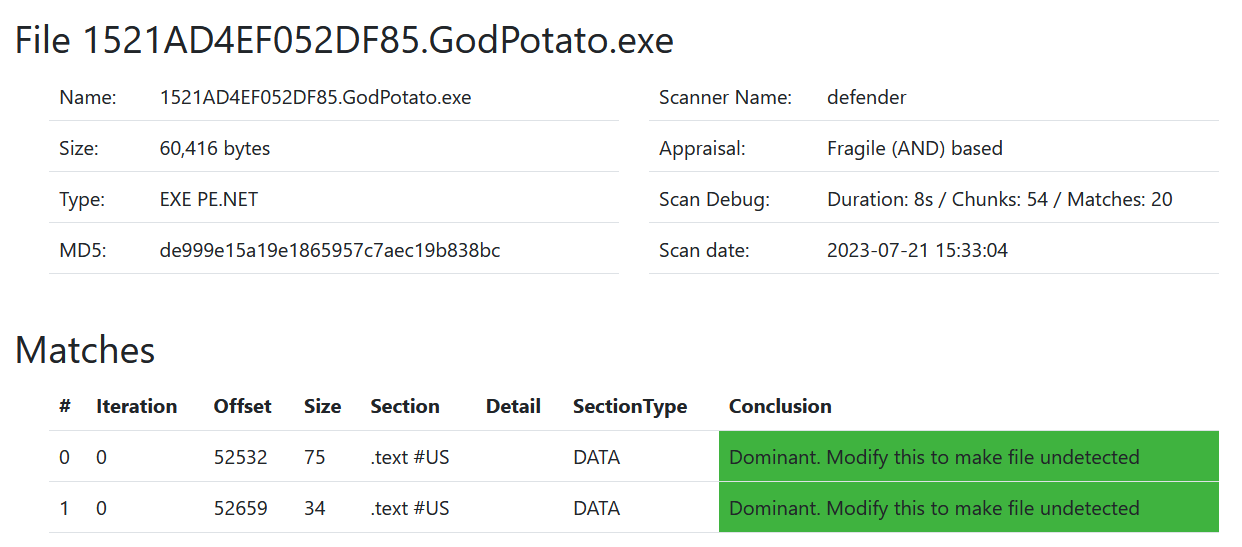
File details:
!avred fileinfo
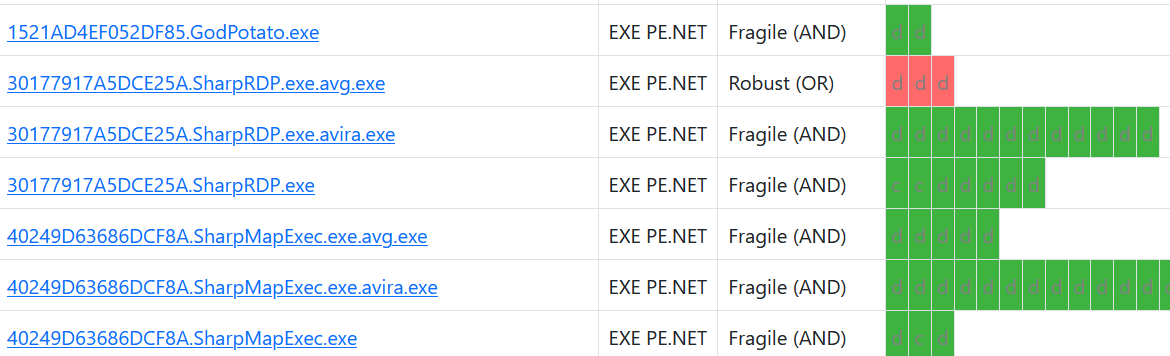
File matches:
!avred filematches
Upgrades
Note: Data is stored in pickled .outcome files. When i change the model,
weird things gonna happen.
Usually this will solve it:
With hashcache enabled, this should be quick.
Install
Requires: python 3.8
Install python deps:
If you get the error ImportError: failed to find libmagic. Check your installation try:
Install radare2:
* follow instructions on radare2 github
* Or download exe from github releases and add to your PATH (e.g. on windows)
Note: Make sure you ha >= 0.14.1 installed
Setup
First, we need a windows instance with an antivirus. We use a as interface to this antivirus on a Windows host.
Lets install and configure a on windows VM 1.1.1.1:9001.
Follow install instructions on a README.
Once you have this and its working properly (use curl 1.1.1.1:9001/test), you can setup avred:
* Configure your server IP in config.yaml (eg "amsi": "1.1.1.1:9001")
* Test it by scanning a file with: ./avred.py --file test.ps1 --server amsi
It should look like this:
How to use
As a web server:
If you dont want that every user is able to see every uploaded file,
set password in config.yaml in key password, use username admin.
From command line:
File and Directory structure
I am team NO-DB. Only files.
File nomenclature:
* file.exe: The file you want to scan
* file.exe.log: All log output of the scanning (with --logtofile)
* file.exe.outcome: Pickled Outcome data structure with all further information
* file.exe.pdb: If you ha symbols
For the webapp, files are uploaded to app/uploads/.
Docker
Build:
run:
run with upload directory mounted:
References
Similar to:
*
*
*
Based on:
*
Tests
Co:
项目信息
开发语言:Python
Star 数:548
技术要点
该项目属于病毒分析方向的开源资源,代码结构清晰,适合安全研究人员学习参考。项目围绕Analyse your malware to surgically obfuscate it展开,提供了可运行的实现,对理解相关安全机制、工具原理与攻防技术具有较高的研究价值。
从技术实现角度看,此类项目的核心在于对底层原理的深入理解与工程化落地。开发者在研究过程中可以结合官方文档与社区讨论,梳理项目的初始化流程、核心模块职责与数据流转,逐步掌握其中的技术细节与设计思路。
使用与学习建议
1. 下载源码压缩包,解压到本地环境。
2. 根据项目类型准备对应的运行环境与依赖。
3. 按照 README 中的步骤完成配置与部署。
4. 在隔离的测试环境中运行验证,避免影响生产系统。
免责声明
本资源来源于开源社区,仅供安全研究、技术学习与合法授权范围内的攻防演练使用,请勿用于任何非法或侵害他人权益的用途。使用本项目产生的一切后果由使用者自行承担。
| 资源标题 | avred - Analyse your malware to surgically obfuscate it |
| 所属分类 | 病毒分析 |
| 发布作者 | admin |
| 发布时间 | 2026-10-05 23:17:45 |
| 下载权限 | 免费下载 |
| 附件数量 | 2 个下载链接 |
| 浏览次数 | 303 |
| 讨论数量 | 0 |
| 主题状态 | 正常讨论中 |