 病毒分析
点击放大
debloat - A GUI and CLI tool for removing bloat from executa
项目说明
!debloat
Debloat
Debloat is a GUI and CLI tool to remo garbage from bloated executables.
By excess garbage, I mean 100 - 800 MB of junk bytes added to a binary to keep it from going into a sandbox. This method of adding junk is called "inflating" or "pumping" a binary. Debloat currently handles the 10 most common inflation tactics.
Being built with Python, the application can easily be le in other workflows. Currently, debloat is used by CCCS's AssemblyLine and CERT Polska's MWDB.
The program can be compiled for Windows, MacOS, Linux. The GUI and CLI ha options: it is intended to be as simple as possible and the logic within the program handles the different use cases automatically.
Compiled binaries ha been included in the Releases.
The debloat can installed using pip install debloat. Use debloat to launch the CLI and debloat-gui to launch the GUI.
For ad users, Debloat can also be imported into other scripts and the processing functions can be called indi.
How to use the GUI?
The GUI of Debloat intends to be as intuitive as possible.
When launched, you can drag and drop bloated file onto the text bar and press the "Process file" button.
Some technical information will be printed to the scrolling textbox and the file without bloat will be written to the directory the file was pulled from.
Sound easy? It is!
Processing files will take a few seconds.<br>
!image
How to use the CLI?
After installing using
pip install debloat use the command debloat.<br>debloat can take two arguments. The first argument is required: the file to debloat. The second argument is optional: the output location. When no output is provided, it will be written to the same directory as the original file.The gui can also be launched from the CLI using the command debloat-gui.
Does it always work?
Not yet.
Based on my recent analysis, debloat is able to remove junk from bloated files 97.8% of the time.
In previous , debloat could accidentally remove too much of the binary. That is no longer the case unless you use the "--last-ditch" switch. If you ever need this switch, consider sharing the sample for additional analysis. This option has now been added to the GUI. Functionally, what the function does is it will remove the whole o, if there is one. In some cases this is necessary as no pattern for the junk was found---this is most commonly the case in samples that do not compress well.
Use Cases (Images from Malcat)
Full support
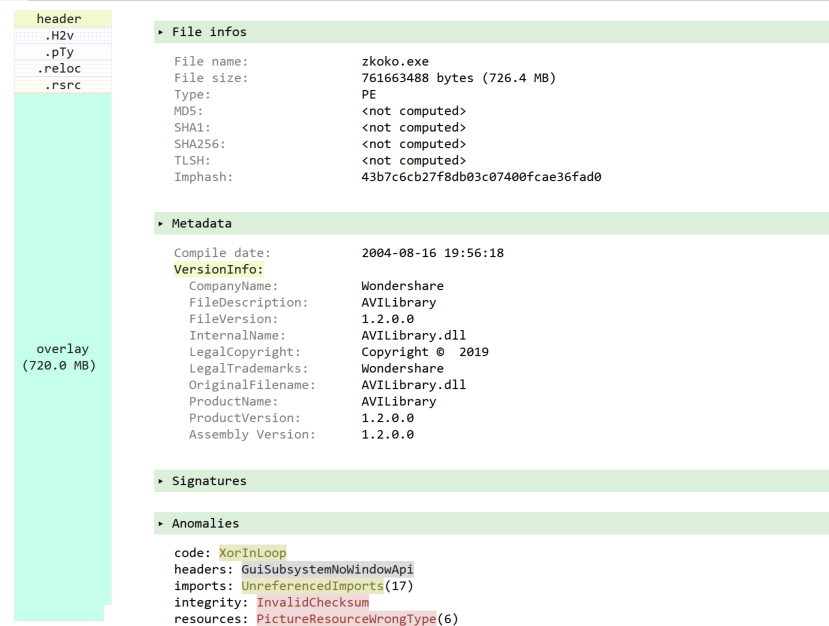
In the image below, the bloat has been appended to the end of the executable. <br>
!Screenshot 2023-02-11 at 3 32 36 PM
In the image below, the bloat has been appended to the executable after packing. <br>
!Screenshot 2023-02-11 at 3 44 10 PM
In the image below, the bloat is identified as in the .rsrc section and is removed from the PE.<br>
!Screenshot 2023-02-11 at 3 35 21 PM
In the image below, the bloat has been included in a PE section named [0]. <br>
!Screenshot 2023-02-11 at 3 26 52 PM
These exe are installers that may contain one or more files. The files contained may or may not be malicious. (Sometimes actors will add files simply for increasing the file size.) All files within the installer are extracted to a new directory. The directory also contains the script for the installer which can be consulted to determine which files may be malicious.
In the image below, Malcat has identified the executable as a NSIS installer.
!image
Partial Support
Other use cases
There are use cases where the tool does not work. However, I plan to solve for them before publishing too much about them.
Why?
There appear to be a limited number of tools to easily process bloated executables. The two tools I have seen the most are “foremost” which is intended for reco binaries from a disk image and “pecheck”.
Foremost works best in instances where the junk bytes are null (0x00) and it struggles when the binary has a fake or real signature. Its use in removing bloat from files is not its original purpose.
Pecheck has been de over 14+ years and has some confusing commandline options. The option to remo content is not the primary function of the script. Pecheck has to be combined with another tool (disitool) in order to handle signed executables. In my experience, there are other times where pecheck can get confused and return an executable twice the size of the original bloated executable. All these factors seem OK if you are handling a small number of binaries, but as the number of binaries and methods increase, a tool specific to removing bloat is needed.
Binary Refinery is an amazing tool. It was written with the intention of being a CyberChef of the commandline. While both tools are amazing, they both have a shortcoming that requires the user to know what formulas should be applied.
There are good solid manual methods to remo from binaries, but these methods can be tedious and not all analysts have the skills to do this. This tool removes the burden of needing to know how to manually remo. Additionally, it allows for better scale. The principles used in the script allow allow for better scale if automation is desired.
How to build?
Follow the build commands appropriate to your platform. The main difference between build commands is the format of the icon.
<br>
MacOS<br>
pyinstaller --onefile --noconsole --additional-hooks-dir=./hook --icon=debloat.icns gui.pyWindows<br>pyinstaller --onefile --noconsole --additional-hooks-dir=./hook --icon=debloat.ico gui.py
Linux<br> pyinstaller --onefile --noconsole --icon=debloat.ico --collect-all tkinterdnd2 gui.py
Want to discuss?
Consider joining the debloat Discord.
Credits
Big shoutout to Jesko Hüttenhain creator of Binary Refinery. The NSIS extraction is based on his reverse engineering of the NSIS file format. Check out Binary Refinery if you have not.
Where is this project going next?
Batch processing: process all files in a directory and produce a report.
Better support for using processing methods outside of debloat.
Support for debloating without unzipping.
项目信息
开发语言:Python
Star 数:456
技术要点
该项目属于病毒分析方向的开源资源,代码结构清晰,适合安全研究人员学习参考。项目围绕A GUI and CLI tool for removing bloat from executables展开,提供了可运行的实现,对理解相关安全机制、工具原理与攻防技术具有较高的研究价值。
从技术实现角度看,此类项目的核心在于对底层原理的深入理解与工程化落地。开发者在研究过程中可以结合官方文档与社区讨论,梳理项目的初始化流程、核心模块职责与数据流转,逐步掌握其中的技术细节与设计思路。
使用与学习建议
1. 下载源码压缩包,解压到本地环境。
2. 根据项目类型准备对应的运行环境与依赖。
3. 按照 README 中的步骤完成配置与部署。
4. 在隔离的测试环境中运行验证,避免影响生产系统。
免责声明
本资源来源于开源社区,仅供安全研究、技术学习与合法授权范围内的攻防演练使用,请勿用于任何非法或侵害他人权益的用途。使用本项目产生的一切后果由使用者自行承担。
| 资源标题 | debloat - A GUI and CLI tool for removing bloat from executa |
| 所属分类 | 病毒分析 |
| 发布作者 | admin |
| 发布时间 | 2026-10-05 23:19:27 |
| 下载权限 | 免费下载 |
| 附件数量 | 2 个下载链接 |
| 浏览次数 | 440 |
| 讨论数量 | 0 |
| 主题状态 | 正常讨论中 |