 病毒分析
点击放大
macOS-Fortress - Firewall and Privatizing Proxy for Trackers, Attac
项目说明
macOS-Fortress
===========
macOS-Fortress: Firewall, Blackhole, and Pri Proxy for Trackers, Attackers, Malware, Adware, and Spammers; with On-Demand and On-Access Anti-Virus Scanning
Kernel-level, OS-level, and client-le for macOS. Built to address a steady stream of attacks on snort and server logs, as well as blocks ads, malicious scripts, and conceal information used to track you around the web. After this package was installed, snort and other detections ha to a fraction with a few simple blocking actions. This setup is a lot more capable and effective than using a simple adblocking browser add-on. There's a world of difference between ad-filled web pages with and without a filtering proxy server. It's also saved me from inad clicking on phishing links.
Proxy features
* macOS adapti
* Adapti to brute force attacks
* IP blocks updated about twice a day from emergingthreats.net (IP blocks, compromised hosts, Mal) and dshield.org’s top-20
* Host blocks updated about twice a day from hphosts.net
* HTTPS Inspection using Privoxy
* EasyList Tracker and Adblock Rules for Privoxy with adblock2privoxy
* Incorporates multiple blocking rulesets into both Privoxy and PAC formats, including easyprivacy.txt, easylist.txt, fanboy-annoyance.txt, fanboy-social.txt, antiadblockfilters.txt, malwaredomains_full.txt, and the anti-spamware list adblock-list.txt.
Anti-Virus features
* Configures clamAV for macOS with regular on-demand scans and on-access scanning of user
Downloads and
Desktop directories.* See the MacPorts port
clama for details, port notes clama.Installation
After initial installation, it is necessary to kickstart these launch daemons, which run on a schedule, and do not run at load time:
The default web server is nati Apache, which must be started with the command:
Note that all files in this repo are superceded by the MacPorts port
macos-fortress, including the
deprecated installation script readme-and-install.sh.
Firewall-only installation
Proxy-only installation
Check and troubleshoot setup
> sudo sh macosfortress_setup_check.sh
Working output:
Disabling
or
This repo is superceded by the MacPorts port
macos-fortress, including the
deprecated disable/uninstall script disable.sh, which was originally used to unload all launch daemons,
disable the pf firewall, and list all installed files without removing them.
Configuration modifications
There are three major, independent, and configurable components to the repo: the PF firewall, the proxy chain, and the
A. Here are a few configuration pointers.
PF firewall
The file pf.conf controls the firewall ruleset and likely must be edited on a specific computer and network, or
edited for a configuration.
* The PF firewall can be disabled with the command:
> sudo pfctl -d
* The int_if for the internal interface is set to en0. This should be changed to the acti on your
computer, which can be determined with the command ifconfig -a, or more specificall:
> ifconfig | pcregrep -M -o '^[^\t:]+:([^\n]|\n\t)*status: active' | egrep -o -m 1 '^[^\t:]+'
* The table <lan_inet> is set to the standard reser { 10/8, 172.16/12, 192.168/16 }. This must be changed
to the CIDR ranges on the specific LAN.
* Specific services accessible only on the LAN and on the open internet should be selected and set in the appropriate
. See /etc/services.
* The PF firewall ruleset can be flushed, enabled, and reintialized with the command:
> sudo pfctl -Fall && sudo pfctl -ef /etc/pf.conf
* See the pfctl commands in the script pf_attacks to determine IP addresses and counts for the
blocked IPs. E.g., the adapti <bruteforce> is shown using the command:
> sudo pfctl -t bruteforce -Ts
Proxy
Privoxy on port 8118 is configured in config to sent web requests to the internet, wih HTTPS inspection configured for
blocking content within TLS encrypted tunnels—the great majorityof we content. An auxiliary nginx webserver for CSS-based
element hiding is configured on port 8119. Privoxy .action and .filter files, and nginx .css files are created from Easylist rules
using the repo adblock2privoxy.
Browsing to the privoxy configuration page through any of these proxy configurations is a check on whether the
proxy is running and configured correctly.
To provide these services on a firewalled LAN, edit the privoxy and nginx configuration files
config, and nginx.conf so that they're
a for devices on the LAN, or connecting from a .
Macports updates
Update Macports packages regularly. This command with update the Macports database, update all installed packages, and uninstall all older, inacti.
sudo bash -c 'port selfupdate ; port -puN upgrade outdated ; port uninstall inactive'
Warning about Privoxy compression
Though it's possible to build Privoxy with the configure --enable-compression option,
compressed HTTP traffic within a exposes your traffic to the
CRIME/BEAST/ attacks and is generally not
recommended.
Installation details
The MacPorts port
macos-fortress
(
sudo port install macos-fortress) installs and configures an macOS Firewall and PriProxy. It will:
* Uses Macports to download and install several key utilities and applications (wget gnupg p7zip squid privoxy nmap)
* Configure macOS's PF nati (man pfctl, man pf.conf), and privoxy
* Networking on the local computer can be set up to use this Automatic Proxy Configuration without breaking App Store or other updates (see Privoxy config)
* Uncomment the nat directive in pf.conf if you wish to set up an Open
* Install and launch daemons that download and regularly update open source IP and host blacklists. The sources are emergingthreats.net (net.emergingthreats.blockips.plist), dshield.org (net.dshield.block.plist), hosts-file.net (net.hphosts.hosts.plist)
* After installation the connection between clients and the internet looks this this:
> Application :arrow_right: proxy.pac :arrow_right:port 8118:arrow_right: Privoxy :arrow_right: Internet
An auxilliary nginx-based webserver (nominally on localhost:8119) is used for both a proxy.pac ad and tracker blackhole and for CSS element blocking rules with the Privoxy configuration generated by adblock2privoxy.
Public Service Announcement
This firewall is configured to block all known tracker and adware content—in the browser, in-app, wherever it finds them. Many websites now offer an additional way to block ads: subscribe to their content. Security and privacy will always necessitate ad blocking, but now that this software has become mainstream with mainstream effects, ad blocker users must consider the potential impact of ad blocking on the writers and publications that are important to them. Personally, two publications that I gladly pay for, especially for their important 2016 US Presidential election co, are the *New York Times* and *The Atlantic*. I encourage all users to subscribe to their own preferred publications and writers.
Tracker blocking
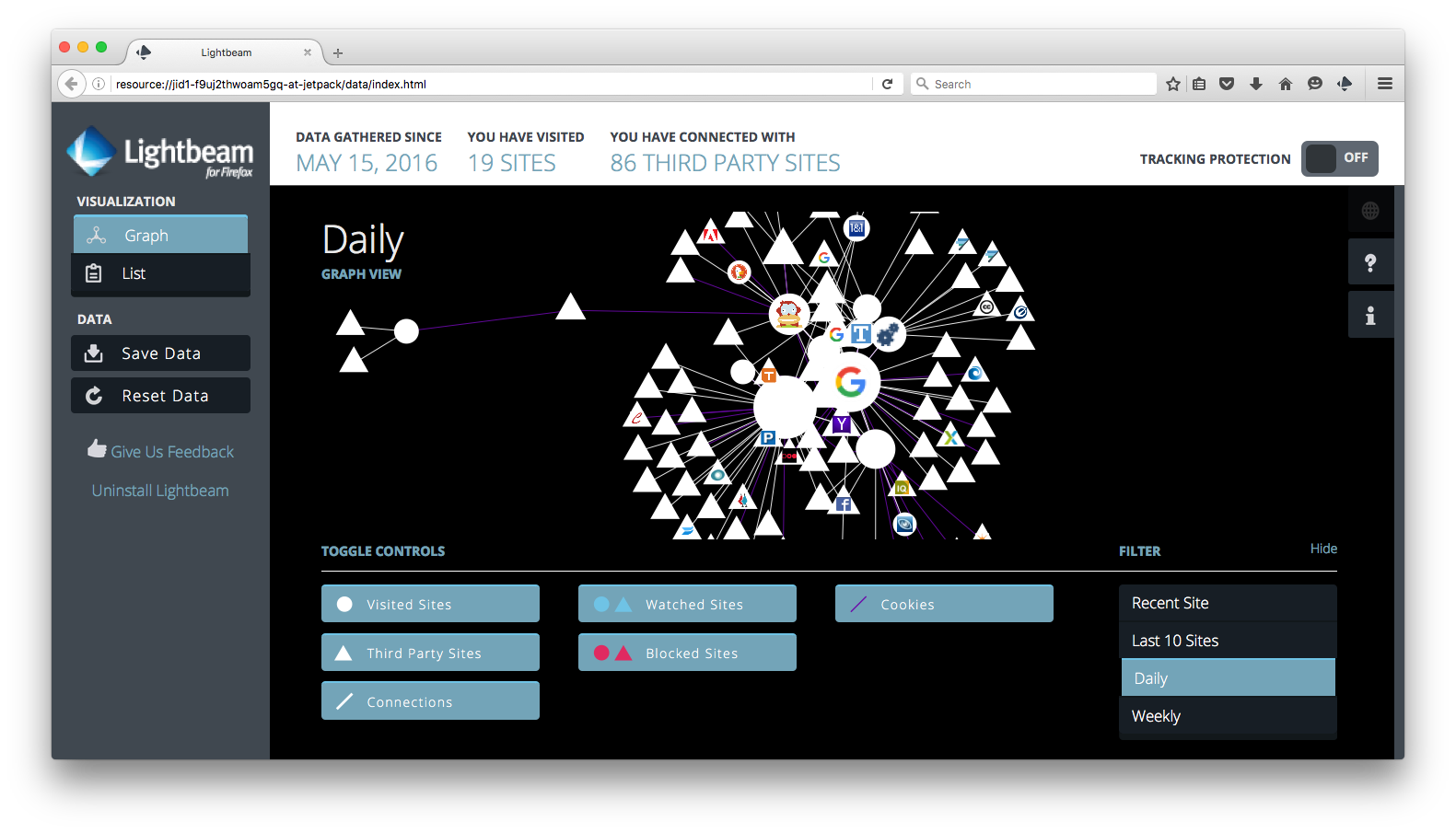
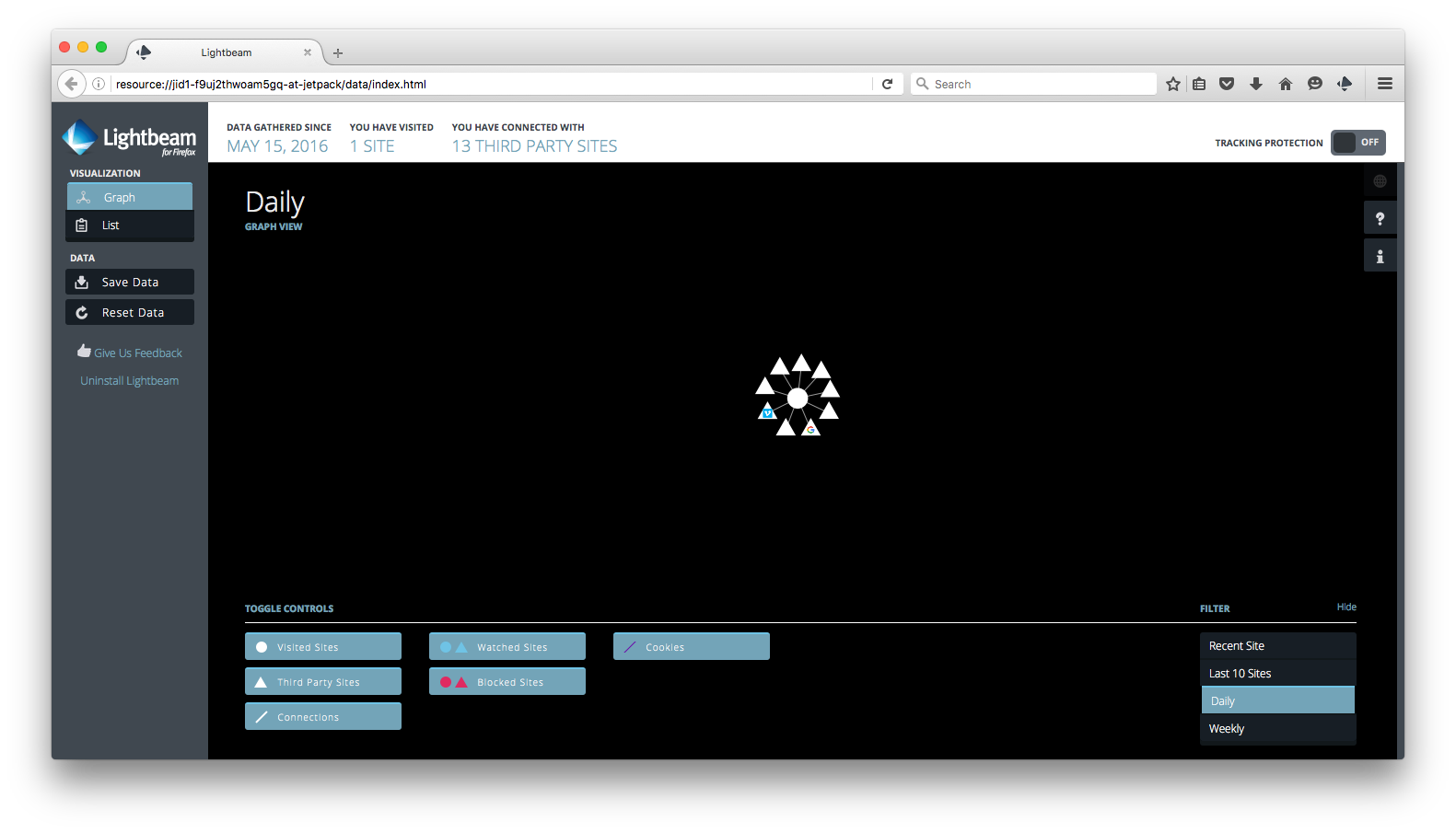
Lightbeam, the tracking tracker Firefox add-on, shows how ad- and tracker-blocking works to prevent third parties monitoring you or your children's online acti. My daughter enjoys the learning exercises at the children's website ABCya!. The Lightbeam graph below on the left shows all the third party trackers after less than a minute of browser activity, without using a pri proxy. The graph on the right shows all this tracker activity blocked when this pri proxy is used.
!Lightbeam graph without proxy| !Lightbeam graph without proxy
------------ | -------------
Lightbeam graph without proxy | Lightbeam graph with proxy
This problem is the subject of Gary Kovacs's TED talk, *Tracking Our Online Trackers:*

Attack blocking
The snort intrusion detection system reports far fewer events when known attack sites are blackholed by the packet filter:
!snort+BASE O| !snort+BASE Events
------------ | -------------
snort+BASE O | snort+BASE Events
Notes
* Configure the squid proxy to accept connections on the LAN IP and set LAN device Automatic Proxy Configurations to to protect devices on the LAN.
* Count the number of attacks since boot with the script pf_attacks. `Attack'' is defined as the number of blocked IPs in PF's bruteforce table plus the number of denied connections from blacklisted IPs in the tables compromised_ips, dshield_block_ip, and emerging_threats./usr/local/etc/whitelist.txt
* Both squid and Privoxy are configured to forge the User-Agent. The default is an iPad to allow mobile device access. Change this to your local needs if necessary.
* Whitelist or blacklist specific domain names with the files and /usr/local/etc/blacklist.txt. After editing these file, use launchctl to unload and load the plist /Library/LaunchDaemons/net.hphosts.hosts.plist, which recreates the hostfile /etc/hosts-hphost and reconfigures the squid proxy to use the updates.macosfortress_boot_check
* Sometimes pf and privoxy do not launch at boot, in spite of the use of the use of their launch daemons. Fix this by hand after boot with the scripts , or indi using pf_restart, pri, and squid_restart. And please post a solution if you find one.wget -N` option to sa's bandwidth
* All open source updates are done using the
Security
* These services are intended to be run on a secure LAN behind a router firewall.
* The default proxy configuration will only accept connections made from the local computer (localhost). If you change this to accept connections from any client on your LAN, do not configure the router to forward ports 8118, or you will be running an open web proxy.
项目信息
开发语言:Shell
Star 数:449
技术要点
该项目属于病毒分析方向的开源资源,代码结构清晰,适合安全研究人员学习参考。项目围绕Firewall and Privatizing Proxy for Trackers, Attackers, Malware, Adware, and Spammers with Anti-Virus On-Demand and On-Access Scanning (PF, squid, privoxy, hphosts, dshield, emergingthreats, hostsfile, PAC file, clamav)展开,提供了可运行的实现,对理解相关安全机制、工具原理与攻防技术具有较高的研究价值。
从技术实现角度看,此类项目的核心在于对底层原理的深入理解与工程化落地。开发者在研究过程中可以结合官方文档与社区讨论,梳理项目的初始化流程、核心模块职责与数据流转,逐步掌握其中的技术细节与设计思路。
使用与学习建议
1. 下载源码压缩包,解压到本地环境。
2. 根据项目类型准备对应的运行环境与依赖。
3. 按照 README 中的步骤完成配置与部署。
4. 在隔离的测试环境中运行验证,避免影响生产系统。
免责声明
本资源来源于开源社区,仅供安全研究、技术学习与合法授权范围内的攻防演练使用,请勿用于任何非法或侵害他人权益的用途。使用本项目产生的一切后果由使用者自行承担。
| 资源标题 | macOS-Fortress - Firewall and Privatizing Proxy for Trackers, Attac |
| 所属分类 | 病毒分析 |
| 发布作者 | admin |
| 发布时间 | 2026-10-05 23:19:40 |
| 下载权限 | 免费下载 |
| 附件数量 | 2 个下载链接 |
| 浏览次数 | 201 |
| 讨论数量 | 0 |
| 主题状态 | 正常讨论中 |