 病毒分析
点击放大
Simpleator - Simpleator ("Simple-ator") is an innovative Window
项目说明
Simpleator
![Build Status]()
Simpleator ("Simple-ator") is an inno Windows-centric x64 user-mode application emulator that le several new features that were added in Windows 10 Spring Update (1803), also called "Redstone 4", with additional impro that were made in Windows 10 October Update (1809), aka "Redstone 5".
Namely, Simpleator relies on:
* The Hyper- API (WH now allows compatible applications to le the Hyper- in order to create and manage "Exo" Partitions, pro a similar API as KVM on Linux.
* Changes to the Memory Manager API which resulted in the creation of the and Map APIs that allow constraining alignment, minimum, and maximum address ranges, without custom hooks or hacks.
* Impro to WHVP in 1809, specifically the ability to partially unmap guest physical address (GPA) ranges.
It is meant as a Proof-of-Concept on how simpler and faster sandboxed detonation en could be built, as well as even more resource-limited containers that could run ser workloads (AWS Lambdas / Azure Functions) without requiring a guest operating system.
Building
Simpleator can be built with Studio 2017 and the latest Windows SDK (1809). Note that older SDKs cannot be used, as they do not support the newer WH, and that Simpleator itself only supports 64-bit Windows 10 systems running builds 17763 or abo 5 / 1809).
Screenshots
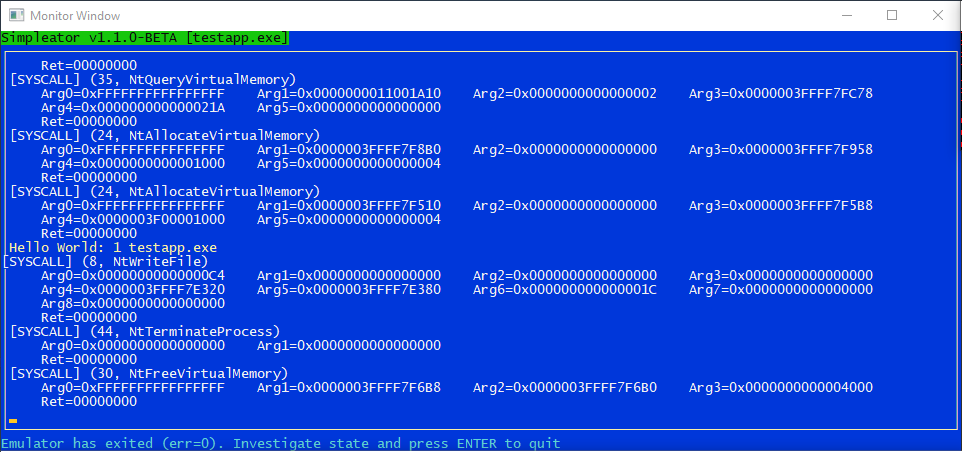
The main Monitor Window which traces the system calls, shown here displaying the console output from the test guest application:
!Monitor
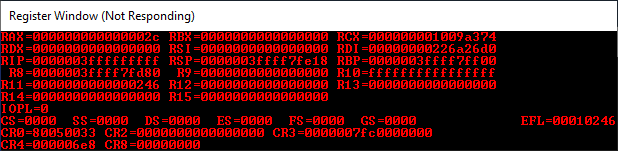
The Register Window, which can be used when there's an assertion/issue with the emulator (the UI thread will freeze, hence the "not responding" message):
!Registers
And finally, if enabling the FLG_SHOW_LDR_SNAPS flag in the PEB, the Debug Window shows calls to DbgPrint from the loader (otherwise, any other DbgPrint calls would show up regardless):
!Debug
Moti
tbd tbd add links
De have been writing, and le, emulation technologies for decades, so why write yet another emulator?
First, the introduction of an actual API in the heart of Windows is an under-publicized dramatic (in a positive way) shift to the previous closed nature of the Hyper-. While there were undocumented APIs and IOCTLs through the Infrastructure Device (VID) library, a supported and stable Win32 layer is a welcomed impro. Already, QEMU now supports using WHVP for its acceleration, and 6.0 will likely ship with this support as well (it is already implemented in the repository). Only stands alone and defiant. On this topic, learning how to le this new API isn't necessarily an easy topic, so I wanted to learn -- and share with others -- how these new interfaces work.
Second, when looking at emulation technologies, there are usually three modern driving forces for its use:
* The ability to emulate full operating systems, for purposes of testing, de, education, and compatibility or accessibility.
* The ability to o a machine, such as for pro cloud/container-type services
* The ability to safely 'detonate' potentially malicious code and study its behavior
My main interest was to look at the third bullet -- which so far has been achieved with full system emulation, with some custom implementations that use o models, but still bringing lots of complexity -- a case in point being most Antivirus Emulators, such as the one implemented in Windows Defender (see some great research [here] and [here]). Furthermore, researchers familiar with Qilin ha already seen the multitude of simple Python bindings that easily build upon it in order to quickly 'spin-up' a Windows process using an o model by le QEMU as a full system emulator but yet without a primary OS image.
I decided to pursue another avenue -- a sort of 'user-mode Windows' implementation, where the only binaries mapped in the guest address space would be the host's OS loader (Ntdll.dll) and the target binary, and where a 256 GB address space would be provided that would ha 1:1 access between guest mappings and host mappings, in a 'sandboxed' process (NOTE: I have not yet implemented the AppContainer-based sandboxing). As long as the emulator would provide the basic kernel-constructed data structures for the loader and system DLLs, the host could run at nati, with only pri Ring transitions causing exits.
Then, for simplicity, a System Call Provider intercepts the system calls that are being made by the guest VM, and can operate in one of three ways:
* Forward the call natively to the host operating system
* Adjust certain parameters and/or modify the behavior of the call in order to satisfy the needs of the emulation en (including perhaps blocking or not implementing the call)
* Similar to the point abo the call from a security point of view, such that the guest code is not attempting to operate on system-call-accessible state that belongs to the host
Depending on where the needs lie between performance, complexity, compatibility and security, less than 500 lines of code are needed to implement enough of bullets 1 and 2 above to get a simple test application to load, display a "Hello World" message, and exit, with lots of potential security issues in handling its system calls. A doubling of the codebase could probably realistically mitigate most of the security issues in the system calls (minus actual in the host OS kernel -- which a sandbox could mitigate against).
But even at 1000 lines of code, since all of the system calls are ultimately natively sent to the operating system, Simpleator behaves more like a 'seccomp' implementation on top of a cgroup on Linux, rather than the much more complex emulators that we see today.
Finally, it's worth pointing out that there's renewed interest in the cloud computing/containerization space to minimize the resources needed for running workloads such as Amazon Lambdas or Azure Functions, which are ser pieces of code that run in containers, which still require spinning up an entire guest operating system. With a stricter control of the security boundaries that Simpleator provides, one could imagine the ability to run the JVM or .NET Core as a dedicated application without requiring a full guest OS.
Basic Design
tbd tbd
There are 3 main interesting parts (to me) about how Simpleator achieves a unique guest execution en that makes it much simpler to run Windows applications:
* The creation of a PEB and TEB with the same kind of data that the kernel's MiCreatePebOrTeb functions would set up, but with specific flags to make it easier to run under the guest en, including
1) Running as a secure process todo: Flag
2) Running as a protected process todo: Flag
3) Disabling IFEO todo: Flag
* Creating a 1:1 mapping between guest and host addresses, and le the new "address requirements" features to lock down allocations to that range. Note that at the moment, Simpleator maps the authentic KUSER_SHARED_DATA region at 0x7FFE0000 which means that the passage of time is 'seen' by the guest to the updating of the SystemTime and InterruptTime fields that are kept up to date by the host. Isolating this region would require a periodic timer to emulate updating this value.
* Mapping the authentic Ntdll.dll image and le the host OS system calls to natively execute most of the loading process, pro access to INT 2E, SYSCALL and INT 2C ring transitions.
Additionally, from a modularity basis, Simpleator is composed of three binaries:
* Simpleator.exe which implements the Debug Monitor. This component is responsible for displaying the UI for the Monitor, Debug, and Register windows, hosting a named pipe which allows the emulator to communicate with it, and loading the emulator with an appropriate en (today, this means setting up the 256 GB address space reser, in the future, this would also mean the sandbox).
* Provider.dll which implements the System Call Provider for Windows 10 1809 (RS5) and Windows 10 1903 (19H1), the current builds supported.
* Emulator.exe which implements the actual WH emulator code. It is mainly responsible for communicating with the Debug Monitor over the pipe, handling the ring transition code to talk to and from the System Call Provider, and doing the initial address space setup and PE loading of the Ntdll.dll loader library and the target application binary.
Testing
First, you must install the Windows Hypervisor Platform, which also requires Hyper-V to be installed and enabled. You can do so either by using the following command-line:
Or by launching the GUI as below:
And then checking the "Hyper-V" and "Windows Hypervisor Platform" checkboxes, as seen in the screenshot below.
!Optional Features
You must ha rights for usage of any of these commands.
Ob, please make sure that your hardware supports Hardware Technology (such as Intel VT-x).
References
If you would like to know more about my research or work, I invite you check out my blog at as well as my training & consulting company, Winsider Seminars & Solutions Inc., at
tbd tbd
Caveats and Limitations
Simpleator is designed to minimize code size and complexity -- this does come at a cost of robustness and most importantly, security. For example, in the current implementation, NtCreateFile, NtOpenFile and NtWriteFile are fully passed through to the host OS kernel, meaning that a 'malicious' payload could o any files on disk that the host emulator process has access to, since there is no additional sandboxing around the host.
Furthermore, note that only the _strict minimum number of system calls_ were implemented to get the Testapp.exe application to launch, print its text, and exit. Running a more complex application such as Cmd.exe will require significantly more work, especially as certain APIs expect a connection to CSRSS to be made over LPC and for particular data to be returned back. Currently, Simpleator pretends that it is a Secure VTL-1 Protected Process, which limits significantly what some of the guest APIs attempt to do, and therefore, certain calls outright crash (such as, for example, some of those around locale).
More complex emulation and modification of the guest's address space would be required to unblock such API usage.
*Simpleator does not do much error checking, , and exception handling. It is not robust software designed for production use, but rather a reference code base*.
License
项目信息
开发语言:C++
Star 数:404
技术要点
该项目属于病毒分析方向的开源资源,代码结构清晰,适合安全研究人员学习参考。项目围绕Simpleator ("Simple-ator") is an innovative Windows-centric x64 user-mode application emulator that leverages several new features that were added in Windows 10 Spring Update (1803), also called "Redstone 4", with additional improvements that were made in Windows 10 October Update (1809), aka "Redstone 5".展开,提供了可运行的实现,对理解相关安全机制、工具原理与攻防技术具有较高的研究价值。
从技术实现角度看,此类项目的核心在于对底层原理的深入理解与工程化落地。开发者在研究过程中可以结合官方文档与社区讨论,梳理项目的初始化流程、核心模块职责与数据流转,逐步掌握其中的技术细节与设计思路。
使用与学习建议
1. 下载源码压缩包,解压到本地环境。
2. 根据项目类型准备对应的运行环境与依赖。
3. 按照 README 中的步骤完成配置与部署。
4. 在隔离的测试环境中运行验证,避免影响生产系统。
免责声明
本资源来源于开源社区,仅供安全研究、技术学习与合法授权范围内的攻防演练使用,请勿用于任何非法或侵害他人权益的用途。使用本项目产生的一切后果由使用者自行承担。
| 资源标题 | Simpleator - Simpleator ("Simple-ator") is an innovative Window |
| 所属分类 | 病毒分析 |
| 发布作者 | admin |
| 发布时间 | 2026-10-05 23:20:41 |
| 下载权限 | 免费下载 |
| 附件数量 | 2 个下载链接 |
| 浏览次数 | 213 |
| 讨论数量 | 0 |
| 主题状态 | 正常讨论中 |