 病毒分析
点击放大
ghost - Detects process injection and memory manipulation
项目说明
Ghost
![CI]()

Ghost is a process injection detection tool written in Rust. It watches running processes and tries to catch suspicious stuff like code injection, memory manipulation, and other tricks that malware uses to hide.
What it does
The main idea is simple: scan processes and look for weird memory patterns, hooked functions, shellcode, and other signs that something's been tampered with. It works on Windows, Linux, and macOS (though Windows support is the most complete right now).
Some of the things it can detect:
It also maps detected behaviors to the MITRE ATT&CK framework, which is helpful if you're documenting threats or writing reports.
Demo
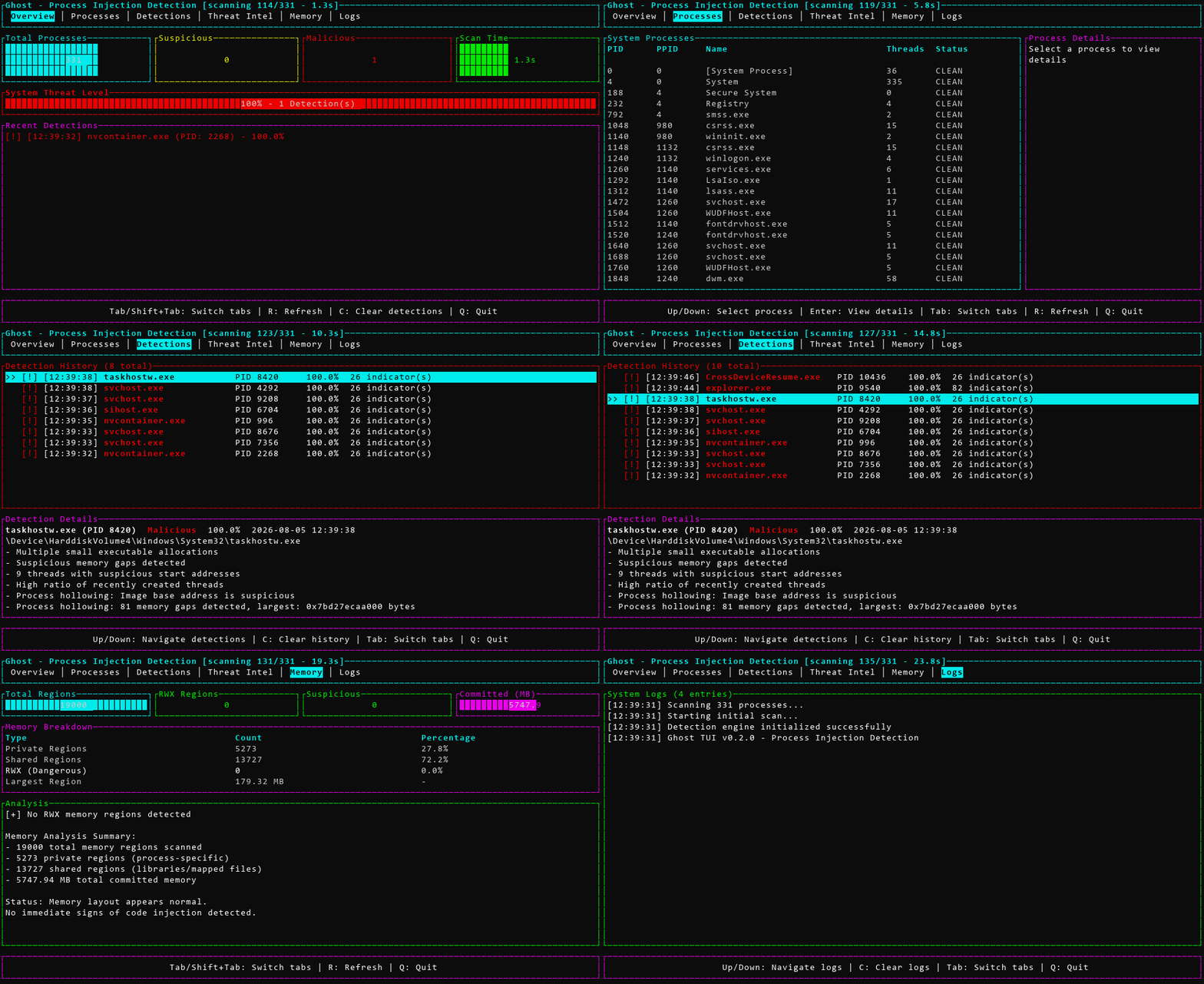
!Ghost TUI mid-scan
Results stream in as each process is analyzed, with li in the title bar ([scanning N/M]).
Building it
You'll need Rust installed (1.70 or newer). Then:
On Windows, you'll also need the MS tools. Linux needs basic de (gcc, etc.). macOS needs Xcode command line tools.
Running it
There are two interfaces: a command-line tool and an interacti UI.
CLI:
TUI:
The TUI has six tabs: O, Processes, Detections, Threat Intel, Memory, and Logs. A scan runs in the background and results stream in live as each process is analyzed, with [scanning N/M] progress shown in the header.
Keybindings:
Tab / Shift+Tab or Left/Right - switch tabsUp/Down - na the list on the current tab (selection is highlighted with >>)Enter - view details for the selected process (Processes tab)R - trigger a rescanC - clear the current tab's data (detections on O/Detections, logs on Logs)Q - quitEsc is deliberately not bound to quit - some terminals deli Escape bytes from focus or OSC sequences, which would otherwise close the app unexpectedly.
Shell Completions
Ghost supports tab completion for Bash, Zsh, Fish, PowerShell, and Elvish.
See completions/README.md for detailed installation instructions.
Optional Features
Ghost supports optional features that can be enabled during build:
Note: ML features require trained models to function. See ghost_ml/README.md for training instructions.
Configuration
You can tweak behavior with a TOML config file. Check examples/ghost.toml for a starting point. You can enable/disable specific detection methods, set confidence thresholds, skip system processes, and control how often it scans.
Example config snippet:
Controlling Output Size
By default, Ghost limits output to 10 indicators per detection and deduplicates similar findings. For large scans, you can further reduce output:
Command-line options:
Configuration file:
This is useful when scanning many processes or running continuous monitoring where output files would otherwise grow too large.
Watch Mode
Watch mode lets you monitor your system continuously without having to run scans manually. It's useful for catching injection attempts as they happen.
When running in watch mode, Ghost:
Example output:
Baseline Mode
Baseline mode captures a snapshot of your system's current state. Later scans can compare against this baseline to detect changes - useful for finding new threats without wading through known issues.
When comparing against a baseline, Ghost reports:
Example output:
Exit code is 1 if changes are detected, 0 if clean.
Webhook Alerts
Ghost can send real-time alerts to Slack, Discord, or any HTTP endpoint when threats are detected. Perfect for SOC integration or getting notified on your phone.
Ghost auto-detects the webhook type from the URL:
hooks.slack.com → Slack format with attachmentsdiscord.com/api/webhooks → Discord format with embedsSlack alerts include color-coded attachments (red/orange/green by threat level) with the process name, PID, top indicators, threat level, and confidence score as fields. No emoji in the payload - message text reads "Ghost detected suspicious activity on *hostname*".
Discord alerts use rich embeds with the same information in a clean format.
Generic webhooks send a JSON payload:
What the results mean
Ghost assigns one of three threat levels: Clean, Suspicious, or Malicious. A confidence score alone doesn't decide the - Malicious additionally requires at least one high-specificity indicator (like a thread starting in unbacked executable memory), so a pile of weak, generic signals can't add up to a malicious on their own. That corroboration requirement is what keeps things like JIT-hea with unbacked RWX memory at Suspicious instead of Malicious.
High confidence doesn't always mean malware - some legit software does weird stuff with memory too. Use your judgment and in further if needed.
Platform differences
Windows: Fully functional. Process enumeration, memory reading, hook detection, process hollowing detection, PE , and thread analysis all work.
Linux: Functional core features. Process enumeration (/proc), memory reading, LD_PRELOAD detection, and ptrace-based injection detection work. eBPF support requires ebpf-detection feature flag and is currently a stub implementation.
macOS: Partial support. Process enumeration, memory region enumeration, memory reading, and thread enumeration work using mach VM APIs. Hook detection includes DYLD_INSERT_LIBRARIES detection and inline hook detection framework.
Performance
It's designed to be fast enough for continuous monitoring. A full system scan (200 processes) usually takes under 5 seconds. Memory enumeration per process is around 50-100ms. The detection engine itself adds about 5-10ms per analysis.
YARA rules
The tool includes YARA rule integration, built with --features yara-scanning. Rules are stored in the rules/ directory and co malware families like Metasploit, Cobalt Strike, generic shellcode patterns, and e techniques. You can add your own rules - just drop .yar files in that folder.
Ghost looks for rules in this order: the GHOST_RULES_DIR en , then next to the running executable, then the current working directory.
Prebuilt release archives and the Docker image currently ship YARA support only on the x86_64-unknown-linux-gnu target - other platforms in the release matrix are built with --no-default-features and won't load rules until someone adds a proven path to a system YARA library for them.
Exit codes
Limitations
This is a userspace tool with the following limitations:
Malicious; the detection logic has since been reworked and that same scan now reports 0. JIT-hea (browsers, some game clients) still show up as Suspicious due to unbacked RWX memory, which is a real but not inherently malicious pattern worth triage rather than a Documentation
There's more detail in the docs/ folder:
DETECTION_METHODS.md - Explains how each detection technique worksMITRE_ATTACK_CO.md - Lists which ATT&CK techniques are coveredPERFORMANCE_GUIDE.md - Tips for tuning performanceAlso check out CONTRIBUTING.md if you want to contribute, and SECURITY.md for the security policy.
License
MIT. See the LICENSE file.
A note on usage
This tool is for security research, testing your own systems, and catching actual threats. Don't use it on systems you don't own or don't ha to test. Be responsible.
Also, if you're in a real incident, remember that malware can detect when it's being analyzed and might beha or shut down. Ghost tries to be stealthy but there's no guarantee ad malware won't notice.
项目信息
开发语言:Rust
Star 数:391
技术要点
该项目属于病毒分析方向的开源资源,代码结构清晰,适合安全研究人员学习参考。项目围绕Detects process injection and memory manipulation used by malware. Finds RWX regions, shellcode patterns, API hooks, thread hijacking, and process hollowing. Built in Rust for speed. Includes CLI and TUI interfaces.展开,提供了可运行的实现,对理解相关安全机制、工具原理与攻防技术具有较高的研究价值。
从技术实现角度看,此类项目的核心在于对底层原理的深入理解与工程化落地。开发者在研究过程中可以结合官方文档与社区讨论,梳理项目的初始化流程、核心模块职责与数据流转,逐步掌握其中的技术细节与设计思路。
使用与学习建议
1. 下载源码压缩包,解压到本地环境。
2. 根据项目类型准备对应的运行环境与依赖。
3. 按照 README 中的步骤完成配置与部署。
4. 在隔离的测试环境中运行验证,避免影响生产系统。
免责声明
本资源来源于开源社区,仅供安全研究、技术学习与合法授权范围内的攻防演练使用,请勿用于任何非法或侵害他人权益的用途。使用本项目产生的一切后果由使用者自行承担。
| 资源标题 | ghost - Detects process injection and memory manipulation |
| 所属分类 | 病毒分析 |
| 发布作者 | admin |
| 发布时间 | 2026-10-05 23:20:57 |
| 下载权限 | 免费下载 |
| 附件数量 | 2 个下载链接 |
| 浏览次数 | 287 |
| 讨论数量 | 0 |
| 主题状态 | 正常讨论中 |