 病毒分析
点击放大
RIFT - Rust Library Recognition Project for Rust Malware
项目说明
RIFT (Rust Interacti Tool)
> ⚠️ Security Warning
>
> This tool is intended to be used only within a dedicated machine (VM) en. Running it outside of a controlled VM may expose your system to security risks, including potential malware execution or data leakage.
>
> Please ensure all analysis is conducted in an isolated, sandboxed VM with no access to production networks or sensitive data.
> 🧪 Experimental Build
>
> This branch is under acti. Functionality may be incomplete or subject to change. Testing has been conducted on Windows only. Behaviour on Linux or macOS is untested and not guaranteed.
RIFT (Rust Interacti Tool) is a toolsuite to assist reverse engineers in identifying library code in rust malware. It is a research project de by the MIRAGE Team, explores library recognition techniques conducted on rust binaries and was presented at RECON 2025.
This branch is an updated , supporting only FLIRT signature generation. For the original presented at RECON 2025 and also supports BinaryDiffing, see the () build.
Features
- Rust compiler and commit hash
- Target architecture and triple
- Compiler type (MSVC, GNU, UEFI)
- Detected Rust crates and their
- File type detection (PE/ELF)
- Rust compiler toolchain (rustc)
- Indi Rust crates
- Multiple architectures, tested only on x86 and x86_64
- File analysis mode (run rift_cli.py directly on binaries)
- JSON configuration mode (feed exported JSON files as input, similar as in )
- Direct generation mode (specific crate/compiler combinations)
- Ida Pro Plugin and RIFT_API server to generate FLIRT signature in single RE sessions
Installation
1. Clone the repository
2. Install dependencies via py -m pip install -r requirements.txt
3. Ensure that rustup and cargo are installed, preferably via:
4. Place Ida Pro utilities (pcf, sigmake) and strings.exe from preferably SysInternals Suite in the bin/ directory
5. Configure rift_config.cfg with correct paths
Furthermore, RIFT depends on data/rustc_hashes.json to determine the rust of the corresponding commit hash. This file should be updated regularily.
To update the rustc_hashes.json file, one can simply always pull the latest RIFT or generate it by themselves update_rustc_hashes.ps1 or update_rustc_hashes.sh, depending on the en.
Usage
RIFT can either run as a command line application to generate FLIRT signatures on demand or as an API ser, communicating with an Ida Pro Plugin directly.
CommandLine Mode
| Argument | Short | Description | Default |
|----------|-------|-------------|---------|
| --file | -f | Path to binary file to analyze | - |
| --json | - | Input JSON configuration file | - |
| --cfg | -c | Path to config file | ./rift_config.cfg |
| --log | -l | Log file path | None |
| -- | -v | Enable logging | False |
| --output | -o | Output folder for signatures | ./Output |
| --only-meta | - | Print metadata only (file mode) | False |
#### File Analysis Mode
Run rift_cli.py directly on a binary and extract metadata or generate FLIRT signatures on demand:
Analyze a binary and generate FLIRT signatures:
#### JSON Configuration Mode
Input a JSON configuration and generate FLIRT signatures as configured in JSON:
#### Direct Generation Mode
Input either a crate and a compiler or simply a compiler toolchain:
Generate FLIRT for a specific crate and compiler:
Generate FLIRT for a compiler toolchain only:
Server Mode
RIFT includes a lightweight HTTP API server (rift_server.py) that accepts FLIRT generation jobs from remote clients (e.g. the IDA Pro plugin) and processes them asynchronously in the background.
#### Starting the server
| Argument | Description | Default |
|----------|-------------|---------|
| -o | Output folder for generated signatures. When set, o any output_folder value sent by the client. | ./Output/ |
| --cfg | Path to rift_config.cfg | ./rift_config.cfg |
| --log | Log file path | None (stdout only) |
| -- | Enable DEBUG-le | False |
The ser to the IP and port configured in rift_config.cfg under [RiftServer] (Ip and Port). Default is 127.0.0.1:5001.
#### API Endpoints
| Method | Path | Description |
|--------|------|-------------|
| POST | /flirt | Submit a FLIRT generation job. Returns a job_id immediately. |
| GET | /job?id=<job_id> | Get the status and result of a specific job. |
| GET | /jobs[?status=<status>] | List all jobs, optionally filtered by status (pending, running, completed, failed). |
| GET | /health | Health check — returns ser and worker state. |
#### POST /flirt — Request body
> Note: output_folder in the request body is ignored when the server is started with -o.
#### GET /job — Response example
IDA Pro Integration
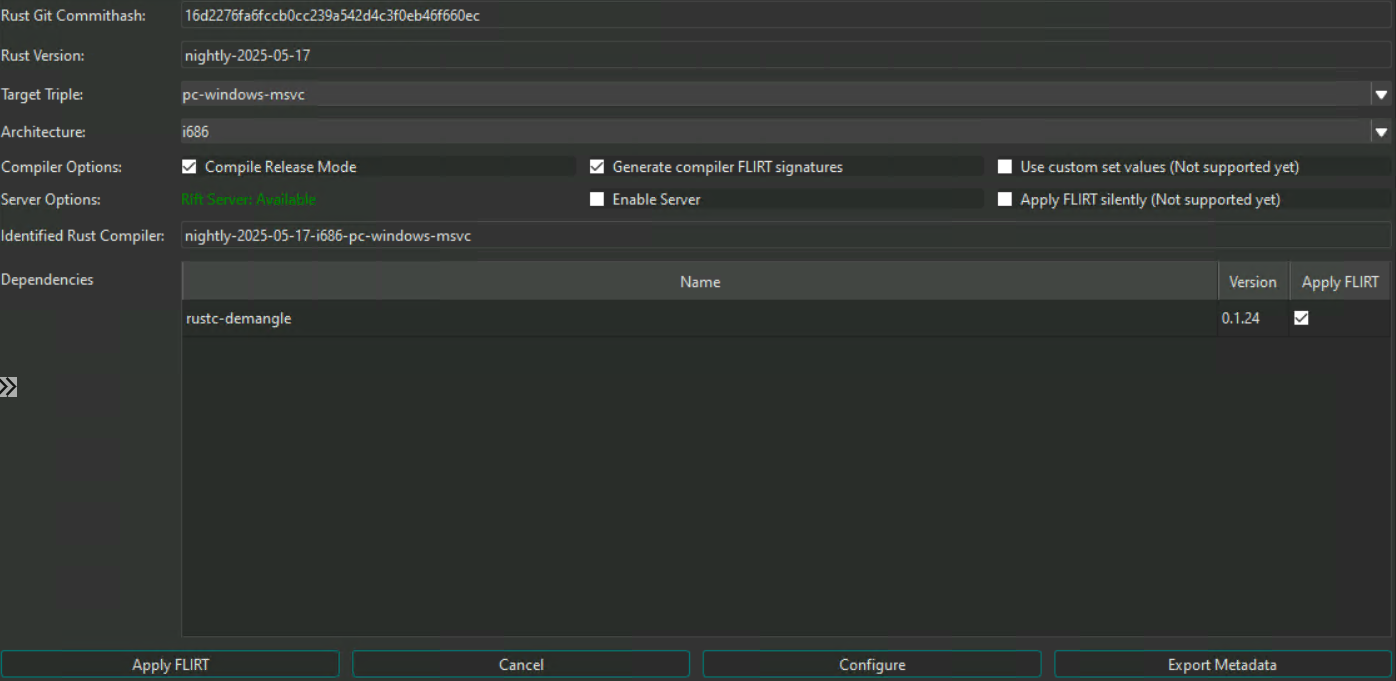
!image
The RIFT IDA Pro plugin allows FLIRT signatures to be generated and optionally applied directly from within an acti engineering session, without leaving IDA Pro.
#### Prerequisites
rift_config.cfg configured with the correct server IP and port#### Installation
Run the installer script, passing the path to your IDA Pro plugins folder:
This copies the following layout into your plugins folder:
#### Configuration
Edit rift_essentials/rift_config.cfg in the plugins folder and set the ser:
#### Usage
1. Open a Rust binary in IDA Pro.
2. Go to Edit → Plugins → RIFT (or use the hotkey if configured).
3. The plugin automatically extracts metadata from the binary (compiler , crates, architecture, target triple).
4. Click Configure to ser.
5. Click Apply to submit a job to the RIFT server and select a local folder where signatures will be stored.
6. Generated .sig files can be applied to the database via IDA's signature manager or the ida_apply_flirt_from_folder.py script in the scripts/ folder.
项目信息
开发语言:Python
Star 数:385
技术要点
该项目属于病毒分析方向的开源资源,代码结构清晰,适合安全研究人员学习参考。项目围绕Rust Library Recognition Project for Rust Malware by the MSTIC-MIRAGE Team展开,提供了可运行的实现,对理解相关安全机制、工具原理与攻防技术具有较高的研究价值。
从技术实现角度看,此类项目的核心在于对底层原理的深入理解与工程化落地。开发者在研究过程中可以结合官方文档与社区讨论,梳理项目的初始化流程、核心模块职责与数据流转,逐步掌握其中的技术细节与设计思路。
使用与学习建议
1. 下载源码压缩包,解压到本地环境。
2. 根据项目类型准备对应的运行环境与依赖。
3. 按照 README 中的步骤完成配置与部署。
4. 在隔离的测试环境中运行验证,避免影响生产系统。
免责声明
本资源来源于开源社区,仅供安全研究、技术学习与合法授权范围内的攻防演练使用,请勿用于任何非法或侵害他人权益的用途。使用本项目产生的一切后果由使用者自行承担。
| 资源标题 | RIFT - Rust Library Recognition Project for Rust Malware |
| 所属分类 | 病毒分析 |
| 发布作者 | admin |
| 发布时间 | 2026-10-05 23:21:06 |
| 下载权限 | 免费下载 |
| 附件数量 | 2 个下载链接 |
| 浏览次数 | 459 |
| 讨论数量 | 0 |
| 主题状态 | 正常讨论中 |