 病毒分析
点击放大
MalwareMultiScan - Self-hosted VirusTotal / MetaDefender wannabe with
项目说明
MalwareMultiScan
!Tests !API !UI !Scanners
Self-hosted / OPSWAT MetaDefender wannabe API for scanning URLs and files by multiple antivirus solutions.
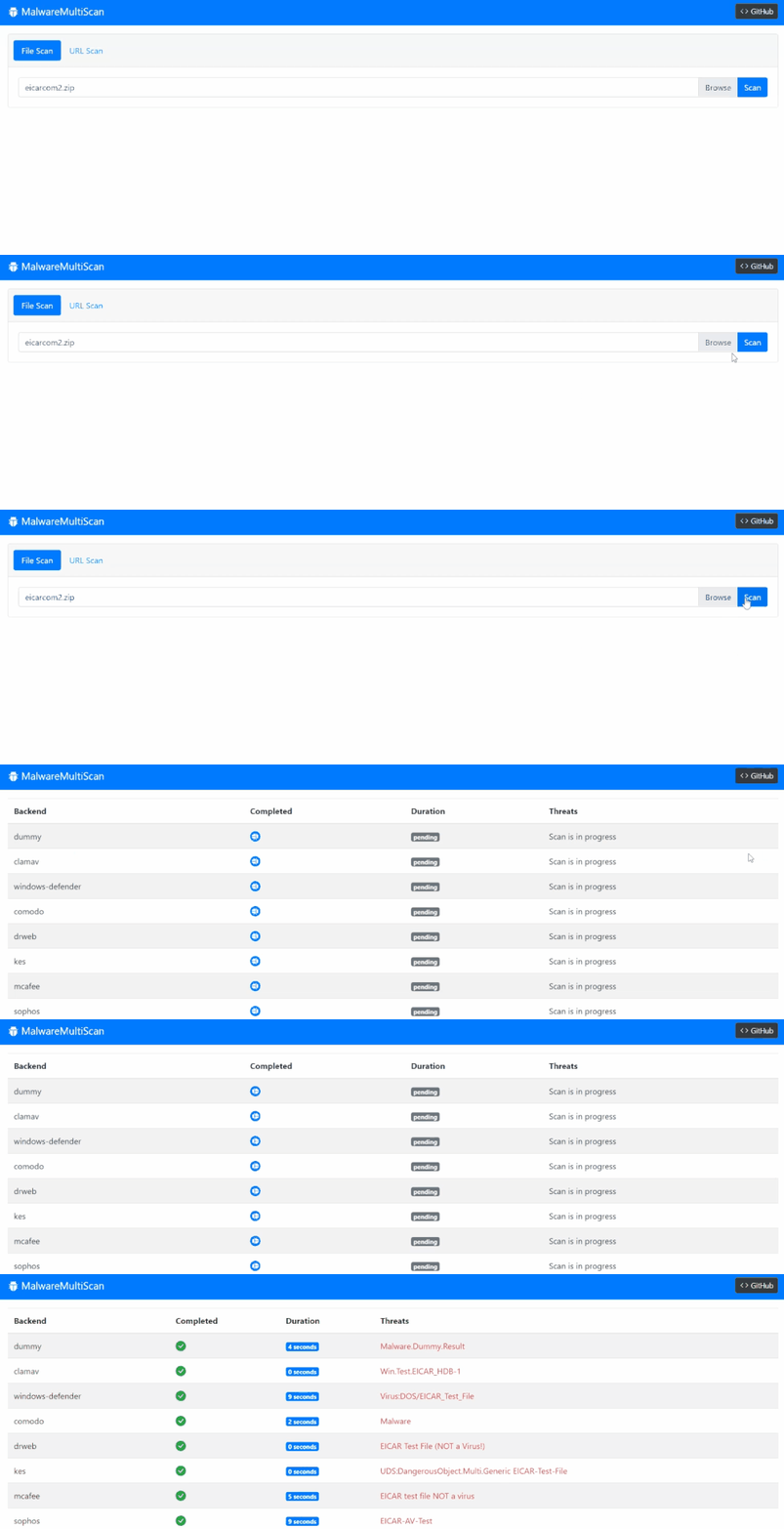
!MalwareMultiScan UI
IMPORTANT: 1.5 introduces breaking changes in containers configuration and docker-compose.yaml layout. Please see releases page and changelog of docker-compose.yaml and README.md for the additional details.
Introduction
I faced a need to scan user-uploaded files in one of my work projects in an automated mode to ensure they don't contain any malware. Using was not an option because of a) legal restrictions and data residency limitations b) scanning by hash-sums would not be sufficient because the majority of files are generated / modified by users.
After googling, I stumbled upon a fantastic maliceio/malice project. Unfortunately, it looks abandoned, and most plugins do not work for the moment. In addition to that, I had an intention to use the .NET stack to align with the internal infrastructure.
In the end, it's nothing but the set of Docker containers running the agent. That agent downloads the remote file to the temp folder, then launches the command-line scanning utility with proper arguments, and parses the output with a regular expression to extract a detected malware name.
Installation & Usage
IMPORTANT: MalwareMultiScan is not intended as a publicly-facing API / UI. It has (intentionally) no authorization, authentication, rate-limiting, or logging. Therefore, it should be used only as an internal / private API or behind the restrictive API gateway.
Whole solution can be started with docker-compose up executed in a root folder of repository.
It can be also deployed to the Docker Swarm cluster by using the command docker stack deploy malware-multi-scan --compose-file docker-compose.yaml.
After the start the Demo Web UI will become a under
See components chapter below and the docker-compose.yaml file.
Configuration
Configuration of API and Scanners is performed by passing the en . Descriptions and default are provided below.
#### MalwareMultiScan.Api
* MONGO_ADDRESS=mongodb://localhost:27017 - MongoDB connection string.
* MONGO_DATABASE=MalwareMultiScan - MongoDB collection name.
* REDIS_ADDRESS=localhost:6379 - Redis address for the distributed task queue.
* CONSUL_ADDRESS= - Consul address for the service registration.
* FILE_SIZE_LIMIT=52428800 - Maximum size of a file that can be handled for the file scanning. The size of the URL content is not . Set to 0 to disable the .
#### MalwareMultiScan.Scanner
* BACKEND_ID=dummy - Id of a backend.
* REDIS_ADDRESS=localhost:6379 - Redis address for the distributed task queue.
* CONSUL_ADDRESS= - Consul address for the service registration.
* MAX_SCANNING_TIME=60 - Scan time limit. It is used not just for actual scanning but also for getting the file.
* WORKER_COUNT=4 - Number of workers for parallel scanning.
#### MalwareMultiScan.Ui
* API_URL= - Absolute URL incl. port number for the running instance of MalwareMultiScan.Api.
API Endpoints
* POST /api/queue/url with a url parameter passed via the form data.. Returns 201 Accepted response with a ScanResult or 400 Bad Request error.
* POST /api/queue/file with a file parameter passed via the form data. Returns 201 Accepted response with a ScanResult or 400 Bad Request error.
* GET /api/results/{result-id} where {result-id} corresponds to the id value of a ScanResult. Returns 200 OK response with a ScanResult or 404 Not Found error.
#### Callback URL
Both /api/queue/url and /api/queue/file also accept an optional callbackUrl parameter with the http(s) URL in it. This URL will be requested by the POST method with JSON serialized ScanResultMessage in a body on every update from scan backends. Query string will contain id parameter that corresponds to the id of the scan result and backend parameter with the id of backend which completed the scan.
I.e. when you define callbackUrl=, the POST request will be made to with a body
Supported Scan Engines
| Name | Dockerfile | Enabled | Comments |
|------|------------|---------|----------|
| ClamAV | Clama | :white_check_mark: | |
| Comodo | Comodo.Dockerfile | :white_large_square: | |
| DrWeb | DrWeb.Dockerfile | :white_large_square: | Pass license key to the DRWEB_KEY build arg. |
| Dummy | Dockerfile | :white_check_mark: | Scan backend made for testing. Returns Malware.Dummy.Result threat for every scan after 5 seconds. |
| KES | KES.Dockerfile | :white_large_square: | Pass license key to the KES_KEY build arg. KES 11 does not work in Docker. |
| McAfee | McAfee.Dockerfile | :white_large_square: | |
| Sophos | Sophos.Dockerfile | :white_large_square: | |
| Defender | WindowsDefender.Dockerfile | :white_check_mark: | |
More scan backends can be added in the future. Some of the popular ones do not ha line scanning utility, Linux , or don't start in Docker container. Feel free to raise an issue if you know any in addition to the list above.
Components
Workflow
1. On startup all Scanners register themselves in Consul with a service name equal to scanner and the BackendId metadata field equal to the value of BACKEND_ID en . They also register a TTL check and listen for Hangfire background job in a queue named under the BackendId metadata field.
2. Third-party client triggers /api/queue/url or /api/queue/file of the MalwareMultiScan.Api.
3. MalwareMultiScan.Api sends a query to Consul and receives the list of alive scan backends with the service name scanner.
4. MalwareMultiScan.Api schedules a Hangfire background job in a queue named under the BackendId metadata field.
5. Scanners picks up a job from queue, starts the scan and sends result back to the default queue of Hangfire.
6. MalwareMultiScan.Api picks a job from the default` queue of Hangfire and updates the state of the scan.
7. If callback URL was specified during the step #2, MalwareMultiScan.Api triggers a HTTP POST request to the specified URL. See Callback URL for details.
Prerequisites
* MongoDB of 3.x or above. Used for storing scan results and files in GridFS. The communication is happening through the official C#/.NET driver.
* Redis of 5.x or above. Used for tasks queueing. The communication is happening through the Hangfire library.
* Consul of 1.8.x or above. Used for service registration of scan backends.
* Docker and docker-compose running under Windows (in Linux containers mode), Linux, or OSX. Docker Compose is needed only for test / local deployments.
* Optional: DockerSwarm / Kubernetes cluster for scaling up the scanning capacities.
Parts
* MalwareMultiScan.Api - Simple ASP.NET Core WebApi for queueing files & urls for the scan and returning the result. Also acts as a receiver of scan results from the scanning backend nodes. See Dockerfile.
* MalwareMultiScan.Backends - Scan backends logic. Includes Dockerfiles and implementation classes for third-party scan backends.
* MalwareMultiScan.Shared - Shared components.
* MalwareMultiScan.Scanner - .NET Core Worker service subscribes to messages corresponding to the backend id, then fires up scanning command-line utility, and parses the output. See Dockerfile. The image of MalwareMultiScan.Scanner acts as a base image for the rest of the scan backends. Check Dockerfiles from the table above for details.
* MalwareMultiScan.Ui - Nuxt.js TypeScript SPA for demoing the API capabilities. See Dockerfile.
## Plans
See issues for the list of planned features, bug-fixes, and impro.
项目信息
开发语言:C#
Star 数:381
技术要点
该项目属于病毒分析方向的开源资源,代码结构清晰,适合安全研究人员学习参考。项目围绕Self-hosted VirusTotal / MetaDefender wannabe with API, demo UI and Scanners running in Docker.展开,提供了可运行的实现,对理解相关安全机制、工具原理与攻防技术具有较高的研究价值。
从技术实现角度看,此类项目的核心在于对底层原理的深入理解与工程化落地。开发者在研究过程中可以结合官方文档与社区讨论,梳理项目的初始化流程、核心模块职责与数据流转,逐步掌握其中的技术细节与设计思路。
使用与学习建议
1. 下载源码压缩包,解压到本地环境。
2. 根据项目类型准备对应的运行环境与依赖。
3. 按照 README 中的步骤完成配置与部署。
4. 在隔离的测试环境中运行验证,避免影响生产系统。
免责声明
本资源来源于开源社区,仅供安全研究、技术学习与合法授权范围内的攻防演练使用,请勿用于任何非法或侵害他人权益的用途。使用本项目产生的一切后果由使用者自行承担。
| 资源标题 | MalwareMultiScan - Self-hosted VirusTotal / MetaDefender wannabe with |
| 所属分类 | 病毒分析 |
| 发布作者 | admin |
| 发布时间 | 2026-10-05 23:21:09 |
| 下载权限 | 免费下载 |
| 附件数量 | 2 个下载链接 |
| 浏览次数 | 420 |
| 讨论数量 | 0 |
| 主题状态 | 正常讨论中 |