 病毒分析
点击放大
Trawler - PowerShell script helping Incident Responders disc
项目说明
<p align="center">
<img src="assets/logo.png" height="200">
</p>
<h1 align="center">
Dredging Windows for Persistence
</h1>
What is it?
Trawler is a PowerShell script designed to help Incident Responders disco indicators of compromise on Windows hosts, primarily focused on persistence mechanisms including Scheduled Tasks, Services, Registry Modifications, Startup Items, Binary Modifications and more.
Currently, trawler can detect most of the persistence techniques specifically called out by MITRE and Atomic Red Team with more detections being added on a regular basis.
Main Features
* Scanning Windows OS for a of persistence techniques (Listed below)
* CS with MITRE Technique and In Jumpstart Metadata
* Analysis and Remediation Guidance Documentation ()
* Dynamic Risk Assignment for each detection
* Built-in Allow Lists for common Windows configurations spanning Windows 10/Server 2012|2016|2019|2022 to reduce noise
* Capture persistence metadata from 'golden' enterprise image (snapshot) for use as a dynamic allow-list at runtime
* Analyze mounted disk images re-targeting
How do I use it?
Just download and run trawler.ps1 from an Administrati/cmd prompt - any detections will be displayed in the console as well as written to a CSV ('detections.csv') in the current working directory. The generated CSV will contain Detection Name, Source, Risk, Metadata and the relevant MITRE Technique.
Or use this one-liner from an Administrati terminal:
Certain detections ha built-in to help remo from default Windows configurations (10/2016/2019/2022) - expected Scheduled Tasks, Services, etc. Of course, it is always possible for attackers to hijack these directly and masquerade with great detail as a default OS process - take care to use multiple forms of analysis and detection when dealing with skillful ad.
If you ha or ideas for additional detections, please feel free to submit an Issue or PR with relevant technical details/references - the code-base is a little messy right now and will be cleaned up over time.
Additionally, if you identify obvious false positives, please let me know by opening an issue or PR on GitHub! The obvious culprits for this will be non-standard COMs, Services or Tasks.
CLI Parameters
What separates this from PersistenceSniper?
PersistenceSniper is an awesome tool - I've used it heavily in the past - but there are a few key points that differentiate these utilities
* trawler is (currently) a local utility - it would be pretty straight-forward to wrap it in a loop and use WinRM/PowerShell Sessions to execute it on remote hosts though
* trawler implements allow-listing for many 'noisy' detections to help remo detections from default configurations of Windows (10/2016/2019/2022) and these are constantly being updated (PS also does this)
* ~~PersistenceSniper (for the most part) does not contain any type of allow-listing - therefore, there is more noise generated when considering items such as Services, Scheduled Tasks, general COM DLL scanning, etc.~~
* trawler's output is simplified - Name, Risk, Source, MITRE Technique and Metadata are the only items provided for each detection to help analysts jump-start their persistence hunting efforts - this is a double-edged sword.
* Regex is used in many checks to help detect 'suspicious' keywords or patterns in critical areas including scanned file contents, registry , etc. This provides a bit more flexibility but also a potentially higher false-positive rate.
* trawler supports 'dri' to check dead-boxes mounted to an analysis machine.
O, these tools are extremely similar but approach the problem from slightly different angles - PersistenceSniper provides all information back to the analyst for review while Trawler tries to limit what is returned to only results that are likely to be potential ad persistence mechanisms. As such, there is a possibility for false-negatives with trawler if an ad completely mimics an allow-listed item.
As an example - PersistenceSniper will return all 'non-safe' Windows Services while trawler will only return those that match a specific detection rule, etc.
Tuning to your en
Trawler supports loading an allow-list from a 'snapshot' - to do this requires two steps.
1. Run '.\trawler.ps1 -snapshot' on a "Golden Image" representing the servers in your en - once complete, in addition to the standard 'detections.csv' a file named 'snapshots.csv' will be generated
2. This file can then be used as input to trawler when running on other hosts and the data will be loaded dynamically as an allow-list for each appropriate detection
1. '.\trawler.ps1' -loadsnapshot "path\to\snapshot.csv"
That's it - all relevant detections will then draw from the snapshot file as an allow-list to reduce noise and identify any potential changes to the base image that may ha.
(Allow-listing is implemented for most of the checks but not all - still being actively implemented)
Dri
Often during an in, analysts may end up mounting a new drive that represents an imaged Windows device - Trawler now partially supports scanning these mounted dri the use of the '-dri' parameter.
At runtime, Trawler will re-target temporary script-le for use in checking file-based artifacts and also will attempt to load relevant Registry Hives (HKLM\SOFTWARE, HKLM\SYSTEM, NTUSER.DATs, USRCLASS.DATs) underneath HKLM/HKU and prefixed by 'ANALYSIS_'. Trawler will also attempt to unload these temporarily loaded hives upon script completion.
As an example, if you have an image mounted at a location such as 'F:\Test' which contains the NTFS file system ('F:\Test\Windows', 'F:\Test\User', etc) then you can invoke trawler like below;
Please note that since trawler attempts to load the registry hi from the drive in question, mapping a UNC path to a li device will NOT work as those files will not be accessible due to system locks. I am working on an approach which will handle li devices, stay tuned.
What is not inspected when dri?
* Running Processes
* Network Connections
* 'Phantom' DLLs
* WMI Consumers (Being worked on)
* BITS Jobs (Being worked on)
* Certificate Parsing (Being worked on)
Most other checks will function fine because they are based entirely on reading registry hives or file-based artifacts (or can be con to do so, such as directly reading Task XML as opposed to using built-in command-lets.)
Any limitations in checks when doing dri will be discussed more fully in the GitHub Wiki.
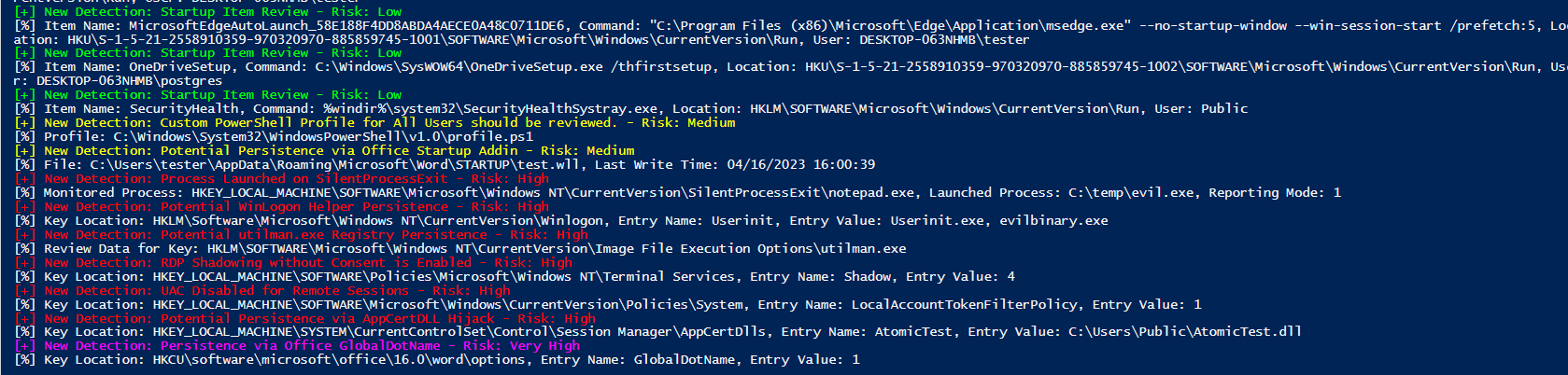
Example Images
<p align="center">
<img src="assets/sample.PNG">
</p>
<p align="center">
<img src="assets/sample2.PNG">
</p>
<p align="center">
<img src="assets/sample3.PNG">
</p>
What is inspected?
* Scheduled Tasks
* Users
* Services
* Running Processes
* Network Connections
* WMI Event Consumers (CommandLine/Script)
* Startup Item Discovery
* BITS Jobs Discovery
* Windows Accessibility Feature Modifications
* PowerShell Profile Existence
* Office TrustedDocuments
* Office Addins from Trusted Locations
* SilentProcessExit Monitoring
* Winlogon Helper DLL Hijacking
* Image File Execution Option Hijacking
* RDP Shadowing
* UAC Setting for Remote Sessions
* Print Monitor DLLs
* LSA Security and Authentication Package Hijacking
* Time Provider DLLs
* Print Processor DLLs
* Boot/Logon Acti
* User Initialization Logon Script Hijacking
* ScreenSa Hijacking
* Netsh DLLs
* AppCert DLLs
* AppInit DLLs
* Application Shimming
* COM Object Hijacking
* LSA Notification Hijacking
* 'Office test' Usage
* Office GlobalDotName Usage
* Terminal Services DLL Hijacking
* Autodial DLL Hijacking
* Command AutoRun Processor Abuse
* Outlook OTM Hijacking
* Trust Provider Hijacking
* LNK Target Scanning (Suspicious Terms, Multiple Extensions, Multiple EXEs)
* 'Phantom' Windows DLL Names loaded into running process (eg. un-signed WptsExtensions.dll)
* Scanning Critical OS Directories for Unsigned EXEs/DLLs
* Un-Quoted Service Path Hijacking
* PATH Binary Hijacking
* Common File Association Hijacks and Suspicious Keywords
* Suspicious Certificate Hunting
* GPO Script Discovery/Scanning
* NLP De Platform DLL O
* AeDebug/.NET/Script/Process/WER Debug Replacements
* Explorer 'Load'
* Windows Terminal startOnUserLogin Hijacks
* App Path Mismatches
* Service DLL/ImagePath Mismatches
* GPO Extension DLLs
* Potential COM Hijacks
* Non-Standard LSA Extensions
* DNSSer Presence
* Explorer\MyComputer Utility Hijack
* Terminal Services InitialProgram Check
* RDP Startup Programs
* Microsoft Telemetry Commands
* Non-Standard AMSI Pro
* Internet Settings LUI Error DLL
* PeerDist\Extension DLL
* ErrorHandler.CMD Checks
* Built-In Diagnostics DLL
* MiniDumpAuxiliary DLLs
* KnownManagedDebugger DLLs
* WOW64 Compatibility Layer DLLs
* E MSC Hijack
* Uninstall Strings Scan
* PolicyManager DLLs
* SEMgr Wallet DLL
* WER Runtime Exception Handlers
* HTML Help (.CHM)
* Remote Access Tool Artifacts (Files, Directories, Registry Keys)
* ContextMenuHandler DLL Checks
* Office AI.exe Presence
* Notepad++ Plugins
* MSDTC Registry Hijacks
* Narrator DLL Hijack (MSTTSLocEnUS.DLL)
* Suspicious File Location Checks
* Boot Check
* DiskCleanupHandler Checks
* Low Integrity Isolation Checks
* Suspiciously-Named Installed Software
* Directory Services Restore Mode Status
* Service Control Manager Security Descriptor Modifications
* Windows Subsystem for Linux VMs
* Browser Extension Analysis
TODO
* Add Analysis/Remediation Guidance to each detection in the GitHub Wiki (In-Progress)
* Browser Extension Analysis (?)
* RID Hijacking [][]
* PowerAutomate Checks
* ShadowPad Indicators [ ]
* OBS Startup Script Scanning []
* SQL Ser Addins []
* AutoPlay Handler Inspection [HKEY_LOCAL_MACHINE\SOFTWARE\Microsoft\Windows\Current\Explorer\AutoplayHandlers\Handlers\]
* HKLM\SOFTWARE\Microsoft\Windows\Current\Setup\Pending\SPRe
* OCSetup []
* Review for additional opportunities
* Review for additional opportunities
* Review for additional opportunities
MITRE Techniques E
Please be aware that some of these are (of course) more detected than others - for example, we are not detecting all possible registry modifications but rather inspecting certain keys for obvious changes and using the generic MITRE technique "Modify Registry" where no other technique is applicable. For other items such as COM hijacking, we are inspecting all entries in the relevant registry section, checking against 'known-good' patterns and bubbling up unknown or mismatched , resulting in a much more complete detection surface for that particular technique.
* T1037: Boot or Logon Initialization Scripts
* T1037.001: Boot or Logon Initialization Scripts: Logon Script (Windows)
* T1037.005: Boot or Logon Initialization Scripts: Startup Items
* T1055.001: Process Injection: Dynamic-link Library Injection
* T1059: Command and Scripting Interpreter
* T1071: Application Layer Protocol
* T1098: Account Manipulation
* T1112: Modify Registry
* T1053: Scheduled Task/Job
* T1136: Create Account
* T1137.001: Office Application Office Template Macros
* T1137.002: Office Application Startup: Office Test
* T1137.006: Office Application Startup: Add-ins
* T1176: Browser Extensions
* T1197: BITS Jobs
* T1505.005: Ser Component: Terminal Services DLL
* T1543.003: Create or Modify System Process: Windows Service
* T1546: Event Triggered Execution
* T1546.001: Event Triggered Execution: Change Default File Association
* T1546.002: Event Triggered Execution: Screensaver
* T1546.003: Event Triggered Execution: Windows Management Instrumentation Event Subscription
* T1546.007: Event Triggered Execution: Netsh Helper DLL
* T1546.008: Event Triggered Execution: Accessibility Features
* T1546.009: Event Triggered Execution: AppCert DLLs
* T1546.010: Event Triggered Execution: AppInit DLLs
* T1546.011: Event Triggered Execution: Application Shimming
* T1546.012: Event Triggered Execution: Image File Execution Options Injection
* T1546.013: Event Triggered Execution: PowerShell Profile
* T1546.015: Event Triggered Execution: Component Object Model Hijacking
* T1547.002: Boot or Logon Autostart Execution: Authentication Packages
* T1547.003: Boot or Logon Autostart Execution: Time Pro
* T1547.004: Boot or Logon Autostart Execution: Winlogon Helper DLL
* T1547.005: Boot or Logon Autostart Execution: Security Support Provider
* T1547.009: Boot or Logon Autostart Execution: Shortcut Modification
* T1547.012: Boot or Logon Autostart Execution: Print Processors
* T1547.014: Boot or Logon Autostart Execution: Acti
* T1553: Subvert Trust Controls
* T1553.004: Subvert Trust Controls: Install Root Certificate
* T1556.002: Modify Authentication Process: Password Filter DLL
* T1564.006: Hide Artifacts: Run Instance
* T1574: Hijack Execution Flow
* T1574.007: Hijack Execution Flow: Path Interception by PATH En
* T1574.009: Hijack Execution Flow: Path Interception by Unquoted Path
References
This tool would not exist without the amazing InfoSec community - the most notable references I used are provided below.
* PersistenceSniper
* MITRE ATT&CK
* Persistence Info GitHub
* Hexacorn - Persistence Series
* IRED
* PayloadsAllTheThings
More References
*
*
*
*
*
项目信息
开发语言:PowerShell
Star 数:341
技术要点
该项目属于病毒分析方向的开源资源,代码结构清晰,适合安全研究人员学习参考。项目围绕PowerShell script helping Incident Responders discover potential adversary persistence mechanisms.展开,提供了可运行的实现,对理解相关安全机制、工具原理与攻防技术具有较高的研究价值。
从技术实现角度看,此类项目的核心在于对底层原理的深入理解与工程化落地。开发者在研究过程中可以结合官方文档与社区讨论,梳理项目的初始化流程、核心模块职责与数据流转,逐步掌握其中的技术细节与设计思路。
使用与学习建议
1. 下载源码压缩包,解压到本地环境。
2. 根据项目类型准备对应的运行环境与依赖。
3. 按照 README 中的步骤完成配置与部署。
4. 在隔离的测试环境中运行验证,避免影响生产系统。
免责声明
本资源来源于开源社区,仅供安全研究、技术学习与合法授权范围内的攻防演练使用,请勿用于任何非法或侵害他人权益的用途。使用本项目产生的一切后果由使用者自行承担。
| 资源标题 | Trawler - PowerShell script helping Incident Responders disc |
| 所属分类 | 病毒分析 |
| 发布作者 | admin |
| 发布时间 | 2026-10-05 23:22:10 |
| 下载权限 | 免费下载 |
| 附件数量 | 2 个下载链接 |
| 浏览次数 | 349 |
| 讨论数量 | 0 |
| 主题状态 | 正常讨论中 |