 病毒分析
点击放大
Fake-Sandbox-Artifacts - This script allows you to create various artifacts
项目说明
Fake Sandbox Artifacts (FSA)
Inspired from the PowerShell script Fake Sandbox Processes (FSP), this script allows you to create artifacts on a bare-metal Windows computer in an attempt to trick malwares that looks for VM or analysis tools.
The names of the artifacts to be created are separated in text files in the different folders to allow easy modification.
<img align="right" src="image/logo.jpg" width=20% height=20% />
Background
It is estimated that 15-20% [[13]](#13) of malwares are aware of machine en and will either abort execution or change its behavior upon detection. Also, *fingerprinting tactic is still the dominant approach to evade sandboxes*. [[15]](#15)
Features
Usage
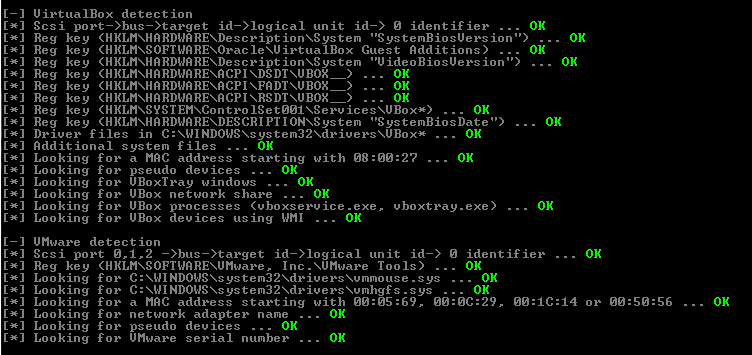
Testing against pafish and al-khaser
| Pafish - Before | Pafish - After running *fsa.py* |
|:-:|:-:|
| <img style="float: left;" src="image/pafish_before.png"> | <img style="float: right;" src="image/pafish_after_fsa.png"> |
| Al-khaser - Before | Al-khaser - after running *fsa.py* |
| <img style="float: left;" src="image/al-khaser_before.png"> | <img style="float: right;" src="image/al-khaser_after_fsa.png"> |
Testing against malware samples
| Malware Name | Source | Without FSA | With FSA | Notes | Conclusion |
| :-------------: |:-------------:|:-------------:|:-------------:|:-------------:|:-------------:|
| :red_circle:AgentTesla | MalwareBazaar | Malware established persistance via the Windows scheduler | No malicious behaviors observed | Modified registry affects the malware behavior | Pre :hea: |
| :red_circle:TrickBot | MalwareBazaar | Malware contacted C2 IPs, downloaded modules networkDll64 & pwgrab64 | same | Anti- used by Trickbot includes screen resolution | Not pre :x: |
| :red_circle:ZLoader | MalwareBazaar | Doc launched Wscript, created C:\tabkey\ and dropped a .vbe script and a .dll | Wscript not launched. No malicious behaviors observed | Dummy processes running affects the malicious Word Macro behavior | Pre :hea: |
To be continued
Limitations
For this script to trigger a positi from the malware sample, it has to know what constitutes the fingerprinting in the first place. However, the strategy here is simply to hit on many of those known checks as possible, hoping that at least one artifact will be detected.
Most ad checks are looking for hardware, memory or kernel hypervisor artifacts, which are harder to fake (e.g. Hardware IDs., loaded drivers/kernel objects).
------------
Successfully tested on the following bare-metal Windows :
References
<a id="1">[1]</a> Github - Public malware techniques used in the wild
<a id="2">[2]</a> Github - Pafish
<a id="3">[3]</a> Gtihub - Anti-Sandbox and Anti- Machine Tool
<a id="4">[4]</a> Github - E
<a id="5">[5]</a> Github - cuckoosandbox signatures
<a id="6">[6]</a> Github - Anti
<a id="7">[7]</a> Deep Instinct - Anti- Malware
<a id="8">[8]</a> Cyberbit - Anti-VM and Anti-Sandbox Explained
<a id="9">[9]</a> Blog - GuLoader Anti
<a id="10">[10]</a> Prodefence - Collection of Anti-Malware Analysis Tricks
<a id="11">[11]</a> r - Anti VM and Anti Sandbox techniques in Themida and
<a id="12">[12]</a> code13 Blog - anti-
<a id="13">[13]</a> Symantec - Internet Security Threat Report 24 | February 2019
<a id="14">[14]</a> Uni of Tsukuba - Trends of anti-analysis operations of malwares observed in API call logs
<a id="15">[15]</a> Amirkabir Uni of Technology - Malware Dynamic Analysis E Techniques: A Survey
项目信息
开发语言:Python
Star 数:295
技术要点
该项目属于病毒分析方向的开源资源,代码结构清晰,适合安全研究人员学习参考。项目围绕This script allows you to create various artifacts on a bare-metal Windows computer in an attempt to trick malwares that looks for VM or analysis tools展开,提供了可运行的实现,对理解相关安全机制、工具原理与攻防技术具有较高的研究价值。
从技术实现角度看,此类项目的核心在于对底层原理的深入理解与工程化落地。开发者在研究过程中可以结合官方文档与社区讨论,梳理项目的初始化流程、核心模块职责与数据流转,逐步掌握其中的技术细节与设计思路。
使用与学习建议
1. 下载源码压缩包,解压到本地环境。
2. 根据项目类型准备对应的运行环境与依赖。
3. 按照 README 中的步骤完成配置与部署。
4. 在隔离的测试环境中运行验证,避免影响生产系统。
免责声明
本资源来源于开源社区,仅供安全研究、技术学习与合法授权范围内的攻防演练使用,请勿用于任何非法或侵害他人权益的用途。使用本项目产生的一切后果由使用者自行承担。
| 资源标题 | Fake-Sandbox-Artifacts - This script allows you to create various artifacts |
| 所属分类 | 病毒分析 |
| 发布作者 | admin |
| 发布时间 | 2026-10-05 23:24:14 |
| 下载权限 | 免费下载 |
| 附件数量 | 2 个下载链接 |
| 浏览次数 | 333 |
| 讨论数量 | 0 |
| 主题状态 | 正常讨论中 |