 病毒分析
点击放大
MalwareAnalysis-in-PDF - Malicious PDF files recently considered one of the
项目说明
Malware Analysis – Dissecting PDF file
Filipi Pires
Security Researcher and Cybersecurity Ad
Abstract
*There are a large number of cyber threats today, many of these cyber threats can be based on malicious code, one of this code is known as Malware (Malicious Software or maldoc - Malicious Document ) to refer these kind of threats. The term Malware, is a generic term that covers all types of programs specifically de to perform malicious actions on a computer, thus the term malware has become the name for any type of program specifically de to perform harmful actions and malicious acti on a compromised system.
This paper presents an in-depth security analysis of the PDF features and capabilities, independently from any . The aim is to exhaustively explore and e the risk attached to PDF language-based malware which could successfully using different techniques in malware-based in PDF embedded. You’ll have the experience of understanding different kind of structures in the binaries as PDF such as header/ body/cross-reference table/trailer, explaining how each session works within a binary, what are the techniques used such as obfuscation, encodings with Ja (PDF) and more, demonstrating as a is the action of these malwares and where it would be possible to "include" a malicious code. By the end of this article it will be clear to e, how we got find C&C ( Command Control) in binaries structures, how can the researcher should conduct each of these kind of analyses, it should seek more basic knowledge, with file structures, software architecture and programming language*
*Keywords: MalwareAnalysis, Maldoc, MaliciousPDF*
============================================================================
1 Introduction
Over the past few years, different technologies have been de to provide cybersecurity, however, when you look at incident indicators from different sources, you see that the number of incidents within information technology grows every year, always motivated by different types of threat using different kind of artifacts.
Due to the large number of these artifacts, some organizations and security companies use automated or semi-automated analysis methods. Knowing how malicious code works is the basis for producing efficient detection and protection tools, as it allows you to know the context that the malware intends to reach, understanding the target audience of the threat, the information collected, the use and the destination of this malware.
However, the time to find the defenses has not been consistent with the current attack scenario, which is extremely unfa for the end user. With this moti, researchers ha themsel to face the problem and confident in proposing solutions that make the processes, both of analysis and detection, efficient and reliable.
It is worth noting that, in cases in financial fraud and identity theft, knowing the performance of the malware is paramount to eradicate the incident. The simple discovery of malicious codes may suggest a pre action in relation, for example, to prevent a user from having access to a system, as it is not possible to guarantee that that user is correctly recognized, as the compromise of his identification information does risk of fraud becoming high.
A major problem faced in these situations is to determine the type of compromise, that is, to identify the real ability that malware has to capture information. This factor determines the response time that the organization and security companies have to produce a malware recognition signature.
Artifact analysis has different applications, it can be used to help understand a particular artifact, be it malware or maldoc that was identified in an incident, or that was received or even sent by someone to some security research group to e.
The analysis of the artifact is a necessary process to build intelligence on cyber threats, because through this intelligence it is possible to e the effecti of security controls, whether they are methodological or based on some tool. This continuous impro approach based on built intelligence is what really makes it possible to increase cyber resilience.
When we talk about Malware Analysis, we can say that they are based on two forms of analysis, known as Static Analysis and Dynamic Analysis.
We begin our exploration of malware analysis with “Static Analysis”, which is often the first step in malware studies.
Static analysis describes the process of analyzing a program's code or structure to determine its function. The program itself doesn’t run at this time (depending on the program), this makes the parsing process more “safe”, because we aren’t actually executing it.
Dynamic analysis is based solely on behavior, ie the interaction that malware has when it is executed or a maldoc is used, also known as “runtime” analysis. It can be easily automated, there are sites today that already perform analysis of malicious artefacts, using the concept called "sandbox"
It generates information that may help to understand the cyber threat in question, promoting the generation of intelligence from a heuristic that allows the identification of the artefact, increasing the effecti of detection.
Malware to test ->
Important to note is that none is better or worse than another and are totally complementary, in some cases using the dynamic approach to prove or cast doubt on what has been found with static analysis is very useful.
=============================================================================
2 Introduction for PDF File
PDF (Portable Document Format) is a file format, de by Adobe Systems in 1993, to represent documents independently of the application, hardware and operating system used to create them.
A PDF file can describe documents that contain text, graphics and images in a de format and resolution. A PDF document can be defined as a collection of objects which describe how one or more pages must be displayed.
This collection of objects can also consider additional interacti and application data at a higher level.
In general, a PDF document consists of four main parts.
1. One-line header ou Header
2. Body
3. Cross-reference table
4. Trailer
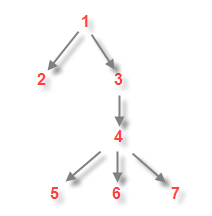
What I describe here is the physical structure of a PDF file. The header identifies that this is a PDF file (specifying the PDF file format ), the trailer points to the cross reference table (starting at byte position 642 into the file), and the cross reference table points to each object (1 to 7) in the file (byte positions 12 through 518).
The objects are ordered in the file: 1, 2, 3, 4, 5, 6 and 7.
The logical structure of a PDF file is a hierarchical structure, the root object is identified in the trailer.
Object 1 is the root, object 2 and 3 are children of object 1, etc, as you can see below
!Structure
=============================================================================
3 Header identification
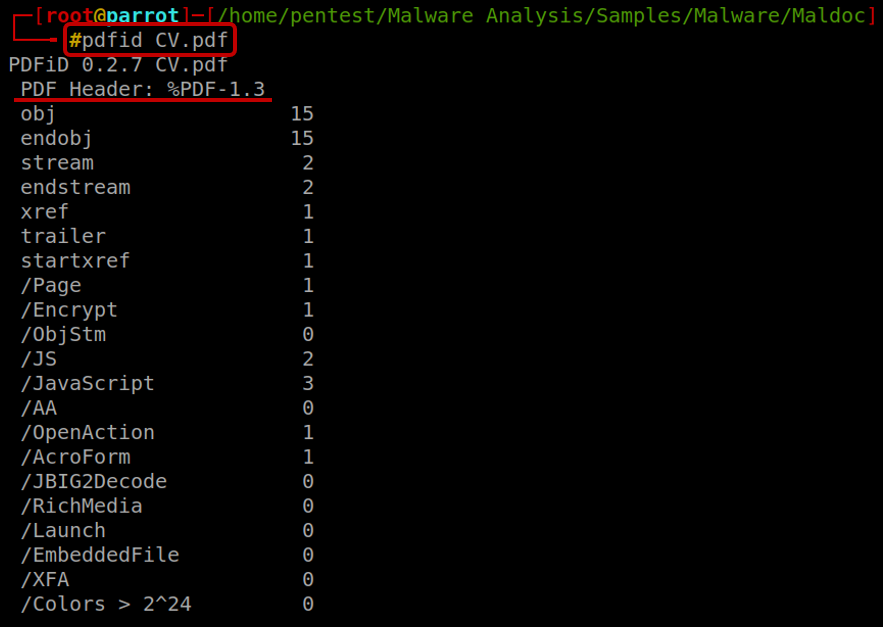
As we saw earlier, that we can see in PDF files is to look at its header information. The first line of the PDF specifies the of a PDF file format. These headers are the topmost portion of a document. It reveals the basic information of a PDF file, for example, "%PDF-1.3", it means that this PDF format is the third . By the way, to read a PDF, you need a later of PDF reader, i.e. you have to download Adobe Acrobat 4.0 to view %PDF-1.3, you can find this information using “strings” commands or using one of tools de by Didier Stevens like PDFID.
!PDFID
PDFiD will scan a PDF document for a given list of strings and count the occurrences (total and obfuscated) allowing you to identify PDF documents that contain (for example) Ja and/or execute an action when opened. PDFiD will also handle name obfuscation. The idea is to use this tool first to triage PDF documents, and then analyze the suspicious ones with other tool the name pdf-parser, as you can see, this tool shows many relevant information.
Almost every PDF documents will contain the first 7 words as you can see in the picture above(obj through startxref), and to a lesser extent stream and endstream. Something very interesting within this tool is that we can see the use of "/ (slash)" to show information that is located within the objects of a PDF, as you can see below:
/Page gives an indication of the number of pages in the PDF document. Most malicious PDF document have only one page.
/Encrypt indicates that the PDF document has DRM or needs a password to be read.
/ObjStm counts the number of object streams. An object stream is a stream object that can contain other objects, and can therefor be used to obfuscate objects (by using different filters).
/JS and /Ja indicate that the PDF document contains Ja. Almost all malicious PDF documents that I’ in the wild contain Ja (to exploit a Ja and/or to execute a heap spray). Of course, you can also find Ja in PDF documents without malicious intent.
/AA and /OpenAction indicate an automatic action to be performed when the page/document is . All malicious PDF documents with Ja I’ve seen in the wild had an automatic action to launch the Ja without user interaction.
*The combination of automatic action and Ja makes a PDF document very suspicious*
/JBIG2Decode indicates if the PDF document uses JBIG2 compression. This is not necessarily and indication of a malicious PDF document, but requires further in.
/RichMedia is for embedded Flash.
/Launch counts launch actions.
/XFA is for XML Forms Architecture.
When we look at the response of the command, we can see that it returns with the information of 5 Ja inside that PDF, it looks at least suspicious, don't you think?
!pdf-parser
Another point very interesting is the we can find one Open Action within the PDF, which means, indicate an automatic action to be performed when the page/document is . All malicious PDF documents with Ja, I’ve seen in the wild had an automatic action to launch the Ja without user interaction.
!OpenAction
=============================================================================
4 Technical Analysis
The body of a PDF file consists of objects that compose the contents of the document. These objects include image data, fonts, annotations, text streams and so on. You can also make the content of a PDF document more secure by implementing security features. Users can also integrate in objects or elements. These objects embed the interacti in a document like animation or graphics. A user can also implement logical structure in the document. One can protect the content of a document from unauthorized printing, , editing or modifying. The body of a PDF also supports two types of numbers called integers and real numbers.
I used the PDF-PARSER another tool de by Didier Stevens, this tool will parse a PDF document to identify the fundamental elements used in the analyzed file. It will not render a PDF document. The code of the parser is quick-and-dirty. This tool can print many information interesting, the filter option applies the filter(s) to the stream. For the moment, only FlateDecode is supported (e.g. zlib decompression).
One the options that I like is --raw option makes pdf-parser output raw data (e.g. not the printable Python representation). The Objects outputs the data of the indirect object which ID was specified; This ID is not dependent, If more than one object have the same ID (disregarding the ), all these objects will be outputted. Reference allows you to select all objects referencing the specified indirect object. This ID is not dependent. Type allows you to select all objects of a given type. The type is a Name and as such is case-sensitive and must start with a slash-character (/).
!pdf-parser raw
So, let's go step by step to understand each structure and try to find Ja (possibly malicious) within that PDF. The Obj 1 is referencing Obj 02, 03, 04, 05, 07, Object 1 is the *root*, object 2 and 3 are children and so on, this information is contained in the Trailer structure as mention before. Looking the all objects within the PDF we can find another reference, the Obj 7 referencing Obj 10 and as we can see contain a *Ja*, we can see below too, that Obj 09 that it was referenced by Obj 04, is referencing Obj 08 and Obj 11**.
!pdf-parser raw details
Looking more deeply at all this information that is contained within the body of a PDF, it arrived at a fundamental and very interesting point of the Analysis of a PDF, we were finally able to find a stream within 2 objects.
Obj 11 contains stream with size length 36, and the Obj 12 referencing Obj 13 with Ja, and this obj we found another *Contain Stream*, but in this case the size is major than first (length 3151).
!pdf-parser raw details Obj13
Command $ pdftk CV.pdf output dump.txt uncompress
When we look inside the stream we can see that inside the stream there is a code that is obfuscated in ja and now what we needed is to use some techniques to perform the desobfuscation of this code in a way that is and understandable.
!ObfuscatedCode
Looking at the code that is obfuscated, we managed to find an e inside the code, with that, we decided to rewrite it in html, to try to print the code in the webpage, basically we rewrote the E, look that we found in the image below when we execute this link in a browser.
**Editing file <script><html>A=………….;document.write(A);</script></html>
!ObfuscatedCode_ReWriteHTML
!Payload
As we can see that a Ja obfuscation technique was used to hide a payload that would be downloaded on the 's machine, and ob it would be exploiting a for this exploit to be downloaded and through that payload, it was possible for the to communicate and the C&C of the attack that created this maldoc, now we can see that this PDF has a lot of malicious instructions.
!Decode
Seeing that there was a payload, I could see that I could try to go deeper in the analysis to try to find the attacker's C&C, looking at the code printed in the browser it is possible to notice that there is one more technique to hide this information the called Encoding using Unicode.
Unicode is a character encoding standard that has widespread acceptance. Microsoft software uses Unicode at its core. Whether you realize it or not, you are using Unicode already! Basically, “computers just deal with numbers.¹
!Decode_Unicode
Another way to find this information is using a tool called Mallzila for Windows platform, MalZilla is a useful program for use in exploring malicious pages. It allows you to choose your own user agent and referrer, and has the ability to use proxies. It shows you the full source of webpages and all the HTTP headers. It gives you decoders to try and deobfuscate ja as well. To find information in Mallzill it’s necessary convert UCS2 to text, but who is UCS-2?
*UCS-2 is a character encoding standard in which characters are represented by a fixed-length 16 bits (2 bytes). It is used as a fallback on many GSM networks when a message cannot be encoded using GSM-7 or when a language requires more than 128 characters to be rendered and The Uni Coded Character Set (UCS) is a standard set of characters defined by the International Standard ISO/IEC 10646, Information technology — Uni Coded Character Set (UCS) (plus amendments to that standard), which is the basis of many character encodings.
*The latest contains over 136,000 abstract characters, each identified by an unambiguous name and an integer number called its code point. This ISO/IEC 10646 standard is maintained in conjunction with The Unicode Standard ("Unicode"), and they are code-for-code identical. ²
!Malzilla
Using the Malzilla we can generate a binary with this information that are contained and encoded within this code. Now we just need some tool to help us finally reach C&C using the attacker. One of the tools that can be use is XORSearch (Created by Didier Stevens), that is a program to search for a gi in an XOR, ROL, ROT or SHIFT encoded binary file.
An XOR encoded binary file is a file where some (or all) bytes have been XORed with a constant value (the key). A ROL (or ROR) encoded file has its bytes rotated by a certain number of bits (the key). A ROT encoded file has its alphabetic characters (A-Z and a-z) rotated by a certain number of positions.
A SHIFT encoded file has its bytes shifted left by a certain number of bits (the key): all bits of the first byte shift left, the MSB of the second byte becomes the LSB of the first byte, all bits of the second byte shift left, … XOR and ROL/ROR encoding is used by malware programmers to obfuscate strings like URLs, That said, we can understand that through XORSearch we can search for strings like URLs.
!HexBinary
Baum, Now we finally have the C&C that it was responsible to receive all the IP - 92.62.100.66, Of course, if we try to access this site today, the server is already down, and probably the attacker must have used the TOR network to carry out this attack and this was probably the last hop that he used, this IP it is located on Estonia – Europe.
!C C-IP
=============================================================================
PoC in Video
In this video below, We can see all these steps executed in this paper.
![PoC]()
=============================================================================
Conclusions
In this paper we went through all the steps to understand what the structures of a PDF file are like, How one structure is linked to another, we also checked the techniques that were applied by the attacker in this Maldoc, such as obfuscation and encoding.
Malicious PDF files recently considered one of the most dangerous threats to the system security. The flexible code-bearing of the PDF format enables to attacker to carry out malicious code on the computer system for user exploitation
I invite you to seek to understand well these first steps that are very important for building knowledge of this content understanding the differences for Statistical Analysis and Dynamic Analysis, executing commands manually, understanding how this command works or why and how it was created, observing how the tools work and who knows how to also create our own tools based on the knowledge of the tools that already exist and of course, after that comes what we call Reverse Engineering a much more complex subject.
We now intend to explore further the risk attached to PDF, Because as we saw in this paper, there are some ways and techniques to hide code in several parts within a PDF, and finally we need bases in programming language, so we need to learn more, so we will understand a little how malwares are created.
=============================================================================
Publications
=============================================================================
References
– Access at 19/03/2020
- Access at 18/03/2020
- Access at 18/03/2020
- Access at 19/03/2020
- Access at 19/01/2020
- Access at 19/03/2020
- Access at 19/01/2020
¹ - Access at 19/01/2020
² - Access at 19/01/2020
项目信息
开发语言:未知
Star 数:239
技术要点
该项目属于病毒分析方向的开源资源,代码结构清晰,适合安全研究人员学习参考。项目围绕Malicious PDF files recently considered one of the most dangerous threats to the system security. The flexible code-bearing vector of the PDF format enables to attacker to carry out malicious code on the computer system for user exploitation.展开,提供了可运行的实现,对理解相关安全机制、工具原理与攻防技术具有较高的研究价值。
从技术实现角度看,此类项目的核心在于对底层原理的深入理解与工程化落地。开发者在研究过程中可以结合官方文档与社区讨论,梳理项目的初始化流程、核心模块职责与数据流转,逐步掌握其中的技术细节与设计思路。
使用与学习建议
1. 下载源码压缩包,解压到本地环境。
2. 根据项目类型准备对应的运行环境与依赖。
3. 按照 README 中的步骤完成配置与部署。
4. 在隔离的测试环境中运行验证,避免影响生产系统。
免责声明
本资源来源于开源社区,仅供安全研究、技术学习与合法授权范围内的攻防演练使用,请勿用于任何非法或侵害他人权益的用途。使用本项目产生的一切后果由使用者自行承担。
| 资源标题 | MalwareAnalysis-in-PDF - Malicious PDF files recently considered one of the |
| 所属分类 | 病毒分析 |
| 发布作者 | admin |
| 发布时间 | 2026-10-05 23:26:26 |
| 下载权限 | 免费下载 |
| 附件数量 | 2 个下载链接 |
| 浏览次数 | 219 |
| 讨论数量 | 0 |
| 主题状态 | 正常讨论中 |