 病毒分析
点击放大
IDA_Plugin_AntiDebugSeeker - Automatically identify and extract potential anti-
项目说明
IDA_Plugin_AntiDebugSeeker
of Ghidra
Introduction
Through this tool, users can automatically extract potential anti-debugging methods used by malware, making it easier for analysts to take appropriate action.
The main functionalities of this plugin are as follows:
(All subsequent API represent the Windows API)
Additionally, the file that defines the detection rules is designed to easily add keywords you want to detect.
This allows analysts to easily add new detection rules or make changes.
For packed malware, running this plugin after unpacking and fixing the Import Address Table is more effective.
<p align="center">
<img src="picture/IDA_AntiDebugSeeker.gif" alt="AntiDebugSeeker" width="600"/>
</p>
Requirements
From Ver1.1, PyQt5 installation is required:
Installation
Place the following three files under the plugin directory of IDA :
1. anti_debug.config (A file containing rules for detecting anti-debugging techniques)
2. anti_debug_techniques_descriptions.json (A file containing descriptions of the detected rules)
3. AntiDebugSeeker.py (The anti-debugging detection program)
Usage
Ctrl + Shift + D (To launch the plugin)
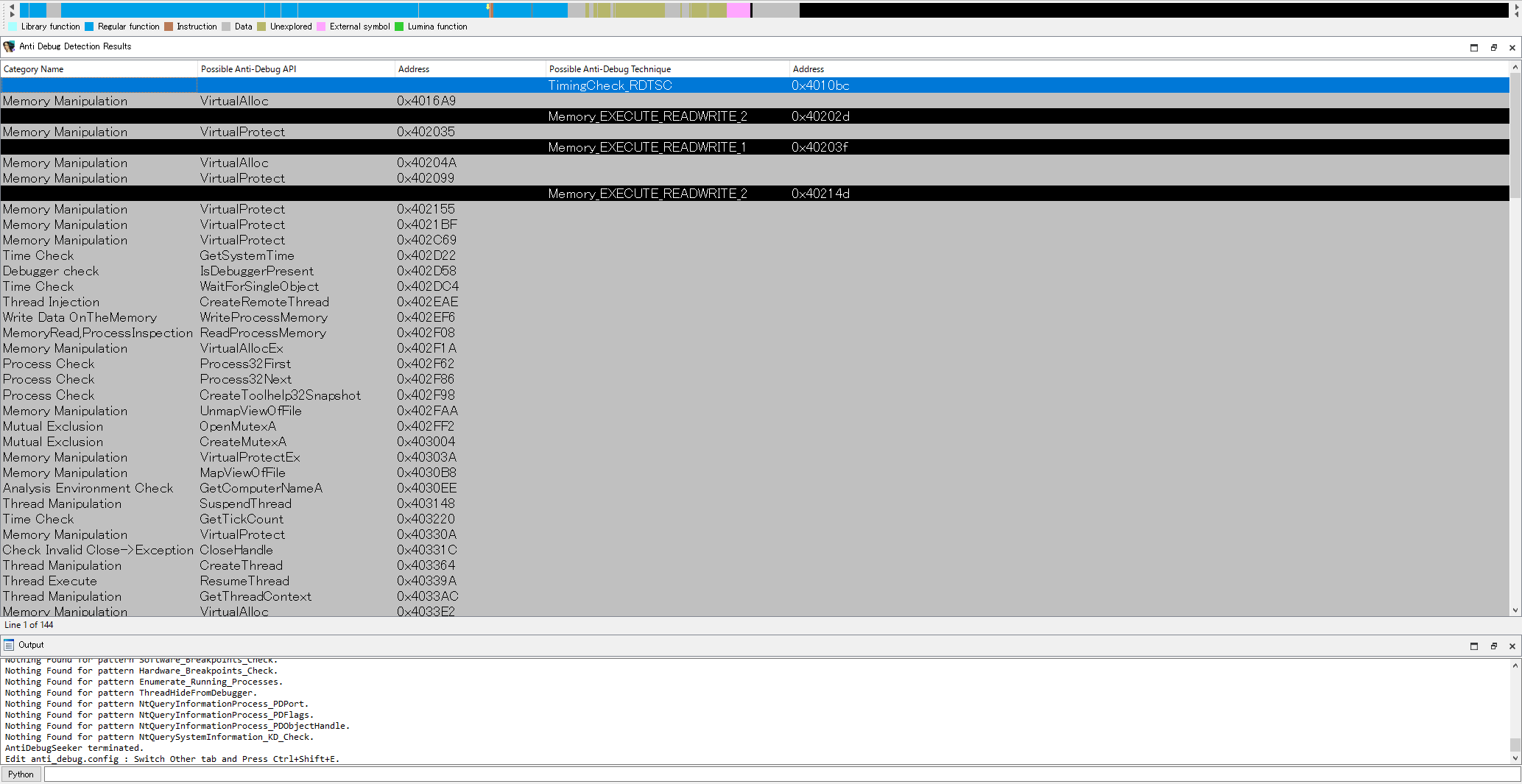
A screen named “Anti Debug Detection Results” will appear after the analysis is complete.
Anti Debug Detection Results
API category name defined in the Anti_Debug_API as listed in anti_debug.config.
List of detected APIs displayed.
Address where the detected API is being used.
Detection name identified by the keyword defined in Anti_Debug_Technique as listed in anti_debug.config.
Address of the first detected keyword.
(Address Transition)
By double-clicking on the detected line, you will jump to the address specified.
!Anti-Debug-Detection-Results-Display
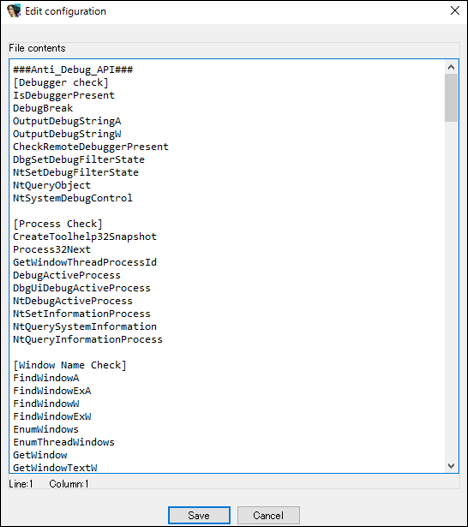
Ctrl + Shift + E (Config File Editing)
Functionality for checking and editing the contents of anti_debug.config.
After making changes,
click the 'Save' button to save the modifications.
!Edit-antidebug.config
Support Functions
After running the plugin, detected APIs and keywords are highlighted in different colors.
Additionally, if an API specified in Anti_Debug_API is detected, the category name is added as a comment. Likewise, if a rule name is detected in Anti_Debug_Technique, a description of that rule is added as a comment to the first detected keyword.
!AntiDebugAPI_Technique_Detect
anti_debug.config and anti_debug_techniques_descriptions.json
This config file contains the detection rules that are utilized by AntiDebugSeeker.py.
There are sections named Anti_Debug_API and Anti_Debug_Technique.
Anti_Debug_API
(exact match) You can freely create categories and add APIs that you wish to detect.
<img src="picture/HowToWriteAnti_Debug_API_Section.png" alt="HowToWriteAnti_Debug_API_Section" width="380"/>
Anti_Debug_Technique
(partial match) You can set between one to three keywords.
The basic flow of the search is as follows:
1. First, search for the first keyword.
2. If it is found, search within the specified number of bytes (default is 80 bytes) for the second keyword.
3. The same process is then applied for searching for the third keyword.
<img src="picture/HowToWriteAnti_Debug_Technique_Section.png" alt="HowToWriteAnti_Debug_Technique_Section" width="430"/>
If you want to set a custom search range instead of using the default value, you can specify 'search_range=value' at the end of the keyword you've set.
This allows you to change the search range for each rule you'.
<img src="picture/Custom_SearchRange.png" alt="AntiDebugTechnique_Search_Range" width="380"/>
anti_debug_techniques_descriptions.json contains the descriptions of the rules defined in the Anti_Debug_Technique section.
The defined in this file can be referenced on the disassembly screen, allowing you to check the descriptions of the rules.
<img src="picture/anti_debug_techniques_descriptions.png" alt="anti_debug_techniques_descriptions" width="600"/>
List of detectable anti-debugging techniques (Ver1.0)
The following is a list of rule names defined in the Anti_Debug_Technique section of the antidebug.config.
项目信息
开发语言:Python
Star 数:179
技术要点
该项目属于病毒分析方向的开源资源,代码结构清晰,适合安全研究人员学习参考。项目围绕Automatically identify and extract potential anti-debugging techniques used by malware.展开,提供了可运行的实现,对理解相关安全机制、工具原理与攻防技术具有较高的研究价值。
从技术实现角度看,此类项目的核心在于对底层原理的深入理解与工程化落地。开发者在研究过程中可以结合官方文档与社区讨论,梳理项目的初始化流程、核心模块职责与数据流转,逐步掌握其中的技术细节与设计思路。
使用与学习建议
1. 下载源码压缩包,解压到本地环境。
2. 根据项目类型准备对应的运行环境与依赖。
3. 按照 README 中的步骤完成配置与部署。
4. 在隔离的测试环境中运行验证,避免影响生产系统。
免责声明
本资源来源于开源社区,仅供安全研究、技术学习与合法授权范围内的攻防演练使用,请勿用于任何非法或侵害他人权益的用途。使用本项目产生的一切后果由使用者自行承担。
| 资源标题 | IDA_Plugin_AntiDebugSeeker - Automatically identify and extract potential anti- |
| 所属分类 | 病毒分析 |
| 发布作者 | admin |
| 发布时间 | 2026-10-05 23:29:49 |
| 下载权限 | 免费下载 |
| 附件数量 | 2 个下载链接 |
| 浏览次数 | 491 |
| 讨论数量 | 0 |
| 主题状态 | 正常讨论中 |