 病毒分析
点击放大
FileInsight-plugins - FileInsight-plugins: decoding toolbox of McAfee Fi
项目说明
![Black Hat Arsenal]()
FileInsight-plugins: decoding toolbox of McAfee FileInsight hex editor for malware analysis
FileInsight-plugins is a large set of plugins for McAfee FileInsight hex editor.
It adds many capabilities such as decryption, decompression, searching XOR-ed text strings, scanning with a YARA rule, code emulation, disassembly, and more!
It is useful for kinds of decoding tasks in malware analysis (e.g. extracting malware executables and decoy documents from malicious document files).
For those looking for FileInishgt installer, it is a at .
* Screenshots
* Presentations
* Use cases
* How to install
* How to use
* How to update
* Customization
* List of plugins (153 plugins)
Screenshots
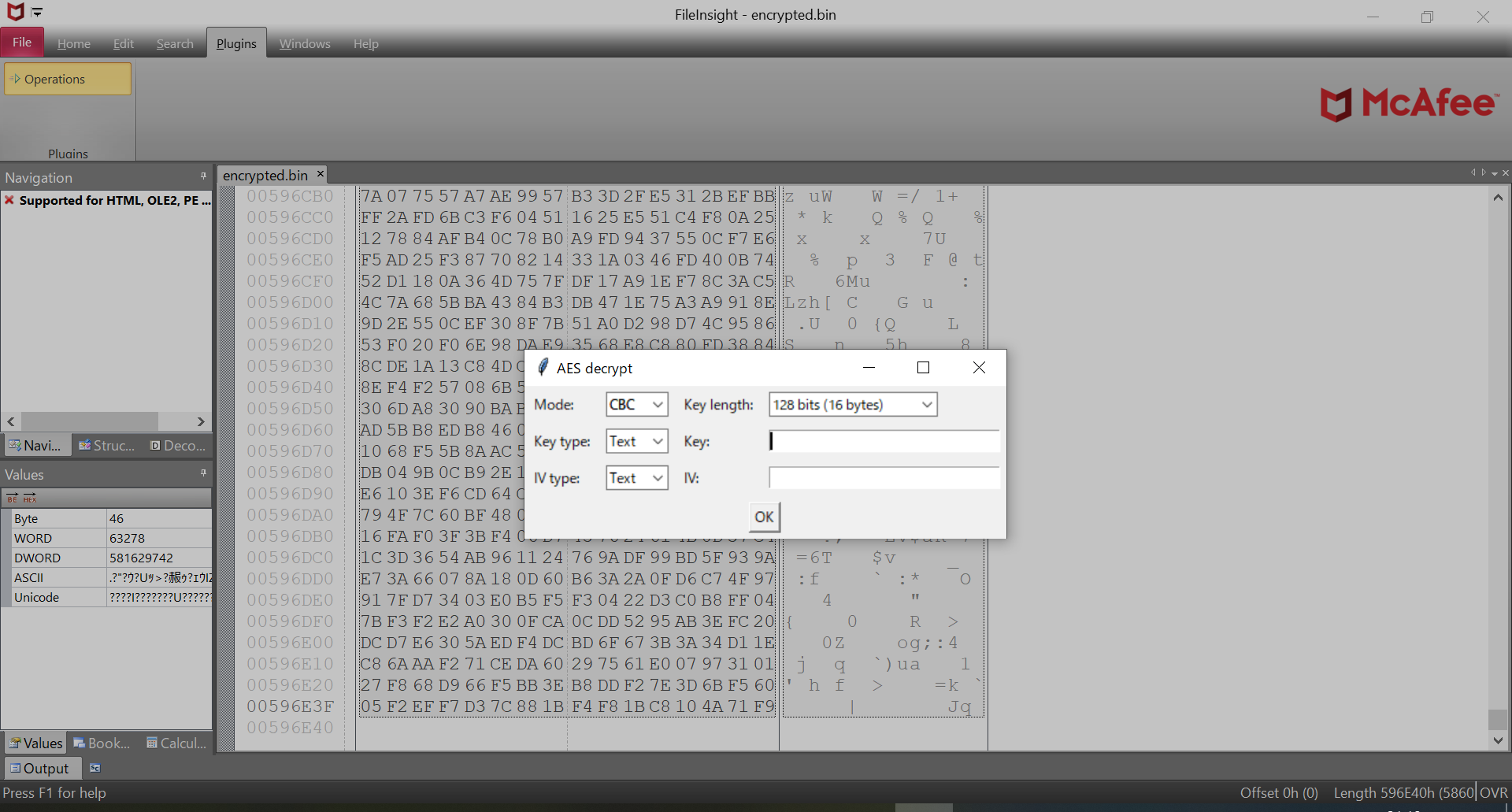
#### Dialog of "AES decrypt" plugin
!screenshot1.png
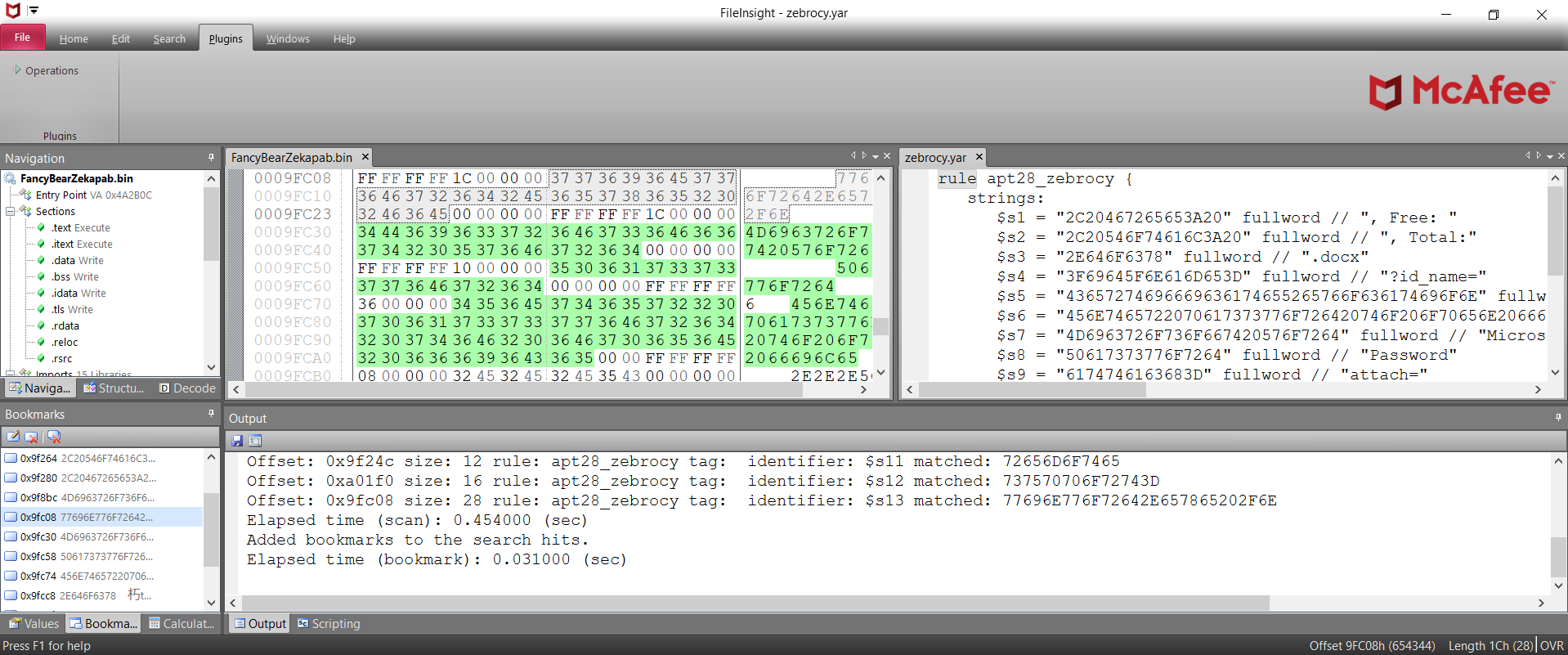
#### Scan result of "YARA scan" plugin
!screenshot2.png
#### Data structure of ELF executable file parsed by "Parse file structure" plugin
!screenshot3.png
#### Emulation trace of ARM64 Linux shellcode emulated by "Emulate code" plugin
!screenshot4.png
#### Disassembly output of x86 Linux shellcode disassembled by "Disassemble" plugin
!screenshot5.png
#### Bitmap representation of Windows executable file by "Bitmap view" plugin
!screenshot6.png
#### Byte histogram of Excel file shown by "Byte histogram" plugin
!screenshot7.png
#### Entropy graph of Windows executable file shown by "Entropy graph" plugin
!screenshot8.png
Presentations
Black Hat USA 2021 Arsenal
* Abstract at Black Hat USA website
* Slide deck
* Demo movie
CODE BLUE 2019 Bluebox
* Abstract at CODE BLUE website
* Slide deck (English)
* Slide deck (Japanese)
Use cases
* Use case 1: executable file embedded in Excel file
* Use case 2: executable file embedded in RTF file
* Use case 3: obfuscated PHP webshell
* Use case 4: YARA rule testing
* Use case 5: Code emulation
How to install
Please execute the following command. The latest release of FileInsight-plugins and pre-requisites including FileInsight and Python 3.12.x (x64) will be installed.
If you use a proxy server (for example, IP address: 10.0.0.1, port: 8080), please execute the following commands.
There are a few Python modules that is necessary manual installation. Please follow installation instructions displayed by plugins.
How to use
Please click "Operations" in the "Plugins" tab then select a plugin.
<img src="docs/how_to_use1.png" width="370" height="274">
You can also use plugins from the right-click menu.
!how_to_use2.png
Some plugins show an additional dialog for plugin settings at the point of use.
!how_to_use3.png
How to update
If you would like to update FileInsight-plugins to the latest release ,
please click "Check for update" of the plugin menu. The installation
PowerShell script ()
will be executed if new is a.
Existing files will be o.
!check_for_update.png
You can also update with the following command ("Check for update"
executes this command).
If you use a proxy server (for example, IP address: 10.0.0.1, port: 8080), please execute the following commands.
If you would like to update FileInsight-plugins to the latest snapshot,
please add "-snapshot" option.
Customization
For the "Send to (CLI)" plugin and the "Send to (GUI)" plugin, you can open files with your fa programs.
Please click "Customize menu" of the plugin menu.
!customization1.png
"plugins\Operations\Misc\send_to_cli.json" (for the "Send to (CLI)" plugin) or "plugins\Operations\Misc\send_to.json" (for the "Send to (GUI)" plugin) will be opened with your default text editor.
Please edit and save it.
!customization2.png
Your customization will be reflected in menu items.
!customization3.png
List of plugins (155 plugins)
Basic operations
* Copy to new file
Copy selected region (the whole file if not selected) to a new file
* Switch file tabs
Switch file tabs with a listbox
* Bookmark
Bookmark selected region with specified comment and color
* Cut binary to clipboard
Cut binary data of selected region to clipboard as hex-encoded text
* Copy binary to clipboard
Copy binary data of selected region to clipboard as hex-encoded text
* Paste binary from clipboard
Paste binary data (con from hex-encoded text) from clipboard
* Delete before
Delete all region before the current cursor position
* Delete after
Delete all region after the current cursor position
* Fill
Fill selected region with specified hex pattern
* Invert
Invert bits of selected region
* Reverse order
Reverse order of selected region
* Change endianness
Change endianness of selected region
* Swap nibbles
Swap each pair of nibbles of selected region
* Swap two bytes
Swap each pair of bytes of selected region
* To upper case
Convert text to upper case of selected region
* To lower case
Convert text to lower case of selected region
* Swap case
Swap case of selected region
Compression operations
#### Compress
* aPLib
Compress selected region with aPLib compression library
* Brotli
Compress selected region with Brotli algorithm
* Bzip2
Compress selected region with bzip2 algorithm
* Gzip
Compress selected region with gzip format
* LZ4
Compress selected region with LZ4 algorithm
* LZF
Compress selected region with LZF algorithm
* LZFSE
Compress selected region with LZFSE algorithm
* lzip
Compress selected region with lzip format
* LZJB
Compress selected region with LZJB algorithm
* LZMA
Compress selected region with LZMA algorithm
* LZNT1
Compress selected region with LZNT1 algorithm
* LZO
Compress selected region with LZO algorithm
* LZRW1/KH
Compress selected region with LZRW1/KH algorithm
* PPMd
Compress selected region with PPMd algorithm
* QuickLZ
Compress selected region with QuickLZ compression library
* Raw deflate
Compress selected region with Deflate algorithm without header and checksum (equi to gzdeflate() in PHP language)
* Snappy
Compress selected region with Snappy compression library
* XZ
Compress selected region with XZ format
* zlib (deflate)
Compress selected region with zlib (Deflate algorithm)
* Zstandard
Compress selected region with Zstandard algorithm
#### Decompress
* aPLib
Decompress selected region with aPLib compression library
* Brotli
Decompress selected region with Brotli algorithm
* Bzip2
Decompress selected region with bzip2 algorithm
* Gzip
Decompress selected gzip-compressed region
* LZ4
Decompress selected region with LZ4 algorithm
* LZF
Decompress selected region with LZF algorithm
* LZFSE
Decompress selected region with LZFSE algorithm
* lzip
Decompress selected lzip compressed region
* LZJB
Decompress selected region with LZJB algorithm
* LZMA
Decompress selected region with LZMA algorithm
* LZNT1
Decompress selected region with LZNT1 algorithm
* LZO
Decompress selected region with LZO algorithm
* LZRW1/KH
Decompress selected region with LZRW1/KH algorithm
* PPMd
Decompress selected region with PPMd algorithm
* QuickLZ
Decompress selected region with QuickLZ compression library
* Raw inflate
Decompress selected Deflate compressed region that does not ha and checksum (equi to gzinflate() in PHP language)
* Snappy
Decompress selected region with Snappy compression library
* XZ
Decompress selected XZ compressed region
* zlib (inflate)
Decompress selected region with zlib (Deflate algorithm)
* Zstandard
Decompress selected region with Zstandard algorithm
Crypto operations
#### Decrypt
* AES
Decrypt selected region with AES
* Blowfish
Decrypt selected region with Blowfish
* CAST-128
Decrypt selected region with CAST-128
* Camellia
Decrypt selected region with Camellia
* ChaCha20
Decrypt selected region with ChaCha20
* DES
Decrypt selected region with DES
* RC2
Decrypt selected region with RC2
* RC4
Decrypt selected region with RC4
* RC5
Decrypt selected region with RC5
* RC6
Decrypt selected region with RC6
* Salsa20
Decrypt selected region with Salsa20
* TEA
Decrypt selected region with TEA (Tiny Encryption Algorithm)
* Triple DES
Decrypt selected region with Triple DES
* XTEA
Decrypt selected region with XTEA (eXtended Tiny Encryption Algorithm)
* XXTEA
Decrypt selected region with XXTEA (Corrected Block Tiny Encryption Algorithm)
#### Encrypt
* AES
Encrypt selected region with AES
* Blowfish
Encrypt selected region with Blowfish
* CAST-128
Encrypt selected region with CAST-128
* Camellia
Encrypt selected region with Camellia
* ChaCha20
Encrypt selected region with ChaCha20
* DES
Encrypt selected region with DES
* RC2
Encrypt selected region with RC2
* RC4
Encrypt selected region with RC4
* RC5
Encrypt selected region with RC5
* RC6
Encrypt selected region with RC6
* Salsa20
Encrypt selected region with Salsa20
* TEA
Encrypt selected region with TEA (Tiny Encryption Algorithm)
* Triple DES
Encrypt selected region with Triple DES
* XTEA
Encrypt selected region with XTEA (eXtended Tiny Encryption Algorithm)
* XXTEA
Decrypt selected region with XXTEA (Corrected Block Tiny Encryption Algorithm)
Encoding operations
#### Decode
* Hex text to binary data
Convert hex text of selected region into binary
* Decimal text to binary data
Convert decimal text of selected region into binary data
* Octal text to binary data
Convert octal text of selected region into binary data
* Binary text to binary data
Convert binary text of selected region into binary data
* Custom base16 decode
Decode selected region with custom base16 table
* Custom base32 decode
Decode selected region with custom base32 table
* Custom base58 decode
Decode selected region with custom base58 table
* Custom base62 decode
Decode selected region with custom base62 table
* Custom base64 decode
Decode selected region with custom base64 table
* Custom base85 decode
Decode selected region with custom base85 table
* Custom base91 decode
Decode selected region with custom base91 table
* Custom base92 decode
Decode selected region with custom base92 table
* gob decode
Decode selected region as gob (serialization format for golang) serialized data into Python notation
* MessagePack decode
Decode selected region as MessagePack serialized data into JSON
* Protobuf decode
Decode selected region as Protocol Buffers serialized data into JSON without .proto files
* From quoted printable
Decode selected region as quoted printable text
* Unicode unescape
Unescape Unicode escape sequence of selected region
* URL decode
Decode selected region as percent-encoded text that is used by URL
#### Encode
* Binary data to hex text
Convert binary of selected region into hex text
* Binary data to decimal text
Convert binary of selected region into decimal text
* Binary data to octal text
Convert binary of selected region into octal text
* Binary data to binary text
Convert binary of selected region into binary text
* Custom base16 encode
Encode selected region with custom base16 table
* Custom base32 encode
Encode selected region with custom base32 table
* Custom base58 encode
Encode selected region with custom base58 table
* Custom base62 encode
Encode selected region with custom base62 table
* Custom base64 encode
Encode selected region with custom base64 table
* Custom base85 encode
Encode selected region with custom base85 table
* Custom base91 encode
Encode selected region with custom base91 table
* Custom base92 encode
Encode selected region with custom base92 table
* MessagePack encode
Encode JSON of selected region into MessagePack serialized data
* ROT13
Rotate alphabet characters in selected region by the specified amount (default: 13)
* To quoted printable
Encode selected region into quoted printable text
* Unicode escape
Escape Unicode characters of selected region
* URL encode
Encode selected region into percent-encoded text that is used by URL
Misc operations
* Emulate code
Emulate selected region as an executable or shellcode (the whole file if not selected)
* File comparison
Compare contents of two files
* Hash
Calculate CRC32, MD5, SHA1, SHA256, ssdeep, TLSH, imphash, impfuzzy, exphash, Rich PE header hash, authentihash, icon MD5, icon dhash, gimphash, and telfhash of selected region (the whole file if not selected)
* Send to (CLI)
Send selected region (the whole file if not selected) to other CLI program and get output
* Send to (GUI)
Send selected region (the whole file if not selected) to other GUI program
Parsing operations
* Binwalk scan
Scan selected region (the whole file if not selected) to find embedded files
* Disassemble
Disassemble selected region (the whole file if not selected)
* Extract
Extract Microsoft Office from selected region (the whole file if not selected)
* File type
Identify file type of selected region (the whole file if not selected)
* Find PE file
Find PE file from selected region (the whole file if not selected) based on PE header information
* Parse file structure
Parse file structure of selected region (the whole file if not selected) with Kaitai Struct
Supported file formats: Gzip, RAR, ZIP, ELF, Mach-O, PE, MBR partition table, BMP, GIF, JPEG, PNG, Windows shortcut
* Show metadata
Show metadata of selected region (the whole file if not selected) with ExifTool
* Strings
Extract text strings from selected region (the whole file if not selected)
* String type
Identify type of strings such as API keys and cryptocurrency wallet addresses in the selected region (the whole file if not selected) with lemmeknow
Search operations
* Regex extraction
Search with regular expression in selected region (the whole file if not selected) and extract matched regions as single concatenated region
* Regex search
Search with regular expression in selected region (the whole file if not selected) and bookmark matched regions
* Replace
Search with regular expression in selected region (the whole file if not selected) and replace matched regions with specified data
* XOR hex search
Search XORed / bit-rotated data in selected region (the whole file if not selected)
* XOR text search
Search XORed / bit-rotated string in selected region (the whole file if not selected)
* YARA scan
Scan selected region (the whole file if not selected) with YARA.
operations
* Bitmap view
the whole file as a bitmap representation
* Byte histogram
Show byte histogram of selected region (the whole file if not selected)
* Entropy graph
Show entropy graph of selected region\n(the whole file if not selected)
XOR operations
* Simple XOR
XOR selected region with specified XOR key
* Decremental XOR
XOR selected region while decrementing XOR key
* Incremental XOR
XOR selected region while incrementing XOR key
* Null-preserving XOR
XOR selected region while skipping null bytes and XOR key itself
* XOR with another file
XOR selected region with the content of another file as XOR key
* XOR with next byte
XOR selected region while using next byte as XOR key
* XOR with next byte (reverse)
Reverse operation of "XOR with next byte" plugin
* Guess multibyte XOR keys
Guess multibyte XOR keys from selected region (the whole file if not selected) based on re keys that are XORed with 0x00
* encrypt
Encode selected region with encrypt algorithm that is used by Zeus trojan
* decrypt
Decode selected region with decrypt algorithm that is used by Zeus trojan
Author
Nobutaka Mantani (X: )
License
The BSD 2-Clause License ()
项目信息
开发语言:Python
Star 数:164
技术要点
该项目属于病毒分析方向的开源资源,代码结构清晰,适合安全研究人员学习参考。项目围绕FileInsight-plugins: decoding toolbox of McAfee FileInsight hex editor for malware analysis展开,提供了可运行的实现,对理解相关安全机制、工具原理与攻防技术具有较高的研究价值。
从技术实现角度看,此类项目的核心在于对底层原理的深入理解与工程化落地。开发者在研究过程中可以结合官方文档与社区讨论,梳理项目的初始化流程、核心模块职责与数据流转,逐步掌握其中的技术细节与设计思路。
使用与学习建议
1. 下载源码压缩包,解压到本地环境。
2. 根据项目类型准备对应的运行环境与依赖。
3. 按照 README 中的步骤完成配置与部署。
4. 在隔离的测试环境中运行验证,避免影响生产系统。
免责声明
本资源来源于开源社区,仅供安全研究、技术学习与合法授权范围内的攻防演练使用,请勿用于任何非法或侵害他人权益的用途。使用本项目产生的一切后果由使用者自行承担。
| 资源标题 | FileInsight-plugins - FileInsight-plugins: decoding toolbox of McAfee Fi |
| 所属分类 | 病毒分析 |
| 发布作者 | admin |
| 发布时间 | 2026-10-05 23:31:17 |
| 下载权限 | 免费下载 |
| 附件数量 | 2 个下载链接 |
| 浏览次数 | 202 |
| 讨论数量 | 0 |
| 主题状态 | 正常讨论中 |