 病毒分析
点击放大
flare-vm - A collection of software installations scripts for
项目说明
FLARE-VM
Welcome to FLARE-VM - a collection of software installations scripts for Windows systems that allows you to easily setup and maintain a reverse engineering en on a machine (VM). FLARE-VM was designed to solve the problem of reverse engineering tool curation and relies on two main technologies: Chocolatey and Boxstarter. Chocolatey is a Windows-based Nuget package management system, where a "package" is essentially a ZIP file containing PowerShell installation scripts that download and configure a specific tool. Boxstarter le Chocolatey packages to automate the installation of software and create repeatable, scripted Windows en.
<p align="center">
<img src="Images/flare.png" alt="FLARE-VM Logo" width="600">
</p>
Requirements
FLARE- ONLY be installed on a machine.
The satisfy the following requirements:
* Windows ≥ 10
* PowerShell ≥ 5
* Disk capacity of at least 60 GB and memory of at least 2GB
* Usernames without spaces or other special characters
* Internet connection
* Tamper Protection and any Anti-Malware solution (e.g., Windows Defender) disabled, preferably Policy
* Windows Updates Disabled
Installation instruction
This section documents the steps to install FLARE-VM. You may also find useful the _Building a VM for Reverse Engineering and Malware Analysis! Installing the FLARE-.
Pre-installation
* Prepare a Windows 10+ machine
* Install Windows in the machine, for example using the raw Windows 10 ISO from
* Ensure the requirements above are satisfied, including:
* Disable Windows Updates (at least until installation is finished)
*
* Disable Tamper Protection and any Anti-Malware solution (e.g., Windows Defender), preferably Policy.
* GPO:
* Non-GPO - Manual:
* Non-GPO - Automated:
* Non-GPO - Semi-Automated (User needs to toggle off Tamper Protection):
* Take a so you can always revert to a state before the FLARE-
* NOTE for IDA Pro: If you are installing IDA Pro via
idapro.vm, you must place your IDA Pro installer (and optionally, your license file) on the Desktop before running the FLARE-.FLARE-
* Open a
PowerShell prompt as administrator* Download the installation script
installer.ps1 to your Desktop:*
(New-Object net.webclient).DownloadFile(']::GetFolderPath("Desktop"))\install.ps1")* Unblock the installation script:
*
Unblock-File .\install.ps1* Enable script execution:
*
Set-ExecutionPolicy Unrestricted -Force* If you receive an error saying the execution policy is o by a policy defined at a more specific scope, you may need to pass a scope in via
Set-ExecutionPolicy Unrestricted -Scope CurrentUser -Force. To view execution policies for all scopes, execute Get-ExecutionPolicy -List* Finally, execute the installer script as follow:
*
.\install.ps1* To pass your password as an argument:
.\install.ps1 -password <password>* To use the CLI-only mode with minimal user interaction:
.\install.ps1 -password <password> -noWait -noGui* To use the CLI-only mode with minimal user interaction and a custom config file:
.\install.ps1 -customConfig <config.xml> -password <password> -noWait -noGui* After installation it is recommended to switch to
host-only networking mode and take a #### Installer Parameters
Below are the CLI parameter descriptions.
Get full usage information by running Get-Help .\install.ps1 -Detailed.
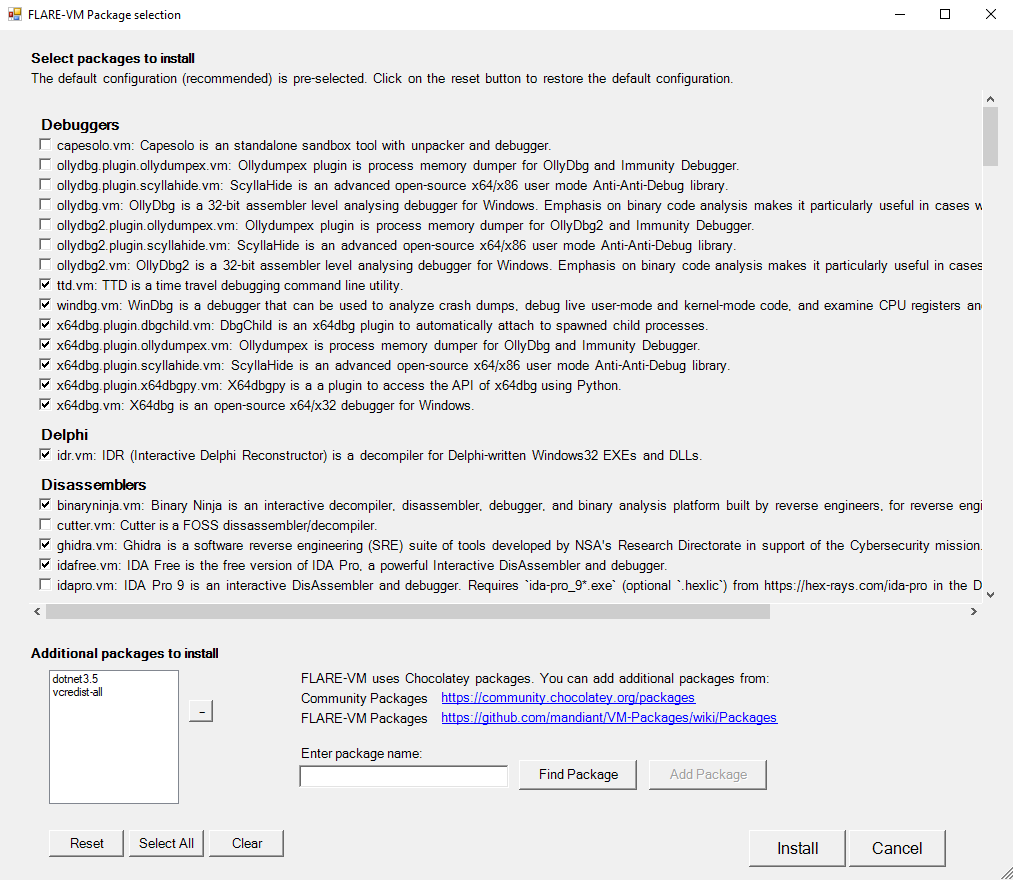
#### Installer GUI
The Installer GUI is display after executing the checks and installing Boxstarter and Chocolatey (if they are not installed already).
Using the installer GUI you may customize:
* Package selection from FLARE-VM and Chocolatey community
* En paths
!Installer GUI
#### Configuration
The installer will download config.xml from the FLARE-. This file contains the default configuration, including the list of packages to install and the en paths. You may use your own configuration by specifying the CLI-argument -customConfig and pro either a local file path or URL to your config.xml file. For example:
#### Taskbar Layout
The installer will use CustomStartLayout.xml from the FLARE-. This file contains the default taskbar layout. You may use your own configuration by specifying the CLI-argument -customLayout and pro a local file path or URL to your CustomStartLayout.xml file. For example:
##### Things to Consider:
.exe files) or shortcuts to applications can be pinned.cmd.exe or powershell with arguments supplied that will perform that actions you would like.-runAsAdmin and pinning the shortcut.#### Post installation steps
You can include any post installation step you like in the configuration inside the tags apps, services, path-items, registry-items, and custom-items.
For example:
For more examples, check the default configuration file: config.xml.
Contributing
Troubleshooting
If your installation fails, please attempt to identify the reason for the installation error by reading through the log files listed below on your system:
*
%%\log.txt*
%PROGRAMDATA%\chocolatey\logs\chocolatey.log*
%LOCALAPPDATA%\Boxstarter\boxstarter.logEnsure you are running the latest of the FLARE- and that your the requirements.
Installer Error
If the installation failed due to an issue in the installation script (e.g.,
install.ps1), report the bug in FLARE-VM.Provide all the information requested to ensure we are able to help you.
> Note: Rarely should install.ps1 be the reason for an installation failure. Most likely it is a specific package or set of packages that are failing (see below).
Package Error
Packages fail to install from time to time -- this is normal. The most common reasons are outlined below:
1. Failure or timeout from Chocolatey or MyGet to download a .nupkg file
2. Failure or timeout due to remote host when downloading a tool
3. Intrusion Detection System (IDS) or A (e.g., Windows Defender) prevents a tool download or removes the tool from the system
4. Host specific issue, for example when using an untested
5. Tool fails to build due to dependencies
6. Old tool URL (e.g., HTTP STATUS 404)
7. Tool's SHA256 hash has changed from what is hardcoded in the package installation script
Reasons 1-4 are difficult for us to fix since we do not control them. If an issue related to reasons 1-4 is filed, it is unlikely we will be able to assist.
We can help with reasons 5-7 and welcome the community to contribute fixes as well!
Please report the bug in pro all the information requested.
Updates
Note that package updates are best effort and that updates are not being tested.
If you encounter errors, perform a fresh FLARE-.
Mailing List
Subscribe to the FLARE mailing list for community announcements! Email "subscribe" to .
Legal Notice
> This download configuration script is provided to assist cyber security analysts in creating handy and toolboxes for malware analysis en. It provides a con interface for them to obtain a useful set of analysis tools directly from their original sources. Installation and use of this script is subject to the Apache 2.0 License. You as a user of this script must review, accept and comply with the license terms of each downloaded/installed package. By proceeding with the installation, you are accepting the license terms of each package, and acknowledging that your use of each package will be subject to its respecti terms.
项目信息
开发语言:PowerShell
Star 数:9098
技术要点
该项目属于病毒分析方向的开源资源,代码结构清晰,适合安全研究人员学习参考。项目围绕A collection of software installations scripts for Windows systems that allows you to easily setup and maintain a reverse engineering environment on a VM.展开,提供了可运行的实现,对理解相关安全机制、工具原理与攻防技术具有较高的研究价值。
从技术实现角度看,此类项目的核心在于对底层原理的深入理解与工程化落地。开发者在研究过程中可以结合官方文档与社区讨论,梳理项目的初始化流程、核心模块职责与数据流转,逐步掌握其中的技术细节与设计思路。
使用与学习建议
1. 下载源码压缩包,解压到本地环境。
2. 根据项目类型准备对应的运行环境与依赖。
3. 按照 README 中的步骤完成配置与部署。
4. 在隔离的测试环境中运行验证,避免影响生产系统。
免责声明
本资源来源于开源社区,仅供安全研究、技术学习与合法授权范围内的攻防演练使用,请勿用于任何非法或侵害他人权益的用途。使用本项目产生的一切后果由使用者自行承担。
| 资源标题 | flare-vm - A collection of software installations scripts for |
| 所属分类 | 病毒分析 |
| 发布作者 | admin |
| 发布时间 | 2026-10-05 23:32:01 |
| 下载权限 | 免费下载 |
| 附件数量 | 2 个下载链接 |
| 浏览次数 | 185 |
| 讨论数量 | 0 |
| 主题状态 | 正常讨论中 |