 病毒分析
点击放大
BlueTeam-Tools - Tools and Techniques for Blue Team / Incident Resp
项目说明
BlueTeam-Tools
<p align="center">
<img src=" height="300">
</p>
This github repository contains a collection of 70+ tools and resources that can be useful for blue teaming acti.
Some of the tools may be specifically designed for blue teaming, while others are more general-purpose and can be adapted for use in a blue teaming context.
> 🔗 If you are a Red Teamer, check out RedTeam-Tools
> Warning
>
> *The materials in this repository are for informational and educational purposes only. They are not intended for use in any illegal acti.*
> Note
>
> *Hide Tool List headings with the arrow.*
>
> *Click 🔙 to get back to the list.*
Tool List
<details open>
<summary><b>Blue Team Tips</b> 5 tips</summary>
<ul>
<ul>
<li><b><a href="#payload-extraction-with-process-hacker">Payload extraction with Process Hacker</a></b><i> </i></li>
<li><b><a href="#prea-double-click">Prevent Script Execution Click</a></b><i> Default Application GPO Change</i></li>
<li><b><a href="#detect-cryptojacking-malware-with-proxy-logs">Detect Cryptojacking Malware with Proxy Logs</a></b><i> Da</i></li>
<li><b><a href="#remoef-malware-analysis">Remove null bytes in CyberChef malware analysis</a></b><i> </i></li>
<li><b><a href="#recoom-a-pdf">Reco metadata from a PDF</a></b><i> </i></li>
</ul>
</ul>
</details>
<details open>
<summary><b>Threat Hunting</b> 3 tools</summary>
<ul>
<ul>
<li><b><a href="#threathuntapp">threathunt.app</a></b><i> Threat hunting toolkit</i></li>
<li><b><a href="#huntio">hunt.io</a></b><i> Disco C2 servers and perform proacti hunting</i></li>
<li><b><a href="#"></a></b><i> Pi DNS, certificates, and host responses</i></li>
</ul>
</ul>
</details>
<details open>
<summary><b>Network Discovery and Mapping</b> 6 tools</summary>
<ul>
<ul>
<li><b><a href="#nmap">Nmap</a></b><i> Network scanner</i></li>
<li><b><a href="#nuclei">Nuclei</a></b><i> scanner</i></li>
<li><b><a href="#masscan">Masscan</a></b><i> Fast network scanner</i></li>
<li><b><a href="#angry-ip-scanner">Angry IP Scanner</a></b><i> IP/port scanner</i></li>
<li><b><a href="#zmap">ZMap</a></b><i> Large network scanner</i></li>
<li><b><a href="#shodan">Shodan</a></b><i> Internet facing asset search engine</i></li>
</ul>
</ul>
</details>
<details open>
<summary><b> Management</b> 5 tools</summary>
<ul>
<ul>
<li><b><a href="#openvas">OpenVAS</a></b><i> Open-source scanner</i></li>
<li><b><a href="#nessus-essentials">Nessus Essentials</a></b><i> scanner</i></li>
<li><b><a href="#nexpose">Nexpose</a></b><i> management tool</i></li>
<li><b><a href="#hackerone">HackerOne</a></b><i> Bug Bounty Management Platform</i></li>
<li><b><a href="#lynis">Lynis</a></b><i> Security auditing tool for Linux, macOS, and UNIX</i></li>
</ul>
</ul>
</details>
<details open>
<summary><b>Security Monitoring</b> 11 tools</summary>
<ul>
<ul>
<li><b><a href="#sysmon">Sysmon</a></b><i> System Monitor for Windows</i></li>
<li><b><a href="#kibana">Kibana</a></b><i> Data and exploration</i></li>
<li><b><a href="#logstash">Logstash</a></b><i> Data collection and processing</i></li>
<li><b><a href="#parsedmarc">parsedmarc</a></b><i> Email DMARC data </i></li>
<li><b><a href="#phishing-catcher">Phishing Catcher</a></b><i> Phishing catcher using Certstream</i></li>
<li><b><a href="#maltrail">maltrail</a></b><i> Malicious traffic detection system</i></li>
<li><b><a href="#autorunstowine">AutorunsToWinE</a></b><i> Windows AutoRuns Event Parser</i></li>
<li><b><a href="#procfilter">procfilter</a></b><i> YARA-integrated process denial framework</i></li>
<li><b><a href="#"></a></b><i> Endpoint and collection tool</i></li>
<li><b><a href="#sysmonsearch">SysmonSearch</a></b><i> Sysmon event log </i></li>
<li><b><a href="#canary-tokens">Canary Tokens</a></b><i> Deception honeypot documents</i></li>
</ul>
</ul>
</details>
<details open>
<summary><b>Threat Tools and Techniques</b> 12 tools</summary>
<ul>
<ul>
<li><b><a href="#lolbas-projectgithubio">lolbas-project.github.io</a></b><i> Living Off The Land Windows Binaries</i></li>
<li><b><a href="#gtfobinsgithubio">gtfobins.github.io</a></b><i> Living Off The Land Linux Binaries</i></li>
<li><b><a href="#filesecio">filesec.io</a></b><i> Attacker file extensions</i></li>
<li><b><a href="#kql-search">KQL Search</a></b><i> KQL query aggregator</i></li>
<li><b><a href="#unprotect-project">Unprotect Project</a></b><i> Malware e techniques knowledge base</i></li>
<li><b><a href="#chainsaw">chainsaw</a></b><i> Fast Windows Forensic Artefacts Searcher</i></li>
<li><b><a href="#freq">freq</a></b><i> Domain generation algorithm malware detection</i></li>
<li><b><a href="#yargen">yarGen</a></b><i> YARA rule generator</i></li>
<li><b><a href="#emailanalyzer">EmailAnalyzer</a></b><i> Suspicious emails analyser</i></li>
<li><b><a href="#vcg">VCG</a></b><i> Code security scanning tool</i></li>
<li><b><a href="#cyberchef">CyberChef</a></b><i> GCHQ online data manipulation platform</i></li>
<li><b><a href="#persistencesniper">PersistenceSniper</a></b><i> Find implants on Windows machines</i></li>
</ul>
</ul>
</details>
<details open>
<summary><b>Threat Intelligence</b> 4 tools</summary>
<ul>
<ul>
<li><b><a href="#maltego">Maltego</a></b><i> Threat Intelligence Platform</i></li>
<li><b><a href="#misp">MISP</a></b><i> Malware Information Sharing Platform</i></li>
<li><b><a href="#threatconnect">ThreatConnect</a></b><i> Threat data aggregation</i></li>
<li><b><a href="#ady">Ad Emulation Library</a></b><i> An open library of ad emulation plans</i></li>
</ul>
</ul>
</details>
<details open>
<summary><b>Incident Response Planning</b> 5 tools</summary>
<ul>
<ul>
<li><b><a href="#nist">NIST</a></b><i> Cybersecurity Framework</i></li>
<li><b><a href="#incident-response-plan">Incident Response Plan</a></b><i> Framework for incident response</i></li>
<li><b><a href="#ransomware-response-plan">Ransomware Response Plan</a></b><i> Framework for ransomware response</i></li>
<li><b><a href="#incident-response-reference-guide">Incident Response Reference Guide</a></b><i> Incident preparation guidance paper</i></li>
<li><b><a href="#awesome-incident-response">Awesome Incident Response</a></b><i> List of tools for incident response</i></li>
</ul>
</ul>
</details>
<details open>
<summary><b>Malware Detection and Analysis</b> 11 tools</summary>
<ul>
<ul>
<li><b><a href="#"></a></b><i> Malicious IOC Sharing Platform</i></li>
<li><b><a href="#ida">IDA</a></b><i> Malware disassembler and debugger</i></li>
<li><b><a href="#ghidra">Ghidra</a></b><i> Malware reverse engineering tool</i></li>
<li><b><a href="#decode-vbe">decode-vbe</a></b><i> Encoded decoder</i></li>
<li><b><a href="#pafish">pafish</a></b><i> machine sandbox detector</i></li>
<li><b><a href="#lookyloo">lookyloo</a></b><i> Phishing domain mapping</i></li>
<li><b><a href="#yara">YARA</a></b><i> Malware identification matching</i></li>
<li><b><a href="#cuckoo-sandbox">Cuckoo Sandbox</a></b><i> Malware analysis sandbox</i></li>
<li><b><a href="#radare2">Radare2</a></b><i> Reverse engineering framework</i></li>
<li><b><a href="#dnspy">dnSpy</a></b><i> .NET debugger and assembly editor</i></li>
<li><b><a href="#malware-traffic-analysisnet">malware-traffic-analysis.net</a></b><i> Malware and packet capture samples</i></li>
</ul>
</ul>
</details>
<details open>
<summary><b>Data Recovery</b> 3 tools</summary>
<ul>
<ul>
<li><b><a href="#recuva">Recuva</a></b><i> File recovery</i></li>
<li><b><a href="#extundelete">Extundelete</a></b><i> Ext3 or ext4 partition recovery</i></li>
<li><b><a href="#testdisk">TestDisk</a></b><i> Data Recovery</i></li>
</ul>
</ul>
</details>
<details open>
<summary><b>Digital Forensics</b> 3 tools</summary>
<ul>
<ul>
<li><b><a href="#sans-sift">SANS SIFT</a></b><i> Forensic toolkit</i></li>
<li><b><a href="#the-sleuth-kit">The Sleuth Kit</a></b><i> Disk images analysis tools</i></li>
<li><b><a href="#autopsy">Autopsy</a></b><i> Digital forensics platform</i></li>
</ul>
</ul>
</details>
<details open>
<summary><b>Security Awareness Training</b> 5 tools</summary>
<ul>
<ul>
<li><b><a href="#tryhackme">TryHackMe</a></b><i> Cyber security challenges platform</i></li>
<li><b><a href="#hackthebox">HackTheBox</a></b><i> Cyber security challenges platform</i></li>
<li><b><a href="#cyberdefenders">CyberDefenders</a></b><i> Blue team cyber security challenges platform</i></li>
<li><b><a href="#phishme">PhishMe</a></b><i> Phishing training</i></li>
<li><b><a href="#kc7cyber">kc7cyber</a></b><i> Gamified cybersecurity training platform</i></li>
</ul>
</ul>
</details>
<details open>
<summary><b>Communication and Collaboration</b> 2 tools</summary>
<ul>
<ul>
<li><b><a href="#twitter">Twitter</a></b><i> Cyber Security Accounts</i></li>
<li><b><a href="#facebook-theatexchange">Facebook TheatExchange</a></b><i> Malicious indicators sharing platform</i></li>
</ul>
</ul>
</details>
Blue Team Tips
====================
*Learn from Blue Teamers with a collection of Blue Teaming Tips. These tips cover a range of tactics, tools, and methodologies to improve your blue teaming abilities.*
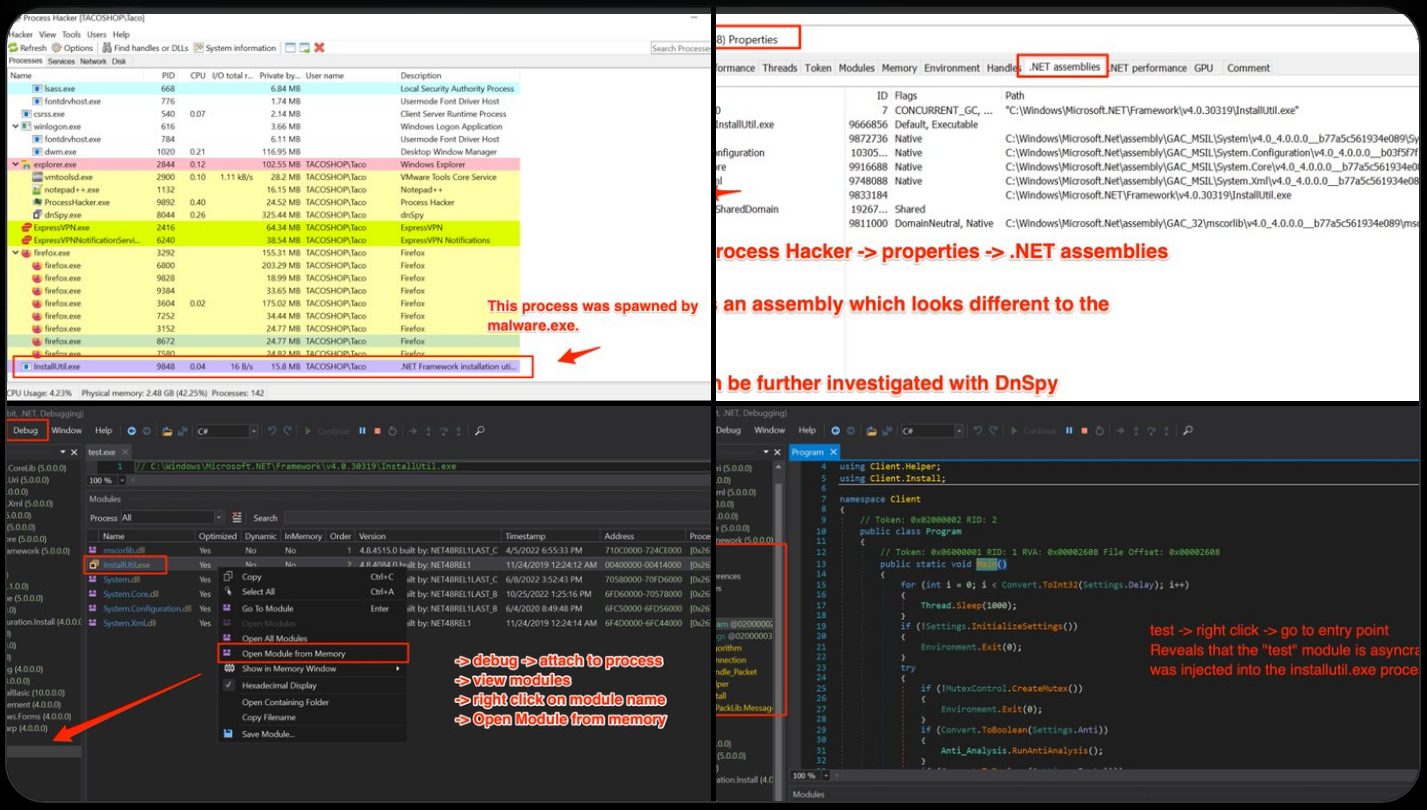
🔙Payload extraction with Process Hacker
!image
Description:
*'Malware Analysis Tip - Use Process Hacker to watch for suspicious .NET assemblies in newly spawned processes. Combined with DnSpy - it's possible to locate and extract malicious payloads without needing to manually de-obfuscate.'*
Credit:
Link: Twitter
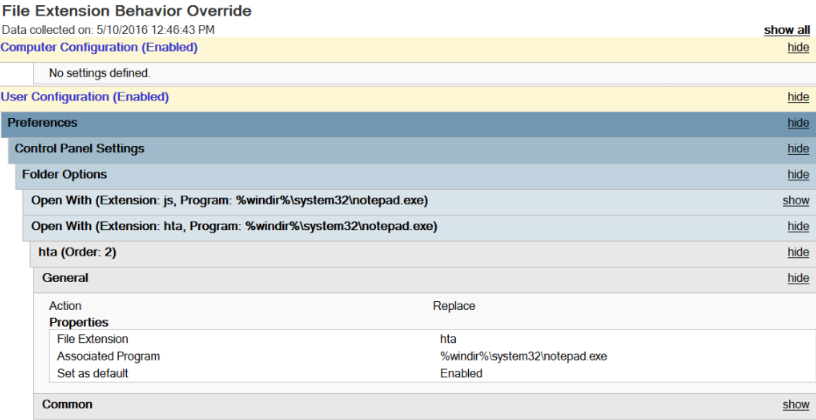
🔙Prevent Script Execution Click
!image
Description:
*On Windows, it's common to see threat actors achie execution script files masquerading as Microsoft Office files. A nice way to prevent this attack chain is to alter the default application associated with these files (HTA, JS, VBA, VBS) to notepad.exe. Now when a user is successfully tricked into clicking a HTA file on disk it will open the script in notepad and execution will not occur*.
Credit: bluesoul
Link: Blog
🔙Detect Cryptojacking Malware with Proxy Logs
Description: *Cryptojacking malware is becoming more suffisticated, with mining malware le DLL sideloading to hide on machine and reducing CPU load to stay below detection thresholds. One thing they all have in common is they have to make connections to mining pools, this is where we can find them. Monitor your proxy and DNS logs for connections containing common mining pool strings (e.g *xmr.* OR *pool.com OR *pool.org OR pool.*).*
Credit: Da
Link: Blog
🔙Remove null bytes in CyberChef malware analysis
!image
Description: *'After decoding base64 for Unicode string during malware analysis, you may encounter null bytes. Keep your code readable by using the "Remove null bytes" operation in CyberChef'.*
Credit: Ayush Anand
Link: Twitter
🔙Reco metadata from a PDF
!image
Description: *Did you know you can reco metadata from a PDF that wasn't scrubbed properly? The changes are incremental, and the history is stored in the PDF. This command removes the "updates" to the PDF metadata:*
exiftool -PDF-update:all= file.pdf
Credit: Jon Gorenflo
Link: Twitter
Threat Hunting
====================
*Tools that support and enhance threat hunting operations.*
🔙threathunt.app
<img width="2018" height="1038" alt="image" src=" />
Threathunt.app is a collection of tools that support internal and external threat hunting operations.
Note: *Some tools are paid. Offers a free 14 day trial for full toolkit access (no payment info needed).*
*Image from
🔙hunt.io
<img width="1831" height="978" alt="image" src=" />
Hunt.io is a cyber threat intelligence and threat hunting platform that maps and tracks malicious internet infrastructure, such as command-and-control (C2) servers, phishing sites, and rogue IP addresses.
Note: *Tool is paid. Offers a free 14 day trial (no payment info needed).*
*Image from
🔙
<img width="1917" height="991" alt="image" src=" />
is a commercial internet intelligence and threat-hunting platform that aggregates historical DNS data, host responses, SSL certificates, and open-source intelligence (OSINT) to help cybersecurity teams track and in malicious online infrastructure.
Note: *Tool is free but does require a "Professional Email" for purposes.*
*Image used from
Network Discovery and Mapping
====================
*Tools for scanning and mapping out the network, disco devices and services, and identifying potential .*
🔙Nmap
Nmap (short for Network Mapper) is a free and open-source network scanner tool used to disco and services on a computer network, and to probe for information about their characteristics.
It can be used to determine which ports on a network are open and what services are running on those ports. Including the ability to identify security on the network.
Install:
You can download the latest release from here.
Usage:
Nice usage cheat sheet.
!image
*Image used from
🔙Nuclei
A specialized tool designed to automate the process of detecting in web applications, networks, and infrastructure.
Nuclei uses pre-defined templates to probe a target and identify potential . It can be used to test a single host or a range of hosts, and can be configured to run a of tests to check for different types of .
Install:
Usage:
Full usage information can be found here.
!image
*Image used from
🔙[Masscan]()
A port scanner that is similar to nmap, but is much faster and can scan a large number of ports in a short amount of time.
Masscan uses a no called "SYN scan" to scan networks, which allows it to scan a large number of ports very quickly.
Install: (Apt)
Install: (Git)
Usage:
!image
*Image used from
🔙Angry IP Scanner
A free and open-source tool for scanning IP addresses and ports.
It's a cross-platform tool, designed to be fast and easy to use, and can scan an entire network or a range of IP addresses to find li.
Angry IP Scanner can also detect the hostname and MAC address of a device, and can be used to perform basic ping sweeps and port scans.
Install:
You can download the latest release from here.
Usage:
Angry IP Scanner can be used via the GUI.
Full usage information and documentation can be found here.
!image
*Image used from
🔙ZMap
ZMap is a network scanner designed to perform comprehensi of the IPv4 address space or large portions of it.
On a typical desktop computer with a gigabit Ethernet connection, ZMap is capable scanning the entire public IPv4 address space in under 45 minutes.
Install:
You can download the latest release from here.
Usage:
Full usage information can be found here.
!image
*Image used from
🔙[Shodan]()
Shodan is a search engine for internet-connected devices.
It crawls the internet for assets, allowing users to search for specific devices and view information about them.
This information can include the device's IP address, the software and it is running, and the type of device it is.
Install:
The search engine can be accessed at
Usage:
Shodan query fundamentals
Shodan query examples
Nice query cheatsheet
!image
*Image used from
Management
====================
*Tools for identifying, prioritizing, and mitigating in the network and on indi devices.*
🔙OpenVAS
OpenVAS is an open-source scanner that helps identify security in software and networks.
It is a tool that can be used to perform network security assessments and is often used to identify in systems and applications so that they can be patched or mitigated.
OpenVAS is de by the Greenbone Networks company and is a as a free and open-source software application.
Install: (Kali)
Usage:
Visit accept the SSL certificate popup and login with admin credentials:
!image
*Image used from
🔙Nessus Essentials
Nessus is a scanner that helps identify and assess the that exist within a network or computer system.
It is a tool that is used to perform security assessments and can be used to identify in systems and applications so that they can be patched or mitigated.
Nessus is de by Tenable, Inc. and is a in both free and paid :
Install:
Register for a Nessus Essentials acti code here and download.
Purchase Nessus Professional from here.
Usage:
Extensi can be found here.
Nessus Plugins Search
Tenable Community
!image
*Image used from
🔙Nexpose
Nexpose is a management tool de by Rapid7. It is designed to help organizations identify and assess in their systems and applications in order to mitigate risk and impro.
Nexpose can be used to scan networks, devices, and applications in order to identify and provide recommendations for remediation.
It also offers features such as asset discovery, risk prioritization, and integration with other tools in the Rapid7 management platform.
Install:
For detailed installation instructions see here.
Usage:
For full login information see here.
For usage and scan creation instructions see here.
!image
*Image used from
🔙HackerOne
HackerOne is a bug bounty management company that can be used to create and manage bug bounty programs for your business.
Bug bounty programs are a great way to outsource external assessments, with the platform offering both private and public programs with the ability set program scopes and rules of engagement.
HackerOne also offer initial triage and management of external bug reports from researchers, with the ability to compensate researchers directly through the platform.
!image
*Image used from
🔙Lynis
Lynis is a security auditing tool for Linux, macOS, and UNIX-based systems. It assists with compliance testing (HIPAA/ISO27001/PCI DSS) and system hardening.
It performs an in-depth security scan and runs on the system itself. The primary goal is to test security defenses and provide tips for further system hardening. It will also scan for general system information, software packages, and possible configuration issues.
Install:
For detailed installation instructions see here.
Usage:
Documentation can be found here.
!image
*Image used from
Security Monitoring
====================
*Tools for collecting and analyzing security logs and other data sources to identify potential threats and anomalous activity.*
🔙Sysmon
Sysmon is a Windows system monitor that tracks system activity and logs it to the Windows event log.
It provides detailed information about system activity, including process creation and termination, network connections, and changes to file creation time.
Sysmon can be configured to monitor specific events or processes and can be used to alert administrators of suspicious activity on a system.
Install:
Download the sysmon binary from here.
Usage:
Full event filtering information can be found here.
The Microsoft documentation page can be found here.
!image
*Image used from
🔙Kibana
Kibana is an open-source data and exploration tool that is often used for log analysis in combination with Elasticsearch.
Kibana provides a user-friendly interface for searching, , and analyzing log data, which can be helpful for identifying patterns and trends that may indicate a security threat.
Kibana can be used to analyze a wide range of data sources, including system logs, network logs, and application logs. It can also be used to create custom dashboards and alerts to help security teams stay informed about potential threats and respond quickly to incidents.
Install:
You can download Kibana from here.
Installation instructions can be found here.
Usage: ( and explore log data)
Kibana provides a range of tools that can help you identify patterns and trends in your log data. You can use these tools to create custom dashboards that display relevant metrics and alerts.
Usage: (Threat Alerting)
Kibana can be configured to send alerts when it detects certain patterns or anomalies in your log data. You can set up alerts to notify you of potential security threats, such as failed login attempts or network connections to known malicious IP addresses.
Nice blog about querying and data in Kibana.
!image
*Image used from
🔙Logstash
Logstash is a open-source data collection engine with real-time pipelining capabilities. It is a ser data processing pipeline that ingests data from a multitude of sources simultaneously, transforms it, and then sends it to a "stash" like Elasticsearch.
Logstash has a rich set of plugins, which allows it to connect to a of sources and process the data in multiple ways. It can parse and transform logs, translate data into a structured format, or send it to another tool for further processing.
With its ability to process large of data quickly, Logstash is an integral part of the ELK stack (Elasticsearch, Logstash, and Kibana) and is often used to centralize, transform, and monitor log data.
Install:
Download logstash from here.
Usage:
Full logstash documentation here.
Configuration examples here.
!image
*Image used from
🔙parsedmarc
A Python module and CLI utility for parsing DMARC reports.
When used with Elasticsearch and Kibana (or Splunk), it works as a self-hosted open source alternative to commercial DMARC report processing services such as Agari Brand Protection, Dmarcian, OnDMARC, ProofPoint Email Fraud Defense, and .
Features:
!image
*Image used from
🔙Phishing Catcher
As a business, phishing can cause reputational and financial damage to you and your customers. Being able to proactively identify phishing infrastructure targeting your business helps to reduce the risk of these damages.
Phish catcher allows you to catch possible phishing domains in near real time by looking for suspicious TLS certificate issuances reported to the Certificate Transparency Log (CTL) via the CertStream API.
"Suspicious" issuances are those whose domain name scores beyond a certain threshold based on a configuration file.
!image
*Image used from
🔙maltrail
Maltrail is a malicious traffic detection system, utilizing publicly a lists containing malicious and/or generally suspicious trails, along with static trails compiled from A and custom user defined lists. A trail can be anything from domain name, URL, IP address or HTTP User-Agent header value.
A demo page for this tool can be found here.
Install:
Usage:
!image
*Image used from
🔙AutorunsToWinE
Autoruns is a tool de by Sysinternals that allows you to view all of the locations in Windows where applications can insert themselves to launch at boot or when certain applications are opened. Malware often takes ad of these locations to ensure that it runs whenever your computer boots up.
Autoruns con includes a non-interacti line utility. This code generates a CSV of Autoruns entries, converts them to JSON, and finally inserts them into a custom Windows Event Log. By doing this, we can take ad of our existing WEF infrastructure to get these entries into our SIEM and start looking for signs of malicious persistence on endpoints and servers.
Install:
Download AutorunsToWinE.
Usage:
From an Admin Powershell console run .\Install.ps1
This script does the following:
!image
*Image used from
🔙procfilter
ProcFilter is a process filtering system for Windows with built-in YARA integration. YARA rules can be instrumented with custom meta tags that tailor its response to rule matches. It runs as a Windows service and is integrated with Microsoft's ETW API, making results in the Windows Event Log. Installation, acti, and removal can be done dynamically and does not require a reboot.
ProcFilter's intended use is for malware analysts to be able to create YARA signatures that protect their Windows en against a specific threat. It does not include a large signature set. Think lightweight, precise, and targeted rather than broad or all-encompassing. ProcFilter is also intended for use in controlled analysis en where custom plugins can perform artifact-specific actions.
Install:
ProcFilter x86/x64 Release/Debug Installers
*Note: Unpatched Windows 7 systems require hotfix 3033929 to load the dri. More information can be found here.*
Nice configuration template file here.
Usage:
Usage screenshots can be found here.
!image
*Image used from
🔙
is a unique, ad open-source endpoint monitoring, digital forensic and cyber response platform.
It was de by Digital Forensic and Incident Response (DFIR) professionals who needed a powerful and efficient way to hunt for specific artifacts and monitor acti across fleets of endpoints. provides you with the ability to more effectively respond to a wide range of digital forensic and cyber incident response in and data breaches:
Features:
Install:
Download the binary from the release page.
Usage:
Full usage information can be found here.
!image
*Image used from
🔙SysmonSearch
SysmonSearch makes event log analysis more effective and less time consuming, by aggregating event logs generated by Microsoft's Sysmon.
SysmonSearch uses Elasticserach and Kibana (and Kibana plugin).
* Elasticserach
Elasticsearch collects/stores Sysmon's event log.
* Kibana
Kibana provides user interface for your Sysmon's event log analysis. The following functions are implemented as Kibana plugin.
* Function
This function Sysmon's event logs to illustrate correlation of processes and networks.
* Statistical Function
This function collects the statistics of each device or Sysmon's event ID.
* Monitor Function
This function monitor incoming logs based on the preconfigured rules, and trigers alert.
* StixIoC server
You can add search/monitor condition by uploading STIX/IOC file. From StixIoC server Web UI, you can upload STIXv1, STIXv2 and OpenIOC format files.
Install: (Linux)
Modify Elasticsearch configuration
Modify Kibana configuration
Full installation instructions can be found here.
Usage:
*Once Elasticsearch and Kibana configurations have been modified, restart the services and na to your Kibana interface. The SysmonSearch ribbon should be .*
the Sysmon log to in suspicious behavior
!image
*Image used from
🔙Canary Tokens
Canarytokens are like motion sensors for your networks, computers and clouds. You can put them in folders, on network devices and on your phones.
Place them where nobody should be poking around and get a clear alarm if they are accessed. They are designed to look juicy to attackers to increase the likelihood that they are opened (and they are completely free).
Install:
Visit the token page and choose from a list of tokens.
Usage:
Add an email address to recei alerts and then wait!
Full usage information and examples can be found here.
!image
*Image used from
Threat Tools and Techniques
====================
*Tools for identifying and implementing detections against TTPs used by threat actors.*
🔙lolbas-project.github.io
Living off the land binaries (LOLBins) are legitimate Windows executables that can be used by threat actors to carry out malicious acti without raising suspicion.
Using LOLBins allows attackers to blend in with normal system activity and evade detection, making them a popular choice for malicious actors.
The LOLBAS project is a MITRE mapped list of LOLBINS with commands, usage and detection information for defenders.
Visit
Usage:
Use the information for detection opportunities to harden your infrastructure against LOLBIN usage.
Here are some project links to get started:
!image
*Image used from
🔙gtfobins.github.io
GTFOBins (short for "Get The F* Out Binaries") is a collection of Unix binaries that can be used to escalate pri, bypass restrictions, or execute arbitrary commands on a system.
They can be used by threat actors to gain unauthorized access to systems and carry out malicious acti.
The GTFOBins project is a list of Unix binaries with command and usage information for attackers. This information can be used to implement unix detections.
Visit
Usage:
Here are some project links to get started:
!image
*Image used from
🔙filesec.io
Filesec is a list of file extensions that can be used by attackers for phishing, execution, macros etc.
This is a nice resource to understand the malicious use cases of common file extentions and ways that you can defend against them.
Each file extension page contains a description, related operating system and recommendations.
Visit
Usage:
Here are some project links to get started:
!image
*Image used from
🔙KQL Search
KQL stands for "Kusto Query Language", and it is a query language used to search and filter data in Azure Monitor logs. It is similar to SQL, but is more optimized for log analytics and time-series data.
KQL query language is particularly useful for blue teamers because it allows you to quickly and easily search through large of log data to identify security events and anomalies that may indicate a threat.
KQL Search is a web app created by that aggregates KQL queries that are shared on GitHub.
You can visit the site at
More information about Kusto Query Language (KQL) can be found here.
!image
*Image used from
🔙Unprotect Project
Malware authors spend a great deal of time and effort to develop complex code to perform malicious actions against a target system. It is crucial for malware to remain undetected and avoid sandbox analysis, anti or malware analysts.
With this kind of technics, malware are able to pass under the radar and stay undetected on a system. The goal of this free database is to centralize the information about malware e techniques.
The project aims to provide Malware Analysts and Defenders with actionable insights and detection capabilities to shorten their response times.
The project can be found at
The project has an API - Docs here.
!image
*Image used from
🔙chainsaw
Chainsaw provides a powerful ‘first-response’ capability to quickly identify threats within Windows forensic artefacts such as Event Logs and MFTs. Chainsaw offers a generic and fast method of searching through event logs for keywords, and by identifying threats using built-in support for Sigma detection rules, and Chainsaw detection rules.
Features:
Install:
Usage:
!image
*Image used from
🔙freq
Ad attempt to bypass signature based/pattern matching/blacklist techniques by introducing random: filenames, service names, workstation names, domains, hostnames, SSL cert subjects and issuer subjects, etc.
Freq is a python API designed by Mark Baggett to handle mass entropy testing. It was designed to be used in conjunction with a SIEM solutions but can work with anything that can submit a web request.
The tool uses frequency tables that map how likely one character will follow another
Install:
Usage:
🔙yarGen
yarGen is a generator for YARA rules
The main principle is the creation of yara rules from strings found in malware files while removing all strings that also appear in goodware files. Therefore yarGen includes a big goodware strings and opcode database as ZIP archives that have to be extracted before the first use.
The rule generation process also tries to identify similarities between the files that get analyzed and then combines the strings to so called super rules. The super rule generation does not remove the simple rule for the files that have been combined in a single super rule. This means that there is some redundancy when super rules are created. You can suppress a simple rule for a file that was already covered by super rule by using --nosimple.
Install:
Download the latest release.
Usage:
Usage examples can be found here.
!image
*Image used from
🔙EmailAnalyzer
With EmailAnalyzer you can able to analyze your suspicious emails. You can extract headers, links and hashes from the .eml file
Install:
Usage:
!image
*Text used from
🔙VCG
VCG is an automated code security review tool that handles C/C++, Java, C#, VB and PL/SQL. It has a few features that should hopefully make it useful to anyone conducting code security reviews, particularly where time is at a premium:
Install:
You can install the pre-compiled binary here.
Open the project .sln, choose "Release", and build.
Usage:
🔙CyberChef
CyberChef is a free, web-based tool that allows users to manipulate and transform data using a wide range of techniques.
With CyberChef, you can perform a wide range of operations on data, such as con between different data formats (e.g., hexadecimal, base64, ASCII), encoding and decoding data, searching and replacing text etc.
The tool also includes a recipe system, which allows you to save and share data manipulation workflows with others.
The tool can be used from here.
!image
*Image used from
🔙PersistenceSniper
PersistenceSniper is a Powershell module that can be used by Blue Teams, Incident Responders and System Administrators to hunt persistences implanted in Windows machines.
PersistenceSniper is able to detect a wide range of persistence techniques, the full list of which can be found here.
Install: (PowerShell Gallery)
Install: (GitHub)
Download the .zip from GitHub and move it to the machine that you want to run the tool from.
Full installation information can be found here.
Usage:
Full usage information can be found here.
!image
*Image used from
Threat Intelligence
====================
*Tools for gathering and analyzing intelligence about current and emerging threats, and for generating alerts about potential threats.*
🔙Maltego
Maltego is a commercial threat intelligence and forensics tool de by Paterva. It is used by security professionals to gather and analyze information about domains, IP addresses, networks, and indi in order to identify relationships and connections that might not be immediately apparent.
Maltego uses a interface to represent data as entities, which can be linked together to form a network of relationships. It includes a range of transforms, which are scripts that can be used to gather data from sources, such as social media, DNS records, and WHOIS data.
Maltego is often used in conjunction with other security tools, such as SIEMs and scanners, as part of a comprehensi intelligence and incident response strategy.
You can schedule a demo here.
Maltego handbook Handbook for Cyber Threat Intelligence
!image
*Image used from
🔙MISP
MISP (short for Malware Information Sharing Platform) is an open-source platform for sharing, storing, and correlating Indicators of Compromise (IOCs) of targeted attacks, threats, and malicious activity.
MISP includes a range of features, such as real-time sharing of IOCs, support for multiple formats, and the ability to import and export data to and from other tools.
It also provides a RESTful API and data models to facilitate the integration of MISP with other security systems. In addition to its use as a threat intelligence platform, MISP is also used for incident response, forensic analysis, and malware research.
Install:
Full installation instructions can be found here.
Usage:
MISP documentation can be found here.
MISP user guide
MISP Training Cheat sheet
!image
*Image used from
🔙ThreatConnect
ThreatConnect is a threat intelligence platform that helps organizations aggregate, analyze, and act on threat data. It is designed to provide a single, unified view of an organization's threat landscape and enable users to collaborate and share information about threats.
The platform includes a range of features for collecting, analyzing, and disseminating threat intelligence, such as a customizable dashboard, integration with third-party data sources, and the ability to create custom reports and alerts.
It is intended to help organizations impro security posture by pro them with the information they need to identify, prioritize, and respond to potential threats.
You can request a demo from here.
ThreatConnect for Threat Intel Analysts - PDF
!image
*Image used from
🔙Ad Emulation Library
This is a library of ad emulation plans to enable you to e your defensi against real-world threats.
Emulation plans are an essential component for organizations looking to prioritize defenses against behavior from specific threats.
The TTPs outlined in this resource can be used to design specific threat emulation acti to test your organisations defenses against specific threat actors.
Visit the resource here.
Example (sandworm)
!image
*Image used from
Incident Response Planning
====================
*Tools for creating and maintaining an incident response plan, including templates and best practices for responding to different types of incidents.*
🔙NIST
The NIST Cybersecurity Framework (CSF) is a framework de by the National Institute of Standards and Technology (NIST) to help organizations manage cybersecurity risks. It provides a set of guidelines, best practices, and standards for implementing and maintaining a robust cybersecurity program.
The framework is organized around five core functions: Identify, Protect, Detect, Respond, and Recover. These functions provide a structure for understanding and addressing the components of cybersecurity risk.
The CSF is designed to be flexible and adaptable, and it can be customized to fit the specific needs and goals of an organization. It is intended to be used as a tool for improving an organization's cybersecurity posture and for helping organizations better understand and manage their cybersecurity risks.
Useful Links:
NIST Quickstart Guide
Framework for Improving Critical Infrastructure Cybersecurity
Data Breach Response: A Guide for Business
NIST Events and Presentations
Twitter -
!image
*Image used from
🔙Incident Response Plan
An incident response plan is a set of procedures that a company puts in place to manage and mitigate the impact of a security incident, such as a data breach or a cyber attack.
The theory behind an incident response plan is that it helps a company to be prepared for and respond effectively to a security incident, which can minimize the damage and reduce the chances of it happening again in the future.
There are several reasons why businesses need an incident response plan:
1. To minimize the impact of a security incident: An incident response plan helps a company to identify and address the source of a security incident as quickly as possible, which can help to minimize the damage and reduce the chances of it spreading.
2. To meet regulatory requirements: Many industries ha that require companies to have an incident response plan in place. For example, the Payment Card Industry Data Security Standard (PCI DSS) requires merchants and other organizations that accept credit cards to have an incident response plan.
3. To protect reputation: A security incident can damage a company's reputation, which can lead to a loss of customers and revenue. An incident response plan can help a company to manage the situation and minimize the damage to its reputation.
4. To reduce the cost of a security incident: The cost of a security incident can be significant, including the cost of remediation, legal fees, and lost business. An incident response plan can help a company to minimize these costs by pro a roadmap for responding to the incident.
Useful Links:
National Cyber Security Centre - Incident Response o
SANS - Security Policy Templates
SANS - Incident Handler's Handbook
FRSecure - Incident Response Plan Template
Cybersecurity and Infrastructure Security Agency - CYBER INCIDENT RESPONSE
FBI - Incident Response Policy
!image
*Image used from
🔙Ransomware Response Plan
Ransomware is a type of malicious software that encrypts a 's files. The attackers then demand a ransom from the to restore access to the files; hence the name ransomware.
The theory behind a ransomware response plan is that it helps a company to be prepared for and respond effectively to a ransomware attack, which can minimize the impact of the attack and reduce the chances of it happening again in the future.
There are several reasons why businesses need a ransomware response plan:
1. To minimize the impact of a ransomware attack: A ransomware response plan helps a company to identify and address a ransomware attack as quickly as possible, which can help to minimize the damage and reduce the chances of the ransomware spreading to other systems.
2. To protect against data loss: Ransomware attacks can result in the loss of important data, which can be costly and disruptive for a business. A ransomware response plan can help a company to recover from an attack and avoid data loss.
3. To protect reputation: A ransomware attack can damage a company's reputation, which can lead to a loss of customers and revenue. A ransomware response plan can help a company to manage the situation and minimize the damage to its reputation.
4. To reduce the cost of a ransomware attack: The cost of a ransomware attack can be significant, including the cost of remediation, legal fees, and lost business. A ransomware response plan can help a company to minimize these costs by pro a roadmap for responding to the attack.
Useful Links:
National Cyber Security Centre - Mitigating malware and ransomware attacks
NIST - Ransomware Protection and Response
Cybersecurity and Infrastructure Security Agency - Ransomware Guide
Microsoft Security - Ransomware response
Blog - Creating a Ransomware Response Plan
!image
*Image used from
🔙Incident Response Reference Guide
This is a “first aid” style of guidance for cybersecurity to help you prepare for a crisis and limit the potential damage in a crisis.
This includes tips and guidance for technical, operational, legal, and communications aspects of a major cybersecurity incident.
Key Takeaways
You can read the paper here.
!image
*Image used from
🔙Awesome Incident Response
A curated list of tools and resources for security incident response, aimed to help security analysts and DFIR teams.
This is a great resource full of links for different aspects of incident response, including:
Visit the resource here.
!image
*Image used from
Malware Detection and Analysis
====================
*Tools for detecting and analyzing malware, including antivirus software and forensic analysis tools.*
🔙
is a website and cloud-based tool that analyzes and scans files, URLs, and software for , worms, and other types of malware.
When a file, URL, or software is submitted to , the tool uses antivirus engines and other tools to scan and analyze it for malware. It then provides a report with the results of the analysis, which can help security professionals and blue teams identify and respond to potential threats.
can also be used to check the reputation of a file or URL, and to monitor for malicious activity on a network.
Visit
Usage:
Full documentation can be found here.
CHEAT SHEET
!image
*Image used from
🔙IDA
IDA (Interacti) is a powerful tool used to reverse engineer and analyze compiled and executable code.
It can be used to examine the inner workings of software, including malware, and to understand how it functions. IDA allows users to disassemble code, decompile it into a higher-le language, and view and edit the resulting source code. This can be useful for identifying , analyzing malware, and understanding how a program works.
IDA can also be used to generate graphs and charts that the structure and flow of code, which can make it easier to understand and analyze.
Install:
Download IDA from here.
Usage:
IDA Practical Cheatsheet
IDAPython cheatsheet
IDA Pro Cheatsheet
!image
*Image used from
🔙Ghidra
Ghidra is a free, open-source software reverse engineering tool de by the National Security Agency (NSA). It is used to analyze compiled and executable code, including malware.
Ghidra allows users to disassemble code, decompile it into a higher-le language, and view and edit the resulting source code. This can be useful for identifying , analyzing malware, and understanding how a program works.
Ghidra also includes a range of features and tools that support SRE tasks, such as debugging, code graphing, and data . Ghidra is written in Java and is a for Windows, MacOS, and Linux.
Install:
1. Download the latest release from here.
2. Extract the zip
Full installation and error fix information can be found here.
Usage:
1. Na to the unzipped folder
If Ghidra failed to launch, see the Troubleshooting link.
!image
*Image used from
🔙decode-vbe
Script Encoding was introduced by Microsoft (long ago) to prevent people from being able to read, understand and alter files.
Encoded scripts are unreadable but still able to execute, making it a popular mechanism with threat actors looking to hide their malicious code, IOCs, hardcoded C2 domains etc whilst still being able to achie.
The decode- can be used to convert encoded back to plaintext for analysis.
Nice blog about here.
Install:
Usage:
🔙pafish
Pafish is a testing tool that uses different techniques to detect machines and malware analysis en in the same way that malware families do.
The project is free and open source; the code of all the anti-analysis techniques is publicly a. Pafish executables for Windows (x86 32-bit and 64-bit) can be downloaded from the releases page.
Install: (Build)
Pafish is written in C and can be built with Mingw-w64 and make.
The wiki page "How to build" contains detailed instructions.
Usage:
!image
*Image used from
🔙lookyloo
Lookyloo is a web interface that captures a webpage and then displays a tree of the domains, that call each other.
Use Lookyloo to map the journey a website page takes - from entering the initial URL address to the redirects to third-party affiliations.
Install:
Full installation instructions can be found here.
Usage:
Once installed and running, lookyloo can be operated via the web interface hosted locally.
!image
*Image used from
🔙YARA
YARA is a tool aimed at (but not limited to) helping malware researchers to identify and classify malware samples. With YARA you can create descriptions of malware families (or whatever you want to describe) based on textual or binary patterns.
Each description, a.k.a rule, consists of a set of strings and a boolean expression which determine its logic.
Install:
Full installation instructions can be found here.
Usage:
Nice YARA cheatsheet here.
!image
*Image used from
🔙Cuckoo Sandbox
Cuckoo is an open source automated malware analysis system.
It’s used to automatically run and analyze files and collect comprehensi results that outline what the malware does while running inside an isolated operating system.
It can retrieve the following type of results:
Install:
For installation follow the docs here.
Usage:
For usage follow the docs here.
🔙radare2
Radare2 provides a set of libraries, tools and plugins to ease reverse engineering tasks.
r2 is a featureful low-le tool with support for scripting. r2 can edit files on local hard drives, view kernel memory, and debug programs locally or via a remote gdb server. r2's wide architecture support allows you to analyze, emulate, debug, modify, and disassemble any binary.
Install:
Usage:
Great usage book here.
!image
*Image used from
🔙dnSpy
dnSpy is a debugger and .NET assembly editor. You can use it to edit and debug assemblies.
Main features:
Install: (Build)
Usage:
Nice tutorial page here.
!image
*Image used from
🔙malware-traffic-analysis.net
This is a site with over 2,200 blog entries about malicious network traffic. Almost every post on the site has pcap files or malware samples (or both).
The site also contains a number of traffic analysis exercises, including technical blog posts outlining techniques being used by threat actors.
Usage:
Visit
!image
*Image used from
Data Recovery
====================
*Tools for reco data from damaged or corrupted systems and devices.*
🔙Recuva
Recuva is a data recovery tool that can be used to reco files from your computer.
It is often used to reco files that may contain information, such as deleted logs or documents that could be used to in a security incident.
Recuva can reco from hard drives, USB drives, and memory cards, and it is a for Windows and Mac operating systems.
Install:
You can download the tool from here.
Usage:
Nice step by step guide.
!image
*Image used from
🔙Extundelete
Extundelete is a utility that can be used to reco files from an ext3 or ext4 file system.
It works by searching the file system for blocks of data that used to belong to a file, and then attempting to recreate the file using those blocks of data. It is often used to reco files that have been accidentally or maliciously deleted.
Install:
You can download the tool from here.
Usage:
Full usage information can be found here.
!image
*Image used from
🔙TestDisk
TestDisk is a free and open-source data recovery software tool that is designed to help recover lost partitions and make non-booting disks bootable again. It is useful for both computer forensics and data recovery.
It can be used to recover data that has been lost due to a of reasons, such as accidental deletion, formatting, or corruption of the partition table.
TestDisk can also be used to repair damaged boot sectors, reco partitions, and recover lost files. It supports a wide range of file systems, including FAT, NTFS, and ext2/3/4, and can be used to recover data from disks that are damaged or formatted with a different file system than the one they were originally created with.
Install:
You can download the tool from here.
Usage:
Full usage examples here.
Step by step guide
TestDisk Documentation PDF - 60 Pages
!image
*Image used from
Digital Forensics
====================
*Tools for conducting forensic in of digital devices and systems, including tools for collecting and analyzing e.*
🔙SANS SIFT
SANS SIFT (SANS In Forensic Toolkit) is a powerful toolkit for forensic analysis and incident response.
It is a collection of open source and commercial tools that can be used to perform forensic analysis on a wide range of systems, including Windows, Linux, and Mac OS X. The SANS SIFT kit is designed to be run on a forensic workstation, which is a specialized computer that is used to perform forensic analysis on digital e.
The SANS SIFT kit is particularly useful for blue teamers, as it provides a wide range of tools and resources that can be used to in incidents, respond to threats, and perform forensic analysis on compromised systems.
Install:
1. Visit
2. Click the 'Login to Download' button and input (or create) your SANS Portal account credentials to download the machine.
3. Once you ha the machine, use the credentials below to gain access.
Note: *Use to elevate pri to root while mounting disk images.*
Additional install options here.
Usage:
Full usage guide here.
!image
*Image used from
🔙The Sleuth Kit
The Sleuth Kit is a collection of command line tools that can be used to analyze disk images and reco from them.
It is primarily used by forensic in to examine digital e after a computer has been seized or an image of a disk has been made. It can be useful because it can help understand what happened during a security incident and identify any malicious activity.
The tools in The Sleuth Kit can be used to extract deleted files, analyze disk partition structures, and examine the file system for e of tampering or unusual activity.
Install:
Download tool from here.
Usage:
Link to documentation.
!image
*Image used from
🔙Autopsy
Autopsy is a digital forensics platform and graphical interface to The Sleuth Kit and other digital forensics tools.
It is used by law enforcement, military, and corporate examiners to in what happened on a computer. You can use it to analyze disk images and reco, as well as to identify system and user activity.
Autopsy is used by "blue teams" (the cybersecurity professionals who defend organizations against attacks) to conduct forensic analysis and incident response. It can help blue teams understand the nature and scope of an attack, and identify any malicious activity that may ha on a computer or network.
Install:
Download the tool from here.
Usage:
Autopsy User Guide
SANS - Introduction to using the AUTOPSY Forensic Browser
!image
*Image used from
Security Awareness Training
====================
*Tools for training employees and other users on how to recognize and prevent potential security threats.*
🔙TryHackMe
TryHackMe is a platform that offers a of machines, known as "rooms," which are designed to teach cybersecurity concepts and skills through hands-on learning.
These rooms are interactive and gamified, allowing users to learn about topics such as web , network security, and cryptography by solving challenges and completing tasks.
The platform is often used for security awareness training, as it provides a safe and controlled en for users to practice their skills and learn about different types of cyber threats and how to defend against them.
Visit and create an account.
TryHackMe - Getting Started Guide
Useful links:
Pre-Security Learning Path
introduction to Cyber Security Learning Path
Visit the hackti tab for a full list of a rooms and modules.
!image
*Image used from
🔙HackTheBox
HackTheBox is a platform for practicing and improving your hacking skills.
It consists of a set of challenges that simulate real-world scenarios and require you to use your knowledge of hacking techniques to solve them. These challenges are designed to test your knowledge of topics such as network security, cryptography, web security, and more.
HackTheBox is often used by security professionals as a way to practice and impro skills, and it can also be a useful resource for security awareness training. By working through the challenges and learning how to solve them, indi can gain a better understanding of how to identify and mitigate common security threats.
Visit and create an account.
Useful links:
Blog - Introduction to Hack The Box
Blog - Learn to Hack with Hack The Box: The Beginner's Bible
Blog - Introduction to Starting Point
!image
*Image used from
🔙CyberDefenders
CyberDefenders is a dedicated platform designed for blue team professionals to enhance their cyber security skills.
The platform provides real-world blue team labs that cover a broad range of disciplines. Participants are encouraged to apply their knowledge in areas such as incident response, digital forensics, and threat hunting to na through these scenarios.
The goal is to offer a practical learning en that mirrors the complexities that defenders encounter in Security Operations Centers.
Visit and create an account.
Useful links:
Blue Team Labs
Certified CyberDefender Certification
!image
🔙PhishMe
PhishMe is a company that provides security awareness training to help organizations educate their employees about how to identify and prevent phishing attacks.
PhishMe's training programs aim to teach employees how to recognize and report phishing attempts, as well as how to protect their personal and professional accounts from these types of attacks.
The company's training programs can be customized to fit the needs of different organizations and can be delivered through a of mediums, including online courses, in-person training, and simulations.
Request a demo from here.
Useful links:
Cofense Blog
Cofense Knowledge Center
!image
*Image used from
🔙kc7cyber
KC7 is a free, gamified cybersecurity training platform that allows users to act as digital detectives and in simulated cyber attacks.
Hunt hackers, view real-world logs, and spot malicious activity without requiring any prior technical experience.
Good for indi new to the industry or on work placements.
Access the dashboard select "Continue as Guest" and start playing.
!image
*Image used from
Communication and Collaboration
====================
Tools for coordinating and communicating with team members during an incident, including chat, email, and project management software.
Twitter is a great platform for sharing information about cyber security.
It's a platform that is widely used by security professionals, researchers, and experts, giving you access to an endless amount of new information.
Some great accounts to follow:
🔙Facebook TheatExchange
Facebook ThreatExchange is a platform for security professionals to share and analyze information about cyber threats.
It was designed to help organizations better defend against threats by allowing them to share threat intelligence with each other in a private and secure way.
It is intended to be used by "blue teams", who are responsible for the security of an organization and work to prevent, detect, and respond to cyber threats.
Usage:
To request access to ThreatExchange, you have to submit an application via
Useful links:
Welcome to ThreatExchange!
ThreatExchange UI O
ThreatExchange API Reference
GitHub - ThreatExchange
项目信息
开发语言:未知
Star 数:4521
技术要点
该项目属于病毒分析方向的开源资源,代码结构清晰,适合安全研究人员学习参考。项目围绕Tools and Techniques for Blue Team / Incident Response展开,提供了可运行的实现,对理解相关安全机制、工具原理与攻防技术具有较高的研究价值。
从技术实现角度看,此类项目的核心在于对底层原理的深入理解与工程化落地。开发者在研究过程中可以结合官方文档与社区讨论,梳理项目的初始化流程、核心模块职责与数据流转,逐步掌握其中的技术细节与设计思路。
使用与学习建议
1. 下载源码压缩包,解压到本地环境。
2. 根据项目类型准备对应的运行环境与依赖。
3. 按照 README 中的步骤完成配置与部署。
4. 在隔离的测试环境中运行验证,避免影响生产系统。
免责声明
本资源来源于开源社区,仅供安全研究、技术学习与合法授权范围内的攻防演练使用,请勿用于任何非法或侵害他人权益的用途。使用本项目产生的一切后果由使用者自行承担。
| 资源标题 | BlueTeam-Tools - Tools and Techniques for Blue Team / Incident Resp |
| 所属分类 | 病毒分析 |
| 发布作者 | admin |
| 发布时间 | 2026-10-05 23:32:27 |
| 下载权限 | 免费下载 |
| 附件数量 | 2 个下载链接 |
| 浏览次数 | 286 |
| 讨论数量 | 0 |
| 主题状态 | 正常讨论中 |