 CTF思路
点击放大
pspy - Monitor linux processes without root permissions
项目说明
<img src="images/logo.svg" align="left" />
pspy - unpri Linux process snooping
![Go Report Card]()
![Maintainability]()
![Test Co]()
![CircleCI]()
pspy is a command line tool designed to snoop on processes without need for root permissions.
It allows you to see commands run by other users, cron jobs, etc. as they execute.
Great for enumeration of Linux systems in CTFs.
Also great to demonstrate your colleagues why passing secrets as arguments on the command line is a bad idea.
The tool gathers the info from procfs scans.
Inotify watchers placed on selected parts of the file system trigger these scans to catch short-li.
Getting started
Download
Get the tool onto the Linux machine you want to inspect.
First get the binaries. Download the released binaries here:
pspy32 downloadpspy64 downloadpspy32s downloadpspy64s downloadThe statically compiled files should work on any Linux system but are quite huge (~4MB).
If size is an issue, try the smaller which depend on libc and are compressed with UPX (~1MB).
Build
Either use Go installed on your system or run the Docker-based build process which ran to create the release.
For the latter, ensure Docker is installed, and then run make build-build-image to build a Docker image, followed by make build to build the binaries with it.
You can run pspy --help to learn about the flags and their meaning.
The summary is as follows:
The default settings should be fine for most applications.
Watching files inside /usr is most important since many tools will access libraries inside it.
Some more complex examples:
Examples
Cron job watching
To see the tool in action, just clone the repo and run make example (Docker needed).
It is known passing passwords as command line arguments is not safe, and the example can be used to demonstrate it.
The command starts a Debian container in which a secret cron job, run by root, changes a user password every minute.
pspy run in foreground, as user myuser, and scans for processes.
You should see output similar to this:
First, pspy prints all currently running processes, each with PID, UID and the command line.
When pspy detects a new process, it adds a line to this log.
In this example, you find a process with PID 23 which seems to change the password of myuser.
This is the result of a Python script used in roots private crontab //cron/crontabs/root, which executes this shell command (check crontab and script).
Note that myuser can neither see the crontab nor the Python script.
With pspy, it can see the commands ne.
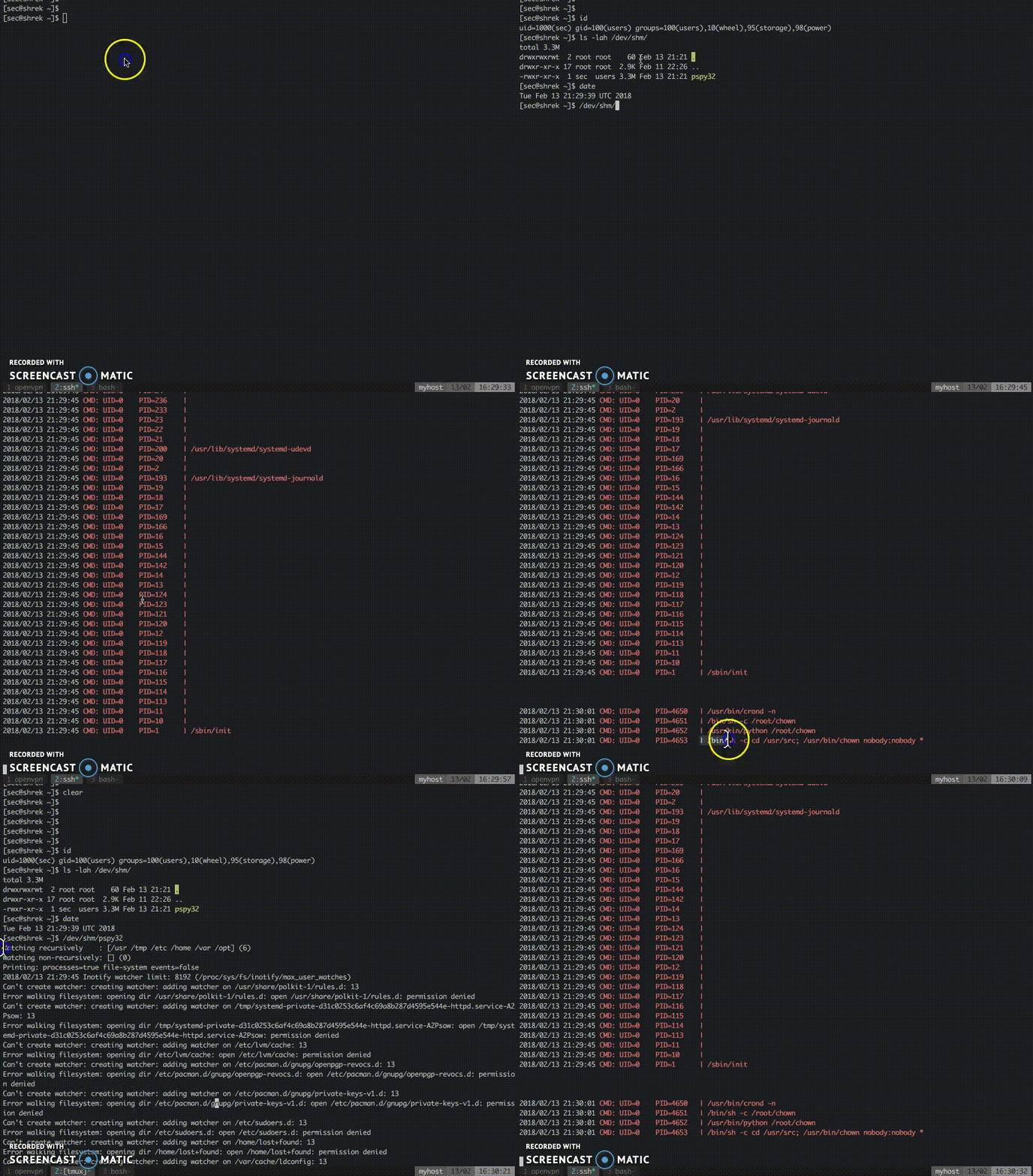
CTF example from Hack The Box
Below is an example from the machine Shrek from Hack The Box.
In this CTF challenge, the task is to exploit a hidden cron job that's changing ownership of all files in a folder.
The is the insecure use of a wildcard together with chmod (details for the interested reader).
It requires substantial guesswork to find and exploit it.
With pspy though, the cron job is easy to find and analyse:
!animated demo gif
How it works
Tools exist to list all processes executed on Linux systems, including those that ha.
For instance there is forkstat.
It recei from the kernel on process-related events such as fork and exec.
These tools require root pri, but that should not give you a false sense of security.
Nothing stops you from snooping on the processes running on a Linux system.
A lot of information is in procfs as long as a process is running.
The only problem is you have to catch short-li in the very short time span in which they are alive.
Scanning the /proc directory for new PIDs in an infinite loop does the trick but consumes a lot of CPU.
A stealthier way is to use the following trick.
Process tend to access files such as libraries in /usr, temporary files in /tmp, log files in /var, ...
Using the inotify API, you can get notifications whene files are created, modified, deleted, accessed, etc.
Linux does not require pri users for this API since it is needed for many innocent applications (such as text editors showing you an up-to-date file explorer).
Thus, while non-root users cannot monitor processes directly, they can monitor the effects of processes on the file system.
We can use the file system events as a trigger to scan /proc, hoping that we can do it fast enough to catch the processes.
This is what pspy does.
There is no guarantee you won't miss one, but chances seem to be good in my experiments.
In general, the longer the processes run, the bigger the chance of catching them is.
Misc
Logo: "By Creative Tail [CC BY 4.0 ()], Commons" (link)
项目信息
开发语言:Go
Star 数:6211
技术要点
该项目属于CTF思路方向的开源资源,代码结构清晰,适合安全研究人员学习参考。项目围绕Monitor linux processes without root permissions展开,提供了可运行的实现,对理解相关安全机制、工具原理与攻防技术具有较高的研究价值。
从技术实现角度看,此类项目的核心在于对底层原理的深入理解与工程化落地。开发者在研究过程中可以结合官方文档与社区讨论,梳理项目的初始化流程、核心模块职责与数据流转,逐步掌握其中的技术细节与设计思路。
使用与学习建议
1. 下载源码压缩包,解压到本地环境。
2. 根据项目类型准备对应的运行环境与依赖。
3. 按照 README 中的步骤完成配置与部署。
4. 在隔离的测试环境中运行验证,避免影响生产系统。
免责声明
本资源来源于开源社区,仅供安全研究、技术学习与合法授权范围内的攻防演练使用,请勿用于任何非法或侵害他人权益的用途。使用本项目产生的一切后果由使用者自行承担。
| 资源标题 | pspy - Monitor linux processes without root permissions |
| 所属分类 | CTF思路 |
| 发布作者 | admin |
| 发布时间 | 2026-10-05 23:34:24 |
| 下载权限 | 免费下载 |
| 附件数量 | 2 个下载链接 |
| 浏览次数 | 520 |
| 讨论数量 | 0 |
| 主题状态 | 正常讨论中 |