 CTF思路
点击放大
stego-toolkit - Collection of steganography tools - helps with CTF
项目说明
Steganography Toolkit
This project is a Docker image useful for solving Steganography challenges as those you can find at CTF platforms like hackthebox.eu.
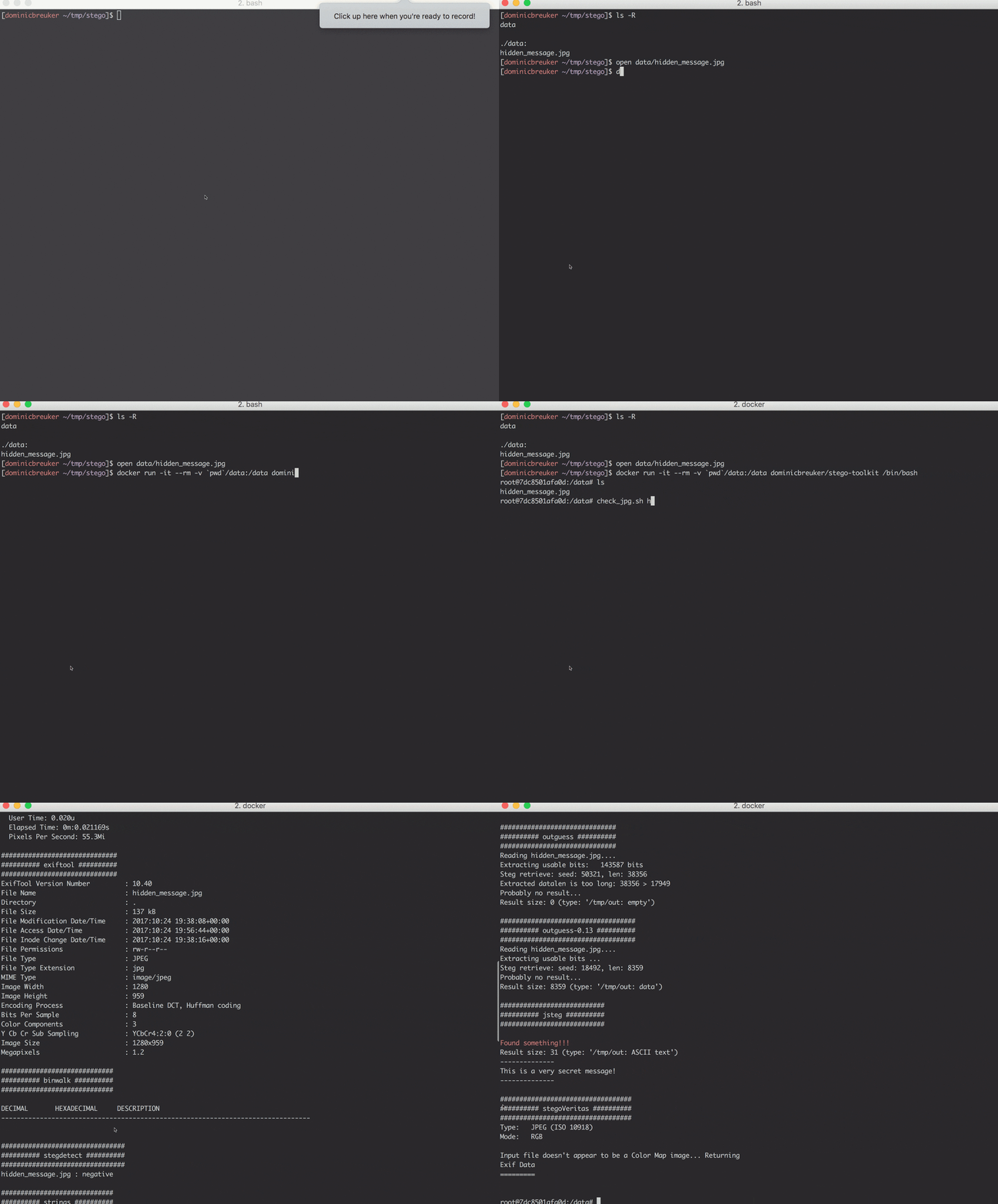
The image comes pre-installed with many popular tools (see list below) and several screening scripts you can use check simple things (for instance, run check_jpg.sh image.jpg to get a report for a JPG file).
![Docker build status]()
![Hack The Box]()
Usage
First make sure you ha installed (how to).
Then you can use the shell scripts bin/build.sh and bin/run.sh in this repo to build the image and run the container.
You will be dropped into a bash shell inside the container.
It will have the data folder mounted, into which you can put the files to analyze.
If you don't use the scripts, follow these steps:
1. Build image (docker build -t <image_name> .) or pull from Docker hub (docker pull dominicbreuker/stego-toolkit)
2. Start a container with your files mounted to the folder /data (docker run -it <image_name> -/folder/with/data:/data /bin/bash)
3. Use CLI tools and screening scripts on your files: e.g., run check_jpg.sh image.jpg to create a quick report, or run brute_jpg.sh image.jpg wordlist.txt to try extracting hidden data with tools and passwords
4. If you want to run GUI tools use one of these two ways:
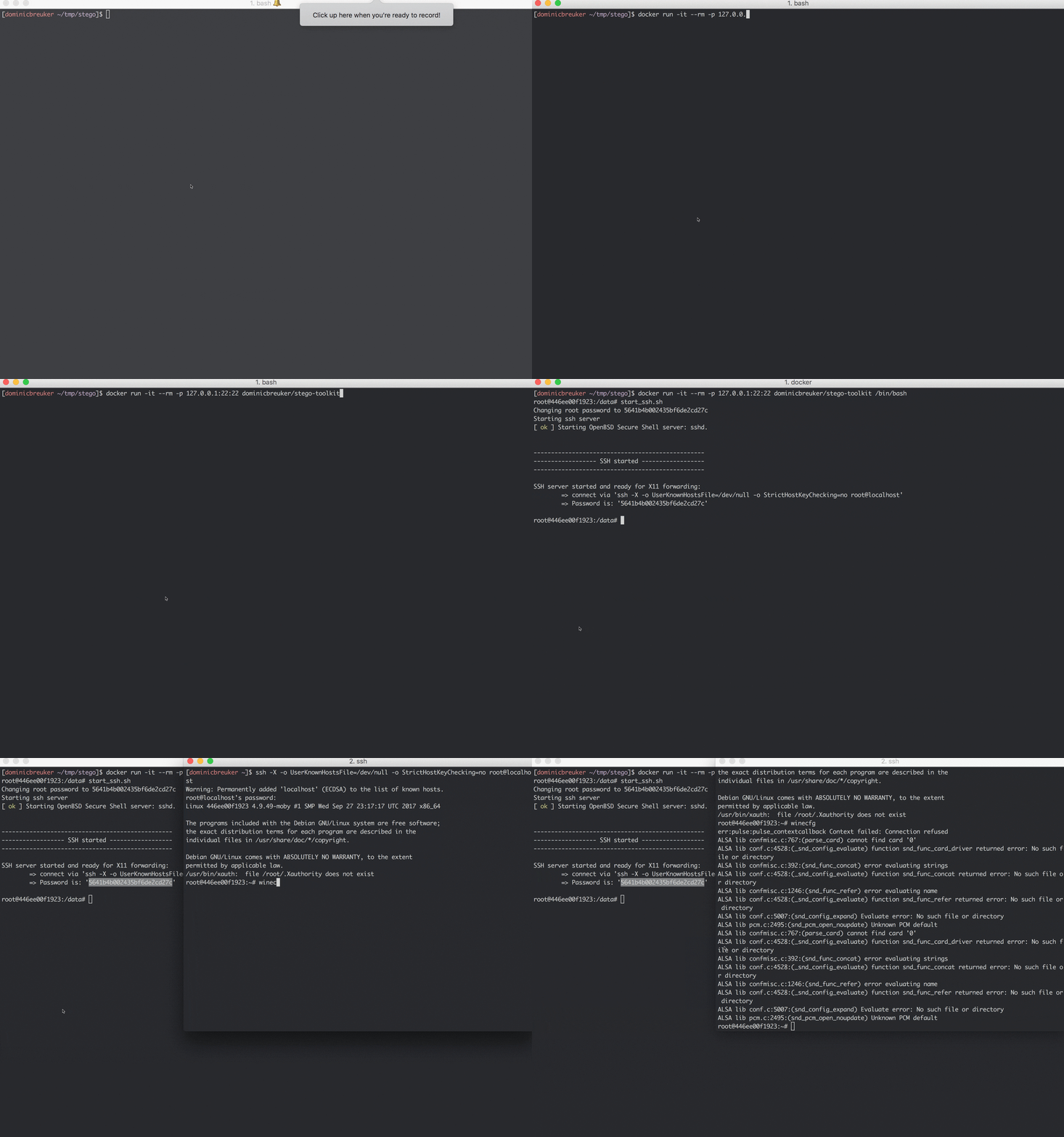
- Run start_ssh.sh and connect to your container with X11 forwarding
- Run start_vnc.sh and connect to the container's Desktop through your browser
Check out the following sections for more information:
Demo
Start with docker run -it --rm -v $(pwd)/data:/data dominicbreuker/stego-toolkit /bin/bash.
You will be dropped into a container shell in work dir /data.
Your host folder $(pwd)/data will be mounted and the images inside will be accessible.
!animated demo gif
Tools
Many different Linux and Windows tools are installed.
Windows tools are supported with Wine.
Some tools can be used on the command line while others require GUI support!
Command line interface tools
These tools can be used on the command line.
All you have to do is start a container and mount the steganography files you want to check.
#### General screening tools
Tools to run in the beginning.
Allow you to get a broad idea of what you are dealing with.
|Tool |Description |How to use |
|--------------|------------------|---------------|
| file | Check out what kind of file you have | file stego.jpg |
| exiftool | Check out metadata of media files | exiftool stego.jpg |
| binwalk | Check out if other files are embedded/appended | binwalk stego.jpg
| strings | Check out if there are interesting readable characters in the file | strings stego.jpg
| foremost | Carve out embedded/appended files | foremost stego.jpg
| pngcheck | Get details on a PNG file (or find out is is actually something else) | pngcheck stego.png
| identify | GraphicMagick tool to check what kind of image a file is. Checks also if image is corrupted. | identify - stego.jpg
| ffmpeg | ffmpeg can be used to check integrity of audio files and let it report infos and errors | ffmpeg -v info -i stego.mp3 -f null - to recode the file and throw away the result
#### Tools detecting steganography
Tools designed to detect steganography in files.
Mostly perform statistical tests.
They will reveal hidden messages only in simple cases.
However, they may provide hints what to look for if they find interesting irregularities.
|Tool |File types |Description |How to use |
|--------------|--------------------------|------------------|---------------|
| stego | Images (JPG, PNG, GIF, TIFF, BMP) | A wide of simple and ad checks. Check out stego.py -h. Checks metadata, creates many transformed images and saves them to a directory, Brute forces LSB, ... | stego.py stego.jpg to run all checks |
| zsteg | Images (PNG, BMP) | Detects LSB stego, also openstego and the Camouflage tool | zsteg -a stego.jpg to run all checks |
| stegdetect | Images (JPG) | Performs statistical tests to find if a stego tool was used (jsteg, outguess, jphide, ...). Check out man stegdetect for details. | stegdetect stego.jpg |
| stegbreak | Images (JPG) | Brute force cracker for JPG images. Claims it can crack outguess, jphide and jsteg. | stegbreak -t o -f wordlist.txt stego.jpg, use -t o for outguess, -t p for jphide or -t j for jsteg |
#### Tools actually doing steganography
Tools you can use to hide messages and reveal them afterwards.
Some encrypt the messages before hiding them.
If they do, they require a password.
If you have a hint what kind of tool was used or what password might be right, try these tools.
Some tools are supported by the brute force scripts a in this Docker image.
|Tool |File types |Description |How to hide | How to recover |
|--------------|--------------------------|------------------|---------------|----------------|
| AudioStego | Audio (MP3 / WAV) | Details on how it works are in this blog post | hideme cover.mp3 secret.txt && m.mp3 stego.mp3 | hideme stego.mp3 -f && cat output.txt |
| jphide/jpseek | Image (JPG) | Pretty old tool from here. Here, the from here is installed since the original one crashed all the time. It prompts for a passphrase interactively! | jphide cover.jpg stego.jpg secret.txt | jpseek stego.jpg output.txt |
| jsteg | Image (JPG) | LSB stego tool. Does not encrypt the message. | jsteg hide cover.jpg secret.txt stego.jpg | jsteg reveal cover.jpg output.txt |
| mp3stego | Audio (MP3) | Old program. Encrypts and then hides a message (3DES encryption!). Windows tool running in Wine. Requires WA (may throw errors for certain WA. what works for me is e.g.: ffmpeg -i audio.mp3 -flags bitexact audio.wav). Important: use absolute path only! | mp3stego-encode -E secret.txt -P password /path/to/cover.wav /path/to/stego.mp3 | mp3stego-decode -X -P password /path/to/stego.mp3 /path/to/out.pcm /path/to/out.txt
| openstego | Images (PNG) | LSB stego algorithms (check out this blog). Still maintained. | openstego embed -mf secret.txt -cf cover.png -p password -sf stego.png | openstego extract -sf openstego.png -p abcd -xf output.txt (leave out -xf to create file with original name!) |
| outguess | Images (JPG) | Uses "redundant bits" to hide data. Comes in two : old=outguess-0.13 taken from here and new=outguess from the package repos. To recover, you must use the one used for hiding. | outguess -k password -d secret.txt cover.jpg stego.jpg | outguess -r -k password stego.jpg output.txt |
| spectrology | Audio (WAV) | Encodes an image in the spectrogram of an audio file. | TODO | Use GUI tool sonic- |
| stegano | Images (PNG) | Hides data with (LSB-based) methods. Provides also some screening tools. | stegano-lsb hide --input cover.jpg -f secret.txt -e UTF-8 --output stego.png or stegano-red hide --input cover.png -m "secret msg" --output stego.png or stegano-lsb-set hide --input cover.png -f secret.txt -e UTF-8 -g $GENERATOR --output stego.png for generators (stegano-lsb-set list-generators) | stegano-lsb reveal -i stego.png -e UTF-8 -o output.txt or stegano-red reveal -i stego.png or stegano-lsb-set reveal -i stego.png -e UTF-8 -g $GENERATOR -o output.txt
| Steghide | Images (JPG, BMP) and Audio (WAV, AU) | and mature tool to encrypt and hide data. | steghide embed -f -ef secret.txt -cf cover.jpg -p password -sf stego.jpg | steghide extract -sf stego.jpg -p password -xf output.txt
| cloackedpixel | Images (PNG) | LSB stego tool for images | cloackedpixel hide cover.jpg secret.txt password creates co.png | cloackedpixel extract co.png output.txt password
| LSBSteg | Images (PNG, BMP, ...) in uncompressed formats | Simple LSB tools with very nice and readable Python code | LSBSteg encode -i cover.png -o stego.png -f secret.txt | LSBSteg decode -i stego.png -o output.txt |
| f5 | Images (JPG) | F5 Steganographic Algorithm with detailed info on the process | f5 -t e -i cover.jpg -o stego.jpg -d 'secret message' | f5 -t x -i stego.jpg 1> output.txt |
| stegpy | Images (PNG, GIF, BMP, WebP) and Audio (WAV) | Simple steganography program based on the LSB method | stegpy secret.jpg cover.png | stegpy _cover.png |
Steganography GUI tools
All tools below ha user interfaces and cannot be used through the command line.
To run them, you must make an X11 ser inside the container.
Two ways are supported:
start_ssh.sh to fire up an SSH server. Connect afterwards with X11 forwarding. Requires an X11 server on your host!start_vnc.sh to fire up a + client. Connect afterwards with your browser to port 6901 and you get an Xfce desktop. No host dependencies!Alternatively, find other ways to make X11 a inside the container.
Many different ways are possible (e.g., mount UNIX sockets).
|Tool |File types |Description |How to start |
|--------------|--------------------------|------------------|----------------|
| Steg | Images (JPG, TIFF, PNG, BMP) | Handles many file types and implements different methods | steg |
| Steganabara (The original link is broken) | Images (???) | Interactively transform images until you find something | steganabara|
| Stegsolve | Images (???) | Interactively transform images, view color schemes separately, ... | stegsolve |
| Sonic | Audio (???) | audio files in wa, display spectrograms, ... | sonic- |
| Stegosuite | Images (JPG, GIF, BMP) | Can encrypt and hide data in images. Actively de. | stegosuite |
| OpenPuff | Images, Audio, Video (many formats) | Sophisticated tool with long history. Still maintained. Windows tool running in wine. | openpuff |
| DeepSound | Audio (MP3, WAV) | Audio stego tool trusted by Mr. Robot himself. Windows tool running in wine (very hacky, requires VNC and runs in desktop, MP3 broken due to missing DLL!) | deepsound only in |
| cloackedpixel-analyse | Images (PNG) | LSB stego for PNGs - use it to detect suspiciously random LSB in images ( close to 0.5 may indicate encrypted data is embedded) | cloackedpixel-analyse image.png |
Screening scripts
Many tools above do not require interaction with a GUI.
Therefore, you can easily automate some workflows to do basic screening of files potentially containing hidden messages.
Since the applicable tools differ by filet type, each file type has different scripts.
For each file type, there are two kinds of scripts:
XXX_check.sh <stego-file>: runs basic screening tools and creates a report (+ possibly a directory with reports in files)XXX_brute.sh <stego-file> <wordlist>: tries to extract a hidden message from a stego file with tools using a wordlist (cewl, john and crunch are installed to generate lists - keep them small).The following file types are supported:
check_jpg.h and brute_jpg.sh (brute running steghide, outguess, outguess-0.13, stegbreak, stego.py -bruteLSB)check_png.h and brute_png.sh (brute running openstego and stego.py -bruteLSB)Wordlist generation
The brute forcing scripts above need wordlists.
Imho it will very likely not help to use huge standard wordlists like rockyou.
The scripts are too slow for it and stego challenges seem to not be designed for
this.
A more probable scenario is that you have a hunch what the password could be but
you do not know exactly.
For these cases, several tools to generate wordlists are included:
john to create many of them. Use john -wordlist:/path/to/your/wordlist -rules:Single -stdout > /path/to/expanded/wordlist to apply extensi (~x1000) john -wordlist:/path/to/your/wordlist -rules:Wordlist -stdout > /path/to/expanded/wordlist for a reduced ruleset (~x50).crunch 6 6 abcdefghijklmnopqrstuvwxyz -t @@1984 will generate the 26 * 26 = 676 passwords aa1984, ab1984, ... up to zz1984. The format is crunch <min-length> <max-length> <charset> <options> and we used the templating option. Check out less /usr/share/crunch/charset.lst to see the char sets crunch ships with.cewl -d 0 -m 8 if you suspect a picture of Donald Trump contains an encrypted hidden message. The command scrapes the site and extracts strings at least 8 characters long.Steganography examples
The image contains a sample image and audio file each in different formats:
/examples/ORIGINAL.jpg/examples/ORIGINAL.png/examples/ORIGINAL.mp3/examples/ORIGINAL.wavIt also contains a script /examples/create_examples.sh which you can run to embed a hidden message ("This is a very secret message!") into these files with many different methods.
After running this script, you find these files in /examples/stego-files with their names indicating which tool was used to embed the message.
You can run the screening scripts to see if they find anything on them or try to break them otherwise.
GUI and Containers
By default, no GUI tools can be run in a Docker container as no X11 server is a.
To run them, you must change that.
What is required to do so depends on your host machine.
If you:
brew install Xquartz)Use X11 forwarding through SSH if you want to go this way. Run start_ssh inside the container to start the server, make sure you expose port 22 when starting the container: docker run -p 127.0.0.1:22:22 ..., then use ssh -X ... when connecting (the script prints the password).
To not depend on X11, the image comes with a Tiger and no.
You can use it to open an HTML5 with your browser to connect to the containers Xfce desktop. To to that, run start_vnc.sh inside the container to start server and client, make sure you expose port 6901 when starting the container docker run -p 127.0.0.1:6901:6901 ... and go to localhost:6901/?password=<the_password> (the script prints the password).
Using SSH with X11 forwarding
!animated demo gif - SSH + X11
Commands in the GIF for copy & paste:
Using Browser and VNC
!animated demo gif - Browser + VNC
Commands in the GIF for copy & paste:
Link collection
This is a collection of useful Steganography links:
References
The following example media files are included in this repository:
项目信息
开发语言:Shell
Star 数:2692
技术要点
该项目属于CTF思路方向的开源资源,代码结构清晰,适合安全研究人员学习参考。项目围绕Collection of steganography tools - helps with CTF challenges展开,提供了可运行的实现,对理解相关安全机制、工具原理与攻防技术具有较高的研究价值。
从技术实现角度看,此类项目的核心在于对底层原理的深入理解与工程化落地。开发者在研究过程中可以结合官方文档与社区讨论,梳理项目的初始化流程、核心模块职责与数据流转,逐步掌握其中的技术细节与设计思路。
使用与学习建议
1. 下载源码压缩包,解压到本地环境。
2. 根据项目类型准备对应的运行环境与依赖。
3. 按照 README 中的步骤完成配置与部署。
4. 在隔离的测试环境中运行验证,避免影响生产系统。
免责声明
本资源来源于开源社区,仅供安全研究、技术学习与合法授权范围内的攻防演练使用,请勿用于任何非法或侵害他人权益的用途。使用本项目产生的一切后果由使用者自行承担。
| 资源标题 | stego-toolkit - Collection of steganography tools - helps with CTF |
| 所属分类 | CTF思路 |
| 发布作者 | admin |
| 发布时间 | 2026-10-05 23:35:13 |
| 下载权限 | 免费下载 |
| 附件数量 | 2 个下载链接 |
| 浏览次数 | 314 |
| 讨论数量 | 0 |
| 主题状态 | 正常讨论中 |