 CTF思路
点击放大
wrongsecrets - Vulnerable app with examples showing how to not us

项目说明
<!-- CRE Link: 223-780 -->
OWASP WrongSecrets
![Tweet]() <img src=" <img src=" <img src="
![Ja and testing]() ![Pre-commit]() ![Terraform FMT]() ![CodeQL]() ![Dead Link Checker]() ![Javadoc and Swaggerdoc generator]() ![Test Heroku with cypress]() ![Build De]()
![Test minikube script (k8s)]() ![Test minikube script (k8s&vault)]() ![Docker container test]() ![Test container on podman]()
![DAST with ZAP]() ![PR Preview and Diff]() ![Build Preview]() ![ Diff]()
![OWASP Production Project]()
![OpenSSF Best Practices]()
![Discussions]()
![Docker pulls]()
Welcome to the OWASP WrongSecrets game! The game is packed with real life examples of how to _not_ store secrets in your software. Each of these examples is captured in a challenge, which you need to sol tools and techniques. Solving these challenges will help you recognize common mistakes & can help you to reflect on your own secrets management strategy.
Can you solve all the 73 challenges?
Try some of them on our Heroku demo en.
Want to play the other challenges? Read the instructions on how to set them up below.
🚀 Quick Start
New to WrongSecrets? Start here:
1. Try Online First: Visit our Heroku demo to get familiar with the challenges
2. Run Locally: Use Docker for the full experience with all challenges:
Then open
3. Want to see what's ahead? Try our bleeding-edge master container with the latest features:
⚠️ *Note: This is a de and may be unstable*
4. Ad Setup: For cloud challenges and Kubernetes exercises, see the detailed instructions below
What you'll learn:
How it works:
This repository contains intentionally code and configuration files with real and fake secrets hidden throughout the codebase. You'll examine source code, configuration files, Docker containers, and cloud deployments to disco secrets. Each challenge teaches you different ways secrets can be accidentally exposed in real-world applications.
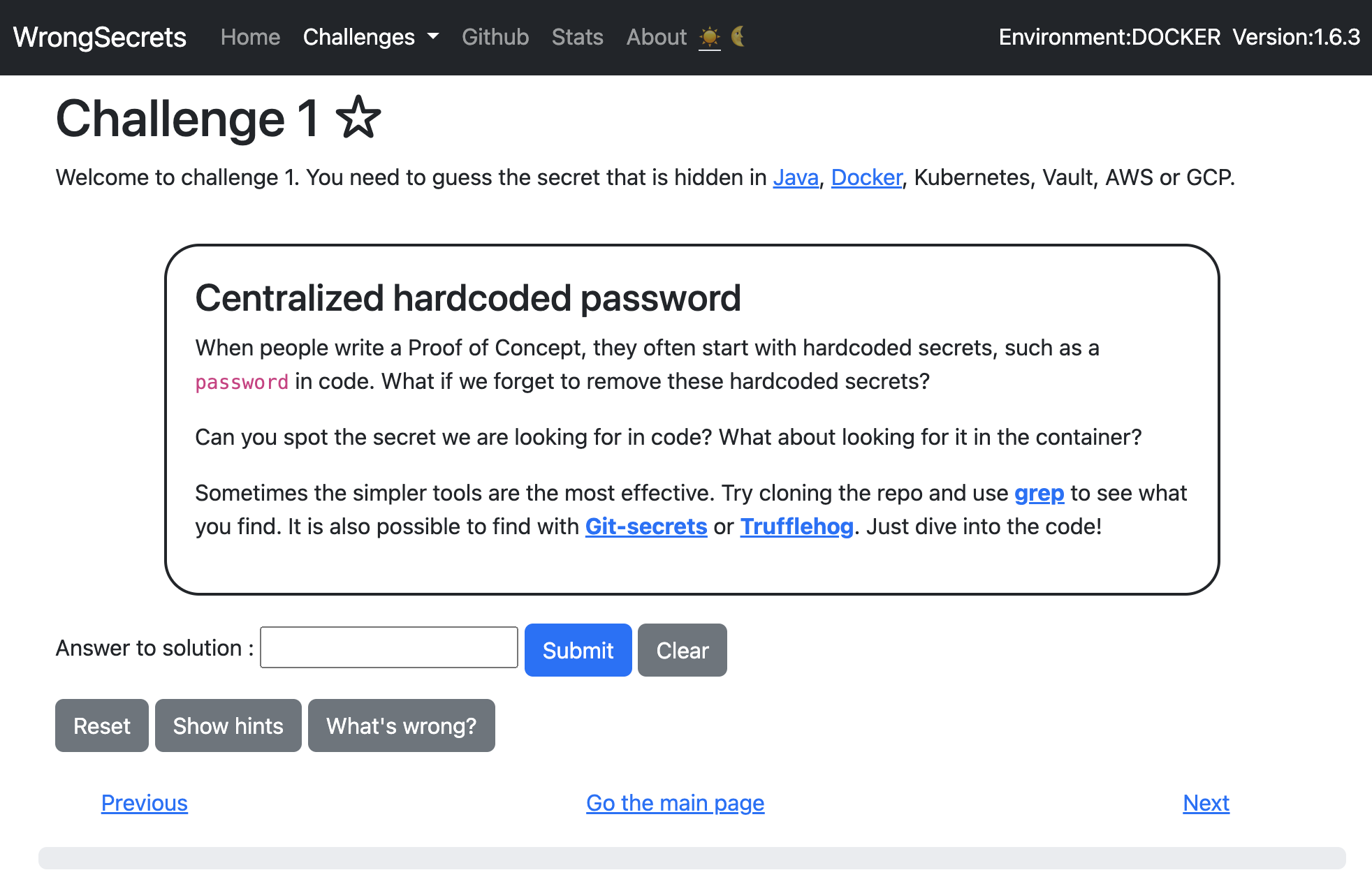
!screenshotOfChallenge1
📋 Prerequisites
For basic usage:
For ad setups:
<a href=" src=" /></a>
Table of contents
🎯 Getting Started
🐳 Deployment Options
- Running these on Heroku
- Running these on Render.io
- Running these on Railway
- Minikube based
- k8s based
- Vault exercises with minikube
☁️ Cloud Challenges
- Running WrongSecrets in AWS
- Running WrongSecrets in GCP
- Running WrongSecrets in Azure
- Running Challenge15 in your own cloud only
🎮 Ad Usage
- CTFD Support
- FBCTF Support
👨💻 De & Contribution
- Spring Boot 4 adoption checklist
- Dependency management
- Get the project started in IntelliJ IDEA
- Automatic reload during de
- How to add a Challenge
- Local testing
- Local Automated testing
📚 Resources & Community
Support
Need support? Contact us
via OWASP Slack for which you sign up here
, file a PR, file
an issue , or
use discussions. Please note that this is an OWASP
based project, so it might take a little while before we respond.
Copyright (c) 2020-2025 Jeroen Willemsen and WrongSecrets contributors.
🛤️ Choose Your Path
Not sure which setup is right for you? Here's a quick guide:
| I want to... | Recommended Setup | Challenges A |
|------------------|----------------------|--------------------------|
| Try it quickly online | Container running on Heroku | Basic challenges (0-4, 8, 12-32, 34-43, 49-52, 54-66, 68-72) |
| Run locally with Docker | Basic Docker | Same as above, but on your machine |
| Learn Kubernetes secrets | K8s/Minikube Setup | Kubernetes challenges (0-6, 8, 12-43, 48-66, 68-72) |
| Practice with cloud secrets | Cloud Challenges | All challenges (0-72) |
| Run a workshop/CTF | CTF Setup | Customizable challenge sets |
| Contribute to the project | De Setup | All challenges + de tools |
Basic docker exercises
_Can be used for challenges 0-4, 8, 12-32, 34-43, 49-52, 54-66, 68-72_
For the basic docker exercises you currently require:
You can install it by doing:
🚀 Want to try the bleeding-edge ?
If you want to see what's coming in the next release, you can use our automatically-built master container:
⚠️ Warning: This is a de built from the latest master branch and may contain experimental features or instabilities.
📝 Note on Ports:
📝 Note on Challenge 62 (Google Drive MCP):
Challenge 62 requires a Google Service Account to be configured for full functionality. See docs/CHALLENGE62_GOOGLE_DRI.md for setup instructions. Without configuration, the challenge will show a placeholder message.
Now you can try to find the secrets by means of solving the challenge offered at the links below
<details>
<summary>all the links for docker challenges (click triangle to open the block).
</summary>
</details>
Note that these challenges are still very basic, and so are their explanations. Feel free to file a PR to make them look
better ;-).
Running these on Heroku
You can test them out at as well! The folks at Heroku ha us an awesome open source support package, which allows us to run the app for free there, where it is almost always up. Still, please do not fuzz and/or try to bring it down: you would be spoiling it for others that want to testdrive it.
Use this link to use our hosted of the app. If you want to host it on Heroku yourself (e.g., for running a training), you can do so by clicking this link. Please be aware that this will incur costs for which this project and/or its maintainers cannot be held responsible.
Running these on Render.io
*status: experimental*
You can test them out at Please understand that we run on a free-tier instance, we cannot give any guarantees. Please do not fuzz and/or try to bring it down: you would be spoiling it for others that want to testdrive it.
Want to deploy yourself with Render? Click the button below:
![Deploy to Render]()
Running these on Railway
*status: maintained by alphasec.io*
If you want to host WrongSecrets on Railway, you can do so by deploying this one-click template. Railway does not offer an always-free plan anymore, but the free trial is good enough to test-drive this before you decide to upgrade. If you need a step-by-step companion guide, see this blog post.
![Deploy on Railway]()
Basic K8s exercise
_Can be used for challenges 0-6, 8, 12-43, 48-72_
Minikube based
Make sure you have the following installed:
The K8S setup currently is based on using Minikube for local fun. You can use the commands below from the root of the project:
Alternatively you can do :
now you can use the provided IP address and port to further play with the K8s (instead of localhost).
k8s based
Want to run on your own k8s? Use the commands below:
now you can use the provided IP address and port to further play with the K8s (instead of localhost).
Vault exercises with minikube
_Can be used for challenges 0-8, 12-46, 48-72_
Make sure you have the following installed:
Run ./k8s-.sh, when the script is done, then the challenges will wait for you at < . This will allow you to run challenges 0-8, 12-66.
When you stopped the k8s-.sh script and want to resume the port forward run: k8s-.sh.
This is because if you run the start script again it will replace the secret in the vault and not update the secret-challenge application with the new secret.
Cloud Challenges
_Can be used for challenges 0-72_
READ THIS: Given that the exercises below contain IAM pri escalation exercises,
never run this on an account which is related to your production en or can influence your account-o
resources.
Running WrongSecrets in AWS
Follow the steps in the README in the AWS subfolder.
Running WrongSecrets in GCP
Follow the steps in the README in the GCP subfolder.
Running WrongSecrets in Azure
Follow the steps in the README in the Azure subfolder.
Running Challenge15 in your own cloud only
When you want to include your own Canarytokens for your cloud-deployment, do the following:
1. Fork the project.
2. Make sure you use the GCP ingress or AWS ingress scripts to generate an ingress for your project.
3. Go to canarytokens.org and select AWS Keys, in the webHook URL field add <your-domain-created-at-step1>/canaries/tokencallback.
4. Encrypt the recei so that Challenge15 can decrypt them again.
5. Commit the unencrypted and encrypted materials to Git and then commit again without the decrypted materials.
6. Adapt the hints of Challenge 15 in your fork to point to your fork.
7. Create a container and push it to your registry
8. O the K8s definition files for either AWS or GCP.
Do you want to play without guidance or spoils?
Each challenge has a Show hints button and a What's wrong? button. These buttons help to simplify the challenges and gi to the reader. Though, the explanations can spoil the fun if you want to do this as a hacking exercise.
Therefore, you can manipulate them by o the following settings in your env:
hints_enabled=false will turn off the Show hints button.reason_enabled=false will turn of the What's wrong? explanation button.spoiling_enabled=false will turn off the /spoil/challenge-x endpoint (where x is the short-name of the challenge).Enabling Swaggerdocs and UI
You can enable Swagger documentation and the Swagger UI by o the SPRINGDOC_UI and SPRINGDOC_DOC when running the Docker container.
Special thanks & Contributors
Leaders:
Top contributors:
Contributors:
Testers:
Special thanks:
Sponsorships
We would like to thank the following parties for helping us out:
![gitguardian_logo.png]()
GitGuardian for their sponsorship which allows us to pay the bills for our cloud-accounts.
![JetBrains logo.]()
Jetbrains for licensing an instance of Intellij IDEA Ultimate edition to the project leads. We could not have been this fast with the de without it!
![1password_logo.png]()
1Password for granting us an open source license to 1Password for the secret detection testbed.
![AWS Open Source]()
AWS for granting us AWS Open Source credits which we use to test our project and the Wrongsecrets CTF Party setup on AWS.
Help Wanted
You can help us by the following methods:
Use OWASP WrongSecrets as a secret detection benchmark
As tons of secret detection tools are coming up for both Docker and Git, we are creating a Benchmark testbed for it.
Want to know if your tool detects e? We will keep track of the embedded secrets in this issue and have a branch in which we put additional secrets for your tool to detect.
The branch will contain a Docker container generation script using which you can e test your container secret scanning.
Automated Secret Scanner Comparison
We now provide an automated GitHub Action workflow that benchmarks multiple secret scanning tools against the WrongSecrets codebase. The Secret Scanner Comparison workflow tests 7 different tools:
The workflow runs weekly and provides a comparison table showing how many secrets each tool detects, helping you understand the relati of different secret scanning tools. See docs/scanner-comparison.md for more details on running and interpreting the results.
CTF
We have 3 ways of playing CTFs:
CTFD Support
Want to use CTFD to play a CTF based on the free Heroku wrongsecrets-ctf instance together with CTFD? You can!
NOTE: CTFD support now works based on the Juiceshop CTF CLI.
NOTE-II: (temporary down based on lack of oss credits) is based on Heroku and has limited capacity.
Initial creation of the zip file for CTFD requires you to visit once before executing the steps below.
Follow the following steps:
> Note: Hints can only be generated if the WrongSecrets instance has hints enabled (HINTS_ENABLED=true). The Heroku CTF instance () runs with HINTS_ENABLED=false, so selecting "Free hints" or "Paid hints" will result in an empty hints list. To generate hints, run your own instance with HINTS_ENABLED=true.
Now visit the CTFD instance at and setup your CTF.
Then use the administrati function to import the zipfile you created with the juice-shop-ctf command.
Game on using
Want to setup your own? You can! Watch out for people finding your key though, so secure it properly: make sure the running container with the actual ctf-key is not exposed to the audience, similar to our heroku container.
FBCTF Support (Experimental!)
NOTE: FBCTF support is experimental.
Follow the same step as with CTFD, only now choose fbctfd and as a url for the countrymapping choose .
Then follow to run the FBCTF.
Notes on de
For de on local machine use the local profile ./m:run -Dspring-boot.run.profiles=local,without-vault
If you want to test against vault without K8s: start vault locally with
and in your next terminal, do (with the token from the previous commands):
Now use the local-vault profile to do your de.
If you want to de a Vault instance, use additionally the without-vault profile to do your de:
Want to push a container? See .github/scripts/docker-create-and-push.sh for a script that generates and pushes all containers. Do not forget to rebuild the app before composing the container.
Want to check why something in vault is not working in kubernetes? Do kubectl exec -n vault -- vault audit enable file file_path=stdout.
Dependency management
We ha and OWASP Dependency-check integrated to check dependencies for .
You can use the OWASP Dependency-checker by calling m:aggregate and m:makeBom to use CycloneDX to create an SBOM.
Dependency-Check Ma Configuration
OWASP WrongSecrets uses the dependency-check-maven plugin to automatically scan project dependencies for known (CVEs).
#### How It Works
./m install) and checks all dependencies against public databases.#### Configuration Highlights
The plugin is configured in pom.xml under the <build><plugins> section:
settings.xml for OSS Index (see below).true to enable OSS Index scanning. If you encounter authentication errors (401), set this to false to disable OSS Index.#### Authenticating with OSS Index
To use OSS Index, you need to add your credentials to your Maven settings.xml:
Replace YOUR_OSSINDEX_USERNAME and YOUR_OSSINDEX_API_TOKEN with your OSS Index account details.
#### Troubleshooting
401 Unauthorized errors for OSS Index, check your credentials or disable OSS Index by setting <ossIndexAnalyzerEnabled>false</ossIndexAnalyzerEnabled> in pom.xml.#### More Info
See Dependency-Check Ma Documentation for ad configuration options.
Get the project started in IntelliJ IDEA
Requirements: make sure you have the following tools installed: Docker, Java26 JDK, NodeJS 26 and IntelliJ IDEA.
1. Fork and clone the project as described in the documentation.
2. Import the project in IntelliJ (e.g. import as m / local sources)
3. Go to the project settings and make sure it uses Java26 (And that the JDK can be found)
4. Go to the IDE settings>Language & Frameworks > Lombok and make sure Lombok processing is enabled
5. Open the Maven Tab in your IDEA and run "Reload All Ma" to make the system sync and download e. Next, in that same tab use the "install" option as part of the OWASP WrongSecrets Lifecycle to genereate the asciidoc and such.
6. Now run the main method in org.owasp.wrongsecrets.WrongSecretsApplication.java. This should fail with a stack trace.
7. Now go to the run configuration of the app and make sure you have the acti without-vault. This is done by setting the arguments to --server.port=8080 --spring.profiles.acti,without-vault. Set K8S_EN as en argument.
8. Repeat step 6: run the app again, you should have a properly running application which is in your browser at
Pictorial Guide on how to get the project started in IntelliJ IDEA is a at _Contributing.md_.
Feel free to edit and propose changes via pull requests. Be sure to follow our guidance in the documentation to get your work accepted.
Please note that we officially only support Linux and MacOS for de. If you want to develop using a Windows machine, use WSL2 or a machine running Linux. We did include Windows detection & a bunch of exe files for a first experiment, but are looking for acti of them. Want to make sure it runs on Windows? Create PRs ;-).
If, after reading this section, you still have no clue on the application code: Have a look at some tutorials on Spring boot from Baeldung.
Automatic reload during de
To make changes made load faster we added spring-de to the Ma.
To enable this in IntelliJ automatically, make sure:
You can also manually invoke: Build -> Recompile the file you just changed, this will also force reloading of the application.
How to add a Challenge
Follow the steps below on adding a challenge:
1. First make sure that you have an Issue reported for which a challenge is really wanted.
2. Add the new challenge in the org.owasp.wrongsecrets.challenges folder. Make sure you add an explanation in src/main/resources/explanations and refer to it from your new Challenge class.
3. Add unit, integration and UI tests as appropriate to show that your challenge is working.
4. Do not forget to configure the challenge in src/main/resources/wrong-secrets-configuration.yaml
5. Review the CONTRIBUTING guide for setting up your contributing en and writing good commit messages.
For more details please refer _Contributing.md_.
If you want to mo cloud challenges to another cloud: extend Challenge classes in the org.owasp.wrongsecrets.challenges.cloud package and make sure you add the required Terraform in a folder with the separate cloud identified. Make sure that the en is added to org.owasp.wrongsecrets.RuntimeEn.
Collaborate with the others at the project to get your container running so you can test at the cloud account.
Local testing
If you have made some changes to the codebase or added a new challenge and would like to see exactly how the container will look after merge for testing, we have a script that makes this very easy. Follow the steps below:
1. Ensure you have bash installed and open.
2. Na to .github/scripts.
3. Run the docker-create script bash docker-create.sh.
- Note: Do you want to run this on your minikube? then first run eval $(minikube docker-env).
4. Follow any instructions given, you made need to install/change packages.
5. Run the newly created container:
- to running locally: docker run -p 8080:8080 -p 8090:8090 jeroenwillemsen/wrongsecrets:local-test-no-vault
- to run it on your minikube: use the container jeroenwillemsen/wrongsecrets:local-test-k8s-vault in your deployment definition.
- to run it with Vault on your minikube: use the container jeroenwillemsen/wrongsecrets:local-test-local-vault in your deployment definition.
Local Automated testing
We currently have 2 different test-suites, both fired with ./mvnw test.
test/java folder with output stored at the default target directory.test/e2e folder with output stored at target/test-classes/e2e/cypress/reports/. See the cypress readme for more details.Note: You can do a full roundtrip of cleaning, building, and testing with ./m install.
🔧 Troubleshooting
Common Issues
Docker Issues:
docker run -p 8081:8080 -p 8091:8090 jeroenwillemsen/wrongsecrets:latest-no-vaultBrowser Issues:
docker psKubernetes Issues:
minikube delete then minikube startkubectl describe pod <pod-name>Need Help?
Want to play, but are not allowed to install the tools?
If you want to play the challenges, but cannot install tools like keepass, Radare, etc. But are allowed to run Docker containers, try the following:
or use something more configurable:
And then at
Note: be careful with trying to deploy the jeroenwillemsen/wrongsecrets-desktop container to Heroku ;-).
Docker on macOS with M1 and Colima (Experimental!)
NOTE: We do not officially support Colima, as we can tell that Github runners ha of issues with it.
If you cannot switch to Docker Desktop/Podman and you want to use Colima with Apple Silicon M1
to run Docker image jeroenwillemsen/wrongsecrets you try one of:
colima stop)docker --context desktop-linux run -p 8080:8080 jeroenwillemsen/wrongsecrets:latest-no-vault)colima start -m 8 -c 1 --arch x86_64)Want to disable challenges in your own release?
If you want to run WrongSecrets but without certain challenges you don't want to present to others: please read this section.
*_NOTE_* Please note that we do not deliver any support to your fork when you follow the process below. Please understand that license and copyright of the original application remain intact for your Fork.
Requirements:
Here are the steps you have to follow to create your own release of WrongSecrets with certain challenges disabled:
1. Fork the repository.
2. In src/main/resources/wrong-secrets-configuration.yaml remove the reference to the challenge you no longer want to have in your fork.
3. In the root of the project run ./m install
4. Now build the Docker image for your target of choice:
Further reading on secrets management
Want to learn more? Checkout the sources below:
项目信息
开发语言:HTML
Star 数:1471
技术要点
该项目属于CTF思路方向的开源资源,代码结构清晰,适合安全研究人员学习参考。项目围绕Vulnerable app with examples showing how to not use secrets展开,提供了可运行的实现,对理解相关安全机制、工具原理与攻防技术具有较高的研究价值。
从技术实现角度看,此类项目的核心在于对底层原理的深入理解与工程化落地。开发者在研究过程中可以结合官方文档与社区讨论,梳理项目的初始化流程、核心模块职责与数据流转,逐步掌握其中的技术细节与设计思路。
使用与学习建议
1. 下载源码压缩包,解压到本地环境。
2. 根据项目类型准备对应的运行环境与依赖。
3. 按照 README 中的步骤完成配置与部署。
4. 在隔离的测试环境中运行验证,避免影响生产系统。
免责声明
本资源来源于开源社区,仅供安全研究、技术学习与合法授权范围内的攻防演练使用,请勿用于任何非法或侵害他人权益的用途。使用本项目产生的一切后果由使用者自行承担。
| 资源标题 | wrongsecrets - Vulnerable app with examples showing how to not us |
| 所属分类 | CTF思路 |
| 发布作者 | admin |
| 发布时间 | 2026-10-05 23:36:57 |
| 下载权限 | 免费下载 |
| 附件数量 | 2 个下载链接 |
| 浏览次数 | 398 |
| 讨论数量 | 0 |
| 主题状态 | 正常讨论中 |