 CTF思路
点击放大
shellen - :cherry_blossom: Interactive shellcoding environme
项目说明
Shellen
General
Shellen is an interacti en. If you want a handy tool to write shellcodes, then shellen may be your friend. Shellen can also be used as an assembly or disassembly tool.
keystone and capstone engines are used for all of shellen's operations.
Shellen only works on python3. python2 support may appear in the future.
Installing
First, you should install shellen's dependencies:
You can install the stable of shellen using :
Or if you already have all required packages (see Requirements):
If you have any problems with installing keystone-engine, then you should compile keystone-engine (see the COMPILE.md file in the keystone repository)
How to Run Shellen
After installing shellen and its required packages, you can run shellen by typing the following in your terminal:
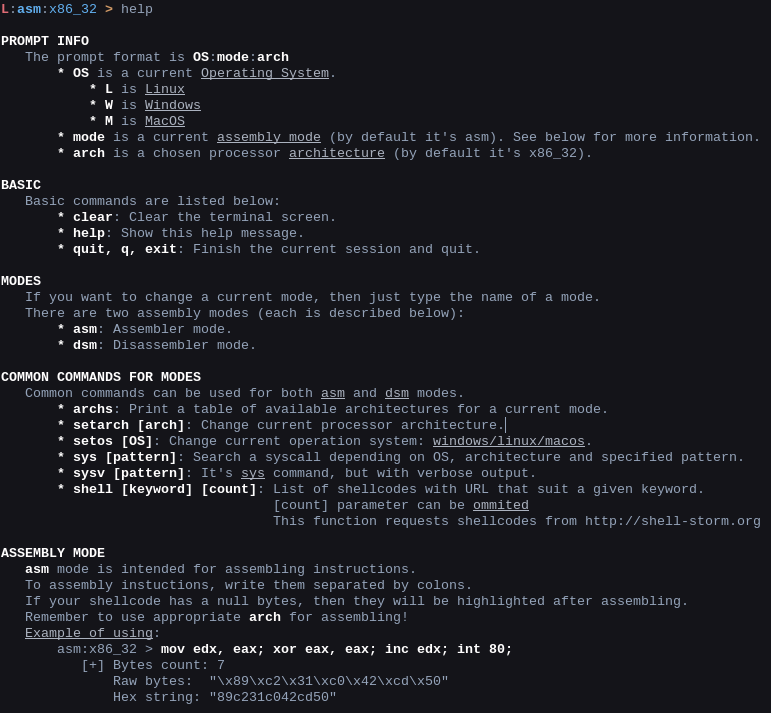
You can run shellen's command to get information about shellen's usage.
Shellen's Features
Shellen assembles and disassembles instructions, so there are two usage modes: asm and dsm respectively. There are other features which include searching syscall tables and searching for common shellcodes.
Prompt
Shellen has a useful prompt that displays the current mode, OS (operating system for syscalls), and the current mode's chosen architecture. Shellen's prompt looks like this:
You can edit your input like you're typing in a terminal. Also, shellen records your command history (just type your up arrow to see your previous commands).
is the shortened name of in the prompt. Below listed all other OS names:
If you want to change OS, then type as follows:
To change current mode, enter or in the prompt.
Base Commands
Command | Description
------- | -----------
| Clear the terminal screen. As usual on Windows or on *nix systems.
| Show the help message.
| Finish the current session and quit
Assembling
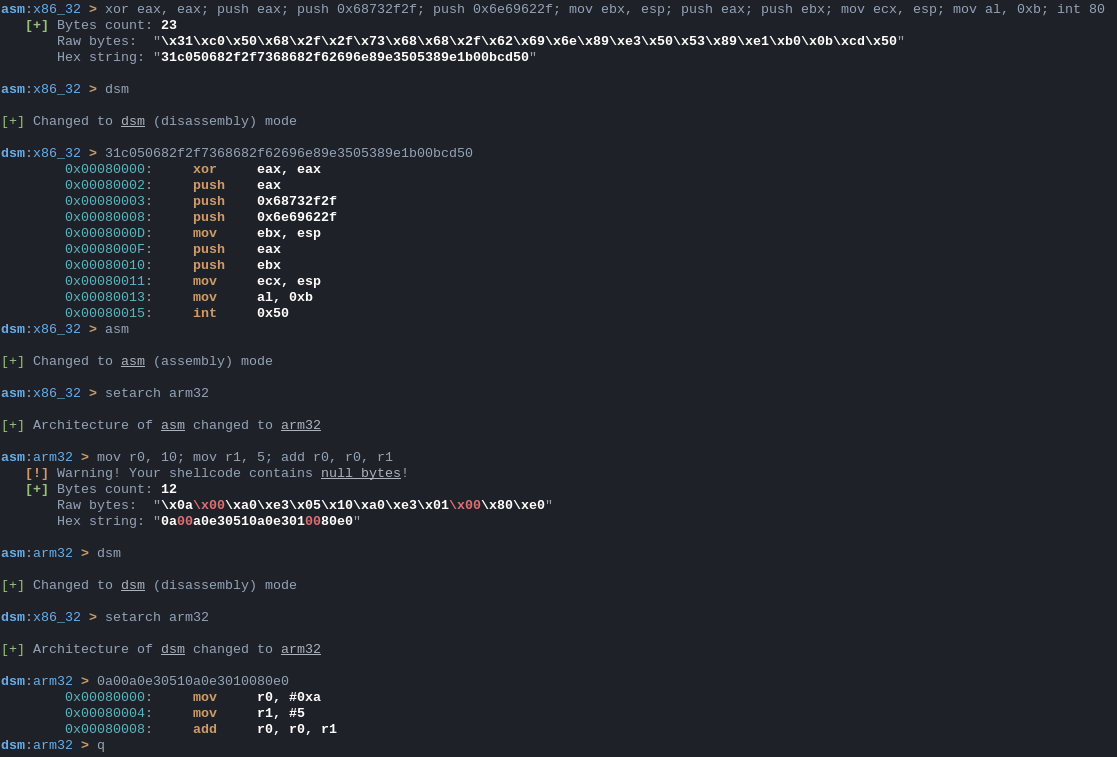
To assemble instuctions, type them and separate them with semicolons as shown here:
If your assembled bytes contain a null byte, then shellen will tell you about this.
Disassembling
Disassembling is similar to assembling. Instead, type your bytes in the prompt and see the result!
Run shellcode
Also, you can run your shellcode in a subprocess. Be aware that this can harm your system!. Jump to the last shellcode in a subprocess. What could go wrong?' Note that you don't get to control the base address your code gets loaded at, and this assumes that the instructions will make sense to your CPU. See inside to see how to use it.
I'm planning to execute subprocess in a some en in order to make it safer to run potentially dangerous shellcode.
Architectures
and modes work for different architectures. To see a list of a architectures for shellen's current mode, type this:
If you want to change the current architecture, enter the following:
Syscalls
When you create a shellcode, you will need syscalls. To lookup syscalls with shellen, type and the name of your desired syscall. Shellen will produce a list of syscalls which may contain the syscall you were looking for.
`sys prints a list of possible for the provided syscall. The syscall table that shellen searches depends on the chosen architecture and operating system (OS). In this case, the architecture is and the OS is .
Common Shellcodes
Shellen can show you a list of common shellcodes depending on your keyword. Shellen's keyword lookup uses shell-storm.org's API (thanks to the author!) and can be used like this:
Note, the parameter isn't required. There is an image of shell <keyword> <count>`'s output in the Pictures section.
Supported Operating Systems
Currently, shellen is only supported on Linux. If you want to add functionality for Windows or MacOS, then write an issue and I will add support.
How to Report Problems or Request for New Features
If you find a problem/bug or something, write an issue about this problem. Also, if you think that a feature will be a nice addition to shellen, do the same -- write an issue and I will try to add your requested feature.
Requirements
TODO
Pictures
Just a little bunch of pictures. (They are outdated because of adding different features)
<p align="left">
<img src="screens/help.png">
</p>
<hr>
<p align="left">
<img src="screens/use.png">
</p>
<hr>
<p align="left">
<img src="screens/syscalls.png">
</p>
<hr>
<p align="left">
<img src="screens/shell.png">
</p>
<hr>
<p align="left">
<img src="screens/tables.png">
</p>
项目信息
开发语言:Python
Star 数:908
技术要点
该项目属于CTF思路方向的开源资源,代码结构清晰,适合安全研究人员学习参考。项目围绕:cherry_blossom: Interactive shellcoding environment to easily craft shellcodes展开,提供了可运行的实现,对理解相关安全机制、工具原理与攻防技术具有较高的研究价值。
从技术实现角度看,此类项目的核心在于对底层原理的深入理解与工程化落地。开发者在研究过程中可以结合官方文档与社区讨论,梳理项目的初始化流程、核心模块职责与数据流转,逐步掌握其中的技术细节与设计思路。
使用与学习建议
1. 下载源码压缩包,解压到本地环境。
2. 根据项目类型准备对应的运行环境与依赖。
3. 按照 README 中的步骤完成配置与部署。
4. 在隔离的测试环境中运行验证,避免影响生产系统。
免责声明
本资源来源于开源社区,仅供安全研究、技术学习与合法授权范围内的攻防演练使用,请勿用于任何非法或侵害他人权益的用途。使用本项目产生的一切后果由使用者自行承担。
| 资源标题 | shellen - :cherry_blossom: Interactive shellcoding environme |
| 所属分类 | CTF思路 |
| 发布作者 | admin |
| 发布时间 | 2026-10-05 23:38:49 |
| 下载权限 | 免费下载 |
| 附件数量 | 2 个下载链接 |
| 浏览次数 | 91 |
| 讨论数量 | 0 |
| 主题状态 | 正常讨论中 |