 CTF思路
点击放大
pwndra - A collection of pwn/CTF related utilities for Ghid
项目说明
pwndra
A collection of pwn/CTF related utilities for Ghidra
Utilities
* Replace Constants
* Annotate Syscalls
* Character Con
* Goto Main
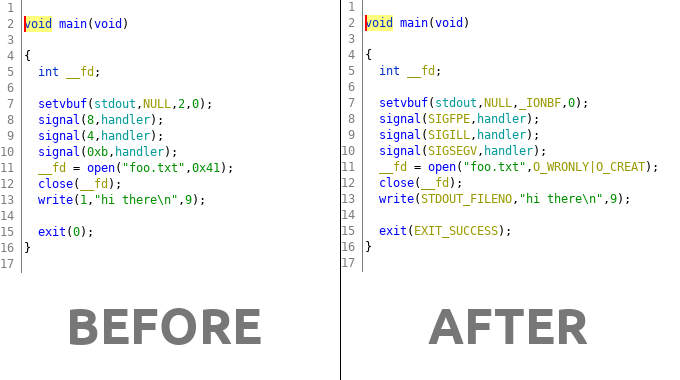
Replace Constants
This utility will attempt to replace known constants in functions with their
human readable counterpart.
!pwndra constants
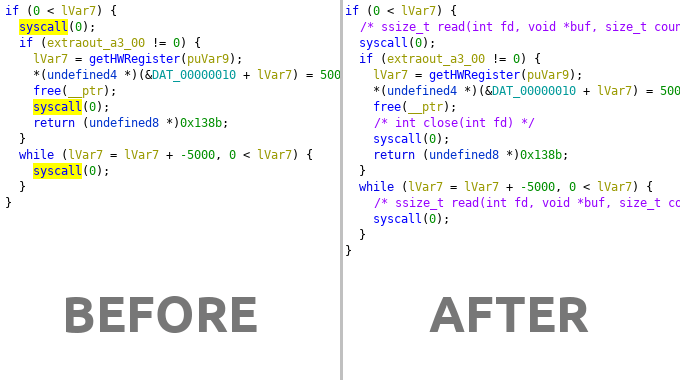
Annotate Syscalls
This utility will attempt to find and identify system calls (and arguments).
*Annotation in the decompiler view*
!pwndra syscalls
*Arguments are annotated in the disassembler view*
!pwndra syscalls
Character Con
The correct workflow to convert displayed data in an operand is to right click
the value and select the con type under the Convert submenu, however,
on request I have made a script to convert the display type of operands tochar so it can be used with a keyboard shortcut for con (IDA style).
To use it select the In Tool option of the UtilitiesCon.py script and
then select a numeric operand and hit shift+r to convert to a string. You
can change the shortcut by editing the line that contains the comment withkeybinding in it at the top of the script.
Goto Main
One annoying difference between Ghidra and IDA is that Ghidra makes no
attempt to jump to main() (or the entry point) when you load a binary.
The UtilitiesGotoMain.py script aims to correct that. Run it directly
or if integrated with In Tool then hit ctrl+m and it will attempt
to dynamically find main() and mo to that function.
If there is no main() function detected, it will jump to the entry
function. If you run on a stripped binary then it will rename the main
function for you.
---
Installation
Clone the repository or download and extract somewhere. In Ghidra, open
the Script Manager (Window -> Script Manager) click the Script button and add
Directorypwndra/scripts to the list.
Once the script directory is added to Ghidra you can find the scripts in
the Pwn category. You can run the scripts directly from the Script if you like but the scripts also ha and keyboard shortcuts
Manager
for ease of use. In order to activate the menus and shortcuts you must
click the In Tool checkbox next to the scripts you wish to integrate
into the tool.
If you clicked In Tool the menus will be under Analysis -> Pwn and
any shortcuts for scripts are listed in the menu item that uses that
shortcut.
Usage
There are several frontends a:
* aarch64
* amd64
* arm (oabi/eabi)
* hppa
* i386
* m68k
* mips (n32/o32/n64)
* powerpc
* powerpc64
* sh
* sh4
* sparc
* sparc64
* thumb
You can either run one of those frontend scripts directly (through theScript Manager or if you clicked In Tool you can access a menu;Analysis -> Pwn -> Tool Name).
There is an Auto frontend that will automatically detect the current loaded
program for you. This can also be accessed with the keyboard shortcut which
is specified in the menu item for the tool.
The scripts have two modes of operation, the default is to operate globally,
the second is to only operate on a gi. This is useful for those
times where you have two binary modes interlaced in the same code such asi386/amd64 or thumb/arm.
项目信息
开发语言:Python
Star 数:709
技术要点
该项目属于CTF思路方向的开源资源,代码结构清晰,适合安全研究人员学习参考。项目围绕A collection of pwn/CTF related utilities for Ghidra展开,提供了可运行的实现,对理解相关安全机制、工具原理与攻防技术具有较高的研究价值。
从技术实现角度看,此类项目的核心在于对底层原理的深入理解与工程化落地。开发者在研究过程中可以结合官方文档与社区讨论,梳理项目的初始化流程、核心模块职责与数据流转,逐步掌握其中的技术细节与设计思路。
使用与学习建议
1. 下载源码压缩包,解压到本地环境。
2. 根据项目类型准备对应的运行环境与依赖。
3. 按照 README 中的步骤完成配置与部署。
4. 在隔离的测试环境中运行验证,避免影响生产系统。
免责声明
本资源来源于开源社区,仅供安全研究、技术学习与合法授权范围内的攻防演练使用,请勿用于任何非法或侵害他人权益的用途。使用本项目产生的一切后果由使用者自行承担。
| 资源标题 | pwndra - A collection of pwn/CTF related utilities for Ghid |
| 所属分类 | CTF思路 |
| 发布作者 | admin |
| 发布时间 | 2026-10-05 23:39:41 |
| 下载权限 | 免费下载 |
| 附件数量 | 2 个下载链接 |
| 浏览次数 | 325 |
| 讨论数量 | 0 |
| 主题状态 | 正常讨论中 |