 CTF思路
点击放大
50M_CTF_Writeup - $50 Million CTF from Hackerone - Writeup

项目说明
$50 million CTF Writeup
Summary
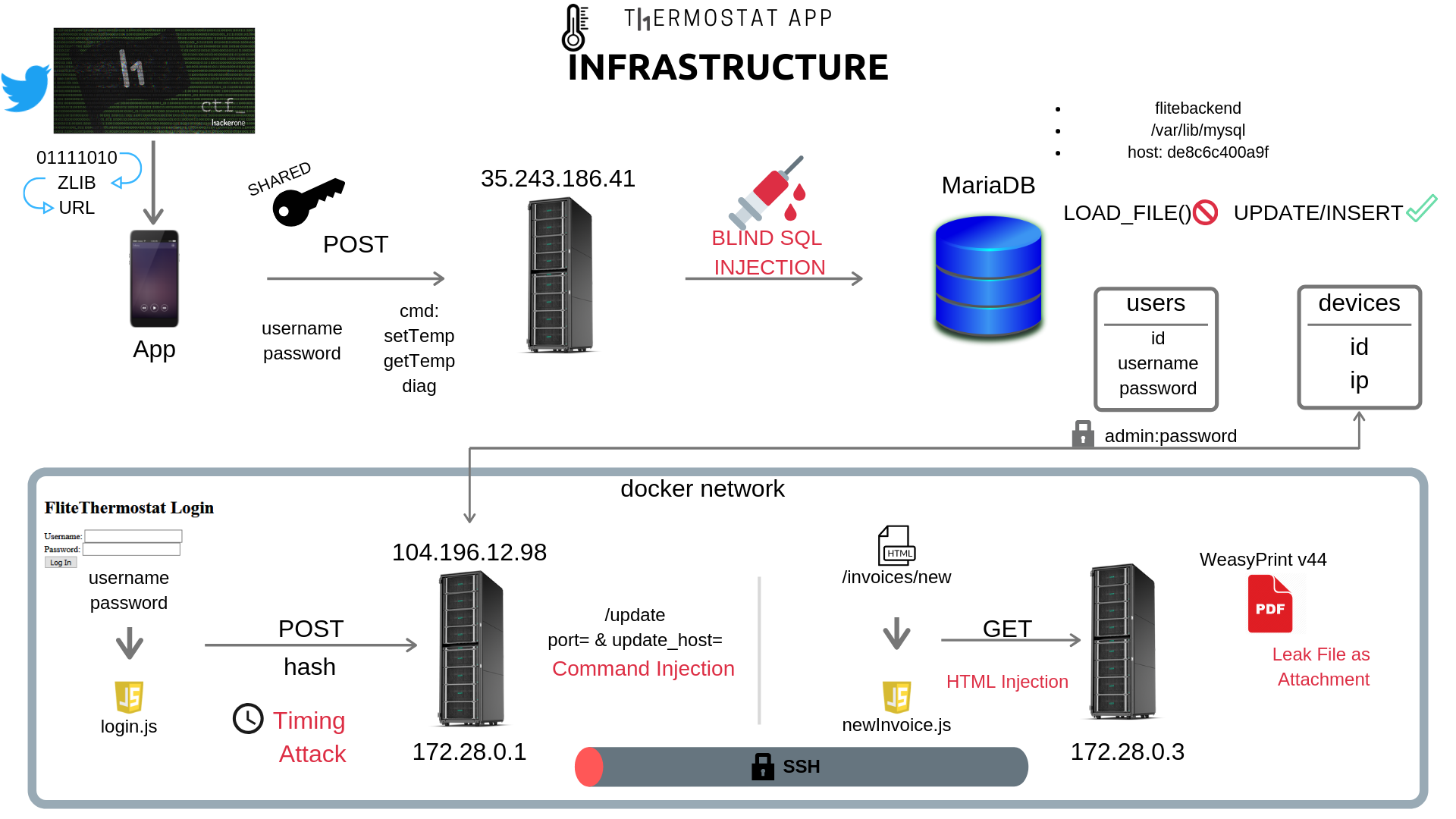
For a brief o of the challenge you can take a look at the following image:
!O
Below I will detail each step that I took to solve the CTF, moreover all the bad assumptions that led me to a dead end in some cases.
The CTF begins with this tweet:
!Tweet
What is this binary?
!Binary
My first thought was try to decode the binary on image’s background. I also noted that after the ‘_’ character the binary numbers were repeating the same sequence, which was:
01111010 01101100 01101001 01100010 00101011 01111000 10011100 01001011 11001010 00101100 11010001 01001011 11001001 11010111 11001111 00110000 00101100 11001001 01001000 00101101 11001010 00000101 00000000 00100101 11010010 00000101 00101001
So let’s see if this lead to any ascii word or something readable:
Nice, the first fi are: zlib+. So, maybe we should use zlib to decompress the remaining bytes.
Ok. Now we have an URL that redirects to an APK file in Google Drive. Let's download it.
APK
As my first step, I used JADX [3] to decompile the app and start to inspect the code:
!JADX
Reading AndroidManifest.xml I could identify two activity classes: com.hackerone.thermostat.LoginActivity and com.hackerone.thermostat.ThermostatActivity.
LoginActivity.class
The core functionality of LoginActivity is to authenticate the user:
In attemptLogin the App builds a json object like this: {"username": "", "password": "", "cmd": "getTemp"} and then instantiates a PayloadRequest object which will be added to a Queue to be processed. So let's see what does this class do.
PayloadRequest.class
From here we could note an URL which probably is being used as the backend server. Also, there is a method called buildPayload which will be the value for d parameter.
The buildPayload method uses a symmetric-key algorithm [4] (AES) in CBC mode that uses the same cryptographic key for both encryption of plaintext and decryption of ciphertext. Moreover, the secretKeySpec is the key and PKCS#5 is the padding method. Thus our json is always sent encrypted to the backend server. Futhermore, there is a method to decript the response, called parseNetworkResponse, which uses the same algorithm and secret key.
ThermostatActivity.class
The other Acti is the ThermostatActivity which calls setTargetTemperature two times and updates the thermostatModel attribute. Also using the same json object from LoginActivity sends a getTemp command, but as you can see, does nothing with the result (String str)
com.hackerone.thermostat.Model.ThermostatModel
Analyzing the other classes we find a ThermostatModel with a setTargetTemperatute method which gives us another command: setTemp. What is interesting about this new command is that now we have a new json attributes temp which is the setTemp parameter.
Dir Brute
Why not? We have an IP running a web server so let's check if we are in a lucky day and get some low hanging fruits figuring out a hidden endpoint. Using FFUF [12]:
Not that easy ...
Creating a Ja
After this initial recon, it's time to try some attacks interacting with the backend server. For this, I just created a ja using the same source code from the App with minor changes.
So we are now able to send commands to the backend using the above sendCommand method. My first bet here was to try some SQL Injection. But we have some limitations as the server only returns "Invalid username or password" or "Unknown". First message is received when there is no error but the username and password does not match and the last when something went wrong. With this restriction, we could try two approaches: Time-Based Blind SQL Injection or Error-Based Blind SQL Injection. Let's try time based with the simplest payload:
Time Based SQL Injection
What? Did we get it? 10 seconds to get a reponse from the payload above! This is definitely my lucky day ... What I could do now? Maybe a tamper for SQLMap [9]? No, no! This is not so 31337! Let's create our own exploit for blind SQL injection... in Ja of all, we need to somehow compare two chars and based on response time determine a boolean value: True or False. We can achieve this as follows:
To measure response time we get the time before and after call sendCommand then we subtract and compare TIME_TO_WAIT with the elapsed time. If elapsed time is greater than TIME_TO_WAIT we have a True boolean value otherwise a False value.
Now we need an abstract query for general purpose that allows us to extract data from the database:
'||(IF((SELECT ascii(substr(column,{1},1)) from table limit {2},1){3}{4},SLEEP({5}),1))#.
with:
Also to improve the performance we could use a binary search algorithm [5] for our time based boolean check:
E seems fine enough to start leaking some data:
Database recon
#### ()
#### database()
#### hostname + datadir
#### Tables
Two tables found: devices and users in flitebackend database.
#### Read files?
Maybe we could read some files?
I don't think so...
#### Login
Maybe you are wondering why I didn't log in yet. But I started doing the time-based SQLi before e to log in. So let's see if we are able to log in using the SQLi:
Humm, we need to think how the backend is doing the login process:
1. SELECT username, password FROM users WHERE username='+ username_param +' and password = '+ password_param +' ?
2. SELECT password FROM table WHERE username='+ username_param +'; then check password?
For 1 we already know that is not the case because using ' or 1=1# would give us a successful message.
For 2 we need another test, first of all, let's check how many columns the query has.
Ok, based on error message we can affirm that there is only one column on the query. Thus we could try to use UNION to fake a successful query:
Not yet. There is something more... Step back and let's dump users table.
#### users table
First, we need to know the table structure. To facilitate the process I created a method called blindColumnName with two parameters: table and offset. This method will dump all columns names from String table parameter.
users(id, username, password)
#### devices table
The same process abo be applied to devices table.
devices(id, ip)
#### Dumping
Knowing the table structure we could dump the :
There is only one user ("admin", "5f4dcc3b5aa765d61d8327deb882cf99"). Is that a hash? _Googled_ it and found the answer, yes it is: md5('password'). Now we are able to log in using admin:password or e the sqli:
Time to dump table devices.
After obtain several ips I noted that most belonged to a private IP address block. My first idea was to build a query removing all private IP addresses and also classes D and E (see where clause):
Nice! A real IP address.
Server 104.196.12.98
First recon step here is to run a port scan to discover if there is any service. As a result I got port 80 (http).
!Thermostat App
Now we are facing a new web application with a form consisting of username and password inputs. Also reading the source code (html) we can see that there is a login.js. Let's use Burp proxy and do a request submitting the login form. What could username and password be? From our previous SQL injection, we got admin:password. So it is a good bet:
As we can note the post is not sending username and password but a hash. Time to see what login.js is doing. Reading the ja code we can spot a hash and a fhash functions, leading us to understand that it is a hash algorithm. There is also some padding and XOR bit operations. Almost sure that it is really a hash function and so the backend will be unable to get the original input (username and password). In this scenario we can infer that the backend will also compute the hash with the same function, as login.js, using the stored username + password. Then it will compare the two hashes. Therefore all we need to be authenticated is a hash.
Is it possible to be another SQL injection? Maybe another type of SQL Injection? At first, all my common payloads didn't work. So in this scenario I decided to run a SQLMap [9], remembering that we are not attacking username and password input fields, but the hash.
Result: Nothing... Maybe we could find another endpoint? Time to use dirseach [7] with some wordlists from SecList [8]:
Interesting, some new endpoints to try. But unfortunately, all of them gave 302 (Found) and redirect (Location) to root (/). Therefore we need to somehow be authenticated.
Let's focus on the hash again ...
Hash
It's a good decision to revisit the major hash attacks:
#### Hash Extension? or Hash Colision?
Could it be a hash extension ? In short hash extension occurs _when a Merkle–Damgård based hash is misused as a message authentication code with construction H(secret ‖ message), and message and the length of secret is known, a length extension attack allows anyone to include extra information at the end of the message and produce a valid hash without knowing the secret_. [10][11] In our scenario this is not applicable as there isn't a signature or message authentication code to be .
Or could it be a hash colision? First of all, to be a hash colision we would need a valid hash and this is not the case here.
What to do now?
At this moment I was in a hard situation. No ideas... I was sure that something important was left behind. Consequently, I decided to go back and search for more flaws or any kind of relevant information.
#### Maybe a SSRF?
What if I could insert another IP into the devices table and use setTemp command to change thermostat temperature? Maybe when someone change the temperature all devices will receive a HTTP request with some authorization token and so I could use this to log in. Seems . First step is to try INSERT:
Ok, it worked. I have my IP address as a device. Now let's run tcpdump [6] on my server (X.X.X.X) to capture all network traffic. Lastly, we need to send some resquests with getTemp and setTemp commands.
# tcpdump -i eth0 -nnvvXS
But "nothing" happens... only a connection (port 80) from someone in San Francisco during h1-415. :) Definitively I should remove my IP address. Dead end here.
#### Create another user?
We are able to insert any device, maybe we can insert another user and use this as login and password for Thermostat Login.
No. We are not able to log in! :(
#### Another command?
And if there is another parameter? Let's brute force it!
After some time just popped up a diag command with the following response {"success": false, "error": "Missing diagnostic parameters"}. Nice, time to brute force parameters name now... After some days trying to guess the parameter for diag command using all sort of wordlists, e cewl [13] to build specific wordlist from real Thermostats manuals, at the end nothing was found!
Timing Attack
Maybe I should rewrite the JS code from login.js to python and do a code review? Ok... So while doing code review I noted something odd on JS code:
Can you see it? This is a padding algorithm and the XOR operation is not working as expected, because of this:
x.charCodeAt[x.length & 0xFF]
This is a typo and this wrong piece of code probably makes the hash function unfeasible for a correct on the backend server, because we won't ever get the same hash value... This is a good assumption to take!
While re the attacks against hash functions I saw an interisting topic about Timing Attack: _"Comparing the hashes in "length-constant" time ensures that an attacker cannot extract the hash of a password in an on-line system using a timing attack, then crack it off-line_.
_The standard way to check if two sequences of bytes (strings) are the same is to compare the first byte, then the second, then the third, and so on. As soon as you find a byte that isn't the same for both strings, you know they are different and can return a negati immediately. If you make it through both strings without finding any bytes that differ, you know the strings are the same and can return a positi. *This means that comparing two strings can take a different amount of time depending on how much of the strings match.* "_ [1]
Time to create a PoC for a timing attack. The idea is to send each hash within the range from 0x00 to 0xFF for the first two chars, filled with ff until 64 chars in total (padding()). These first two chars represent a byte (hex digest) in the hash. After sending the request we save the time elapsed in a dictionary.
I got:
Note that 'f9' took 1.14 seconds, which is 0.5s more than the others. Now I should test the next two chars prefixing f9 in the hash and so on until I got the complete hash.
#### Multithreading
Doing this timing attack in a single thread would take hours. So we need to do it using multithreading [file]. I found out that the most reliable results from my were using a maximum of 16 threads. The general idea was to build a queue with hex range 0x00 to 0xff and make each thread do a request checking the elapsed time. Being greater than 0.5s from the previous base_value time means that we found another "byte".
Let's just see the main function that each thread will perform:
If you ha time you could watch all the full execution here: ; and a quick here:
Finally we can login using f9865a4952a4f5d74b43f3558fed6a0225c6877fba60a250bcbde753f5db13d8 as hash.
Thermostat web app
Now that we are authenticated we can browse the application. All the endpoints are working, except /diagnostics which gi. Further, under /control there is a form to change the temperature by doing a POST to /setTemp. I took some time testing this endpoint, sending all kinds of payloads, but it seemed to only accept numbers. (Note: python accepts underscore in numeric literals [14]).
#### /update
When we access /update we get:
Immediately this caught my eye. What if there are some hidden parameters? To do this we have a lot of options: Param Miner (Burp), Turbo Intruder (Burp), Parameth, WFuzz, FFUF and so on. As at this time I was looking for performance, I chose Turbo Intruder: _Turbo Intruder is a Burp Suite extension for sending large numbers of HTTP requests and analyzing the results. It's intended to complement Burp Intruder by handling attacks that require exceptional speed, duration, or complexity._ [15] Attacks are configured using Python.
Request:
Python:
Note that I just set the parameter value to turbo.d.mydomain.com.br which if resolved it will also be logged in my DNS. After this, I just sorted the result columns by status code, which showed me 500 for parameter port. Nice, we are now able to set the port. Next idea is to try changing the port to all from 0-65535 and detect another service. Using Turbo Intruder it was easy:
But nothing different. Let's try some injection, setting the port to :80 could lead to and thus achieving a SSRF to myserver.com. But it didn't happen, the ser error 500. Port was an integer parameter. Time to breath...
#### JWT
After logged in a session cookie is assigned which appears to be a flask JWT. jwt.io defines: JSON Web Token (JWT) is an open standard (RFC 7519) that defines a compact and self-contained way for securely transmitting information between parties as a JSON object. This information can be and trusted because it is digitally signed. It also says that JSON Web Tokens consist of three parts separated by dots (.), which are: Header.Payload.Signature .... this JSON is Base64Url encoded.....
Base64 decoded the first part:
There is only a loggedIn attribute... Ne I decided to extend and create a brute force to app.secret_key which is used to sign JWT in a flask app.
Dead end!
#### _
I was forgetting something:
!Hint
Cody is the creator of the CTF. Could this be a hint? I really didn't know. But that made me try parameters with _:
Suddenly, I got Connecting to and downloading update manifest!! Yeah! So I was able to change the hostname and so do a SSRF... No, No. None of my attempts triggered a http request. What about a command injection? Using backticks (\) I was able to inject a sleep command. Success, let's do a reverse shell:
We are inside! Where is the flag?
Internal Server (172.28.0.3) - Invoice App
There were no flags! Doing an initial recon I noticed that I was in a docker container. And the first thing that came to my mind was C, a docker container escape to host. But I decided to look more, initially by checking the app source code at /app/main.py to see if there were other containers on the same network. What a surprise when I found another server at 172.28.0.3 with port 80 open. Using curl I was able to see that it was another web app, something about Hackerone in!
Tunnel
To make my life easier and to not leak what I was doing I decided to make an SSH tunnel to my server with port forwarding:
The above SSH command will forward all connection to local port 81 on X.X.X.X to 172.28.0.3:80. So from this moment on, I could use all my local exploits using localhost:81 as the target.
Login
Browsing the web app the first thing we could see is a login form. And again my first shot was a SQL Injection, which made no sense at all. Using only a backtick would fire an exception, but I could not build a valid query. Also tried SQLMap:
I also tried XPATH injection, LDAP injection and NoSQL injection. Nothing worked. Let's move on.
New Invoice
We were also able to create in at /in/new. All the logic was inside newInvoice.js:
Using /invoice/preview we get a html page with our invoice and using /invoice/pdfize we get a PDF with the same content. Analyzing the rest of the code I was able to send a valid request to both endpoints using curl:
One of the first things that I try when attacking a python web application is Server Side Template Injection. Although we ha input options on the json above, none gave me a SSTI using {{7*7}} as payload. Also, what catches our attention is the permission to define styles for the web page, as we already know that using css we could leak information of a web page [17], but it does not seem to be useful here. But we could get some more recon information if we were able to trigger a HTTP request using url():
..."styles":{"body":{"background-image":"url(')"....
And I got a request on my server with this header: User-Agent: WeasyPrint 44 ().
WeasyPrint
What is WeasyPrint? From : _WeasyPrint is a smart solution helping web de to create PDF documents. It turns simple HTML pages into gorgeous statistical reports, in, tickets…_. Ok, time to understand more this python library.
Reading the docs I saw this: _When used with untrusted HTML or untrusted CSS, WeasyPrint can meet security problems. You will need extra configuration in your Python application to avoid high memory use, endless renderings or local files leaks._. Nice! All we need to know now is how to exploit this flaw. Maybe someone opened an issue on github? It was not the case. But, I found this pull request:
"Added support for PDF attachments." ().
What an amazing feature! So, using <link rel='attachment' href='file_path'> WeasyPrint will attach the file from href location to the PDF. I am sure that it is all we need.
Let's test all json attributes to inject HTML code. Nothing better than creating a python script to help us:
And through only one attribute I was able to inject HTML: CSS property! But the backend was not allowing </*>... And this tip from [18]: You can use // to close a tag instead of >.` made the final exploit:
Finally I opened the PDF and there it was:
!Leak
HERE IT IS: c8889970d9fb722066f31e804e351993
Check Others for reports from other players.
References
1.
2.
3.
4.
5.
6.
7.
8.
9.
10.
11.
12.
13.
14.
15.
16.
17.
18.
项目信息
开发语言:未知
Star 数:605
技术要点
该项目属于CTF思路方向的开源资源,代码结构清晰,适合安全研究人员学习参考。项目围绕$50 Million CTF from Hackerone - Writeup展开,提供了可运行的实现,对理解相关安全机制、工具原理与攻防技术具有较高的研究价值。
从技术实现角度看,此类项目的核心在于对底层原理的深入理解与工程化落地。开发者在研究过程中可以结合官方文档与社区讨论,梳理项目的初始化流程、核心模块职责与数据流转,逐步掌握其中的技术细节与设计思路。
使用与学习建议
1. 下载源码压缩包,解压到本地环境。
2. 根据项目类型准备对应的运行环境与依赖。
3. 按照 README 中的步骤完成配置与部署。
4. 在隔离的测试环境中运行验证,避免影响生产系统。
免责声明
本资源来源于开源社区,仅供安全研究、技术学习与合法授权范围内的攻防演练使用,请勿用于任何非法或侵害他人权益的用途。使用本项目产生的一切后果由使用者自行承担。
| 资源标题 | 50M_CTF_Writeup - $50 Million CTF from Hackerone - Writeup |
| 所属分类 | CTF思路 |
| 发布作者 | admin |
| 发布时间 | 2026-10-05 23:40:18 |
| 下载权限 | 免费下载 |
| 附件数量 | 2 个下载链接 |
| 浏览次数 | 290 |
| 讨论数量 | 0 |
| 主题状态 | 正常讨论中 |