 CTF思路
点击放大
CTFNote - CTFNote is a collaborative tool aiming to help CTF
项目说明

CTFNote
Introduction
CTFNote is a collaborative tool aiming to help CTF teams to organise their work.

Installation
Before starting, make sure to copy .en to .env and fill in the information in the .env file.
Running the Docker containers
You can build and start CTFNote with docker compose. The default
configuration makes it super easy to start a new instance!
Building CTFNote requires at least 3 GB of RAM. If you want to host CTFNote
on a server with less than 3 GB of RAM, you can use the pre-build images
from the GitHub Container Registry.
To use the pre-build images, download docker-compose.yml (for example through cloning the repository) and run:
Self-build images
You can build and start CTFNote with docker compose. The default
configuration makes it super easy to start a new instance!
Accessing the instance
The instance will spawn a web server on port 127.0.0.1:8080. The first account created will
ha pri.
Please use nginx to make it a o.
Enable HTTPS with nginx
It is assumed that you want to ser o.
An example configuration for nginx on the host looks like this:
Edit the .env file to instruct the pad to use TLS:
After deploying this configuration, run certbot to make it a o.
See this article for more information.
Add Discord bot support
!Screenshot of a CTF in Discord
To add support for the CTFNote discord bot, you need to change the following in the .env file:
You can also configure the amount of voice channels you want per CTF by changing DISCORD_.
To get the DISCORD_BOT_TOKEN, you need to create a discord bot and add it to your server.
You can follow this guide to do so.
When you are done, copy the token from the Build-A-Bot section and paste it in the .env file.
You can find the DISCORD_SER in the 'Widget' section of your ser.
#### Limitations
Please do not use this bot if untrusted members can create channels or categories in your server, or can edit topics of channels.
This can cause pri escalations within CTFNote.
Please also note that syncing the CTFNote state to Discord is prone to race conditions.
Therefore, some actions such as importing tasks are now serialized (due to correctly handling the 50 channel limit per category of Discord).
Therefore you should patiently wait before the bot is done importing before you perform certain actions, such as deleting or editing the CTF.
The bot will tell you when its done by editing the private reply.
You will now also see more loading animations within CTFNote to indicate syncing to Discord.
Discord also has modification timeouts when you perform certain actions such as editing the category or channel name.
If you modify a task or CTF name multiple times in a row, the sync to Discord can't be performed and you should rename the CTF categories / task channel and topic manually in order to restore syncing.
#### A commands
/link [token]: link you Discord account with your CTFNote account through the CTFNote token found in your profile.
/create: create Discord categories, channels and roles for any upcoming / active CTF.
/archive: convert the messages in the channels of a CTF to a task to be stored permanently in CTFNote.
/delete: remove the Discord categories, channels and roles for a CTF.
You must first create an
/archive before you can do this.
/start: start working on the task linked to the Discord channel.
/stop: stop working on the task linked to the Discord channel.
/solve [flag]: solve the task linked to the Discord channel.
Solving can only be done once and flags cannot be remo through Discord.
The /create, /archive and /delete commands are only accessible when you ha administrator rights (not related to the CTFNote administrator rights).
/start, /stop and /solve are only accessible to users who have /linked their Discord account.
The bot will automatically create more categories when you hit the 50 Discord channel limit, so you can have an almost infinite amount of tasks per CTF.
It is your own responsibility to stay below the Discord ser limit, which is 500 at the moment of writing (categories count as channels).
Migration
If you already have an instance of CTFNote in a previous and wish to
upgrade, you should follow the guide at MIGRATION.md.
Pri
When other players register on your CTFNote instance, they will not be able to
see CTF or tasks. This is because CTFNote uses different roles to restrict CTF
You can manage other players' roles in the _Users_ tab of the _Admin_ panel.
Additionally, you can generate a secret that lets users create an account with a
different pri in the _Registration with password_ menu in the _Admin_
panel.
!Screenshot of the Registration with password menu
Guest
Guest is the default role. This role is meant to be used for guests and friends
helping sporadically on CTF.
You can add a guest to a CTF by ticking their badge in the _Guests_ tab on a
specific CTF.
!Screenshot of the guest menu
Friend
Friend is a role between guest and member which allows the player to automatically
view old CTFs but not active and upcoming CTFs. They are also not allowed to invite any
new players to a CTF. You can use this role to grant guests access to your old CTFs
for them to learn from without granting access to each old CTF indi.
Member
Member is a role that represents a team member. A certain level of trust is
given to these users: they can see every CTF, future, current and past. They can
also invite guests to CTF.
Manager
Manager is a role that represents a team captain. They can create, import,
modify and delete CTF.
They can import CTF directly from CTFtime.
!Screenshot of the Import CTF feature
Admin
Admin is a role with every pri. They ha to the _Admin_ panel
that lets them delete accounts, change permissions, reset passwords, create
one-time secrets and, most importantly, change the theme colours.
!Screenshot of the theme menu
Configuration
The configuration can be changed in the .env file. This file contains
en for the containers.
The value of every are explained in this file.
Screenshots
List of the CTF

Calendar

Information of a single CTF

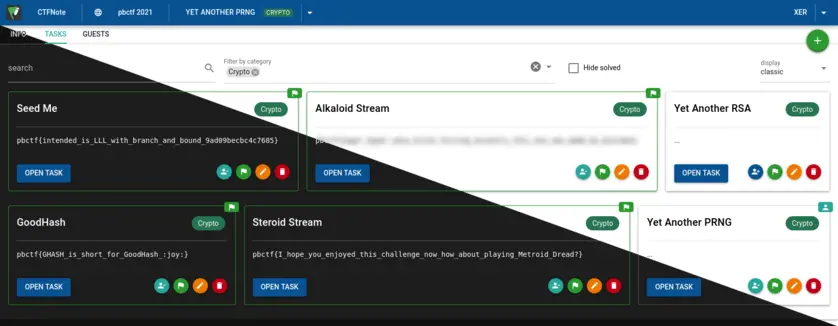
Task list for a CTF

Shared notepad for a task

Contributing
We have a Discord server where we discuss the de and feature of CTFNote.
A contribution guide is a here: CONTRIBUTING.md
项目信息
开发语言:TypeScript
Star 数:598
技术要点
该项目属于CTF思路方向的开源资源,代码结构清晰,适合安全研究人员学习参考。项目围绕CTFNote is a collaborative tool aiming to help CTF teams to organise their work.展开,提供了可运行的实现,对理解相关安全机制、工具原理与攻防技术具有较高的研究价值。
从技术实现角度看,此类项目的核心在于对底层原理的深入理解与工程化落地。开发者在研究过程中可以结合官方文档与社区讨论,梳理项目的初始化流程、核心模块职责与数据流转,逐步掌握其中的技术细节与设计思路。
使用与学习建议
1. 下载源码压缩包,解压到本地环境。
2. 根据项目类型准备对应的运行环境与依赖。
3. 按照 README 中的步骤完成配置与部署。
4. 在隔离的测试环境中运行验证,避免影响生产系统。
免责声明
本资源来源于开源社区,仅供安全研究、技术学习与合法授权范围内的攻防演练使用,请勿用于任何非法或侵害他人权益的用途。使用本项目产生的一切后果由使用者自行承担。
| 资源标题 | CTFNote - CTFNote is a collaborative tool aiming to help CTF |
| 所属分类 | CTF思路 |
| 发布作者 | admin |
| 发布时间 | 2026-10-05 23:40:25 |
| 下载权限 | 免费下载 |
| 附件数量 | 2 个下载链接 |
| 浏览次数 | 151 |
| 讨论数量 | 0 |
| 主题状态 | 正常讨论中 |