 CTF思路
点击放大
picoCTF - The platform used to run picoCTF 2019. (deprecated
项目说明
picoCTF
Deprecation Warning
This repository contains an older, deprecated of the picoCTF platform which was used to run
the picoCTF 2019 competition. Our de efforts are currently focused on our
new web platform at play.picoctf.org, and this repo is
no longer maintained or supported. We do not recommend its use for new competitions.
If you are looking to host your own CTF, we recommend a modern tool such as
CTFd or kCTF.
Introduction
The picoCTF platform is the infrastructure which is used to run
picoCTF.
The platform is designed to be easily adapted to other CTF or programming
competitions.
If using the platform to host a custom competition, we recommend using the most
recent tagged release. Themaster branch represents acti and may not be stable.
Additionally, we cannot guarantee the stability or security of any outdated
releases.
Additional documentation can be found at [docs.picoctf.com][docs] or within the/docs directory.
[docs]:
Please visit our Discord server for other platform deployment questions not
covered in our documentation:
Quick Start
The following steps will use to get you
quickly up and running with the picoCTF platform by deploying the code base to
two local machines. You can read more about using in our
documentation
These commands perform the following:
1. Get the source code at the most recent de state (git)
2. Change into the source code directory (cd)
3. Bring up a local copy of the picoCTF platform ()
- This will take approximately 30-45 minutes based on your network speed as
downloads a base machine and all the components to install
the platform. This is a one-time, upfront cost. Obligatory [xkcd][].
[xkcd]:
Now that your local copy of picoCTF has been deployed:
4. Browse to
5. Login with the automatically created administrator account
- user: ctfadmin
- password: dev
Make your first change. For example to change "CTF Placeholder" in the
na bar:
6. Edit picoCTF-web/web/_includes/header.html
7. Update the running site.
- If you have ansible installed locally on your machine it is as
- If you do not, then you can run the same command from within the
machine:
Then check out the infra_local directory for more information
on using the local de en in a more efficient manner.
Next Steps
Interested in de? Check out the notes in [infra_local][il].
Interested in running a public event? Check out the notes in [infra_remote][ir]
and the [Running Your Own Competition][r] section of this document.
The documentation has more information on [Alternati][ad].
Continue reading for more information on the picoCTF project.
[il]:./infra_local
[ir]:./infra_remote
[r]:/README.md#running-your-own-competition
[ad]:./docs/alt_deployment.md
Project O
This project is broken down into a few discrete components that compose to build
a robust and full featured CTF platform. Specifically the project consists of
the following:
1. picoCTF-web. The website and all APIs.
2. picoCTF-shell. Where users go to sol.
3. problems. CTF problem source code.
4. ansible. Used for configuring machines.
5. Infrastructure Examples. Different ways to deploy the picoCTF platform
- [infra_local][il]. Local infrastructure ()
- [infra_remote][ir]. Remote infrastructure (Terraform)
Walkthrough
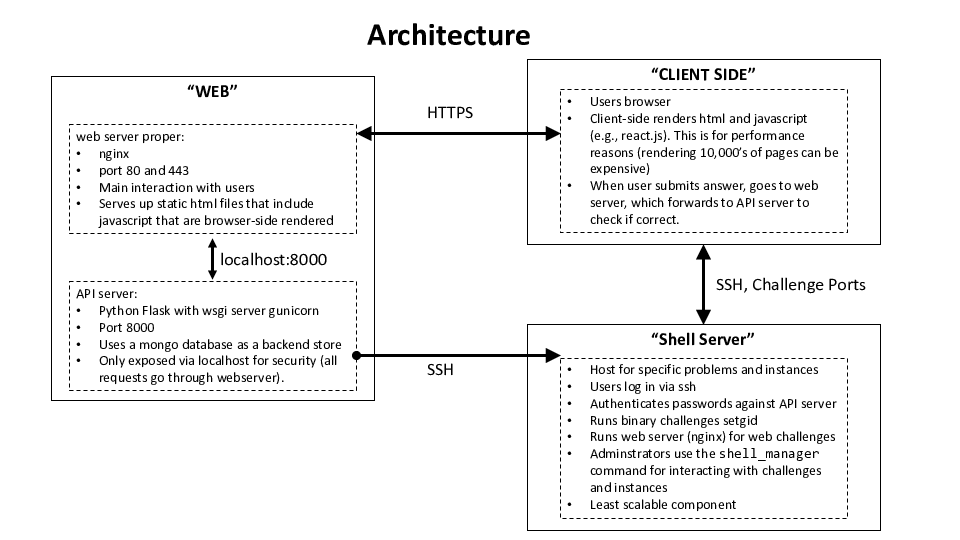
Once you bring e up, the main flow between components is:
!Architecture
Here is a walkthrough:
1. The user connects to the "Web Server". This is an nginx server.
- The nginx ser up content in picoCTF-web/web.
- The nginx server only serves up static HTML files.
- Most HTML files contain ja, which is rendered browser-side for
speed.
- The browser rendering in turn makes requests to a REST-ful like API /api/
to nginx. Requests to /api are forwarded to an API server (running on the
same host for de).
- There is a special interface called /admin, which is used by the admin to
connect to new shell servers.
2. The users /api request is forwarded to the API server.
- The API server is a python flask server with code under
picoCTF-web/api
- There is an API for adding users, checking passwords, etc.
- There is an API for serving up challenges, checking flags, etc.
- The API keeps track of user score and membership to teams.
3. A user can ssh to the shell server.
- The shell server is loaded with problems, with examples in
problems.
- The web ser to the shell server and retrieves a JSON file
containing problem instance location, point value, etc.
- The web ser users using password data stored and via the
API.
Some important terminology:
+ A _problem_ is a logical CTF problem. (Sometimes called a _challenge_)
+ Solving a problem gives a user points.
+ A problem can be _locked_ or _unlocked_ for a user.
+ Super important: problems *do not* ha. They are purely logical.
+ A _problem instance_, or _instance_ for short, is a generated of a
challenge to be solved by a user.
+ A single problem can ha inst_1, inst_2, ..., inst_n. Each
instance has its own flag flag_1, flag_2, ..., flag_n
+ Users are assigned specific problem instances, and they are expected to
submit only their flag. For example, if user Foo has instance inst_1, only
flag_1 is a valid flag (aa separate instance flag flag_2 is not valid)
+ Instances were in to help combat flag sharing. If player Foo has been
assigned inst_1 but submits flag_2, then whomever has inst_2 shared
their flag. There may be legitimate reasons for flag sharing, but in many
competitions it is indicative of cheating.
+ Instances are generated from a _template_. Think of it like templating in a
web framework. For example, a buffer o problem may template the
specific buffer size so a solution for inst_i will not work for inst_j.
picoCTF-web
The competitor facing web site, the API for running a CTF, and the management
functionality for CTF organizers. The de
deploys picoCTF-web to a machine (web) at If you
want to modify the look and feel of the website, this is the place to start.
picoCTF-shell-manager
The tools to create, package, and deploy challenges for use with the picoCTF
platform. This supports the deployment of auto-generated challenge instances and
provides competitors shell access to aid in challenge solving. The de
deploys the shell-server as a second
machine (shell) at If you want to modify challenge
deployment primitives, this is the place to start.
picoCTF Compatible Problems
Example challenges that are compatible with the picoCTF platform. These
challenges can be easily shared, deployed, or adapted for use in a CTF. The
de installs these examples to the shell
server and loads them into the web interface. If you want to see how to create
challenges or le the hacksport library, this is the place to start.
Ansible for Automated System Administration
The tool we use to install, configure, deploy, and administer the picoCTF
platform is Ansible. This allows us to create
flexible, parameterized, automated playbooks and roles that apply across
de, staging, and production en. If you want to modify way the
platform is configured, this is the place to start.
Running Your Own Competition
If you are looking to run your own CTF competition, you should:
1. Make sure you can bring up the local infrastructure (
and [infra_local][il])
1. Make sure you understand how to deploy the infrastructure via terraform and
ansible ([infra_remote][ir]).
2. You can reskin the look and feel of the site by editing the
picoCTF-web/web ja and HTML code.
3. To enable password reset emails, log in using the site administrator
account and configure Email under Management > Configuration.
4. You should start writing your own problems, loading them into the shell
server, and syncing the web ser set with the shell server via the
/admin URL endpoint.
Do not underestimate the importance of spending significant time in problem
de. Our internal system is:
1. We form a working group for the contest.
2. We often ideas with the group before implementation.
3. Implement and deploy. Hardcode nothing (or as little as possible).
4. *THE KEY STEP:* Play test! Often the initial problem will have an
intellectual leap built-in that's obvious to the creator but to no one
else. Play testing makes sure the problem is coherent, self-contained, and
fun.
For more on running events see:
[maxims]:
[ppp]:
Giving Back and De
The picoCTF platform is always under de.
standards.
automated testing.
If you are interested in research in CTFs (e.g., improving skill acquisition,
decreasing time to mastery, etc.), please feel free to email Da.
Credits
picoCTF was started by Da with his CMU professor hat in 2013. The
intention has always been to give back to the CTF community.
The original hea was done by his graduate students, and special thanks
is due to Peter Chapman (picoCTF 2013 technical lead) and Jonathan Burket
(picoCTF 2014 technical lead) for their immense efforts not only de
code, but for organizing art work, problem de, and so on.
In 2015-2016 significant effort was done by
ForAllSecure at the companies expense. This includes
adding concepts like the shell server, and rewriting significant portions of the
web server.
Both CMU and ForAllSecure ha to release all code under the MIT
LICENSE . We do encourage attribution as that helps us secure
funding and interest to run picoCTF year after year, but it is not
necessary. Also, if you do end up running a contest, do feel free to drop David
Brumley a line.
Roy Ragsdale, Peter Chapman, Jonathan Burket, Collin Petty, Tyler Nighswander,
Garrett Barboza, Mong-Yah "Max" Hsieh
项目信息
开发语言:Python
Star 数:314
技术要点
该项目属于CTF思路方向的开源资源,代码结构清晰,适合安全研究人员学习参考。项目围绕The platform used to run picoCTF 2019. (deprecated)展开,提供了可运行的实现,对理解相关安全机制、工具原理与攻防技术具有较高的研究价值。
从技术实现角度看,此类项目的核心在于对底层原理的深入理解与工程化落地。开发者在研究过程中可以结合官方文档与社区讨论,梳理项目的初始化流程、核心模块职责与数据流转,逐步掌握其中的技术细节与设计思路。
使用与学习建议
1. 下载源码压缩包,解压到本地环境。
2. 根据项目类型准备对应的运行环境与依赖。
3. 按照 README 中的步骤完成配置与部署。
4. 在隔离的测试环境中运行验证,避免影响生产系统。
免责声明
本资源来源于开源社区,仅供安全研究、技术学习与合法授权范围内的攻防演练使用,请勿用于任何非法或侵害他人权益的用途。使用本项目产生的一切后果由使用者自行承担。
| 资源标题 | picoCTF - The platform used to run picoCTF 2019. (deprecated |
| 所属分类 | CTF思路 |
| 发布作者 | admin |
| 发布时间 | 2026-10-05 23:43:44 |
| 下载权限 | 免费下载 |
| 附件数量 | 2 个下载链接 |
| 浏览次数 | 523 |
| 讨论数量 | 0 |
| 主题状态 | 正常讨论中 |