 CTF思路
点击放大
ForcAD - Pure-python distributable Attack-Defence CTF platf
项目说明
!tests
ForcAD
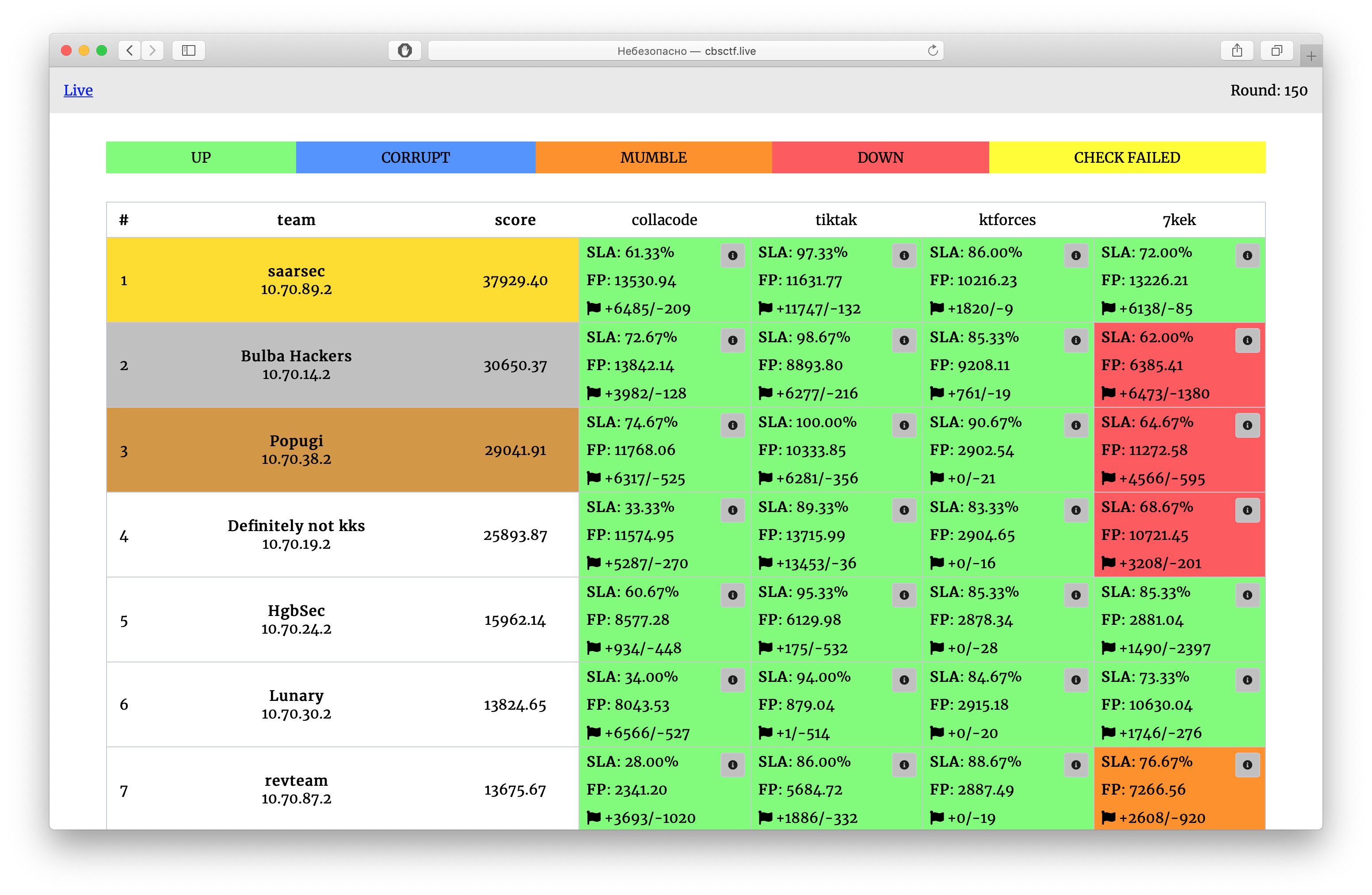
!Front page
Pure-python distributable Attack-Defence CTF platform, created to be easily set up.
The name is pronounced as "forkád".
> This documentation is for the latest (de) of ForcAD. It might not be stable or e. The latest stable can be found here, see the README.md there.
Note that there's a wiki containing some useful queries for game
statistics, services description, writing a checker, modifying the rating system, etc.
Table of contents
<!-- toc -->
* Running
* Configuration and usage
* Receiving flags
* Flag format
* Configuration file
* Checkers
* Configuration
* Checkers folder
* Writing a checker
* Wiki
<!-- tocstop -->
Running
5 easy steps to start a game (assuming current working directory to be the project root):
1. Open config.yml file (or cp config.yml.example config.yml, if the latter is missing).
2. Add teams and tasks to corresponding config sections following the example's format, set start_time, timezone
(e.g. Europe/Moscow) and round_time (in seconds) (for recommendations see checker_timeout ).
3. Install cli/requirements.txt (pip3 install -r cli/requirements.txt)
4. Run ./control.py setup to prepare ForcAD config. This command will generate a new login and password
(if not provided in admin.username and admin.password) for the admin interface and services. Generated
credentials will appear in command output and in the updated config.yml. Backup of the config file will be
generated just in case.
5. Run ./control.py start --fast to start the system. Wait patiently for the images to build, it could take a few
minutes, but happens only once. Notice that --fast option uses the pre-built image, so if you modified the base
images or backend requirements, omit this option to run the full build.
That's all! Now you should be able to access the scoreboard at . Admin panel is accessible at. Celery (flower) is at .
> Before each new game run ./control.py reset to delete old database and temporary files (and docker networks)
Configuration and usage
Receiving flags
Teams are identified by tokens (unique and randomly generated on startup). Look for them in the logs of initializer
container or print using the following command after the system started: ./control.py print_tokens. Token is private
information, so send them to each team correspondingly.
Flag format
System uses the most common flag format by default: [A-Z0-9]{31}=, the first symbol is the first letter of
corresponding service name. You can change flag generation in function Flag.generate in
backend/lib/models/flag.py
Each flag is valid (received by flag receivers and can be checked by checker) for flag_lifetime rounds (game config
).
Configuration file
Config file (config.yml) is split into five main parts:
* game contains the following settings:
* start_time (required): the datetime of game start (timezone will be taken from the timezone option).
Example: 2019-11-30 15:30:00.
* round_time (required): round duration in seconds. Example: 30.
* flag_lifetime (required): flag lifetime in rounds (see flag format section). Example: 5.
* timezone (optional, default UTC): the timezone in which start_time is specified. Example: Europe/Moscow.
* default_score (optional, default 2500): default score for tasks.
* en (optional): string to append to checkers' $PATH en
(see checkers section). Example: /checkers/bin/.
* game_hardness (optional, default 10): game hardness parameter
(see rating system wiki page). Example: 10.5.
* inflation (optional, default true): inflation
(see rating system wiki page). Example: true.
* checkers_path (optional, default /checkers/): path to checkers inside Docker container. Do not change unless
you' the celery image.
* (optional, default false): refuse to accept flags if the attacker's service is down.
* admin contains credentials to access celery (/flower/ on scoreboard) and admin panel:
* username: forcad
* password: change_me
It will be auto-generated if missing. Usernames & passwords to all storages will be the same as to the admin panel.
* teams contains playing teams. Example contents:
Highlighted teams will be marked on the scoreboard with a rainbow border.
* tasks contains configuration of checkers and task-related parameters. More detailed explanation is
in checkers section. Example:
* storages is an auto-generated section, which will be o by control.py <setup>/<kube setup> and describes
settings used to connect to PostgreSQL, Redis and RabbitMQ:
* db: PostgreSQL settings:
* user: <admin.username>
* password: <admin.password>
* dbname: forcad
* host: postgres
* port: 5432
* redis: Redis (cache) settings:
* password: <admin.password>
* db: 0
* host: redis
* port: 6379
* rabbitmq: RabbitMQ (broker) settings:
* user: <admin.username>
* password: <admin.password>
* host: rabbitmq
* port: 5672
* vhost: forcad
For those familiar with Python typings, formal definition of configuration can be found here
. BasicConfig describes what is required before setup
cli command is called, and Config describes the full configuration.
Checkers
Configuration
Checksystem is completely compatible with Hackerdom checkers, but some config-le were added (see below).
Checkers are configured for each task independently. It's recommended to put each checker in a separate folder
under checkers in project root. Checker is considered to consist of the main executable and some auxiliary files in
the same folder.
The following options are supported:
* name (required): name of the service shown on the scoreboard.
* checker (required): path to the checker executable (relative to checkers folder), which needs to be **
world-readable and world-executable** (run chmod o+rx checker_executable), as checkers are run with nobody as the
user. It's usually <ser>/checker.py.
* checker_timeout (required): timeout in seconds for each checker action. As there're at minumum 3 actions run
(depending on puts and gets), it's recommended to set round_time at least 4 times greater than the maximum
checker timeout if possible.
* puts (optional, default 1): number of flags to put for each team for each round.
* gets (optional, default 1): number of flags to check from the last flag_lifetime rounds
(see Configuration and usage for lifetime description).
* places (optional, default 1): large tasks may contain a lot of possible places for a flag, that is the number.
It's randomized for each put in range [1, places] and passed to the checker's PUT and GET actions.
* checker_type (optional, default hackerdom): an option containing underscore-separated tags,
(missing tags are ignored). Examples: hackerdom (hackerdom tag ignored, so no modifier tags are applied),
pfr (checker with public flag data returned). Currently, supported tags are:
* pfr: checker returns public flag data (e.g. username of flag user) from PUT action as a public message,
private flag data (flag_id) as a private message, and public message is shown
on /api/client/attack_data for participants. If checker does not have this tag, no attack data is shown for the
task.
* nfr: flag_id passed to PUT is also passed to GET the same flag. That way, flag_id is used to seed the
random generator in checkers so it would return the same for GET and PUT. Checkers supporting this
options are quite rare (and old), so don't use it unless you're sure.
More detailed explanation of checker tags can be
found in this issue.
* en (optional): path or a combination of paths to be prepended to PATH env
(e.g. path to chromedriver).
See more in checker writing section.
Checkers folder
checkers folder in project root (containing all checker folders) is recommended to have the following structure:
Writing a checker
See the corresponding wiki page on how to write a
checker.
Wiki
More extensi can be found in the wiki pages.
项目信息
开发语言:Python
Star 数:194
技术要点
该项目属于CTF思路方向的开源资源,代码结构清晰,适合安全研究人员学习参考。项目围绕Pure-python distributable Attack-Defence CTF platform, created to be easily set up.展开,提供了可运行的实现,对理解相关安全机制、工具原理与攻防技术具有较高的研究价值。
从技术实现角度看,此类项目的核心在于对底层原理的深入理解与工程化落地。开发者在研究过程中可以结合官方文档与社区讨论,梳理项目的初始化流程、核心模块职责与数据流转,逐步掌握其中的技术细节与设计思路。
使用与学习建议
1. 下载源码压缩包,解压到本地环境。
2. 根据项目类型准备对应的运行环境与依赖。
3. 按照 README 中的步骤完成配置与部署。
4. 在隔离的测试环境中运行验证,避免影响生产系统。
免责声明
本资源来源于开源社区,仅供安全研究、技术学习与合法授权范围内的攻防演练使用,请勿用于任何非法或侵害他人权益的用途。使用本项目产生的一切后果由使用者自行承担。
| 资源标题 | ForcAD - Pure-python distributable Attack-Defence CTF platf |
| 所属分类 | CTF思路 |
| 发布作者 | admin |
| 发布时间 | 2026-10-05 23:47:16 |
| 下载权限 | 免费下载 |
| 附件数量 | 2 个下载链接 |
| 浏览次数 | 469 |
| 讨论数量 | 0 |
| 主题状态 | 正常讨论中 |