 CTF思路
点击放大
项目说明
<h1 align="center">
Github-VPS
</h1>
<p align="center">
<a href="
<img src="
</a>
<a href="
<img src=" alt="Facebook">
</a>
<a href="
<img src=" alt="X">
</a>
<a href="
<img src=" alt="Medium">
</a>
<a href="
<img src=" alt="Docker">
</a>
<a href="
<img src=" alt="Kali">
</a>
</p>
<br>
<br>
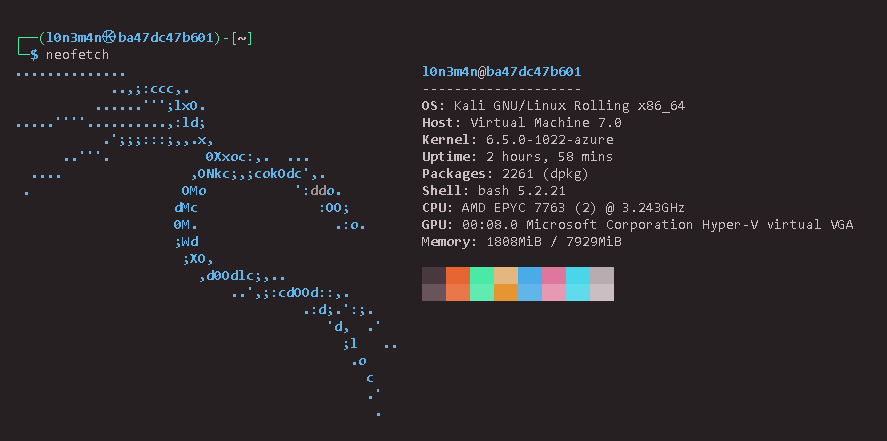
!neofetch
📜 Description
GitHub Codespaces allows de and hackers to create and utilize their coding en directly from GitHub in the cloud. As a CTF player or pentester, you can also le GitHub Codespaces similarly to a VPS ( Private Server). This makes it easy to work on projects from anywhere with the flexibility of a portable de setup using Docker.
📚 Table of Contents
🔥 What's Nice
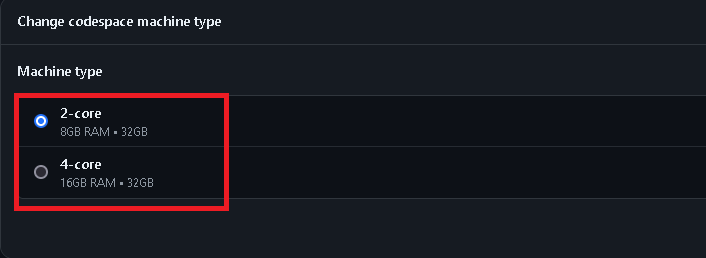
2-vCPUs, 8GB-RAM, and a temporary 32GB-SSD storage drive.4-vCPUs, 16GB-RAM, and a temporary 32GB-SSD storage drive.!machine_type
🐳 Installation
> [!NOTE]
> Github codespace terminal
---
!starting
Kali headless
kali-linux-default: This is a metapackage that installs the default set of tools for a typical Kali Linux system. It includes both GUI and command-line tools that are generally used for penetration testing and security auditing.kali-linux-headless: This is another metapackage, but it installs a more minimal setup. It is intended for users who do not need or want a graphical user interface (GUI). This package installs the core tools needed for penetration testing, but without the o of a GUI en (like X11 or a desktop en).#### Key Differences
#### Which one to use?
Installation without errors
> [!TIP]
> Refer to default installation Guide
Configuration
Starting Docker Kali Image
Adding non-root user
!non-root
Diskspace Monitoring
Docker Pri
> [!IMPORTANT]
> The way to use openvpn or enable
tun0 you need to add --pri option instead using --tty by default, Docker containers do not ha to TUN/TAP devices on the host system due to security and isolation concerns.Automation in new terminal session
> kali_privs.sh
!kali_privs
Manual Terminal Session
Adding Graphical User Interface (noVNC)
> [!IMPORTANT]
> Run this script in the terminal of your Github Codespace
> setup-noVNC.sh
Starting noVNC Web access
> start-novnc.sh
Option 1: SSH o
Adding password to root user
> Github codespace terminal
SSH installation and config
Ngrok Installation and config
> server side (codespace)
> It should be like this
Client side
Github CLI
> Using SSH can be time-consuming. You can simplify the process by using the GitHub CLI instead.
#### Output
🚫 Temporarily Disabled
If you've used 100% of the included services for GitHub Codespaces storage, a few things might happen depending on your account settings and actions.
1. Inability to Use Codespaces: You won't be able to create or use GitHub Codespaces until either your free allotment resets next month or you take action to manage your usage.
2. Options to Regain Access:
- Set Up a Spending Limit: You can set up a spending limit on your GitHub account to prevent unexpected charges and manage your usage effectively.
- Delete Unused Resources: Consider deleting Codespaces or prebuilds that are no longer needed to free up space and potentially reduce future charges.
3. Access to In-Progress Work: It's important to export any unpushed work to a branch if you want to retain access to your in-progress projects. This ensures you have a backup and can continue working on them when you regain access to Codespaces.
4. Review Usage and Charges: GitHub provides a usage report where you can see detailed information about your Codespaces and prebuild usage. This can help you understand your usage patterns and manage future usage effectively.
---
!codespace
!billing
gh billing issue
🔄 Changelog
v1.1.0 - [2024-06-29]
- Adding
pri user mode to enable TUN error when starting the OpenVPN file.📝 Todo
👨🏾⚖️ License
This project is under terms of the MIT License. bugs and error, create issue
项目信息
开发语言:未知
Star 数:166
技术要点
该项目属于CTF思路方向的开源资源,代码结构清晰,适合安全研究人员学习参考。项目围绕You can get a lifetime of FREE VPS using GitHub Codespaces with Kali Linux Docker image installed on github workspace terminal. (beginner, friendly useful for bughunter and pentester)展开,提供了可运行的实现,对理解相关安全机制、工具原理与攻防技术具有较高的研究价值。
从技术实现角度看,此类项目的核心在于对底层原理的深入理解与工程化落地。开发者在研究过程中可以结合官方文档与社区讨论,梳理项目的初始化流程、核心模块职责与数据流转,逐步掌握其中的技术细节与设计思路。
使用与学习建议
1. 下载源码压缩包,解压到本地环境。
2. 根据项目类型准备对应的运行环境与依赖。
3. 按照 README 中的步骤完成配置与部署。
4. 在隔离的测试环境中运行验证,避免影响生产系统。
免责声明
本资源来源于开源社区,仅供安全研究、技术学习与合法授权范围内的攻防演练使用,请勿用于任何非法或侵害他人权益的用途。使用本项目产生的一切后果由使用者自行承担。
| 资源标题 | github-vps - 您可以使用GitHub Co获得终身免费VPS |
| 所属分类 | CTF思路 |
| 发布作者 | admin |
| 发布时间 | 2026-10-05 23:48:30 |
| 下载权限 | 免费下载 |
| 附件数量 | 2 个下载链接 |
| 浏览次数 | 421 |
| 讨论数量 | 0 |
| 主题状态 | 正常讨论中 |