 CTF思路
点击放大
项目说明
Pkappa2
![Go Co]()
Pkappa2 is a packet stream analysis tool intended for Attack & Defense CTF competitions.
It receives pcap files via a http upload, usually send by a tcpdump-complete script, moving .pcap files into a monitored folder, or using PCAP-o.
The recei are processed and using the web interface, users can run queries over the streams.
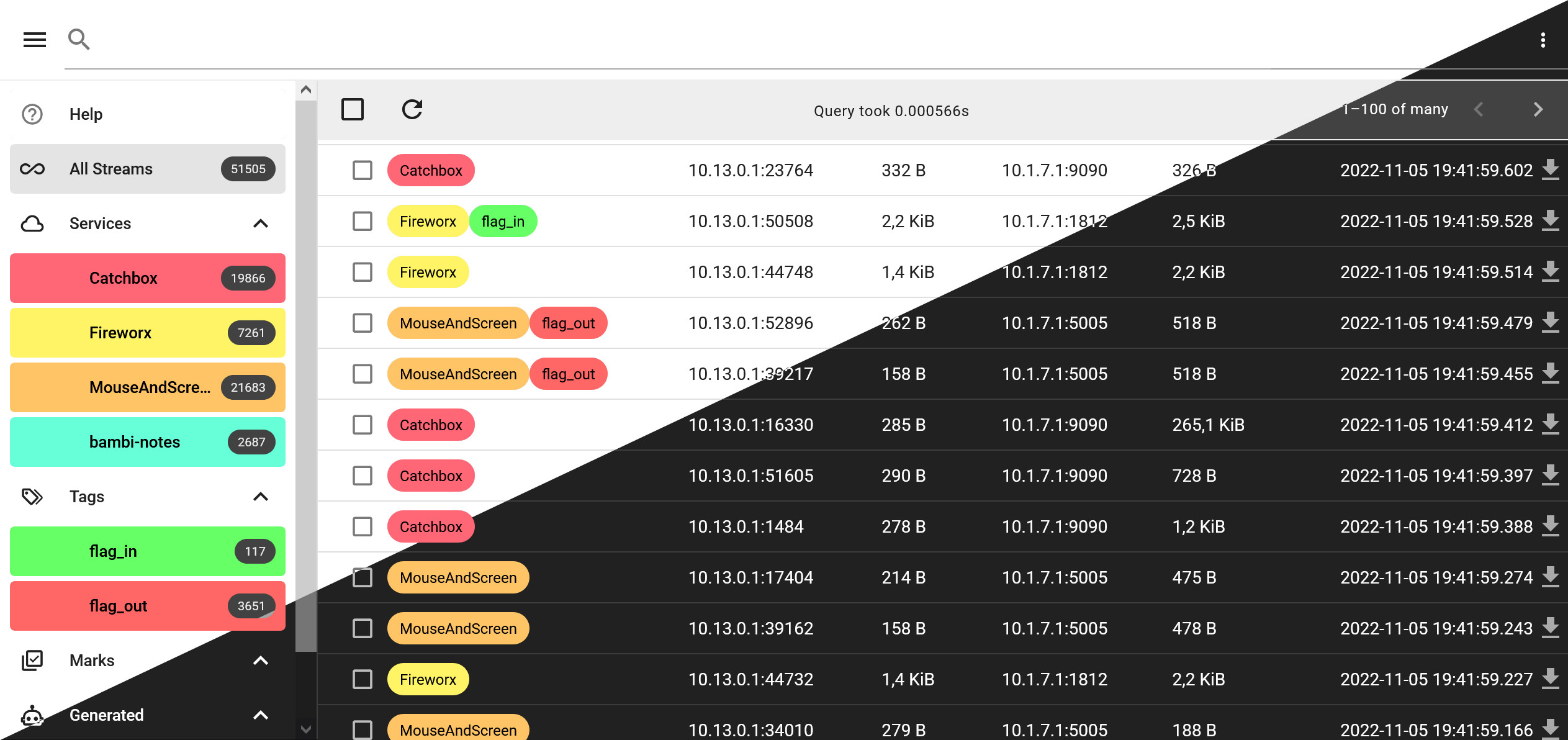
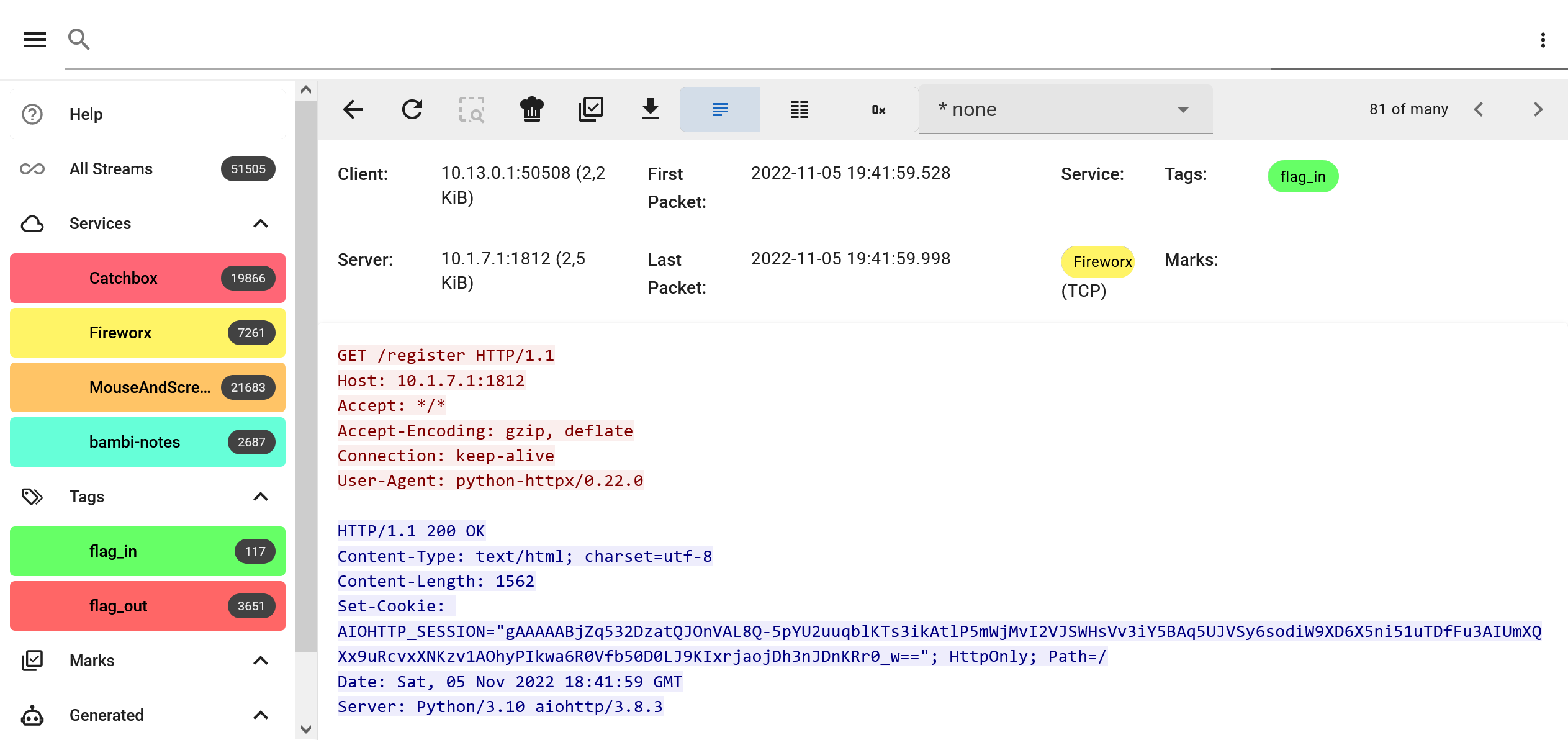
Streams matching the query are displayed, and their content can be in multiple formats.
!Search result list
!Stream view
!Con selection
Add pcaps using a POST request to /upload/filename.pcap. Make sure the filename is unique.
Features
- Match on stream data as well as metadata
- Run con on tag matches automatically and search their output
Searching streams
Pkappa2 uses a custom query language which allows you to find the exact streams you're interested in.
The query format supports a list of filters joined using
[AND]|OR|THEN. Filters follow the format of key:value or key:"value". There are different keys including the stream's data and metadata such as host and port, time, and number of bytes transferred. Checkout the Help page in the frontend for more details.You can look for streams containing a regex using the [cs]data filter:
The matches will be highlighted in the stream data.
To only search in the client or server side of the stream, you can prefix the filter key with c or s respectively:
This matches all streams where the client sent a flag matching that regex.
You can look for temporal relations between data sent in a stream using the THEN operator.
This would show all streams where first the client sends a GET request to a certain endpoint and then the ser with some data.
After saving a query as a service or tag, you can include that service in your query to only look for streams of a certain kind.
This matches all streams matching the MouseAndScreen query and containing the word websocket in the client's data.
Saving queries as services or tags
You can save a query in different types of named tags. The
service tags are used to separate traffic of the tasks in the CTF. They are usually queries in the server port like sport:8080, but can take other factors like the server's IP into account too sport:8008 shost:10.1.7.1.To save the current query as a service, select Save as Service from the menu in the top-right corner:
!Sa as service
Other queries can be saved as general tags in the same way. The most common tags are flag_in and flag_out which look for the flag format in cdata and sdata respectively.
Services and flag_in and flag_out tags can be created using the Setup wizard when first pkappa2 while no tags are saved yet too.
Marking interesting streams
Whenever a stream stands out, and you don't want to lose it, you can mark the stream for e to find quickly. You can do it from the result list using the checkbox or in the stream view directly. The marks will show up in the sidebar.
!Add stream to mark
Using stream data con
Every stream can be processed by an external script selected in the stream view. There are several con decoding well known protocols like HTTP, HTTP/2, Websockets, DNS, gRPC, TLS, and more. You can write your own con for a challenge and decrypt or otherwise enhance the output quickly. The details on how the con programs communicate with pkappa2 are documented in the con folder.
All files in the ./con folder have to be executable scripts following the described JSON line protocol o/stdout. You can add your own script to the folder and select it in the UI immediately for testing.
#### Attaching con to tags / Searchable con output
You can specify that con should be run whenever a stream matches a tag or service by selecting the Attach con option in the menu next to the tags name in the sidebar. All existing and future matches are run through the con and the output is saved to disk. This allows you to search through the con output too. Whenever a stream matching that tag is , the attached con view is pre-selected.
!No con selected
!Websocket con selected
Installation
Getting started with a pkappa2 instance is straight forward. You can run it natively or use a Docker container.
Docker
Open to access the web interface.
The con folder is mapped into the container for you to tweak.
You can modify the docker-compose.yml file and uncomment the ./pcaps_incoming bind mount to allow to ingest pcaps by moving them into the mounted directory.
All command line options can be specified using en .
Manually
- libpcap (e.g.
apt install libpcap-dev)yarn && yarn build in /web- Optionally, install stock con python dependencies:
pip install -r con/pkappa2lib/requirements.txt- Only required to use the con views
go run cmd/pkappa2/main.go in /You likely want to add some arguments to the go run command, check -help
Reverse proxy
You can add a reverse proxy in front of pkappa2 to add TLS encryption or other options. Here is a nginx config which includes the
/ws Websocket endpoint. You can bind the port to 127.0.0.1 in the docker-compose.yml to not expose the internal server when using a reverse proxy.Adding network traffic
There are multiple ways to tell pkappa2 about network traffic you want to be able to search in:
1. Sending a POST request to the /upload/[filename.pcap] endpoint
- curl --data-binary -file.pcap
2. Monitor a folder for new .pcap* files and ingest them automatically once they appear
- By setting the -watch_dir /some/path commandline option or PKAPPA2_WATCH_DIR en
3. Streaming packets over TCP using PCAP-o
- Using e.g. foxit-it/pcap-broker and adding the endpoint in the pkappa2 UI
Collecting traffic on the
The standard way to get pcaps into pkappa2 is using a
-z completion script of tcpdump. The following scripts can be adjusted for your needs. It's important to exclude any traffic that's generated while uploading the pcaps to pkappa2, you'll get exponential pcap file size growth otherwise. Limiting the capture to the game and uploading pcaps to an external IP works for separation. Edit the tcpdump filter according to your setup.pkappa2 supports two different HTTP basic auth passwords. One for accessing the user interface and another one for uploading pcaps to the /upload/[filename] endpoint only. Make sure to use the correct pcap password here.
Add these scripts to your and run tcpdump.sh as root. Make sure the tcpdump_complete.sh script is executable and the pcaps folder is only readable by root. 😉
tcpdump.sh:
tcpdump_complete.sh:
#### PCAP-o
Alternatively, Pkappa2 supports connecting to PCAP-o servers and grabbing packets in real-time. One such server is foxit-it/pcap-broker which can be launched next to your pkappa2 instance.
A con way to set this up is using a ssh tunnel from the pkappa2 host to the , running tcpdump on the and tunneling the output to pkappa2. Only tcpdump and ssh must be a on the for this to work. You'll have to add a private key to the root user's ~/.ssh/authorized_keys on the file to allow the pcap-broker user to connect.
Add the localhost:4200 endpoint in pkappa2 on the Manage PCAP-o page accessible through the More option in the sidebar. Adjust the port accordingly if you add this to pkappa2's docker-compose.yml to use the internal docker network between the containers.
UI De
yarn build) to be able to run pkappa2yarn dev in /webgo run cmd/pkappa2/main.go -address :8081 in /yarn lint && yarn type-check && yarn format before commiting your changesYou can import multiple .pcap files in the current folder using:for f in *.pcap; do curl --data-binary "@$f" " done
Generating type guards
We use type guards to the JSON communication with the backend. In order to generate all the typeguards, go to web/ and call
When getting api-responses about types mismatching, you can debug the typeguards via
项目信息
开发语言:Go
Star 数:151
技术要点
该项目属于CTF思路方向的开源资源,代码结构清晰,适合安全研究人员学习参考。项目围绕Network traffic analysis tool for Attack & Defense CTF's展开,提供了可运行的实现,对理解相关安全机制、工具原理与攻防技术具有较高的研究价值。
从技术实现角度看,此类项目的核心在于对底层原理的深入理解与工程化落地。开发者在研究过程中可以结合官方文档与社区讨论,梳理项目的初始化流程、核心模块职责与数据流转,逐步掌握其中的技术细节与设计思路。
使用与学习建议
1. 下载源码压缩包,解压到本地环境。
2. 根据项目类型准备对应的运行环境与依赖。
3. 按照 README 中的步骤完成配置与部署。
4. 在隔离的测试环境中运行验证,避免影响生产系统。
免责声明
本资源来源于开源社区,仅供安全研究、技术学习与合法授权范围内的攻防演练使用,请勿用于任何非法或侵害他人权益的用途。使用本项目产生的一切后果由使用者自行承担。
| 资源标题 | pkappa2 - 用于攻击和防御的网络流量分析工具 |
| 所属分类 | CTF思路 |
| 发布作者 | admin |
| 发布时间 | 2026-10-05 23:49:42 |
| 下载权限 | 免费下载 |
| 附件数量 | 2 个下载链接 |
| 浏览次数 | 132 |
| 讨论数量 | 0 |
| 主题状态 | 正常讨论中 |