 CTF思路
点击放大
项目说明
- Pull Image
- Example
- Run Container
- Attach Container
- Check Container
- Build Image
- Use Zsh
- Feature
> [!IMPORTANT]
> 2025-03-09更新:因学业繁忙,已无精力维护此仓库,后续不再更新
Docker Image Based On Ubuntu For Pwn Debug
基于Ubuntu构建并用于快速调试pwn题的镜像,开箱即用,告别搭建环境的苦恼!
如果你想基于docker搭建pwn赛题环境,请点击GitHub - RoderickChan/deploy\_pwn\_template: Templates for deploying pwn challenge using docker下载和使用模板。
If you want to deploy a ctf pwn challenge using docker, you can click this repo GitHub - RoderickChan/deploy\_pwn\_template: Templates for deploying pwn challenge using docker to use these templates I offer there.
Pull Image
Pull images from < such as docker pull roderickchan/debug_pwn_env:23.04-2.37-0ubuntu2.1-20231127. The tag of the image means Ubuntu 23.04, glibc 2.37-0ubuntu2.1 and image built in 2023-11-27.
I introduce how to use docker in a Chinese blog.
点击博客查看如何使用docker调试pwn题。
Current tags in the dockerhub:
现有的镜像列表:
| Ubuntu | Glibc | Pull command | User/Password| Status |
| :------------: | :--------------: | :----------------------------------------------------------: | :---: | :---: |
| Ubuntu 24.10 | 2.40-1ubuntu3 | docker pull roderickchan/debug_pwn_env:24.10-2.40-1ubuntu3-20240922 | 1. root/root<br />2. ctf/ctf | 🚩Updating|
| Ubuntu 24.04 | 2.39-0ubuntu8.3 | docker pull roderickchan/debug_pwn_env:24.04-2.39-0ubuntu8.3-20240922 | 1. root/root<br />2. ctf/ctf | 🚩Updating|
| Ubuntu 24.10 | 2.39-0ubuntu9 | docker pull roderickchan/debug_pwn_env:24.10-2.39-0ubuntu9-20240804 | 1. root/root<br />2. ctf/ctf | Archived|
| Ubuntu 24.04 | 2.39-0ubuntu8.2 | docker pull roderickchan/debug_pwn_env:24.04-2.39-0ubuntu8.2-20240818 | 1. root/root<br />2. ctf/ctf | Archived|
| Ubuntu 24.04 | 2.39-0ubuntu8.2 | docker pull roderickchan/debug_pwn_env:24.04-2.39-0ubuntu8.2-20240601 | 1. root/root<br />2. ctf/ctf | Archived|
| Ubuntu 24.04 | 2.39-0ubuntu8.1 | docker pull roderickchan/debug_pwn_env:24.04-2.39-0ubuntu8.1-20240430 | 1. root/root<br />2. ctf/ctf | Archived|
| Ubuntu 24.04 | 2.39-0ubuntu8 | docker pull roderickchan/debug_pwn_env:24.04-2.39-0ubuntu8-20240412 | 1. root/root<br />2. ctf/ctf | Archived|
| Ubuntu 24.04 | 2.39-0ubuntu6 | docker pull roderickchan/debug_pwn_env:24.04-2.39-0ubuntu6-20240324 | 1. root/root<br />2. ctf/ctf | Archived|
| Ubuntu 24.04 | 2.39-0ubuntu2 | docker pull roderickchan/debug_pwn_env:24.04-2.39-0ubuntu2-20240225 | 1. root/root<br />2. ctf/ctf | Archived|
| Ubuntu 24.04 | 2.38-3ubuntu1 | docker pull roderickchan/debug_pwn_env:24.04-2.38-3ubuntu1-20240207 | 1. root/root<br />2. ctf/ctf | Archived|
| Ubuntu 24.04 | 2.38-3ubuntu1 | docker pull roderickchan/debug_pwn_env:24.04-2.38-3ubuntu1-20231211 | 1. root/root<br />2. ctf/ctf | Archived|
| Ubuntu 23.10 | 2.38-1ubuntu6.3 | docker pull roderickchan/debug_pwn_env:23.10-2.38-1ubuntu6.3-20240601 | 1. root/root<br />2. ctf/ctf | 🚩Updating|
| Ubuntu 23.10 | 2.38-1ubuntu6.2 | docker pull roderickchan/debug_pwn_env:23.10-2.38-1ubuntu6.2-20240421 | 1. root/root<br />2. ctf/ctf | Archived|
| Ubuntu 23.10 | 2.38-1ubuntu6.1 | docker pull roderickchan/debug_pwn_env:23.10-2.38-1ubuntu6.1-20240202 | 1. root/root<br />2. ctf/ctf | Archived |
| Ubuntu 23.10 | 2.38-1ubuntu6 | docker pull roderickchan/debug_pwn_env:23.10-2.38-1ubuntu6-20231127 | 1. root/root<br />2. ctf/ctf | Archived |
| Ubuntu 23.04 | 2.37-0ubuntu2.2 | docker pull roderickchan/debug_pwn_env:23.04-2.37-0ubuntu2.2-20231211 | 1. root/root<br />2. ctf/ctf | 🚩Updating|
| Ubuntu 23.04 | 2.37-0ubuntu2.1 | docker pull roderickchan/debug_pwn_env:23.04-2.37-0ubuntu2.1-20231127 | 1. root/root<br />2. ctf/ctf | Archived |
| Ubuntu 22.04 | 2.35-0ubuntu3.8 | docker pull roderickchan/debug_pwn_env:22.04-2.35-0ubuntu3.8-20240601 | 1. root/root<br />2. ctf/ctf | 🚩Updating|
| Ubuntu 22.04 | 2.35-0ubuntu3.7 | docker pull roderickchan/debug_pwn_env:22.04-2.35-0ubuntu3.7-20240421 | 1. root/root<br />2. ctf/ctf | Archived|
| Ubuntu 22.04 | 2.35-0ubuntu3.6 | docker pull roderickchan/debug_pwn_env:22.04-2.35-0ubuntu3.6-20240113 | 1. root/root<br />2. ctf/ctf | Archived|
| Ubuntu 22.04 | 2.35-0ubuntu3.5 | docker pull roderickchan/debug_pwn_env:22.04-2.35-0ubuntu3.5-20231211 | 1. root/root<br />2. ctf/ctf | Archived |
| Ubuntu 22.04 | 2.35-0ubuntu3.4 | docker pull roderickchan/debug_pwn_env:22.04-2.35-0ubuntu3.4-20231127 | 1. root/root<br />2. ctf/ctf | Archived |
| Ubuntu 22.04 | 2.35-0ubuntu3.1 | docker pull roderickchan/debug_pwn_env:22.04-2.35-0ubuntu3.1-20230213 | 1. root/root<br />2. roderick | Archived |
| Ubuntu 22.04 | 2.35-0ubuntu3 | docker pull roderickchan/debug_pwn_env:22.04-2.35-0ubuntu3-20220707 | 1. root/root<br />2. roderick | Archived |
| Ubuntu 20.04 | 2.31-0ubuntu9.16 | docker pull roderickchan/debug_pwn_env:20.04-2.31-0ubuntu9.16-20240601| 1. root/root<br />2. ctf/ctf | 🚩Updating|
| Ubuntu 20.04 | 2.31-0ubuntu9.15 | docker pull roderickchan/debug_pwn_env:20.04-2.31-0ubuntu9.15-20240421| 1. root/root<br />2. ctf/ctf | Archived|
| Ubuntu 20.04 | 2.31-0ubuntu9.14 | docker pull roderickchan/debug_pwn_env:20.04-2.31-0ubuntu9.14-20231211| 1. root/root<br />2. ctf/ctf | Archived|
| Ubuntu 20.04 | 2.31-0ubuntu9.12 | docker pull roderickchan/debug_pwn_env:20.04-2.31-0ubuntu9.12-20231127| 1. root/root<br />2. ctf/ctf | Archived |
| Ubuntu 20.04 | 2.31-0ubuntu9.9 | docker pull roderickchan/debug_pwn_env:20.04-2.31-0ubuntu9.9-20230213 | 1. root/root<br />2. roderick | Archived |
| Ubuntu 20.04 | 2.31-0ubuntu9.7 | docker pull roderickchan/debug_pwn_env:20.04-2.31-0ubuntu9.7-20220525 | 1. root/root<br />2. roderick | Archived |
| Ubuntu 21.10 | 2.34-0ubuntu3.2 | docker pull roderickchan/debug_pwn_env:21.10-2.34-0ubuntu3.2-20220707 | 1. root/root<br />2. roderick | Archived |
| Ubuntu 21.04 | 2.33-0ubuntu5 | docker pull roderickchan/debug_pwn_env:21.04-2.33-0ubuntu5-20220908 | 1. root/root<br />2. roderick | Archived |
| Ubuntu 18.04 | 2.27-3ubuntu1.6 | docker pull roderickchan/debug_pwn_env:18.04-2.27-3ubuntu1.6-20240422 | 1. root/root<br />2. ctf/ctf | 🚩Updating |
| Ubuntu 18.04 | 2.27-3ubuntu1.6 | docker pull roderickchan/debug_pwn_env:18.04-2.27-3ubuntu1.6-20230213 | 1. root/root<br />2. roderick | Archived |
| Ubuntu 18.04 | 2.27-3ubuntu1.5 | docker pull roderickchan/debug_pwn_env:18.04-2.27-3ubuntu1.5-20220525 | 1. root/root<br />2. roderick | Archived |
| Ubuntu 16.04 | 2.23-0ubuntu11.3 | docker pull roderickchan/debug_pwn_env:16.04-2.23-0ubuntu11.3-20240412| 1. root/root<br />2. ctf/ctf | 🚩Updating |
Two users in the image:
root user and password: root/root ctf user and password: ctf/ctfExample
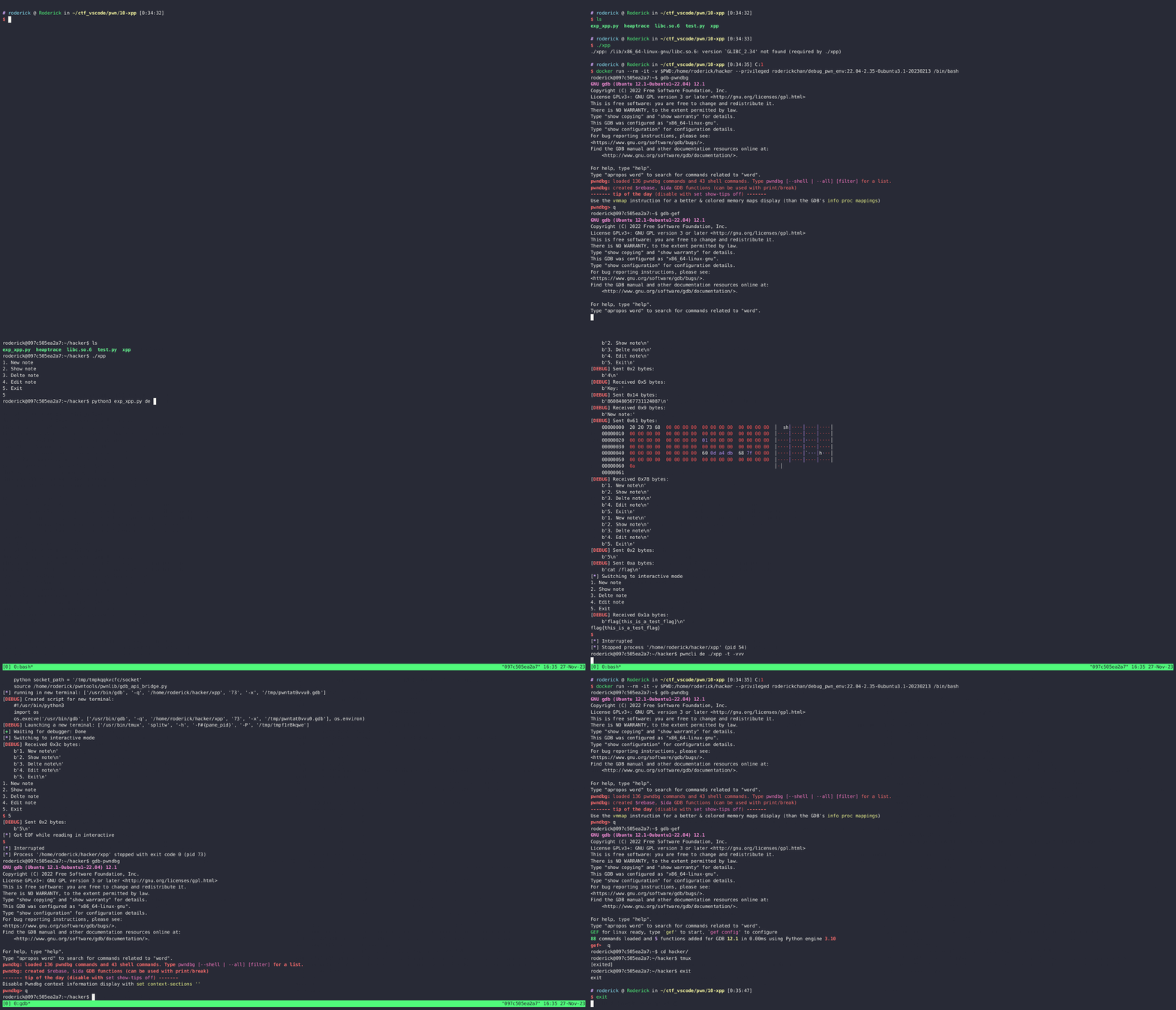
This example uses the old image. The normal username in old image was roderick, the current username is now ctf.
以下示例采用原来的镜像。原来的普通用户名为roderick,现在的普通用户名为ctf。
![]()
可在asciinema上观看:
![asciicast]()
当前的镜像的示例如下。
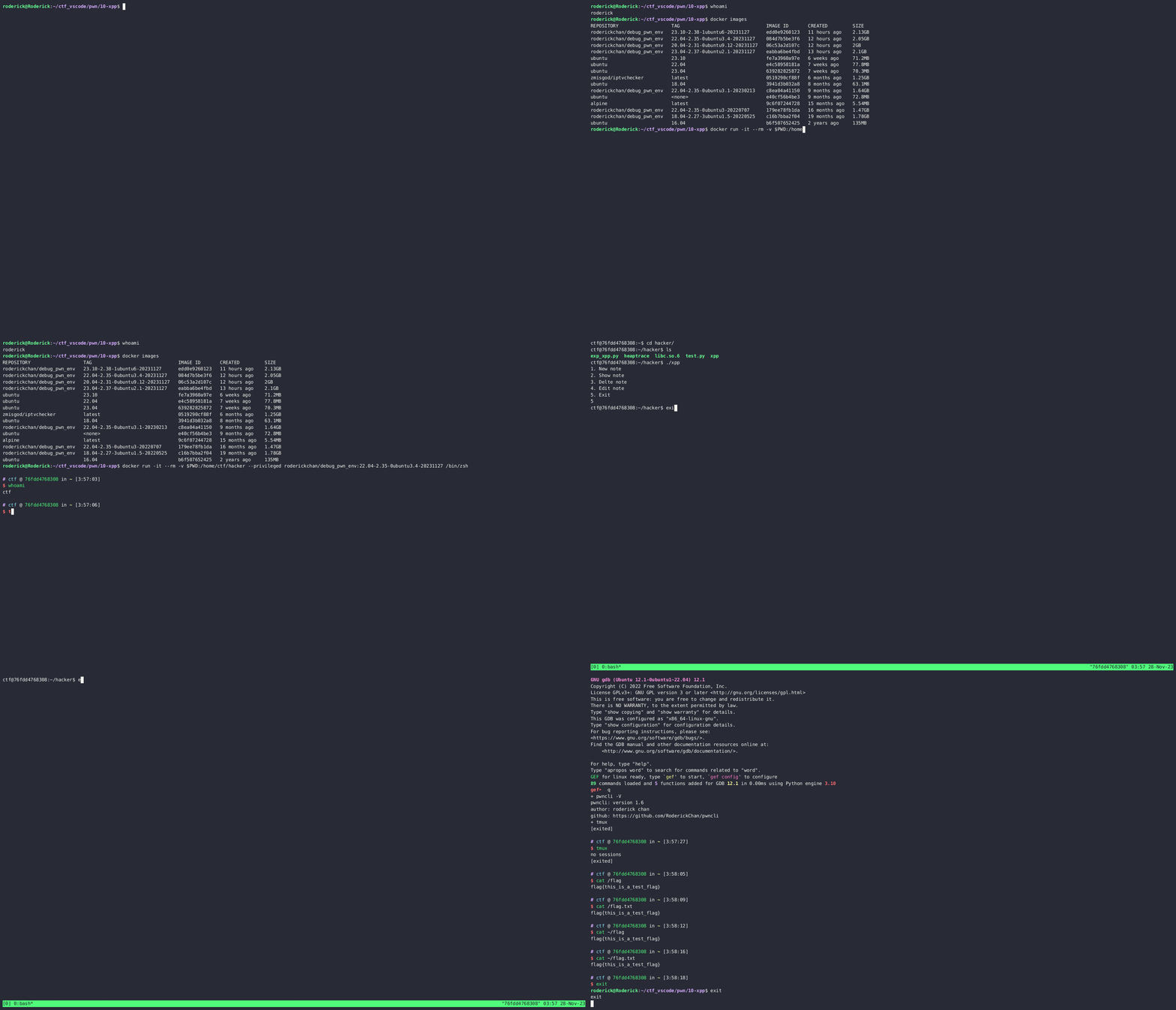
This example uses the updating image:
![]()
可在asciinema上观看:
![asciicast]()
Run Container
启动容器:
Attach Container
进入容器(enter a container):
Check Container
检查容器是否正常:
input q in gdb to exit.
进入gdb后输入q退出。
Build Image
构建镜像(single build):
自动构建(auto build):
构建Ubuntu 16.04的镜像,请使用Dockerfile.ubuntu-16.04文件(use Dockerfile.ubuntu-16.04 to build Ubuntu-16.04 image)
Use Zsh
注意:镜像中安装了oh-my-zsh,提供zsh-autosuggestions和zsh-syntax-highlighting插件,推荐使用zsh作为shell登入。
I ha oh-my-zsh and zsh-autosuggestions plugin, zsh-syntax-highlighting plugin in the image, if you like it, please launch a container with /bin/zsh.
example:
Feature
Software and packages in the image:
镜像中含有的软件和包:
Read Dockerfile to get more infomation.
阅读Dockerfile获得更多信息。
项目信息
开发语言:Shell
Star 数:150
技术要点
该项目属于CTF思路方向的开源资源,代码结构清晰,适合安全研究人员学习参考。项目围绕Debug pwn using docker image展开,提供了可运行的实现,对理解相关安全机制、工具原理与攻防技术具有较高的研究价值。
从技术实现角度看,此类项目的核心在于对底层原理的深入理解与工程化落地。开发者在研究过程中可以结合官方文档与社区讨论,梳理项目的初始化流程、核心模块职责与数据流转,逐步掌握其中的技术细节与设计思路。
使用与学习建议
1. 下载源码压缩包,解压到本地环境。
2. 根据项目类型准备对应的运行环境与依赖。
3. 按照 README 中的步骤完成配置与部署。
4. 在隔离的测试环境中运行验证,避免影响生产系统。
免责声明
本资源来源于开源社区,仅供安全研究、技术学习与合法授权范围内的攻防演练使用,请勿用于任何非法或侵害他人权益的用途。使用本项目产生的一切后果由使用者自行承担。
| 资源标题 | docker_pwn_env - 使用Docker镜像调试pwn |
| 所属分类 | CTF思路 |
| 发布作者 | admin |
| 发布时间 | 2026-10-05 23:49:51 |
| 下载权限 | 免费下载 |
| 附件数量 | 2 个下载链接 |
| 浏览次数 | 318 |
| 讨论数量 | 0 |
| 主题状态 | 正常讨论中 |