 CTF思路
点击放大
项目说明
<img src="
>### *A discord.py bot focused on pro CTF tools for collaboration in Discord servers (ctftime.org commands, team setup + ctfd integration, utilites, etc)! If you have a feature request, make it a GitHub issue or use the >request "x" command.*
Invite to your server
Please let me know if there's any issues with the link! This is one of multiple alternate instances because the original is over the 100 ser Discord imposes for non- bots ( requirements)
\
Join the support server
How to Use
*If you e a command, use
>help!*After in to your server, it is recommended that you first configure the categories you want active and archived CTF channels to go into.
* When you create a ctf, it will by default go into the "CTF" category (it will create one if it is not present), and when you archive a ctf it will go into the ARCHI.
* You can configure this with >config ctf_category "Category for CTFs" and >config archi "Category for Archived CTFs"
---
CTF Commands
The following commands are the ones you will most likely want to pay attention to, although if you do not expect to use this bot to manage CTFs you can skip this category and go down to CTFTime commands.
* >ctf create "ctf name" This is the command you'll use when you want to begin a new CTF. This command will make a text channel with your supplied name under the designated CTF category. *Must ha to manage channels*
!ctf create
*NOTE: the following ctf specific commands will only be accepted under the channel created for that ctf. This is to avoid clashes with multiple ctfs going on in the same server.*
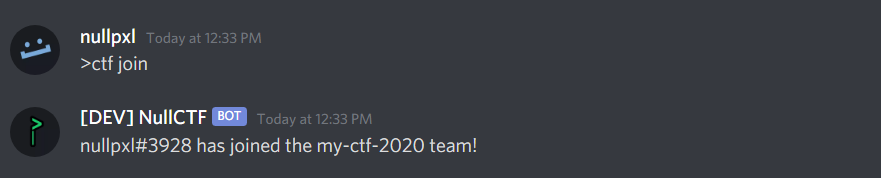
* >ctf join/leave Using this command will either give or remove the role of a created ctf to/from you.
!ctf join/leave
* >ctf challenge add/working/sol "challenge" Allows users to add or remo to a list, and then set the status of that challenge. *Use quotations*
* >ctf challenge list This is the list command that was pre mentioned, it displays the added challenges, who's working on what, and if a challenge is solved (and by who).
!desc
> NOTE: There is shorthand! challenge -> chal/chall, add -> a, working -> w, solved -> s, remove -> r
* >ctf challenge pull "http(s)://ctfd.url" Pull challenges and their sol from a CTFd hosted CTF, and add them to your challenges list. Requires the username and password to be set with >ctf setcreds "username" "password"
* >ctf setcreds "ctfd username" "password" Pin the message of ctf credentials, can be fetched by the bot later in order to use >ctf challenge pull. Credentials are ne outside of Discord.
!ctf pull and setcreds
* >ctf creds Gets the credentials from the pinned message.
> *IMPORTANT: credentials are ne outside of the pinned message on Discord. They are needed to pull challenge data and sol from the CTFd platform.*
* >ctf archive Move the CTF channel into the Archi. *Must ha to manage channels*
* >ctf delete Delete the CTF info from the database, and delete the role. *Must ha to manage channels*
---
CTFtime Commands
* >ctftime countdown/timeleft Countdown will return when a selected CTF starts, and timeleft will return when any currently running CTFs end in the form of days hours minutes and seconds.
!enter image description here
!enter image description here
* >ctftime upcoming <number> Uses the api mentioned to return an embed up to 5 upcoming CTFs. If no number is provided the default is 3.
!enter image description here
* >ctftime current Displays any currently running CTFs in the same embed as pre mentioned.
!enter image description here
* >ctftime top <year> Shows the ctftime leaderboards from a certain year *(dates back to 2011)*.
!enter image description here
---
Utility Commands
*
>help Returns the help page* >amicool Are you cool?
* >magicb filetype Returns the mime and magicbytes of your supplied filetype. Useful for stegonography challenges where a filetype is corrupt.
* >rot "a message" Returns all 25 possible rotations for a message.
* >b64 encode/decode "message" Encode or decode in base64 *(at the time of writing this, if there are any unprintable characters this command will not work, this goes for all encoding/decoding commands).*
* >b32 encode/decode "message" Encode or decode in base32
* >binary encode/decode "message" Encode or decode in binary.
* >hex encode/decode "message" Encode or decode in hex.
* >url encode/decode "message" Encode or decode with url parse. This could be used for generating XSS payloads.
* >reverse "message" Reverse a message.
* >counteach "message" Count the occurrences of each character in the supplied message.
* >characters "message" Count the amount of characters in your message.
* >wordcount a test Counts the amount of words in your message (don't use quotations).
* >cointoss Get a 50/50 cointoss to make all your life's decisions.
* >request/report "a feature"/"a bug" Dm's the creator (nullpxl#3928) with your feature/bug request/report.
Have a feature request? Make a GitHub issue or use the >request command.
Setup - General O
---
* This may be necessary in the future because of Disord's recent requirements for bots in over 100 servers (which this bot is already over). This rule, which will disallow users to invite bots that have not been by the owner (which requires photoid) will be enforced starting october 7th.
```
项目信息
开发语言:Python
Star 数:146
技术要点
该项目属于CTF思路方向的开源资源,代码结构清晰,适合安全研究人员学习参考。项目围绕A Discord bot that provides ctf tools for collaboration in Discord servers!展开,提供了可运行的实现,对理解相关安全机制、工具原理与攻防技术具有较高的研究价值。
从技术实现角度看,此类项目的核心在于对底层原理的深入理解与工程化落地。开发者在研究过程中可以结合官方文档与社区讨论,梳理项目的初始化流程、核心模块职责与数据流转,逐步掌握其中的技术细节与设计思路。
使用与学习建议
1. 下载源码压缩包,解压到本地环境。
2. 根据项目类型准备对应的运行环境与依赖。
3. 按照 README 中的步骤完成配置与部署。
4. 在隔离的测试环境中运行验证,避免影响生产系统。
免责声明
本资源来源于开源社区,仅供安全研究、技术学习与合法授权范围内的攻防演练使用,请勿用于任何非法或侵害他人权益的用途。使用本项目产生的一切后果由使用者自行承担。
| 资源标题 | NullCTF - 为协作提供ctf工具的Discord机器人 |
| 所属分类 | CTF思路 |
| 发布作者 | admin |
| 发布时间 | 2026-10-05 23:50:17 |
| 下载权限 | 免费下载 |
| 附件数量 | 2 个下载链接 |
| 浏览次数 | 390 |
| 讨论数量 | 0 |
| 主题状态 | 正常讨论中 |