 CTF思路
点击放大
项目说明
mkCTF
Why ?
This framework aims at helping your team create jeopardy CTF challenges
using a configurable structure which will enable efficient integration and
deployment on the CTF infrastructure.
This project was initially created for managing challenges for
INS'hAck 2017.
You can find challenges and writeups of the past editions of INS'hAck in
this repository.
This project e over time to enable even more automation when deploying
challenges on a Rancher-based infrastructure.
Caution
Your mkCTF repository shall remain private until the CTF event ends. It
stores flags in plaintext to allow CTF admins to rebuild challenges from
sources without generating new flags. It is recommended to enable 2FA add
defensi to your repository. Do not generate or manage read-only access
token lightly. Do not gi to your repository to untrusted users.
Dependencies
This project requires Python 3.9+ and has been designed and tested on Linux
only. It might work on Darwin and Windows Subsystem for Linux as well.
Other dependencies will depend on the challenges themselves.
Setup
You can setup mkCTF in a few steps:
Then create your first CTF:
Tools
Each tool description may refer to concepts defined in Concepts section so
make sure to check it out if you encounter any unknown concept.
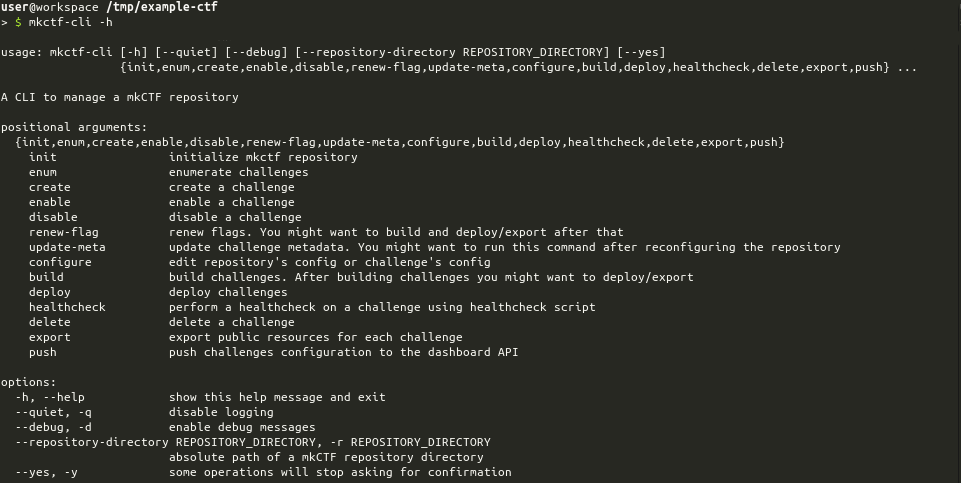
mkctf-cli
mkctf-cli helps you and CTF co-authors to manipulate a mkCTF repository. It
ensures that challenges integration with the CTF infrastructure won't give you
a headache.
!mkctf-cli -h screenshot
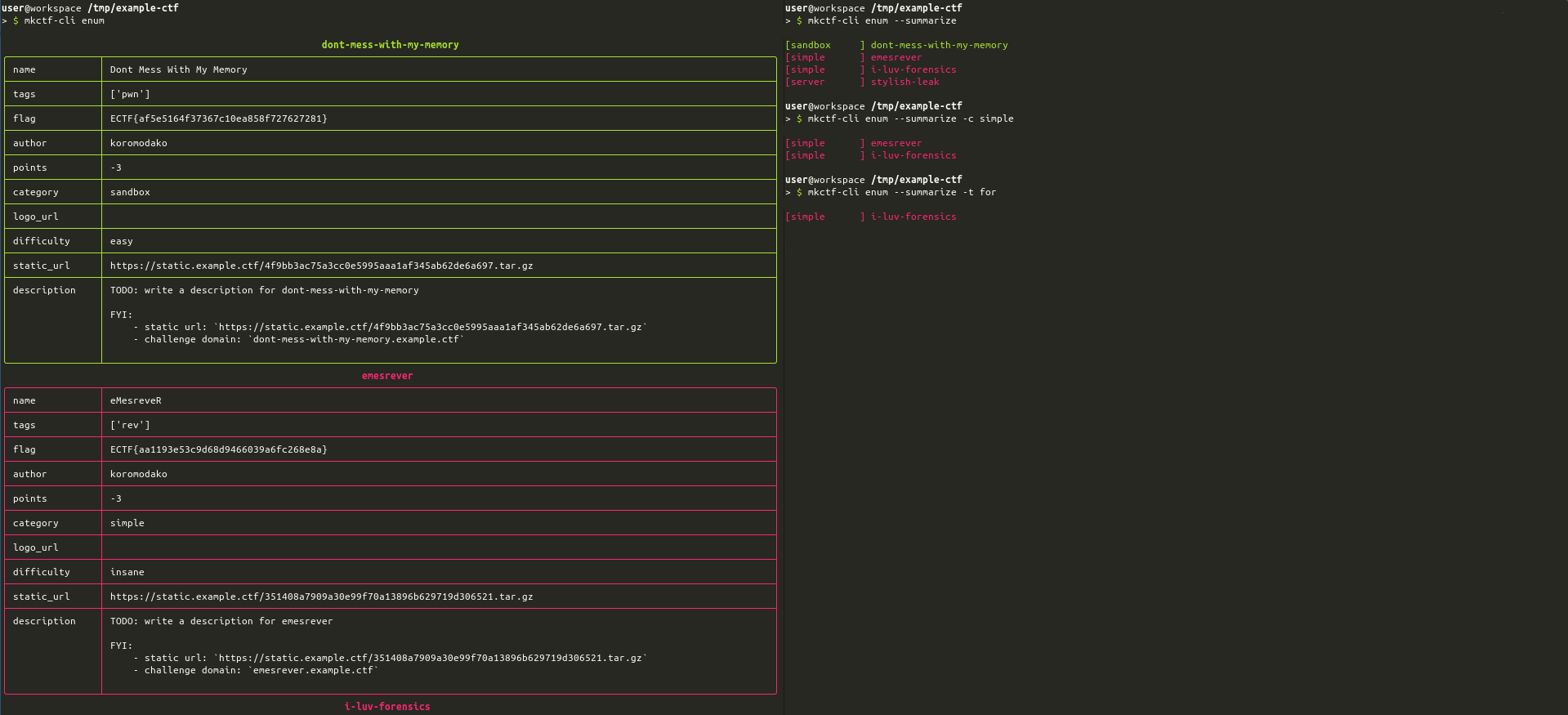
You can enumerate challenges to have a quick o of the work progression
and distribution across tags and categories.
!mkctf-cli enum screenshot
You can also export public files of your challenges in a single command. Public
files location in a challenge directory can be configured.
!mkctf-cli enum screenshot
mkctf-monitor
mkctf-monitor is an all-in-one monitoring solution running healthchecks on a
regular basis and sending reports to the dashboard using an HTTP API defined in
Dashboard section.
!mkctf-monitor -h screenshot
Once you ha your mkCTF repository, you can build a monitoring
image and run it by following this procedure:
Concepts
Challenge
Challenges are the base of jeopardy CTF. Each challenge can be described using
some metadata:
Repository
A repository contains a collection of challenges and monitoring resources. It
can described using some metadata:
Standard Programs
mkCTF framework defines some mandatory programs that have a specific purpose
in the context of integrating each challenge into the CTF infrastructure. These
programs are described below.
| Program | Purpose |
|:-------:|:--------|
| build | This executable builds the challenge from the sources and the configuration (flag) |
| deploy | This executable perform the deployment-related operations for the challenge |
| healthcheck | This executable performs a healcheck on the deployed challenge (checking checksum or playing an exploit) |
Pre defined programs shall respect the following specifications:
| ID | Specification | Comments |
|:----:|:-------------------------------------------------------------------------------|:---------|
| S0 | The executable shall not take positional arguments | The caller will not provide any positional argument |
| S1 | The executable shall be able to to handle an optional --dev argument | This argument might be given by the caller which will expect the executable to run in de mode when applicable |
| S2 | The executable execution shall end before a timeout is triggered | Timeout defaults to 2 minutes. --timeout option enable you to o this value |
| S3 | The executable shall return an exit code | This code will be interpreted using the rules defined in the next table |
As explained in S3 the program exit code will be interpreted according to
the following table:
| Exit Code | Meaning | Description |
|:---------:|:-------:|:------------|
| 0 | SUCCESS | The executable execution succeeded |
| 2 | N/A | The executable does have a meaning in the context of this challenge |
| 3 | MANUAL | The executable cannot perform this task entirely, you will have to get your hands dirty |
| 4 | NOT IMPLEMENTED | The executable is not implemented yet |
| _OTHER_ | FAILURE | The executable execution failed |
When using build, deploy or healthcheck commands, the CLI will behave as
described below.
If the exit code differs from 0 executable output (both _stdout_ and _stderr_)
will be printed out. You can use this behavior to print meaningful instructions
from within these programs. This behavior is particularly interesting if your
program returns a code 3 which means the user must perform a manual operation
to complete the task.
A special status TIMEOUT may occur when using build, deploy or healthcheck
commands. In that case, it means that your executable took too long to execute
as explained in specificationS2.
Dashboard
The dashboard is expected to provide HTTP APIs defined below. Generic endpoint
specifications are the following:
| ID | Specification | Details |
|:----:|:--------------|:--------|
| R1 | The dashboard API shall implement HTTPS with a valid certificate | mkctf-cli will always use https scheme to post the configuration |
| R2 | The dashboard API endpoint shall implement basic authentication | mkctf-cli will set the Authorization header using Basic method |
| R3 | The dashboard API endpoint shall expect a HTTP POST query | mkctf-cli will POST challenge configuration to the dashboard |
| R4 | The dashboard API endpoint shall expect a application/json body | mkctf-cli will POST a JSON body to the dashboard |
#### Configuration Synchronization API
mkctf-cli push command allows to push every challenge configuration to the
dashboard.
The dashboard shall store flags using a secure hashing mecanism such as
argon2.
#### Healthcheck Notification API
mkctf-monitor will push reports to the dashboard.
Previous body means dont-mess-with-my-memory is healthy and stylish-leak
isn't.
项目信息
开发语言:Python
Star 数:119
技术要点
该项目属于CTF思路方向的开源资源,代码结构清晰,适合安全研究人员学习参考。项目围绕A CTF framework to create, build, deploy and monitor challenges展开,提供了可运行的实现,对理解相关安全机制、工具原理与攻防技术具有较高的研究价值。
从技术实现角度看,此类项目的核心在于对底层原理的深入理解与工程化落地。开发者在研究过程中可以结合官方文档与社区讨论,梳理项目的初始化流程、核心模块职责与数据流转,逐步掌握其中的技术细节与设计思路。
使用与学习建议
1. 下载源码压缩包,解压到本地环境。
2. 根据项目类型准备对应的运行环境与依赖。
3. 按照 README 中的步骤完成配置与部署。
4. 在隔离的测试环境中运行验证,避免影响生产系统。
免责声明
本资源来源于开源社区,仅供安全研究、技术学习与合法授权范围内的攻防演练使用,请勿用于任何非法或侵害他人权益的用途。使用本项目产生的一切后果由使用者自行承担。
| 资源标题 | mkctf - 创建、构建、部署和监控的CTF框架 |
| 所属分类 | CTF思路 |
| 发布作者 | admin |
| 发布时间 | 2026-10-05 23:53:03 |
| 下载权限 | 免费下载 |
| 附件数量 | 2 个下载链接 |
| 浏览次数 | 190 |
| 讨论数量 | 0 |
| 主题状态 | 正常讨论中 |