项目说明
<di="center">
<img src="app-icon.svg" width="48" height="48">
<h1>TroveKit</h1>
An open-source, lightweight, fully offline, cross-platform toolbox.
English | 简体中文 | 繁體中文(香港) | 繁體中文(台灣) | 日本語
</div>
<di="center">
<a href=" src=" alt=""></a>
<a href=" src=" alt="License"></a>
<img src=" alt="Windows">
<img src=" alt="macOS">
<img src=" alt="Linux">
</div>
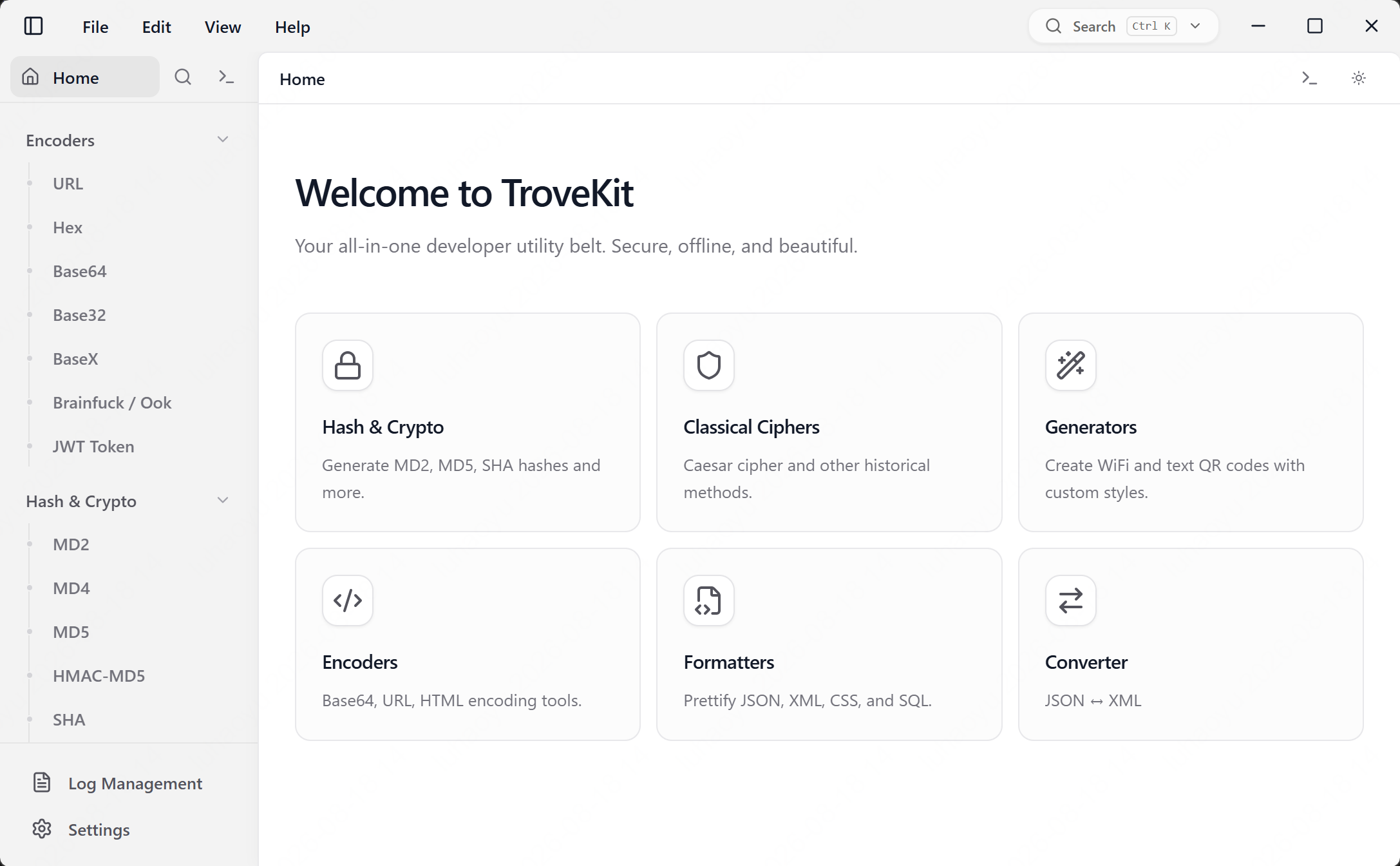
!Home Dashboard
Why TroveKit
You probably use these "small utilities" all the time—hashing, encryption/decryption, encoding/decoding, JSON formatting, QR codes, and simple classical ciphers.
TroveKit bundles them into a fast desktop app, aiming for:
Pure offline: all data processing is localFast workflow: instant results (real-time updates supported)Traceable: operation logs + one-click copyCross-platform: Windows 10/11 (32‑bit & 64‑bit), macOS 10.13+ (Intel & Apple Silicon), Linux desktop (Ubuntu 24.04 x64/arm recommended, requires WebKit2GTK ≥4.1).Built with Tauri v2 + React, TroveKit focuses on a pure offline workflow.
✨ Highlights
All-in-one utilities: Hash / AES / DES / RC4 / Encoders-Decoders / JSON / XML / YAML / Con / QR / Caesar cipher / Log ManagementModern UI: light/dark theme, responsi, smooth animationsGlobal Feature Search: Quickly find and na to tools and features across the application.Collapsible Sidebar: Toggle sidebar to maximize workspace with state persistence.Enhanced i18n: English / 简体中文 / 繁體中文(HK/TW)/ 日本語 with optimized text sizing and translation qualityLogs & toasts: history, error feedback, copy buttons with note functionalityState Persistence: auto-save tool states (never lose your input)Regex Tool: Real-time regular expression testing with syntax highlighting, match groups, highlighting and flag support (updated in v0.3.0).Memory optimization: tool pages, CodeMirror editors, logs, persisted state, and regex results are loaded and retained more conser in v0.3.0.🧰 Utilities
📷 QR Code Generator
Generate QR codes from Text / URLGenerate Wi‑Fi QR codes (SSID / password / encryption / hidden)Customize style: colors, error correction level, optional logoExport PNG (Unicode supported)🔐 Classical Ciphers
Bacon Cipher: encode/decode with Standard (26 letters) or Traditional (24 letters) alphabets and multiple symbol modes (A/B, 0/1, etc.)Caesar Cipher: encode/decode with configurable shiftMorse Code: encode/decode with customizable separator/dash/dotNon-letter handling: keep / ignore / shift ASCII (experimental; may produce non-printable characters)🔒 Hash & Cryptography
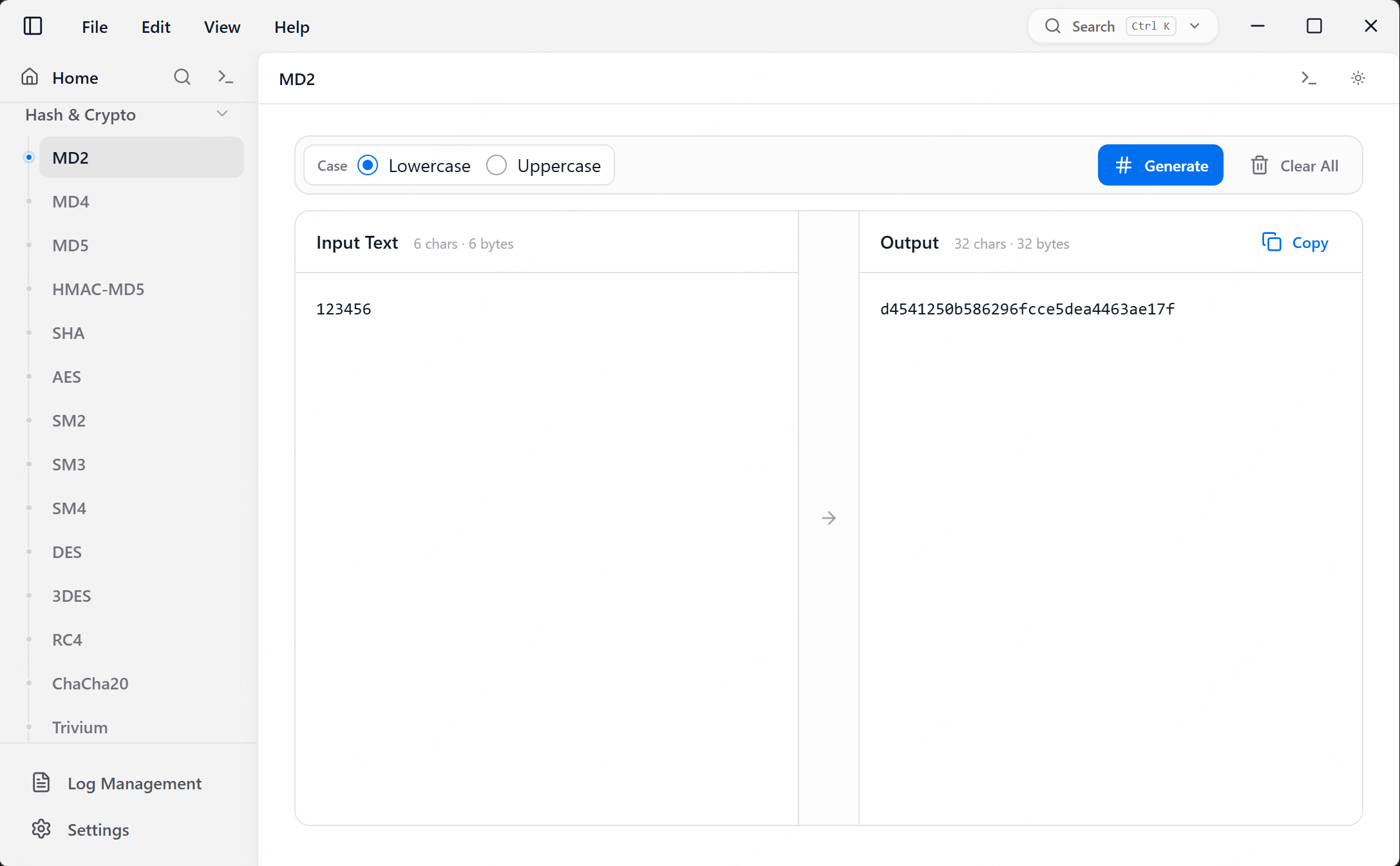
MD5 / MD4 / MD2: 16 / 32 chars, upper/lower caseHMAC-MD5: HMAC-based MD5 hash algorithm supportSHA family: SHA1 / SHA224 / SHA256 / SHA384 / SHA512 / SHA3AES / DES / RC4: Multiple modes and paddings supported (Hex/Base64 input/output)🔢 Encoders & Decoders
Real-time URL / Base64 encode & decodeHex: Encode/decode with configurable newline mode (LF/CRLF)Base32 / Hex(Base16) / Base58 / Base62 / Base91 / custom alphabets📝 Formatters
JSON: format, minify, , and tree viewXML: format and minifyCSS: format and minifySQL: format and minify with support for multiple SQL dialects (MySQL, PostgreSQL, SQLite, T-SQL, etc.)🔄 Con
Timestamp: Bidirectional con between Date and Timestamp (s/ms/μs/ns) with real-time high-precision system clock.Subnet calculator: Supports IPv4 CIDR and subnet mask con; calculates network address, broadcast address, host range and number of hosts.JSON ↔ XML: Bidirectional con with real-time processingJSON ↔ YAML: Bidirectional con with real-time processingSyntax highlighting for all formatsExample data support for quick testingError and helpful feedback🧾 Logs & Toasts
Side panel for operation history with session-based persistence (Experimental)Real-time auto-save: all operations are saved to local SQLite database automaticallySupport for manual log session creation (New Log)Note functionality: add comments/notes to log entries for better context and documentationSession note editing: add and edit notes for log sessionsEnhanced log interaction: trailing whitespaces highlighted with markers (·, →, ↵) and descriptiRedesigned Log Management Tool: dedicated interface with a master-detail layout for , searching, and managing all saved logs. Supports deleting indi entries and entire sessionsEnhanced UUID logging: displays generated UUIDs with configurable format (String/Hex/Base64/Binary), case, and hyphens. Shows count and format details in logs. Maximum 10 UUIDs displayed in log entries with clear indication when limit is reachedLog memory limits: current session logs are capped in memory, historical session loading is limited, and large input/output/details fields are truncated before being stored or restoredStructured method/input/output viewError/success toasts + one-click copy⚙️ Performance & Memory
Tool pages and tabs are mounted on demand, reducing hidden component trees and editor instances.CodeMirror loading is deferred until first use; editor views and observers are explicitly released when tools unmount.Tool state is persisted in Tauri Store only; old localStorage state is migrated once and then removed to avoid duplicate large text caches.Regex match rendering is capped at 1,000 items, and replace-all counting no longer allocates a full match array.🗺️ Roadmap
Formatters: YAMLGenerators: Lorem Ipsum / random passwords, etc.Text diff/compare: Side-by-side and inline text comparison with ignore-whitespace and word-diff options.Common utilities: Handy text tools (case con, line ending normalization, trim/cleanup, etc.)🎨 UI / UX
Theme: Dark/Light mode with system sync: built with Base UI and TailwindCSSAnimations: powered by Framer MotionOptimized Text Sizing: impro across all tools and languages🌍 Internationalization
Languages: English, Simplified Chinese (简体中文), Traditional Chinese (繁體中文 - HK/TW), and Japanese (日本語)📸 Screenshots
| Hash Tool | Encoder Tool |
|:---:|:---:|
| !Hash Tool | !Encoder Tool |
| Operation Logs | Settings |
|:---:|:---:|
| !Log Panel | !Settings |
> Note: QR / Caesar screenshots will be added to the demo gallery later.
🚀 Tech Stack
Core: Rust & Tauri v2Frontend: React 19 & TypeScriptBuild Tool: ViteUI Framework: Base UI & Tailwind CSSState & Logic: Framer Motion, i18next, crypto-jsQR Rendering: qr-code-stylingXML Processing: fast-xml-parser🛠️ Getting Started
Prerequisites
Node.js 18+pnpmRust (stable)Tauri v2 system dependencies (vary by OS; see Tauri docs if your first build fails). On Linux you must ha 4.1 or newer installed (Ubuntu 24.04+ packages are compatible).Install
De
Build
🔒 Privacy
TroveKit is designed as a pure offline toolbox: all utilities work offline.Inputs are processed locally; no data is sent to external servers.📂 Project Structure
🤝 Contributing
Issues and PRs are welcome:
New utility ideas (more formatters/generators/con)Bug fixes and UI/UX improCopy & translation impro (src/locales/)📄 License
MIT
项目信息
开发语言:TypeScript
Star 数:117
技术要点
该项目属于CTF思路方向的开源资源,代码结构清晰,适合安全研究人员学习参考。项目围绕An open-source, lightweight, fully offline, cross-platform toolbox.展开,提供了可运行的实现,对理解相关安全机制、工具原理与攻防技术具有较高的研究价值。
从技术实现角度看,此类项目的核心在于对底层原理的深入理解与工程化落地。开发者在研究过程中可以结合官方文档与社区讨论,梳理项目的初始化流程、核心模块职责与数据流转,逐步掌握其中的技术细节与设计思路。
使用与学习建议
1. 下载源码压缩包,解压到本地环境。
2. 根据项目类型准备对应的运行环境与依赖。
3. 按照 README 中的步骤完成配置与部署。
4. 在隔离的测试环境中运行验证,避免影响生产系统。
免责声明
本资源来源于开源社区,仅供安全研究、技术学习与合法授权范围内的攻防演练使用,请勿用于任何非法或侵害他人权益的用途。使用本项目产生的一切后果由使用者自行承担。