 CTF思路
点击放大
作者:admin
发布:2026-10-05
png-parser - 分析CTF、Python API和CL的PNG文件格式
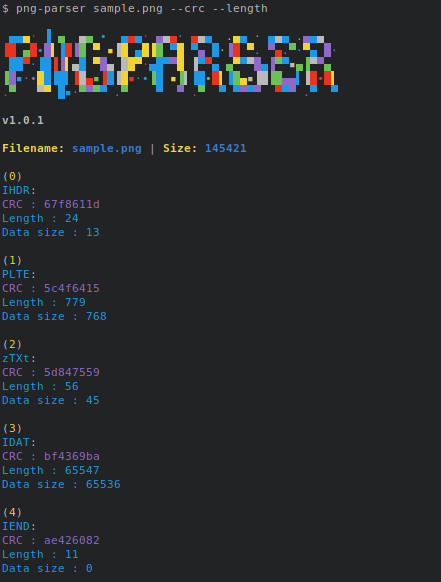
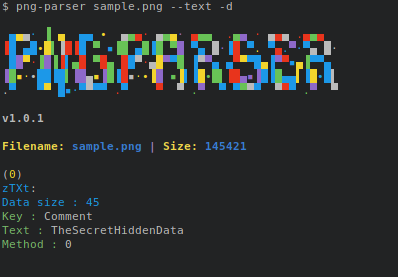
项目说明png-parserBest tool to analyse PNG files, it shows you PNG chunks : header, palette, and text.!demo!demo textUsageAPIClass PngParserPngParser(file…
资源可下载
免费下载
0 条讨论
会员资源
开通会员后即可下载全部资源。
434浏览量
0讨论
2下载链接
可下载资源状态
内容可验证
更新 2026-10-05
人工审核发布
评论区答疑
项目说明
png-parser
Best tool to analyse PNG files, it shows you PNG chunks : header, palette, and text.
!demo
!demo text
Usage
API
Class PngParser
PngParser(file)
file: str or file type
PngParser.get_image_data()
PngParser.set_image_data()
PngParser.get_chunk_by_index(idx)
PngParser.get_chunk_by_type(type)
Class Chunk
Chunk(type, data=None, crc=None)
Chunk.update_crc()
Chunk.length
Class ImageData
ImageData(header, data, palette=None)
ImageData.scanlines
ImageData.get_pixel(x, y)
ImageData.set_pixel(x, y, pixel)
ImageData.set_pixel(x, y, data)
Class Scanline
Scanline(filter, data, previous=None)
Scanline.filter
Scanline.data
Class Pixel
Pixel(type, channels)
Pixel.__getitem__
Dev
Install for de
Run example
DOC
PNG Chunks
| Length | Chunk type | Chunk data | CRC |
|---------|------------|--------------|---------|
| 4 bytes | 4 bytes | Length bytes | 4 bytes |
Critical Chunks:
height, bit depth, color type, compression method, filter method, and
interlace method (13 data bytes total).
Such splitting increases filesize slightly, but makes it possible to
generate a PNG in a streaming manner. The IDAT chunk contains the
actual image data, which is the output stream of the compression
algorithm.
Ancillary Chunks:
is no better choice a, such as in standalone image (but
not web browsers; see below for more details).
point.
compression and translations marked with language tag. The Extensible
Metadata Platform (XMP) uses this chunk with a keyword
'XML:com.adobe.xmp'
key-value pair for each chunk. The "key" must be between 1 and 79
characters long. Separator is a null character. The "value" can be any
length, including zero up to the maximum permissible chunk size minus
the length of the keyword and separator. Neither "key" nor "value" can
contain null character. Leading or trailing spaces are also disallowed.
channel for one or more palette entries. For truecolor and
grayscale images, it stores a single pixel value that is to be regarded
as fully transparent.
same limits as tEXt.
(c)
项目信息
开发语言:Python
Star 数:103
技术要点
该项目属于CTF思路方向的开源资源,代码结构清晰,适合安全研究人员学习参考。项目围绕Analyse PNG file format for CTF, python API and CLI展开,提供了可运行的实现,对理解相关安全机制、工具原理与攻防技术具有较高的研究价值。
从技术实现角度看,此类项目的核心在于对底层原理的深入理解与工程化落地。开发者在研究过程中可以结合官方文档与社区讨论,梳理项目的初始化流程、核心模块职责与数据流转,逐步掌握其中的技术细节与设计思路。
使用与学习建议
1. 下载源码压缩包,解压到本地环境。
2. 根据项目类型准备对应的运行环境与依赖。
3. 按照 README 中的步骤完成配置与部署。
4. 在隔离的测试环境中运行验证,避免影响生产系统。
免责声明
本资源来源于开源社区,仅供安全研究、技术学习与合法授权范围内的攻防演练使用,请勿用于任何非法或侵害他人权益的用途。使用本项目产生的一切后果由使用者自行承担。
| 资源标题 | png-parser - 分析CTF、Python API和CL的PNG文件格式 |
| 所属分类 | CTF思路 |
| 发布作者 | admin |
| 发布时间 | 2026-10-05 23:54:57 |
| 下载权限 | 免费下载 |
| 附件数量 | 2 个下载链接 |
| 浏览次数 | 434 |
| 讨论数量 | 0 |
| 主题状态 | 正常讨论中 |
本资源免费,登录后即可在本页「下载链接」区域获取全部附件。
请在评论区留言说明具体链接,或联系作者补档。楼主更新后本页会同步最新的下载地址。
请先阅读正文中的授权说明;未注明的默认仅限站内学习交流,禁止直接搬运到其他站点二次售卖。
还没有讨论,快来抢沙发~
登录 后才能参与讨论