 CTF思路
点击放大
项目说明
Shovel
<!--
Copyright (C) 2023-2024 ANSSI
SPDX-License-Identifier: CC0-1.0
-->
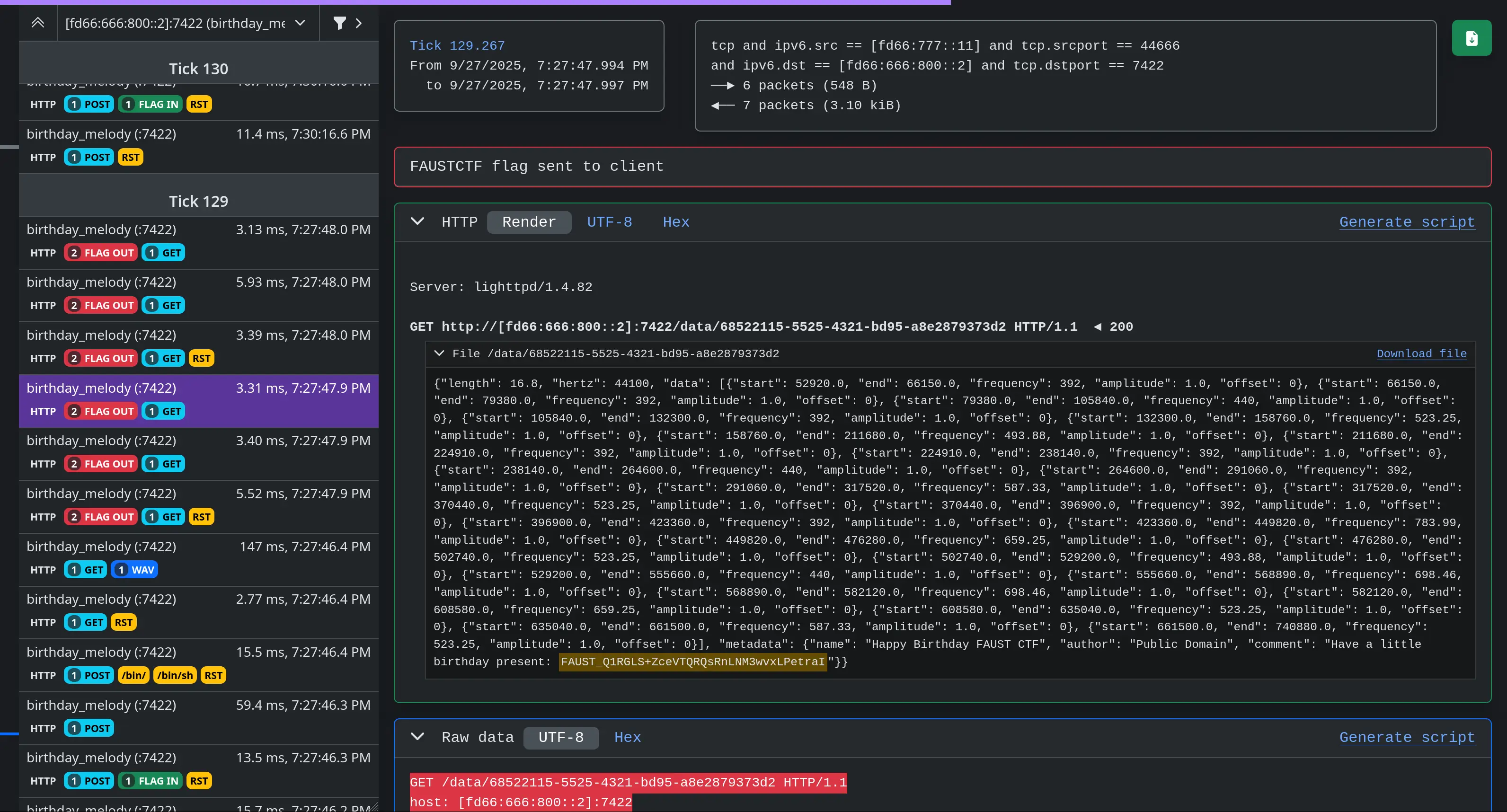
Shovel is a web application that offers a graphical user interface to explore
Suricata Extensible Event Format (E.
Its primary focus is to help
Capture-the-Flag players)
analyse network flows during stressful and time-limited attack-defense games
such as FAUSTCTF, ENOWARS or
ECSC.
Shovel is de in the context of
ECSC Team France training.
!Shovel
You might also want to have a look at these other awesome traffic analyser tools:
Compared to these traffic analyser tools, Shovel only relies on Suricata while
making opinionated choices for the frontend. This has a few nice implications:
WebSocket, SMB, DNS, etc),
matching, HTTP headers and custom Lua scripts),
frontend to quickly compute the similarity of multiple flows.
Sho code is kept simple to reduce technical debt, and make the code
more welcoming to newcomers. We welcome contributions to this repository as long
as they align with the goal of the project.
Shovel is batteries-included with some useful Suricata alert rules for most CTF.
Getting started
Services mapping, ticks and flag format configuration
Shovel is configured using en .
Copy example.env to .env and update the optional configuration parameters.
You may update this file later and restart only the webapp.
Add the flag format in suricata/rules/suricata.rules if needed.
If you modify this file after starting Suricata, you may reload rules usingpkill -USR2 suricata.
Network capture
Sho implements 3 capture modes:
Please prefer mode B or C to get the best latency between the game network and
Suricata.
Use mode A only if you are not root on the and ha to pcap files
indirectly.
#### Mode A: pcap capture mode (slower)
Place pcap files in a folder such as input_pcaps/.
If you are continuously adding new pcap, add --pcap-file-continuous to
Suricata command line.
Then you may start Sho:
If you don't want to use Docker, you may manually launch Suricata and the web
application using the two following commands:
> [!WARNING]
> Please note that restarting Suricata will cause all network capture files to
> be loaded again. It might add some delay before observing new flows.
To generate pcap files, you may use tcpdump or tshark.
For a Microsoft Windows system, you may capture network traffic using the
following command (exclude RDP on port 3389) inside a PowerShell console:
#### Mode B: Li interface mode (fast)
This mode requires to ha access to the game network interface.
This can be achieved by mirroring traffic through a tunnel,
see FAQ for more details.
Here this device is named tun5.
Edit docker-compose.yml and comment mode A and uncomment mode B undersuricata container definitions.
Then, you may start Sho:
If you don't want to use Docker, you may manually launch Suricata and the web
application using the two following commands:
> [!WARNING]
> Please note that stopping Suricata will stop network capture.
Suricata creates pcap files in output_suricata/pcaps/ folder,
remember to backup this folder for archiving purposes!
#### Mode C: Li using PCAP-o (fast)
This mode requires to ha to a TCP listener exposing PCAP-o.
Such server can be easily spawned using:
If you need to route PCAP-o to multiple clients, you should consider using
pcap-broker.
An example is given in docker-compose.yml.
Edit docker-compose.yml and comment mode A and uncomment mode C undersuricata container definitions.
Then, you may start Sho:
If you don't want to use Docker, you may manually launch Suricata and the web
application using the two following commands:
> [!WARNING]
> Please note that stopping Suricata will stop network capture.
Grafana dashboards
Sho two Grafana dashboards.
The first one home.json displays graphs useful while playing CTF.
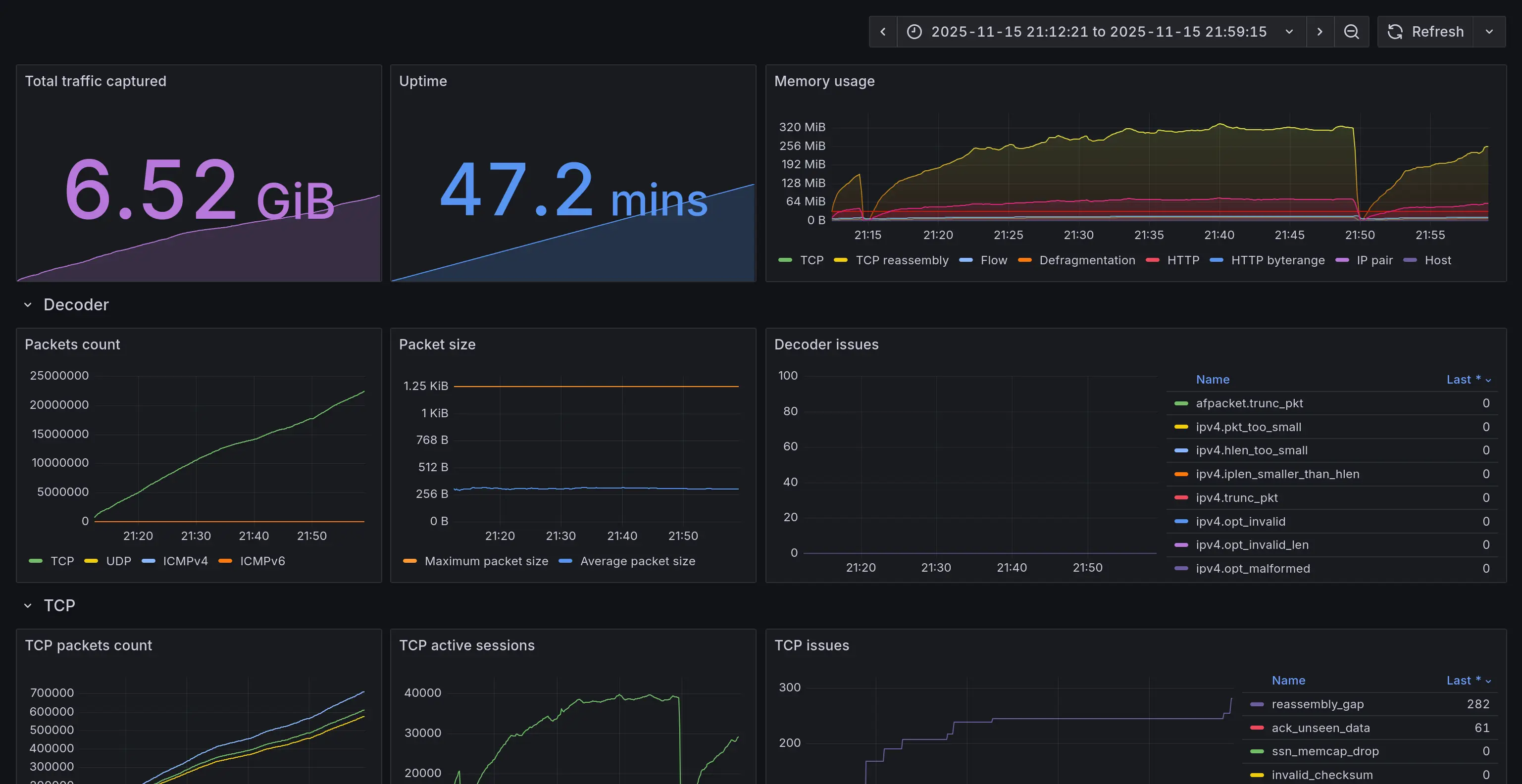
The second one suricata.json plots Suricata statistics.
This helps debugging Suricata-related issues, such as memory exhaustion.
!Suricata Grafana dashboard
Frequently Asked Questions
Is Suricata flow_id really unique?
flow_id is derived from timestamp (ms scale) and current flow parameters (such
as source and destination ports and addresses). See source code:
<
How to setup traffic mirroring using OpenSSH?
Most CTF uses OpenVPN or Wireguard for the "game" network interface on the ,
which means you can duplicate the traffic to an OpenSSH tun tunnel.
Using this method, Shovel can run on another machine in li mode.
> [!WARNING]
> If you need to clone a physical Ethernet interface such as eth0,
> you will need to use -o Tunnel=ethernet -w 5:5 in the SSH command line to
> create a tap.
To achie mirroring, you may use these steps as reference:
1. Enable SSH tunneling in OpenSSH server:
2. Create tun5 tunnel from the local machine to the and up tun5 on :
3. Up tun5 on the local machine and start tcpdump to create pcap files:
4. Mirror game traffic to tun5 on the .
This can be done using Nftables netdev dup option on ingress and egress.
How do I reload rules without restarting Suricata?
You can edit suricata rules in suricata/rules/suricata.rules, then reload the
rules using:
项目信息
开发语言:JavaScript
Star 数:102
技术要点
该项目属于CTF思路方向的开源资源,代码结构清晰,适合安全研究人员学习参考。项目围绕Web interface to explore Suricata EVE outputs展开,提供了可运行的实现,对理解相关安全机制、工具原理与攻防技术具有较高的研究价值。
从技术实现角度看,此类项目的核心在于对底层原理的深入理解与工程化落地。开发者在研究过程中可以结合官方文档与社区讨论,梳理项目的初始化流程、核心模块职责与数据流转,逐步掌握其中的技术细节与设计思路。
使用与学习建议
1. 下载源码压缩包,解压到本地环境。
2. 根据项目类型准备对应的运行环境与依赖。
3. 按照 README 中的步骤完成配置与部署。
4. 在隔离的测试环境中运行验证,避免影响生产系统。
免责声明
本资源来源于开源社区,仅供安全研究、技术学习与合法授权范围内的攻防演练使用,请勿用于任何非法或侵害他人权益的用途。使用本项目产生的一切后果由使用者自行承担。
| 资源标题 | 铲子 - 探索Suricata EVE输出的Web界面 |
| 所属分类 | CTF思路 |
| 发布作者 | admin |
| 发布时间 | 2026-10-05 23:55:07 |
| 下载权限 | 免费下载 |
| 附件数量 | 2 个下载链接 |
| 浏览次数 | 105 |
| 讨论数量 | 0 |
| 主题状态 | 正常讨论中 |