 CTF思路
点击放大
NahamCon_CTF_2020 - Writeup for the challenges in NahamCon CTF 2020
项目说明
NahamCon CTF 2020
<p align="center">
<img width=170 src="assets//images//logo.png"
</p>
This is my writeup for the challenges in NahamCon CTF, I mainly focused on cryptography, steganography and OSINT.
***
Table of Contents
* Warmup
- Read The Rules
- CLIsay
- Metameme
- Mr.robot
- UGGC
- Easy Keesy
- Peter Rabbit
- Pang
* OSINT
- Time Keeper
- New Years Resolution
- Finsta
- Tron
* Steganography
- Ksteg
- Doh
- Beep Boop
- Snowflake
- My Apologies
- Dead Swap
- Walkman
- Old School
* Cryptography
- Docxor
- Homecooked
- Twinning
- Ooo-la-la
- Un Vase
- December
- Raspberry
* Forensics
- Microsooft
- Cow Pie
* Mobile
- Candroid
- Simple App
- Ends Meet
* Miscellaneous
-
- Fake file
- Alkatraz
- Trapped
- Awkward
* Scripting
- Dina
- Rotten
- Really powerful Gnomes
* Web
- Agent 95
- Localghost
- Phphonebook
***
Warmup
Read The Rules
Please follow the rules for this CTF!
Connect here:
flag{we_hope_you_enjoy_the_game}
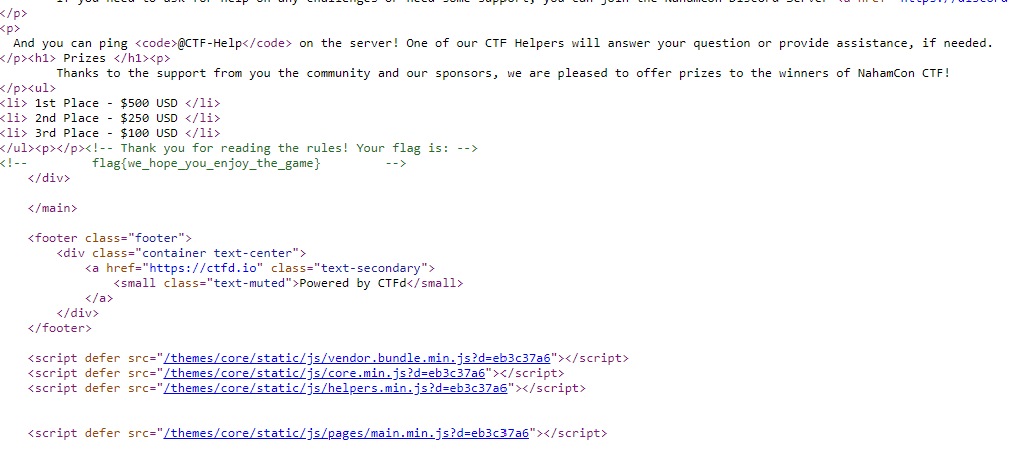
Solution: The flag is commented close to the end of the source code for the rules pages, right after the elements for the prizes:

CLIsay
cowsay is hiding something from us!
Download the file below.
clisay
flag{Y0u_c4n_r3Ad_M1nd5}
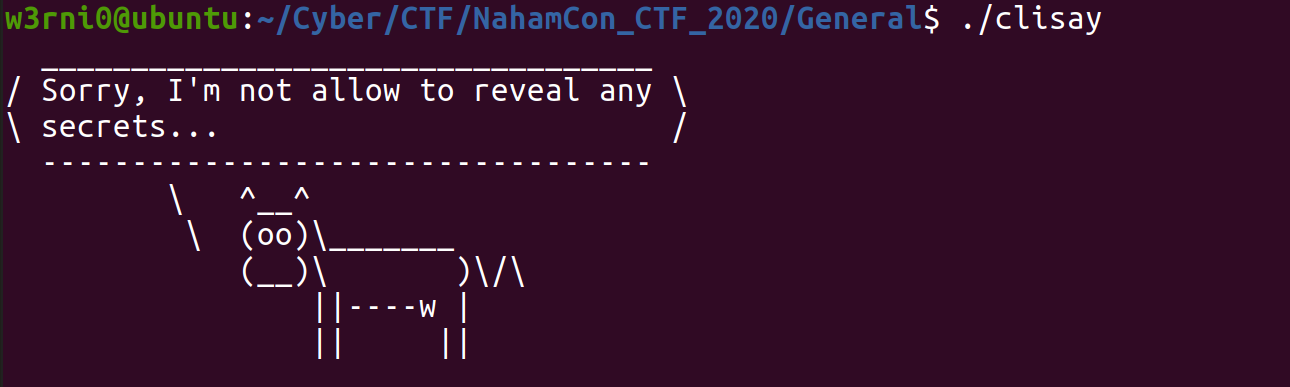
Solution: With the challenge we are given an ELF file (a type of Unix executable), by running it we get:

well that didn't give us much, we can check if there are printable strings in the file by using the strings command on it, doing that gives us the flag:

notice that you need to append the two parts of the flag together (the strings after and before the ascii art).
Resources:
* strings man page:
* ELF file:
Metameme
Hacker memes. So meta.
Download the file below.
hackermeme.jpg
flag{N0t_7h3_4cTuaL_Cr3At0r}
Solution: With the challenge we get this image:
!hackermeme.jpg
We can guess by the name of the challenge and its description that there is something in the metadata of the image, so we can use exiftool on it, exiftool allows you to see the metadata of an image, and by using it we get the flag:

Resources:
* Exif:
* exiftool:
Mr. Robot
Elliot needs your help. You know what to do.
Connect here:\
flag{welcome_to_robots.txt}
Solution: With the challenge we get a url to a website:

There doesn't seem to be much in the index page, but we can guess by the name of the challenge that there is something in the robots.txt file for the website, robots.txt is a file which helps search engines (crawlers in general) to index the site correctly, in most sites nowadays there is a robots.txt file, if we look at the file ( the link is ) we get the flag:

Resources:
* Introduction to robots.txt:
UGGC
Become the admin!
Connect here:\
flag{H4cK_aLL_7H3_C0okI3s}
Solution: With the challenge we get a url to a website and it seems that we can login to the it using the index page:

By the description we know that we need to login as admin, but if we try using admin as our username we get the following:

But we can login with any other username:

If we try to refresh the page or open it in another tab it seems that the login is saved, which means that the site is using cookies, because HTTP connection is stateless (doesn't save the state of the connection ser) and because sometimes the ser to know who is the user in a session it sa on the computer of the user, cookies are data which is most of the time encrypted and sent with HTTP requests to helps the ser the user, we can see the cookies of the site by using the inspector tool in the browser:

we can see that the cookie for the site bares a strange similarity to the username I used, that is because the cookie is encrypted using ceaser cipher, a type of substitution cipher where each letter is replaced by the letter with a specific offset from it, in our case with the offset of 13, so a becomes n, b becomes o and so on, a ceaser cipher with offset of 13 is also called a ROT13 cipher, now that we know the cipher used on the cookie we can change our cookie to being that of the admin, we can use cyberchef to do that:

now we only need to change the value of the cookie to the ciphertext corresponding to admin (we can use the browser inspector tool for that) and we get the flag:

Resources:
* HTTP cookie:
* Ceaser cipher:
* Cyberchef:
Easy Keesy
Dang it, not again...
Download the file below.
easy_keesy
flag{jtr_found_the_keys_to_kingdom}
Solution: With the challenge we get a file with an unknown format, we can use the file command to see that the file is a KeePass database:

This type of files are databases used to keep passwords on the computer 'safely', there are many password managers to view this kind of files but I used KeeWeb for this challenge mostly because it is a web tool, if we try to open the file with it we can quickly notice that we don't have the password for doing that, furthermore there aren't any mentions of a password in the file or in the description of the challenge, so it seems we need to bruteforce for the password.\
Passwords are commonly saved as hashes, hashes are data created using cryptographic hash functions which are one way functions (easy to find an hash for a password, hard to find a password for the hash) who are also able to return a value with a fixed length to any file with any size, a simple example for an hash function is the algorithm shown in the December challenge with the slight modification that only the last block of the cipher is returned, hashes are great because it is easy to a value using them as you can just as hash the value using the hash function and compare the hashes, but, it is hard to get the value from an hash.\
In the case of a KeePass database file, the password for the database, which is called a master password, is saved as an hash in the file in order for a password manager to it, this is not a smart idea to save the password locally like that but it's good for us.\
To find the password I used a dictionary attack, this type of attack uses a known database in order to find the right data, in the case of password cracking we use a database of passwords, preferably ordered by most frequently used to least frequently used, we will hash each password and compare it to the hash we ha we'll find a password with the same one, this does not guarantee that we found the correct password (an hash collision can occur) but most probably it will find the correct one, the dictionary I used is called rockyou.txt which lists common passwords. for executing the attack I used John the Ripper, a great tool for cracking hashes using a dictionary, I first con the file to something john can use and then used john with rockyou.txt to crack the password by executing the following commands:
by doing that we get that the password for the file is monkeys, if we try using it in KeeWeb we are gi to the database and we get the flag:

Resources:
* file man page:
* KeePass:
* KeeWeb:
* rockyou.txt:
* John the Ripper:
* cryptographic hash function (CHF):
Peter Rabbit
Little Peter Rabbit had a fly upon his nose, and he flipped it and he flapped it and it flew away!
Download the file below.\
peter.png
Post CTF Writeup
flag{ohhhpietwastherabbit}
Solution: With the challenge we are given the following PNG image:

this is actually an esoteric programming language called piet, named after the artist Piet Mondrian, we can use an interpreter to execute the script (I linked the one I used in the resources), by doing so we get the flag:

Resources:
* Piet:
* Esoteric Programming Language:
* Piet online interpreter:
Pang
This file does not open!
Download the file below.
pang
flag{wham_bam_thank_you_for_the_flag_maam}
Solution: With the challenge we get a unknown file, we can use the file command to see that this is a PNG image, but it seems we can't open the image in an image , so we can guess that the image is corrupted, we can that by using a tool called pngcheck:

The tool tells us that there is an CRC error in the IHDR chunk, the IHDR is the first chunk in a PNG image and the CRC value is a value stored for every chunk in the image to the authenticity of the data (I explained more about CRC and IHDR in my writeup for the challenges in RACTF 2020 listed in the resources).\
We can fix the image by changing value of the CRC, I prefer to do it using an hex so we can have a clear understanding of the data, the changes are marked in red:


and by saving the modified file and it again we get the flag:

Resources:
* pngcheck man page: )
* PNG file format specification:
* RACTF 2020 writeup for stego challenges:
* HxD:
***
OSINT
Time Keeper
There is some interesting stuff on this website. Or at least, I thought there was...
Connect here:\
JCTF{the_wayback_machine}
Solution: We are given a url of a site with the challenge, as the challenge suggests we need to look at older of the site, the current is:

we can use a site called Wayback Machine (linked in resources) to view older of sites, it seems that there is only one older of the site from the 18th of april, and there is a snapshot of the index page:

link to the snapshot:
You can see that the first blog post from the older can't be found in the current , furthermore it suggests that the flag is in the web server of the site under /flag.txt, trying to view the file in the current gives us 404 error, but if we try to view older of it in the the wayback machine we get the flag:

Resources:
* Wayback Machine:
New Years Resolution
This year, I resolve to not use old and deprecated nameser!
Connect here: jh2i.com
flag{next_year_i_wont_use_spf}
Solution: We can infer from the name of the challenge and the description that it has something to do with nameservers, nameserver are servers which handle resolving human-readable identifiers to numberical identifiers, in the case of web server, nameser pro responses to queries on domain names, usually con urls to IP addresses but not always, we can view this responses using the dig command, in our case we want to view all the type of responses a (the more the merrier), we can do this by writing ANY after the command, the full command is:
dig jh2i.com ANY
and we have our flag in the output of the command:

Resources:
* Name server:
* DNS protocol:
* dig man tool:
Finsta
This time we have a username. Can you track down NahamConTron?
flag{i_feel_like_that_was_too_easy}
Solution: In this challenge we need to track down a username, luckily there is a tool called Sherlock that does just that, it searches popular sites such as GitHub, Twitter, Instagram and etc. for an account with the gi, and returns a list to the profiles, we can run it using the following command:
python3 sherlock NahamConTron
and the commands returns the following list of accounts:
by looking at the instegram account we can find our flag at the accout description:

Resources:
* Sherlock:
Tron
NahamConTron is up to more shenanigans. Find his server.
flag{nahamcontron_is_on_the_grid}
Solution: Taking a look back at the list Sherlock returned in the previous challenge we can see that there is an account in github with this username, let's take a look at it:

there are 2 repositories for the user:

the second one is not very helpful:

but the first one has some interesting files:

the first file to pop into view is the .bash_history file, it contains the command history of a user and can reveal sensiti about the user activity, in our case it contains the following line:
so we now know the user has connected to a ser the SSH protocol (Secure Shell protocol) with an SSH private key, and we also know that the key is in a config folder .... interesting, maybe it is the same folder as the one in the repo?

yeah it is!, the private key is:
and we can connect to the server, using the same command, and in the server we find our flag:

***
Steganography
Ksteg
This must be a typo.... it was kust one letter away!
Download the file below.
luke.jpg
flag{yeast_bit_steganography_oops_another_typo}
Solution: With the challenge we get the following JPEG image:
<p align="center">
<img src="assets//images//luke.jpg">
</p>
We can infer by the challenge name and the challenge description that we need to use Jsteg (link in the resources), this is a type of tool for hiding data in the least significant bit (LSB) of the bytes in the image, this image is actually an image of the creator of the tool (whose name is luke), I only succeeded in using the tool by running the main.go script that's in jsteg/cmd/jsteg using the following command:

Resources:
* Jsteg:
Doh
Doh! Stupid steganography...
Note, this flag is not in the usual format.
Download the file below.
doh.jpg
JCTF{an_annoyed_grunt}
Solution: With the challenge we get the following JPEG image:
<p align="center">
<img src="assets//images//doh.jpg">
</p>
because this is a stego challenge one of the first thing I do is to check if there are files embedded in the image using binwalk and steghide, luckily steghide comes to use and finds a text file in the image which actually contains the flag:

Resources:
* Steghide:
* binwalk man page:
Beep Boop
That must be a really long phone number... right?
Download the file below.
flag.wav
flag{do_you_speak_the_beep_boop}
Solution: Now we are given for a change a WAV file (Wa file), in it we can hear key presses of a phone, this is actually DTMF (dual tone multi frequency) which were used to signal to the phone company that a specific key was pressed and they ha a lot of history with respect to hacking, we can actually decipher this tones using a tool called multimon-ng or using the web tool listed below, this will give us the following code:
we can execute the following command to extract the number:
multimon-ng -t wav -a DTMF flag.wav | grep -o "[0-9]+" | tr -d "\n"
I tried a lot of ways to get the flag from this number and e figured out that you need to convert the numbers from decimal format to hex and then from hex to ascii, or alternatively use long_to_bytes from the pycryptodome module, by doing so we get the flag:

Resources:
* DTMF:
* multimon-ng:
* Web DTMF decoder:
* long_to_bytes:
Snowflake
Frosty the Snowman is just made up of a lot of snowflakes. Which is the right one?
Note, this flag is not in the usual format.
Download the file below.\
frostythesnowman.txt
JCTF{gemmy_spinning_snowflake}
Solution: We are given a text file with the challenge, if we look at the file we can't see anything weird:
but if we open the file in Notepad++ and turn on the option the show special symbols we can now see that something is off with the file:

these are tabs and spaces, and this type of steganography is actually SNOW (Steganographic Nature Of Whitespace), it is a type of whitespace steganography which uses Huffman encoding to compress a message and hide it in the whitespaces, we can use stegsnow tools to reveal the message but it seems that it doesn't work:

After a bit of trial and error I discovered that it is password protected, so I wrote a simple bash script which reads the passwords from rockyou.txt line by line and try to decrypt the data, this is a dictionary attack, and a simple one at that (I explained more about this type of attacks in the writeup for Easy Keesy):
by using this simple bruteforce script we get that the password is ilo (don't we all) and we get the flag (I redirected the script output to a file and then grepped for braces pattern):

Resources:
* SNOW:
* stegsnow man page:
My Apologies
Nothing witty to say here... just that I am sorry.
Note, this flag is not in the usual format.
Download the file below.\
apologies.txt
flag_i_am_so_sorry_steg_sucks
Solution: We again get a txt file with the challenge, now we can easily notice that something off with the message:
This is actually an Homoglyphs Steganography, a type of steganography which uses unicode encoding to hide a message, we can use the link in the resources to reveal the flag:

Resources:
* Twitter Secret Messages:
Dead Swap
There is a flag in my swap!
Download the file below.\
deadswap
Post CTF Writeup
flag{what_are_you_doing_in_my_swap}
Solution: With the challenge we are given a file from an unknown type, with can infer from the challenge title and description that this is a swap file, without getting into details, swap files are files saved in the hard drives to be used as an extension to the memory, when a computer needs to save some data on the memory for quick access and doesnt have a place for it the computer moves a chunk of the data stored on the memory to the hard dri the least used chunk) and o this chunk in the memory with the data, this is actually really not important for this challenge, by using xxd on the file it seems that we only have \xff bytes:

but by grepping for e but \xff bytes we can see thet there are \xfe bytes too:

during the CTF I tried using binary by mapping 1 and 0 to f and e but the solution is actually to map 1 and 0 to fe and ff, this will give us a binary string, encoding the string to ascii we get the flag in reverse, so I wrote a one-liner to do all that (and it's amazing):
xxd deadswap | grep -v "ffff ffff ffff ffff ffff ffff ffff ffff" | cut -d " " -f 2-10 | sed "s/ff/0/g" | sed "s/fe/1/g" | tr -d " \n" | python3 -c "import binascii; print(binascii.unhexlify('%x' % int(input(),2)));" | rev
the one-liner prints the hexdump of the file, greps for lines which contains interesting data, cut only the columns with the hex data, replaces ff and fe with 0 and 1 (using sed), remo, convert the data from binary to ascii using python and re the string, and in action:

Resources:
* Swap file:
Walkman
Do you hear the flag? Maybe if you walk through it one step at a time.
Download the file below.\
wazaa.wav
Post CTF Writeup
flag{do_that_bit_again}
Solution: We are given a WA file with the challenge, I personally hate steganography that is related to audio, if it is not spectogram and wavsteg can't find something I just quit...but I'm a completionist, so I'll cover that as well, we need to use a tool called wa which is listed in the resources using this command to extract the flag:
python3 wa.py -r -s wazaaa.wav -o a -n 1 -b 1000
in action:

this tool uses the least significant bit to hide data and extract hidden data (which wavsteg also do so i'm not sure why it didn't work with it), it's quite common to hide data in the LSB of the file so this type of tools are really handy.
Resources:
* wa:
Old School
Did Dade Murphy do this?
Note, this flag is not in the usual format
Download the file below.\
hackers.bmp
Post CTF Writeup
JCTF{at_least_the_mooftware}
Solution: With the challenge we are given a bitmap (bmp) file:

bmp format is a quite old file format and rarely used today as its compression algorithm is really not good and rarely supported so it's not very efficient in space to sa as bmp files, especially if you consider the image quality nowadays, the flag is again hidden in the least significant bits of the image and again I tried checking that during the CTF and got nothing, a smarter approach is to use zsteg, which checks all the a channels and e the most significant bit for hidden data, we can get the flag using the following command:
zsteg -a hackers.bmp
and in action:

***
Cryptography
Docxor
My friend gave me a copy of his homework the other day... I think he encrypted it or something?? My computer won't open it, but he said the password is only four characters long...
Download the file below.\
homework
flag{xor_is_not_for_security}
Solution: We get an unknown file with the challenge, ob from the challenge description and challenge name we know that the file is xored and that the key is of length 4, if we look at the hex dump of the file we can notice this reoccurring pattern of bytes \x5a\x41\x99\xbb :

furthermore if we analyze the frequency of the bytes in the file we get the following graph where the peaks are in \x5a, \x41, \x99 and \xbb:

but if we look at a regular PNG file or Zip file we get the following bytes frequency:

we can notice that regularly the \x00 byte is the most frequent, so if the key is xorred with the data all of the \x00 bytes will be mapped to the bytes of the key.
so we can infer that key is \x5a\x41\x99\xbb, plugging the file into cyberchef in xorring the data with the key gives us the following zip file:
xorred_homework
this is actually not a zip file but a docx file by the folders in it (there are a lot of file types which are actually zip) if we open the file using Microsoft word or Libreoffice we get the flag:

Resources:
* Xor:
* Frequency analysis:
* An example to some of the file types which are actually zip:
Homecooked
I cannot get this to decrypt!
Download the file below.\
decrypt.py
flag{pR1m3s_4re_co0ler_Wh3n_pal1nDr0miC}
Solution: Now we get with the challenge a python script:
this script is used for decrypting the cipher but it doesn't seem to work well:

it somewhat stops printing at this point but still runs, we can guess by that the code is inefficient, we can try to understand what the script does to figure out how to make it more efficient, we can see that the script decode the ciphertext from base64 to bytes, then for each byte in the ciphertext it tries to find a value of next value for num such that both functions a and b returns a boolean value of True, then xors that value with the value of the byte and prints the result, it continues likes that for the succeeding bytes while continuously increasing the value of num by one, but, by the 13th byte the value of num is jumped to 50000 and by the 26th byte the value of num is jumped to 500000.
Now let's look at the functions, a checks if there are no numbers bigger than 2 and smaller than the input that can divide it without a remainder, so a checks if the input is prime.
The function b checks if the input is equal to itself in reverse so b checks if the input is a palindrome.
a return True if the number is prime and b checks if the number is a palindrome, so the that are xorred with the bytes of the cipher are palindromic primes
if we take a second look at the function a we can see that it is very inefficient as it checks for all the numbers that are smaller than the input if they can divide it without a remainder, we can replace it with the primality test in the sympy module, which uses an efficient method (Rabin-Miller Strong Pseudoprime Test), in the end we get the less obfuscated following script:
and by running this more efficient script we get the flag in a reasonable time:

Twinning
These numbers wore the same shirt! LOL, #TWINNING!
Connect with:\
nc jh2i.com 50013
flag{thats_the_twinning_pin_to_win}
Solution: When we connect to ser we the challenge we are greeted with the following:

we can guess that this is an RSA encryption, I explained more about how RSA works in my writeup for RACTF 2020:
> ... RSA is a public key cipher, which means that there are two keys, one that is public which is used to encrypt data, and one that is private which is used to decrypt data, ob there is some sort of connection between the keys but it is hard to reveal the private key from the public keys (and in this case vice versa), specifically in RSA in order to find the private key we need to solve the integer factorization problem, which is thought to be in NP/P (this is not important for the challenge), we will call our public key e and our private key d, they posses the following attribute - d multiply by e modulo the value of (p-1) * (q-1) which we will name from now phi, is equal to 1, we will call d the modular multiplicati of e and e the modular multiplicati of d, furthermore if we take a plaintext message pt and raise it to the power of d and then to the power of e modulo the value of p * q, which we will name n and will be commonly given to us instead of q and p, we will get pt again (to understand why it is needed to delve into modern algebra, if n is smaller than pt then ob we will not get pt), now with that in mind we can talk about the cipher, encryption in this cipher is raising the plaintext pt to the power of the public key e mod the value of n, similarly, decryption is raising the ciphertext to the power of d mod n...
and I explained why it works and how we can break the cipher:
>...for that we need to talk about factors, factors are numbers which can be divided only by 1 and himself (we are only talking about whole numbers), we ha that there are infinitely many factors and that we can represent any number as the multiplication of factors, but, we haven't discovered an efficient way to find out which factors make up a number, and some will e that there isn't an efficient way to do that (P vs. NP and all that), which means that if we take a big number, it will take days, months and e to find out the factors which makes it, but, we ha efficient ways to find factors, so if I find 2 factors, which are fa big, I multiply them and post the result on my feed to the public, it will take a lot of time for people to discover the factors that make up my number. But, and a big but, if they have a database of numbers and the factors that make them up they can easily find the factors for each numbers I will post, and as I explained before, if we can the factors we can easily calculate phi and consequently calculate d, the private key of RSA, and break the cipher, right now there are databases (listed below) with have the factors to all the numbers up to 60 digits (if I remember correctly), which is a lot but not enough to break modern RSA encryptions, but if we look at the challenge's parameters, we can see that n is awfully small, small enough that it most be in some databases...
if we search for the value of n in factorDB, a database for the factors of numbers, we can find factors for the value of n given to us:

now we can write a small script which calculates phi, finds d the modular inverse for e modulo phi and raise the ciphertext to the power of d (or be a script kiddie and use the RSA module):
and by running this script we get that the PIN is 3274 and by giving the PIN to the server we get the flag:

I guess that the challenge name and description is joking about the proximity of the primes...
Ooo-la-la
Uwu, wow! Those numbers are fine!
Download the file below.\
prompt.txt
flag{ooo_la_la_those_are_sexy_primes}
Solution: With the challenge we are given a text file, the text file contains the following:
So this is another RSA challenge, we can again try to find the factors that make up the value of N, we can use factorDB again:

and we have the factors, now let's recycle the script from the last challenge now with the new parameters,also now we need to convert the plaintext to ascii encoded characters, we can use the function long_to_bytes from pycryptodome for that:
and by running the script we get the flag:

Un Vase
Ah shoot, I dropped this data and now it's all squished and flat. Can you make any sense of this?
Download the file below.\
prompt.txt
Post CTF Writeup
flag{does_this_e}
Solution: We this challenge we are given a text file with the following content:
this seems to be base64 encoding, but if you try to decode it from base64 to ascii you don't get much:
I didn't actually managed to solve this challenge by myself during the CTF thinking it is a combination between rail cipher and base64 but actually that is just a base64 encoding where all the upper cased letters were lowered, we can try going over all combination of lower case and upper case for all the characters in the string but it will take two to the power of the length of the string, which is 2 to the power of 52 at most and at least 2 to the power of 40 if we exclude numbers and symbol, which is still a lot.\
But, we can do something else, base64 is using characters to represents the numbers from 0 to 63, if we'll encode one letter from base64 to binary we get a binary string of length 6 bits, but each ascii character take 8 bits to encode, so if we want to find the smallest ascii substring that decodes to a base64 string without padding we'll need to find a lowest common multiple (LCM) value, for those numbers the LCM is 24, and s0 every 24/8 = 3 ascii characters are encoded to 24/6 = 4 base64 characters without padding and if we will split our ciphertext to blocks of 4 characters and try every possible combination of upper case and lower case on every character in each block until we get a readable substring (preferably of the flag which very likely though not guaranteed) we'll need to try at most 2 to the power of 4 multiplied by the number of blocks for every block, in out case (2 4) * (52 / 4) = (2 4) * 12 which is a lot less then what we had before, for that I wrote the following script which goes through every block in the ciphertext and tries all the possible combinations until the ascii strings decoded from the block are printable (in the range from space \x20 to tilde \x7e):
and by running this script we get the flag:

Resources:
* I used this writeup just to discover the cipher although it seems that he solved just it like me with a way better script:
* Least common multiple:
December
This is my December...
Download the file below.\
source.py ciphertext
flag{this_is_all_i_need}
Solution: With the challenge we get the following python 3 script:
and the ciphertext:
We can see from the script that it uses DES, DES (Data Encryption Standard) is a type of symmetric cipher that was used in the 80s and the 90s as the standard cipher replaced by AES in the following years, it was in by IBM with the help of the NSA (yeah that NSA) and in the 90s people ha ways to crack the cipher in a matter of hours (22 hours and 15 minutes to be precise).\
This cipher also has a lot of weaknesses, one of those are the existence of weak keys, decryption and encryption with this keys have the same effect and so encrypting some data twice with the same weak key is equi to decrypting the encryption and the ciphertext is equal to the original plaintext.
we can also notice that the cipher uses OFB mode of operation, in this mode the plaintext is split to blocks of 8 bytes and for each block of plaintext the mode encrypts the encryption of the previous block (in the case of the first block this mode encrypts IV) and xors the new encryption with the plaintext, in a representation:
<p align="center">
<img src="assets//images//december_1.png" style="background-color:white;" />
</p>
and in a formal representation:
<p align="center">
<img src="assets//images//december_2.png" style="background-color:white;" />
</p>
we can now notice the following attribute of using weak keys in this mode of operation:
<p align="center">
<img src="assets//images//december_3.png" style="background-color:white;" />
</p>
in other words, for every block in an e we get that the encryption with a weak key is equal to xorring IV with the plaintext, so the plaintext for block in an e is equal to the ciphertext xorred with IV, let's try that on our ciphertext, we can do that using the following code:
and we get:

it worked!, now we know that our key is a weak key, we can find a list of weak keys to DES on google and bruteforce them until we get a complete text (there are less than 100 weak and semi-weak keys), I listed all the weak keys in the following file:
weak DES keys
and wrote this script to crack the ciphertext:
and we get the flag:

Raspberry
Raspberries are so tasty. I have to have more than just one!
Download the file below.\
prompt.txt
flag{there_are_a_few_extra_berries_in_this_one}
Solution:: With the challenge we are get a text file, the content of the text file is:
This is again an RSA cipher, if we try plugging the value of n to a factor database we get the following output:

this is a big amount of factors, this amount is actually okay as RSA is not limited to only 2 factors (but it is really bad practice to use a lot of factors), phi is actually the value of Euler's totient function for n, this value is the number of smaller than n which don't ha factors with n, and this value is actually equal to multiplication of all the factors reduced by one each (the proof for that is actually very easy and logical), so for decrypting the message I used the following script which is the same as the previous script with a more general phi calculation:
By running this script we get the flag:

Resources:
* Euler's totient function:
***
Forensics
Microsooft
We have to use Microsoft Word at the office!? Oof...
Download the file below.\
microsooft.docx
flag{oof_is_right_why_gfxdata_though}
Solution: With the challenge we get a docx file, but if we try opening it with Microsoft Word or Libreoffice we get noting interesting:

so we need to inspect the file more, docx files are actually a bunch of xml files contained in a zip file, so if we open the file as a zip file we can look at the content without relying on a document editor:

after a brief inspection I found that there is a filed called foo.txt in the src directory in the zip file:

and the file contains our flag:

Cow Pie
Ew. Some cow left this for us. It's gross... but something doesn't seem right...
Download the file below.\
manure
flag{this_flag_says_mooo_what_say_you}
Solution: run strings on manure and grep for the flag
***
Mobile
Candroid
I think I can, I think I can!
Download the file below.\
candroid.apk
flag{4ndr0id_1s_3asy}
Solution: With the challenge we get an apk file, as the previous challenge an apk file is actually a zip file, we can unzip the file and grep for the flag format to get the flag:

Simple App
Here's a simple Android app. Can you get the flag?
Download the file below.\
candroid.apk
flag{3asY_4ndr0id_r3}
Solution: same as previous challenge:

Ends Meet
Are you a true mobile hacker?
Download the file below.
flag{rer0}
Solution: open the apk file in jadx-gui and get a base64 encoded url in the MainActivity and visit the page with useragent /0
***
Miscellaneous
Will you find the flag, or get lost in the ?
Connect here:\
nc jh2i.com 50017
flag{more_text_in_the_}
Solution: With the challenge we are given a server to connect to, if we try connecting we get...

...that...we can redirect the output of the server to a file and view the file, by doing so for a minute more or less and grepping for the flag format we get the flag:

Fake file
Wait... where is the flag?
Connect here:\
nc jh2i.com 50026
flag{we_should_hak_not_y2k}
Solution: We are given a server to connect to with the challenge, when we connect to the server we seemingly have a shell:

seems that there are two files with the name '..' but using regular command like cat on the file won't work I e tried to use grep -r . to recursively grep the file in the directory, and we get the flag (or we could just get all the flags like this guy ):

Alkatraz
We are so restricted here in Alkatraz. Can you help us break out?
Connect here:\
nc jh2i.com 50024
flag{congrats_you_just_escaped_alkatraz}
Solution: We are gi a server to connect to, it seems that we have a shell again and that the flag is in our working directory, but we can't use cat or grep to read it:

I e got to output the file content to stdout using printf as it is not restricted and using the following command printf '%s' "$(<flag.txt)" we get the flag:

Trapped
Help! I'm trapped!
Connect here:\
nc jh2i.com 50019
flag{you_acti}
Solution: Trap command is catching every command except trap, set the trap to something else with trap '<command>' debug.
like trap 'cat flag.txt' debug to get flag
Awkward
No output..? Awk-o-taco.
Connect here:
nc jh2i.com 50025
flag{okay_well_this_is_e}
Solution: use grep to find cat all files and grep only to flag format
***
Scripting
Dina
Help! I can't make any sense out of what Dina is saying, can you??
Connect with:
nc jh2i.com 50035
Post CTF Writeup\
flag{dina_speaks_in_dna_and_you_do_too}
Disclaimer: I'll start of with a quick disclaimer, e I ended solving it using frequency analysis and some common sense, I don't think what I did was the intention of the author, and I used the mapping john showed three or four times to a character and escape rabbit holes, though I think it can be done without using it at all if you have time, and after the first few characters I could easily complete the rest myself.\
oh and another thing, the script I wrote is really ugly but it works well, you can use an empty mapping and remove the question types and it will still work, and I strongly recommend trying this yourself.
Solution: With the challenge we are given an host and a port to connect to, when we connect the ser a string which comprises only of A,C,G,T and waits for input, if we give some random input it will respond with another string like the previous:

It seems to be a DNA sequence and if you ha knowledge in biology you'll know that DNA sequences are interpreted by the ribosomes to proteins, and every sequence of 3 nucleic acids in the DNA or equi every 3 letters in the DNA which is called a codon is interpreted to one amino acid in the protein, so we can trying using this type of encoding to get a strings consisting of the letters of each matching amino acid, but it will not work.\
we can next try using binary notations for each nucleic acid and decode the binary to ascii characters but this will also not work, after a google search about DNA encoding to English I stumbled upon this writeup where the author uses a mapping from codons to English in order to decode the string, but the mapping didn't seem to help, at this point in the CTF I stopped and moved on to other challenges.\
After the CTF and during the debrief that john did I discovered that the last thing I tried was kinda right but the mapping was incorrect, so I tried to find the right mapping on the internet, but I couldn't find it, and so I resorted to the last thing I could think of, to use frequency analysis.
In every alphabet there are characters who appear more than others, for example the letter a appears more than z and e appears more than a, also if we look at all the printable symbols we will also see that the space symbol appears more than e or any other characters, we can also look at the frequency of one word or two words and so on and see the same trend.\
We can use that to our ad, so I started out by finding a list of frequencies for all the printable symbols () and then wrote a small script which connect to the server a number of times (I used 50) and count the occurrences of every codon in the string and in the end lists them in descending order of occurrences (you can see parts of it in the final script), also, in every session the script would try to guess the plaintext using the already mapped codons or the total number of occurrences of the each codons against the list of frequencies of symbols if it was not mapped, I used it to map codons to the space symbol and e, then map to a and t by looking at the ciphertexts and recognizing words (we can easily guess the mapping for a from a one-letter word and the mapping for t and h from a very frequent three letter-word), admittedly I used john script in the debrief to figure out that the first word in every ciphertext, which is a two-letter word without i, n or t, is a number and and colon (I though initially that it was yo or mr), by using letter frequency and word frequency and most importantly common sense I mapped around ten to fifteen codons to characters, but than I hit a roadblock, e most of the encoded sentence is a readable string like "enter the string" the string in question is a combination of random letters, for example (actually taken from a run):
send back yirkbmusswnqmhq as a string
and for that no frequency analysis would ha, so I turned to what I do best, bruteforcing e I can.
At this point when I had around ten to fifteen characters mapped so sometimes when the sun and the moon align the random string would be comprised by only mapped letters, and more commonly but still rare enough I'll get that the string comprises only of mapped codons except one, and we can use the response of the server for this kind of strings to eliminate mappings or discover the actual mapping, and so I upped the number of retries of the script would do to 200, and added that in every session the script would try to recognize the question sent by the server and send back the matching string *upper-cased* (yeah that throw me off for a while), I then manually went through the output and tried to eliminate wrong mapping or to see if the script discovered any correct one (actually when I think of it I could ha a script which automatically does that):
and oh boy did it worked, after a little more than an hour I succeeded in finding out a mapping for every used codon and get the flag:

actually the mapping is not spot-on for numbers but because the string only comprises of letters this is not that crucial.
Rotten
Ick, this salad doesn't taste too good!
Connect with:\
nc jh2i.com 50034
flag{now_you_know_your_caesars}
Solution: ser is ceaser cipher encrypted, code:
Really powerful Gnomes
Only YOU can save the !
Connect with:
nc jh2i.com 50031
flag{it_was_in_fact_you_that_was_really_powerful}
Solution: Automate going on ad and buying weapons:
***
Web
Agent 95
They' you a number, and taken away your name~
Connect here:\
flag{user_agents_undercover}
Solution: Change User agent to Windows 95
Localghost
BooOooOooOOoo! This spooOoOooky client-side cooOoOode sure is scary! What spoOoOoOoky secrets does he have in stooOoOoOore??
Connect here:\
JCTF{spoooooky_ghosts_in_storage}
Solution: In Ja code for jquerty.jscroll2 after beautifying, flag contains flag in bytes
Phphonebook
Ring ring! Need to look up a number? This phonebook has got you covered! But you will only get a flag if it is an emergency!
Connect here:\
flag{phon3_numb3r_3xtr4ct3d}
Solution: With the challenge we are given a website with the following index page:

so the site tells us that the php source for the page accepts parameters...oooh we might have LFI (local file inclusion), php allows the inclusion of files from the server as parameters in order to extend the functionality of the script or to use code from other files, but if the script is not sanitizing the input as needed (filtering out sensiti) an attacker can include any arbitrary file on the web server or at least use what's not filtered to his ad, php scripts stay in the ser and should not be re to the client-side as it may contain sensitive data (and there is no use to it in the client-side), if we want to leak the php files we'll need to encode or encrypt the data as the LFI php code will read the file as code and execute it, we can do such things using the php://filter wrapper, using this wrapper in the following way will leak the php source code for index page:
and by going to this url we get the file base64 encoded:

and decoding this from base64 gives us the code:
we can now tell by this line include(str_replace('.php','',$_GET['file']).".php"); that we only leak php files as the code removes the php extension from the file given as input (if there is one) and then appends a php extension to it, I think that there are ways to go around this but it is not important for this challenge, doing the same for phphonebook.php gives us this code:
by the end of the code there is a php segment where the method extract is used on $\_POST and then there is a check if $emergency is set, if so the code echoes the content of a file called flag.txt.\
this is really interesting, I'll explain the gist of it mainly because I'm not so strong at php, the $_POST is the array of passed to the script when an HTTP POST request is sent to it (we commonly use 2 type of HTTP request, POST and GET, where GET asks from the server to return some resource for example the source for a page, and POST also sends to a file in the server in the request body), the extract method extracts the from the array, the extracted name is set to the name passed in the HTTP request and the value is set to the corresponding value, the isset method just checks if there is a with this name, by all this we can infer that we need to send a POST request to the server with a named emergency which has some arbitrary value in order to get the server to print the flag, we can do so using curl or using a proxy like burp suite like I will show first, we need to set burp suite as our proxy and send a post request to the server, we can do such that using the submit button in the phphonebook page:

burp suite catches the request and allows us to edit it:

we now only need to add an emergency and we get the flag:


with curl we can simply use the following command curl -X POST --data "emergency=1" and by using that and grepping for the flag format we can easily get the flag:

Resources:
* File Inclusion :
* HTTP request methods:
* Payload all the things - File Inclusion:
项目信息
开发语言:Python
Star 数:81
技术要点
该项目属于CTF思路方向的开源资源,代码结构清晰,适合安全研究人员学习参考。项目围绕Writeup for the challenges in NahamCon CTF 2020展开,提供了可运行的实现,对理解相关安全机制、工具原理与攻防技术具有较高的研究价值。
从技术实现角度看,此类项目的核心在于对底层原理的深入理解与工程化落地。开发者在研究过程中可以结合官方文档与社区讨论,梳理项目的初始化流程、核心模块职责与数据流转,逐步掌握其中的技术细节与设计思路。
使用与学习建议
1. 下载源码压缩包,解压到本地环境。
2. 根据项目类型准备对应的运行环境与依赖。
3. 按照 README 中的步骤完成配置与部署。
4. 在隔离的测试环境中运行验证,避免影响生产系统。
免责声明
本资源来源于开源社区,仅供安全研究、技术学习与合法授权范围内的攻防演练使用,请勿用于任何非法或侵害他人权益的用途。使用本项目产生的一切后果由使用者自行承担。
| 资源标题 | NahamCon_CTF_2020 - Writeup for the challenges in NahamCon CTF 2020 |
| 所属分类 | CTF思路 |
| 发布作者 | admin |
| 发布时间 | 2026-10-05 23:58:39 |
| 下载权限 | 免费下载 |
| 附件数量 | 2 个下载链接 |
| 浏览次数 | 122 |
| 讨论数量 | 0 |
| 主题状态 | 正常讨论中 |